Echolight: ping-pong, orbit, clouds and shimmer, with recipes
October 25, 2026
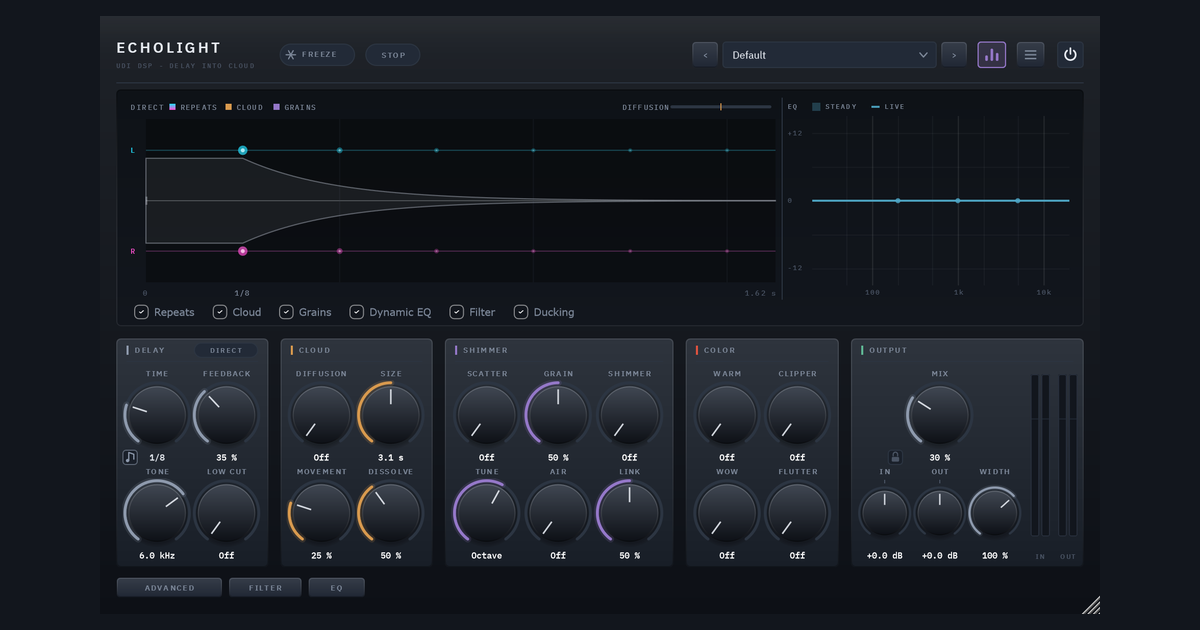
Most delay plugins give you repeats and stop there. Echolight is a stereo delay that can dissolve into a cloud. A reverb is what an echo becomes when there are so many copies so close together that they stop sounding like copies, and Echolight puts the delay and the reverb at either end of one knob.
With Diffusion at zero it is a clean, honest delay: repeats on the beat, each a little darker than the last, and the cloud isn’t even computed. Turn Diffusion up and a wash grows around the repeats until they melt into it. Turn it all the way up and only the cloud is left. The cloud can then be broken into grains with the same granular engine as Ghostlight Pro.
The basics are what you’d expect. Time runs from 1 ms to 30 seconds free, or 1/32 to 8 bars synced to your tempo, straight, triplet or dotted. Tone, Low Cut, Warm, Clipper, Wow and Flutter sit inside the loop, so every repeat is shaped again, the way a tape echo wears with each pass. There’s also a seven-type filter page, a dynamic EQ, Ducking, Freeze and a tape-style Stop. The rest of this post is about the parts that make Echolight sound different: where the echoes go, and what they turn into.
Where the echoes go: Direct, Ping-Pong and Orbit
One pill in the Delay section’s title row cycles the echo mode. The same pill sits in the Echoes section of the Advanced page, next to the controls that shape each mode.
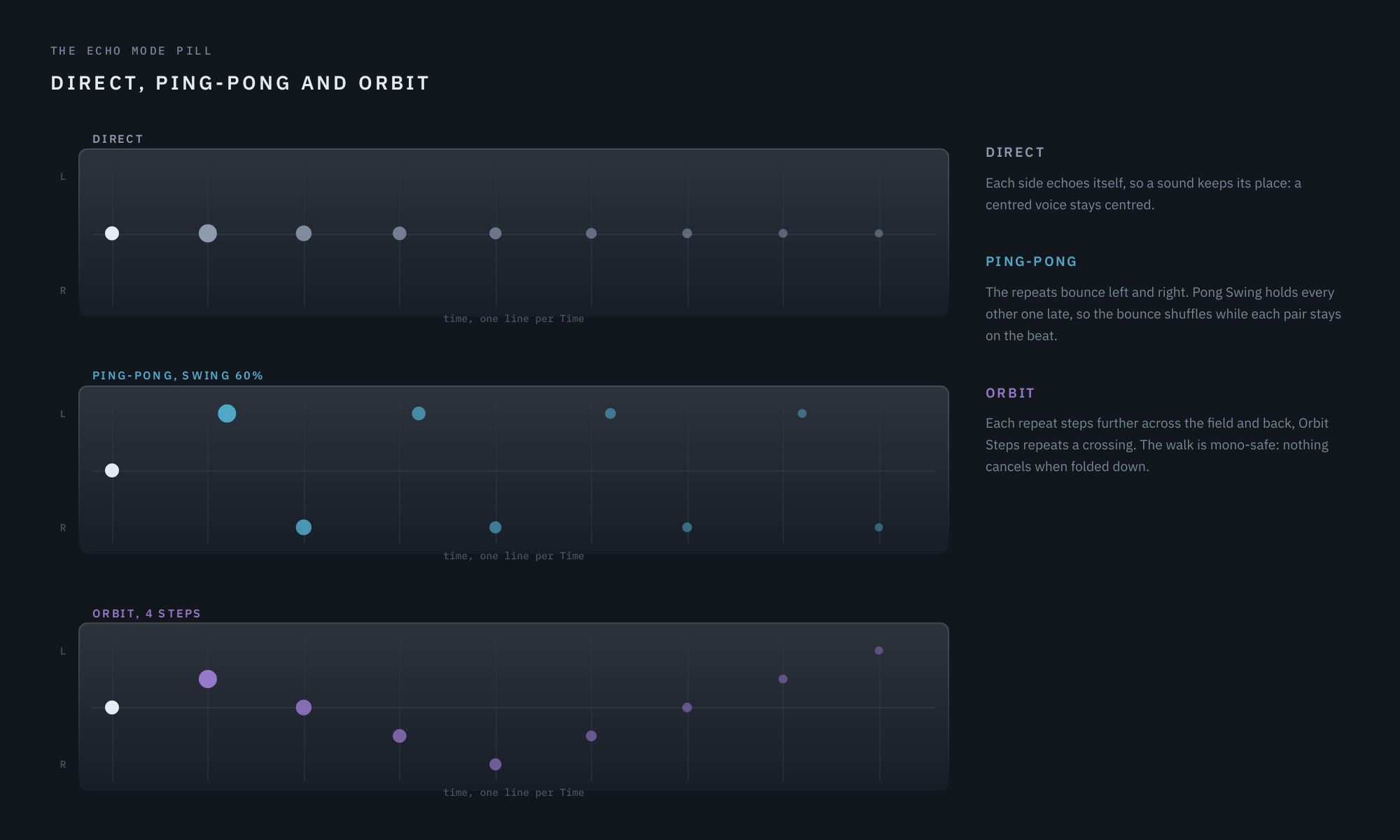
Eight repeats of one centred hit at Feedback 80%, in each mode.
Direct
Each side echoes itself, so a stereo source keeps its image and a centred voice stays centred. This is the plain delay.
Ping-Pong
The repeats bounce between left and right. Four controls on the Advanced page decide how:
- Pong Swing (Off to 75%) holds every other repeat late, while each pair of repeats stays on the beat. It acts only on the bounce. Around 67% gives a triplet shuffle, which is what turns a straight bounce into a groove.
- Pong Width (Centre to 100%) sets how far apart the two sides sit. At 100% the bounce is hard left and right. Turn it down and the sides move toward the middle. At Centre the bounce is gone but the rhythm, swing included, stays exactly as it was. It is a proper pan rather than a narrowing, so the repeats keep their level as they close in.
- Travel (Off to 100%) makes the repeats cross the field instead of jumping between the sides. Each sound is born at one side and walks to the other over the delay time, so the two streams pass through each other in the middle. It is a pan, not a fade, so nothing gets quieter on the way across.
- Width in the Output section scales the whole image, and it combines with Pong Width. Half a bounce inside a half-width image sits at a quarter of full.
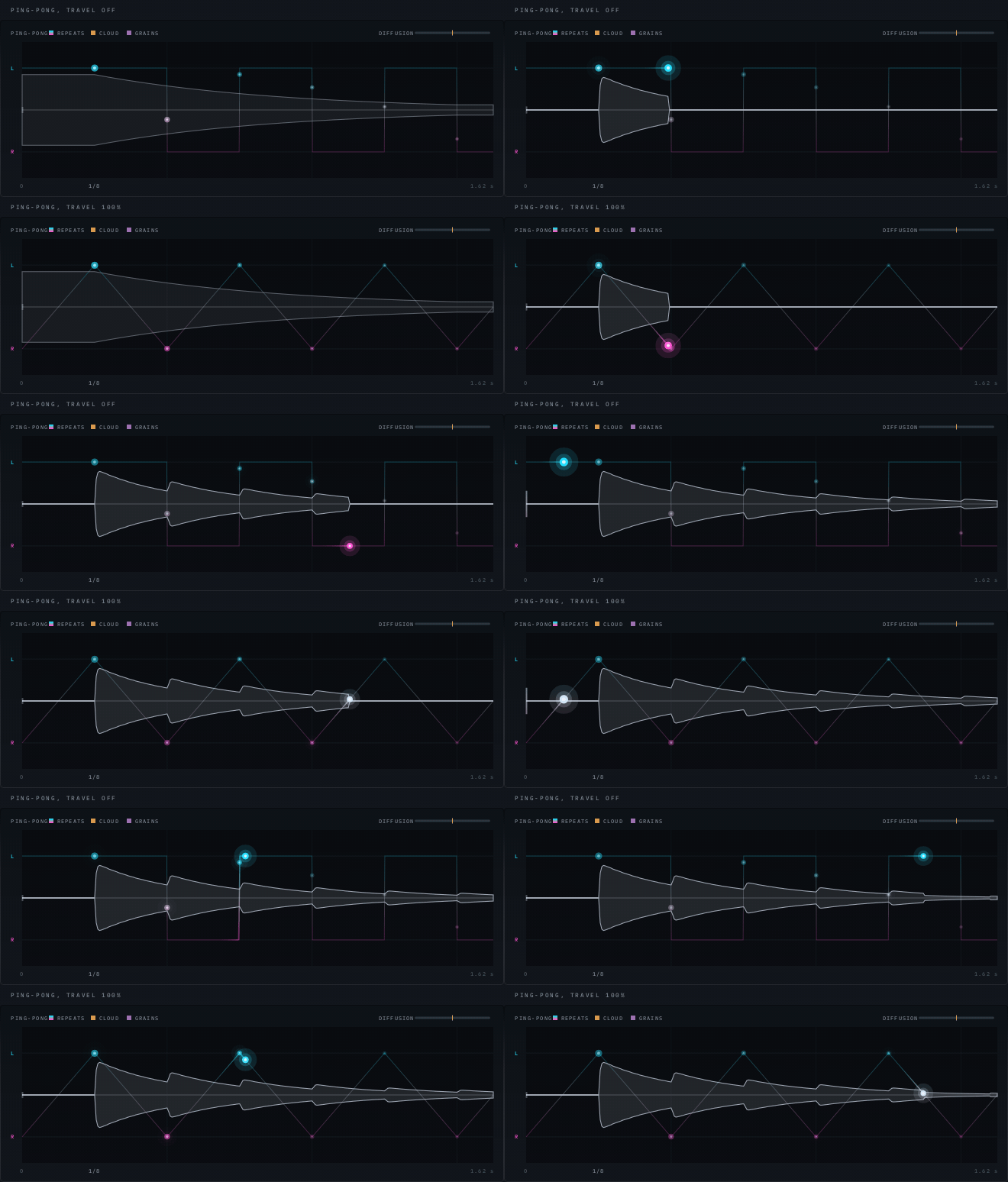
Same settings apart from Travel. Above, the repeat jumps from side to side. Below, it leans across the whole gap.
One thing worth knowing: Travel sweeps sustained material. A short percussive hit has stopped before the walk has moved, so drums still land on one side, while pads, guitars and held notes travel.
Orbit
Orbit walks each repeat a step further across the stereo field, from left to right and back, without anything cancelling when the mix is folded to mono. Two controls shape it:
- Orbit Steps (2 to 16) is how many repeats one crossing takes. At 4 the sound crosses the field every four repeats. At 16 it is a slow, wide drift. With Time synced and notes on the beat, notes land on the steps of the walk.
- Orbit Depth (Flat to 100%) turns the walk from a line into a circle. Two speakers can only place a sound between them, so the second direction is distance: as the echoes go round they also move away and come back, quieter and duller behind you, louder and brighter in front. It is built from level and tone alone, with no phase tricks, so it stays mono-safe. The sound gets quieter as it passes behind, by up to 6 dB, and that is the effect.
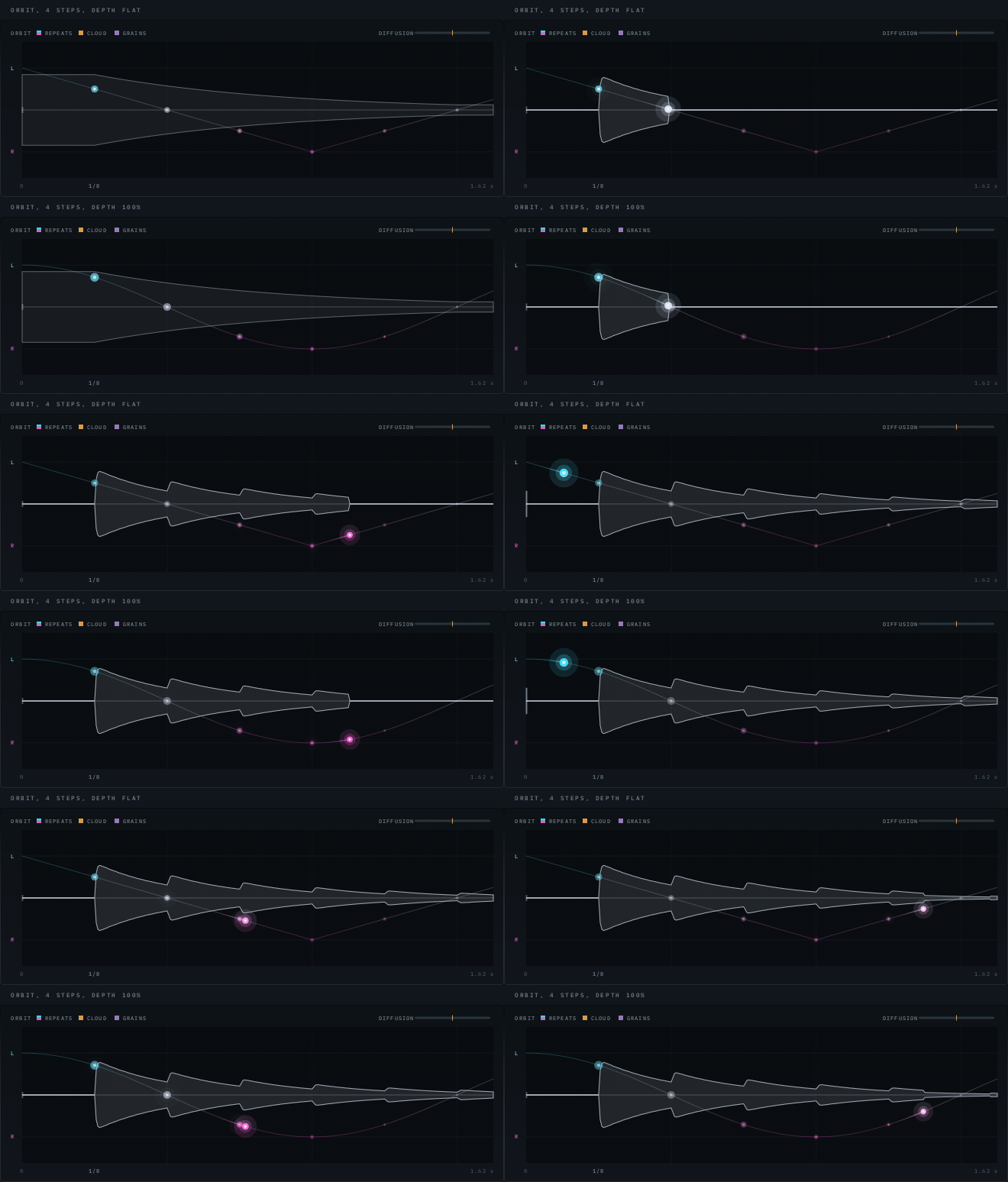
Four steps in both. Above, the plain walk. Below, the dots shrink and dim as they pass behind you.
From echoes to cloud
The Cloud section is a diffuser feeding an 8-line reverb network. It is fed by the repeats, so it inherits their tone.
- Diffusion is the main knob. It blends the raw repeats, a smeared version of them, and the cloud. At 0 only the raw repeats sound. At 100% only the cloud is left.
- Dissolve (20 to 100%) sets where on Diffusion’s travel the raw repeats disappear. A raw echo left under the cloud still strikes again each time it arrives, even 12 dB down, so the repeats only stop reading as repeats once they are completely gone. A low Dissolve melts the delay early. A high one keeps the knob a delay for most of its range.
- Size (0.8 to 12 s) is how long the cloud rings.
- Movement is how far the cloud’s internal lines drift, from still and glassy at 0 to a slow, chorus-like swirl at the top.
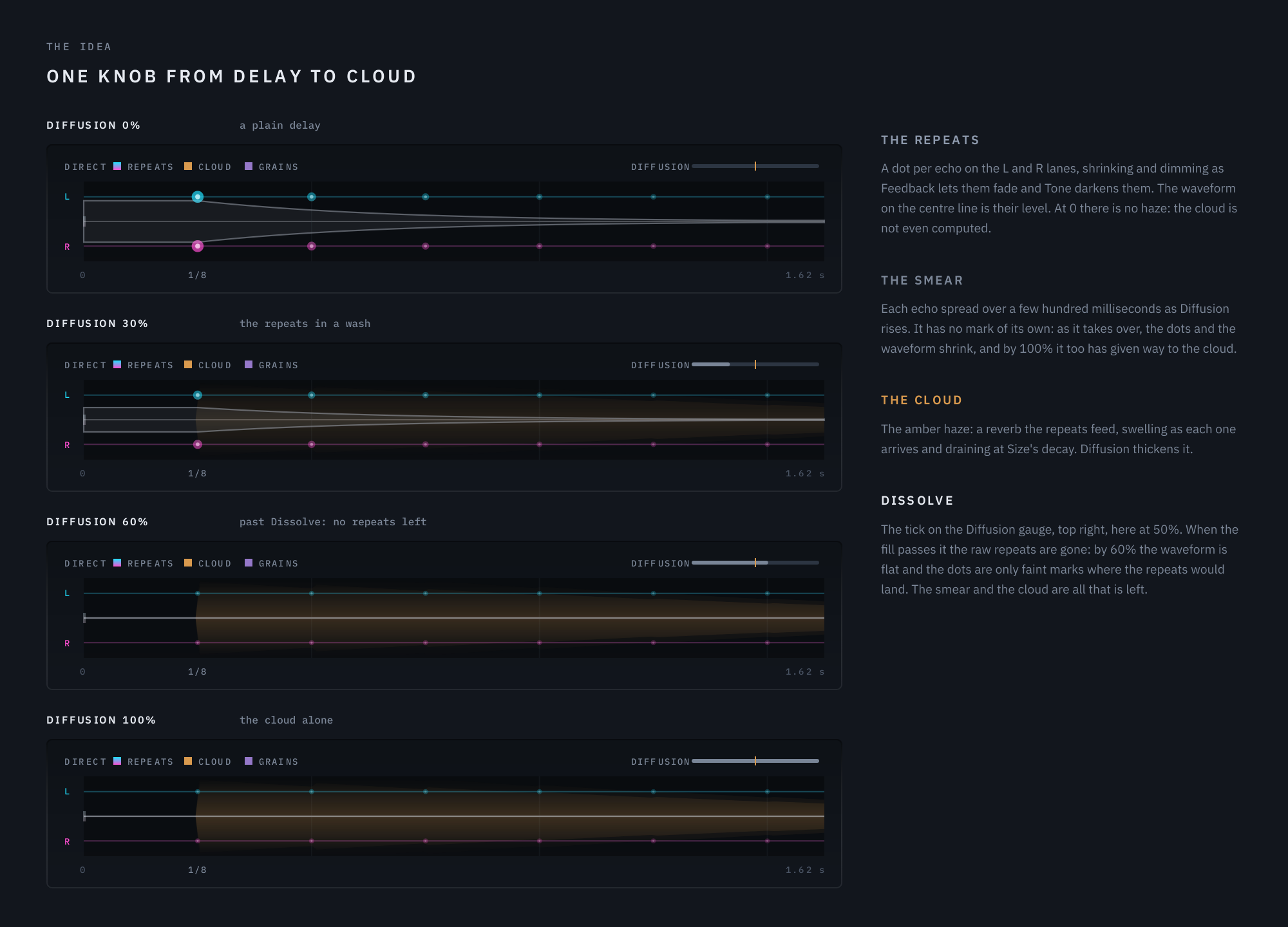
Four settings of Diffusion, from a plain delay to the cloud alone.
Shimmer: grains on the cloud
The Shimmer section is Ghostlight Pro’s granular engine, working on the cloud rather than on each echo. That’s why Shimmer sounds like a sparkling haze over a tail rather than a pitched repeat.
- Scatter is how much of the wet signal becomes a cloud of grains. Nothing in this section is heard with Scatter at zero.
- Grain moves from long, sparse grains to short, dense ones.
- Shimmer is the share of grains pitched by Tune, which lands on Oct down, 5th, m7, Octave, Oct+5th or 2 Oct. Hold Shift while dragging to tune anywhere in between.
- Air washes the grains through a diffuser, softening distinct sparks into a haze.
- Link makes the grains follow your playing. Each new note bursts them denser and shorter for a moment, then they settle.
- Shimmer Pan sweeps the pitched grains from side to side, and its rate can be synced to your song’s bars.
The Advanced page adds Grain Size, Density, Jitter, Spread and Reverse, the share of grains played backwards.
Recipes
These are starting points, not presets. Set the values, play something, then nudge Feedback and Mix to taste. Anything not mentioned stays at its default.
1. Dotted-eighth bounce (guitar, electric piano) Time 1/8 Dotted, mode Ping-Pong, Feedback about 40%, Tone about 4 kHz, Mix about 25%. Add a little Travel for a bounce that leans across the field instead of jumping.
2. Shuffling ping-pong (drums, percussive keys) Time 1/8, mode Ping-Pong, Pong Swing about 67%, Feedback about 45%. Pull Pong Width down to about 70% if the hard left-right bounce is too wide for the mix. The rhythm stays put as the sides close in.
3. Orbit arpeggio (synth arps, plucks) Time 1/8 synced, mode Orbit, Orbit Steps 8, Orbit Depth about 60%, Feedback about 55%. The notes drift around you, passing behind and coming back. Fold the mix to mono to check it: nothing should cancel. For something tighter, drop Orbit Steps to 4.
4. Delay into cloud (vocals) Time 1/4, Feedback about 35%, Diffusion about 40%, Dissolve about 50%, Size about 4 s, Ducking about 40%. The repeats start clean and bloom into a wash behind the voice, and Ducking pulls the tail down while the singer is singing so it swells back in the gaps.
5. Octave shimmer halo (pads, strings, clean guitar) Diffusion about 70%, Size about 6 s, Scatter about 50%, Shimmer about 70%, Tune Octave, Air about 40%, Link about 50%. Add Shimmer Pan around 40% and the pitched grains drift from side to side. Try 2 Oct for something more ethereal.
6. Frozen bloom (chord, then hold) Diffusion 100%, Size about 10 s, Scatter about 40%, Shimmer about 50%. Play a chord, then hold Freeze. The input is muted, the repeats and the cloud keep ringing, and the grains hold too. Let go and the delay carries on from where it was.
7. Tape wind-down (end of a section) Time 1/4 Dotted, Feedback about 60%, Warm and Wow up a little. Set Stop Time to around 2 s, then hold Stop at the end of a phrase. The echoes wind down to a halt like a tape machine losing power, with the cloud and grains going with them, while your dry signal keeps playing. Let go and they spin back up.
Try it
Echolight ships with 44 factory presets in seven categories, including Eighth Ping-Pong, Swing Pong, Orbit Arpeggio, Delay Into Cloud, Cathedral Shimmer and Infinite Horizon, which are good places to see these controls at work.
See Echolight → with audio examples, or read the full user guide.