
Ghostlight Pro
A reverb whose four decay bands swell toward what's loud in your source, or invert to reveal what isn't — plus a granular engine that scatters, pitches and freezes the tail.
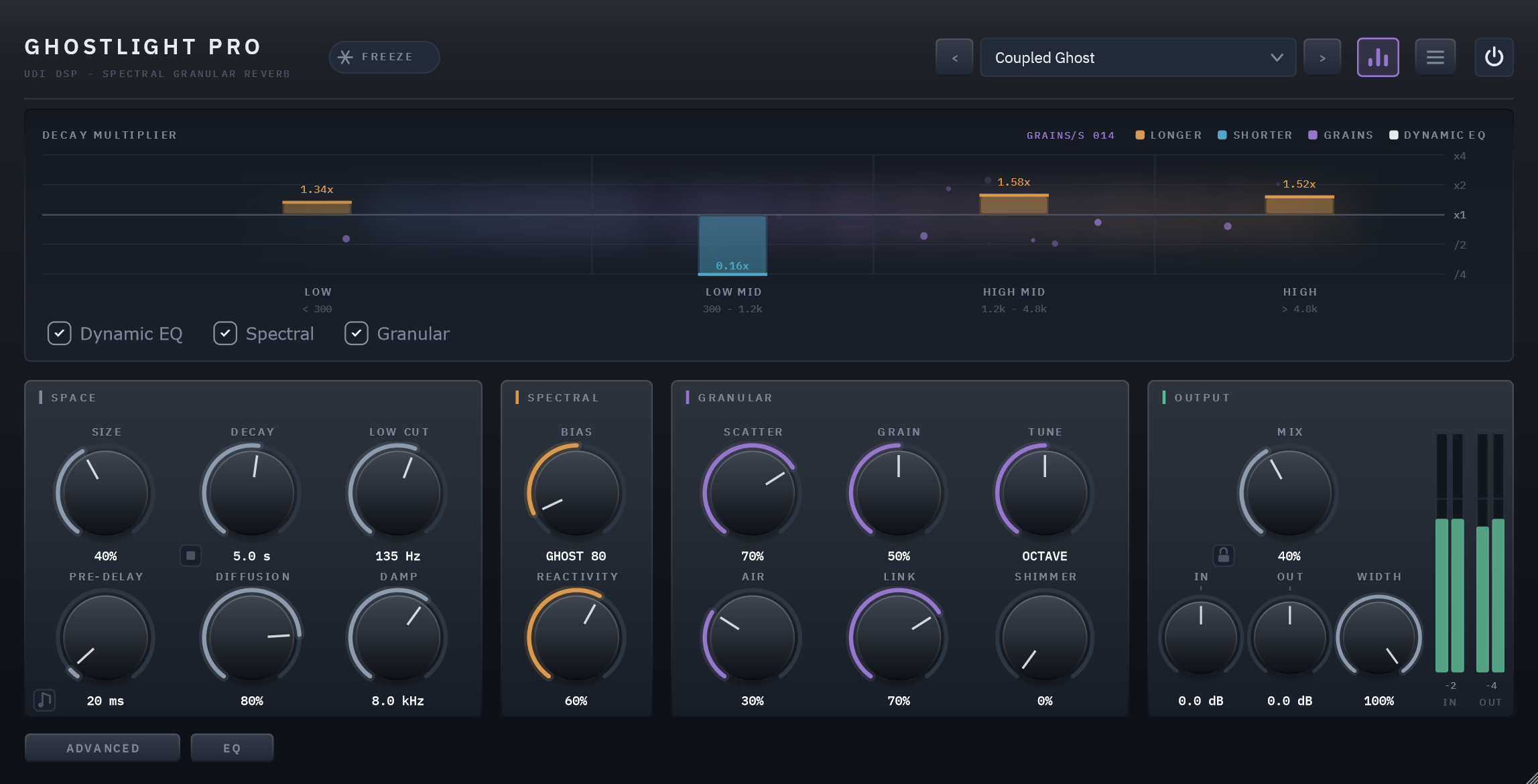
A reverb that listens back
Where a conventional reverb has a single decay time, Ghostlight Pro splits its tail into four frequency bands and continuously re-weights how long each band rings, based on what the input signal is actually doing — in real time, with zero added latency.
It is also simply a good reverb. With the spectral engine at rest, you get a smooth, dense, modulated feedback-delay-network tail comparable to a classic algorithmic hall or plate. That's the baseline everything else is built on: turn the signature features off and the plugin still earns its place.
The same clip, dry and wet
9 sources, each run through the factory preset built for it. Toggle Dry/Wet mid-playback — it crossfades from the same instant rather than restarting.
Reactive spectral decay
One bipolar control, two different instruments. Bloom rings the loud bands longer; Ghost dies them fast and lets what's hidden ring on instead.
A second tail, made of grains
Scatter crossfades the smooth tail into a cloud of overlapping grains pulled from its own recent past.
Link: one instrument, not two effects
The granular engine listens to the same analysis driving Ghost/Bloom, so grains are built from whatever band is actually ringing.
Zero added latency
The entire spectral analysis runs side-chain. Reported latency is 0 samples.
Tune the band split to the source
Low Crossover moves where LOW ends, so Ghost and Bloom can target a source's actual low-mid register.
Freeze, and play into it
Holds the tank indefinitely for pads and live layering, while new input ducks quietly underneath rather than piling on top.
A reverb worth trusting at the core
An 8-line Hadamard-mixed FDN, modulated and diffused inside the feedback loop, with a send-only de-esser so long tails never turn harsh.
Shimmer, tuned and drifting
Grains pitched up from unison to two octaves, snapping to musical intervals by default — and the shifted layer can follow a slow stereo drift instead of landing at random, so it moves as its own thing rather than scattering.
A dynamic EQ on the tail
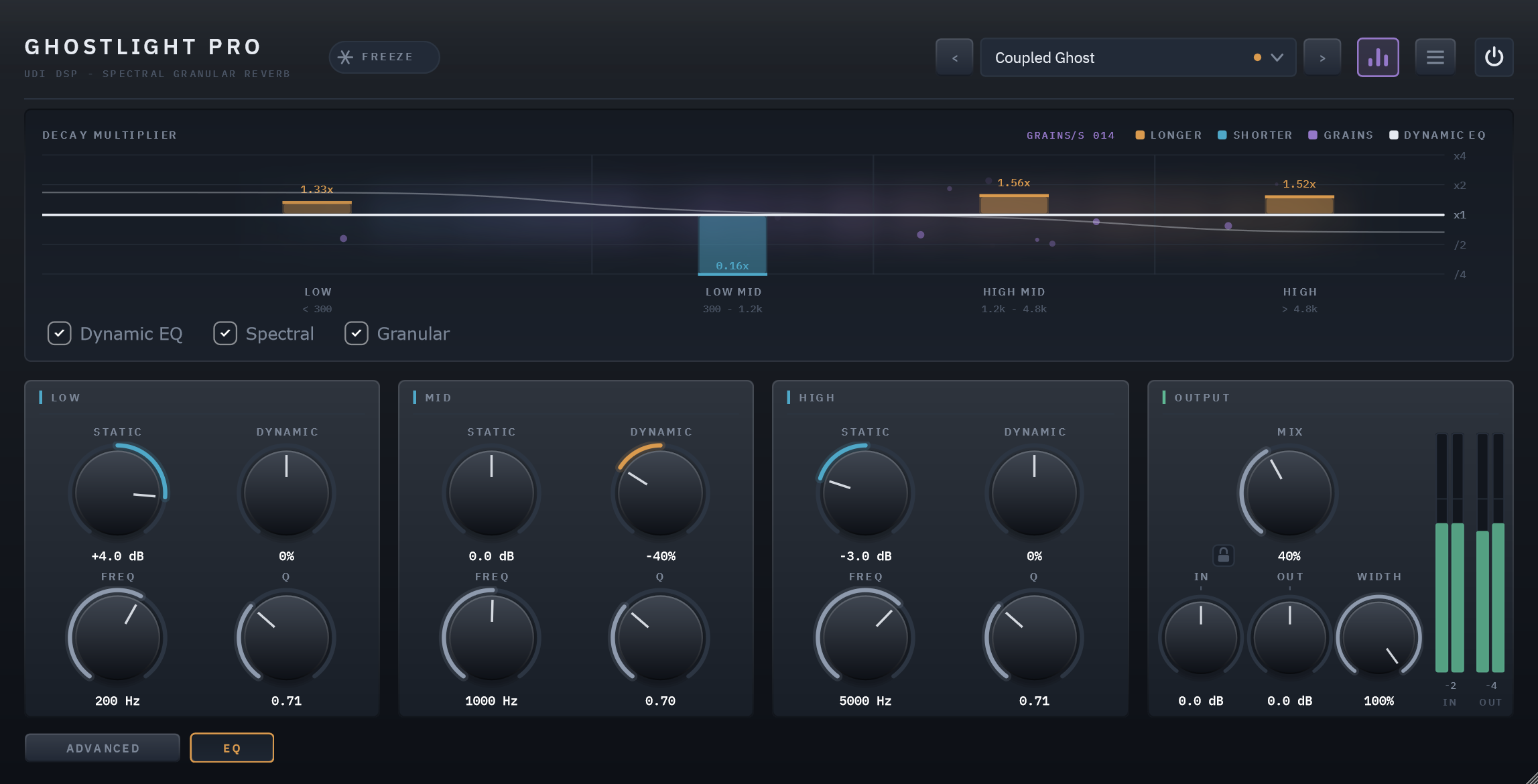
Three bands — low shelf, bell, high shelf — each with a fixed Static setting and a level-reactive Dynamic amount that follows the wet tail, plus movable Frequency and Q. Bit-transparent until you move it.
Kill the tail
A small stop button beside Decay empties the reverb and the grains in 10 ms, without a click, so a thirty-second decay doesn't have to ring out every time you try a setting. It's automatable too — cut a tail cleanly at the end of a section.
Lock the mix while you audition
A padlock beside Mix holds Mix, In and Out through every preset change, so each preset is heard at your blend and level rather than its own. Saved with the session, per instance.
A clean slate on every preset
Turn on Clear Tail on Preset Change in the menu and the old preset's tail is cut as the next one loads, so a long decay never bleeds into the preset you're judging.
Bipolar, and it's two different instruments
The Spectral Bias knob is bipolar, and its two directions are two different instruments. In each diagram below, the left bars show the input's spectrum; the right bars show how long each band of the reverb tail rings.
Bloom
BIAS → +100Bands that are loud in your source ring longer. The reverb amplifies what's already dominant — chords swell around their own harmonics. Resonant, agreeable, "the room agrees with you."
Ghost
BIAS → −100The inverse — and the sound nobody else has. Loud bands decay fast; quiet bands ring long. The tail carries what your source is not emphasising: on a vocal, the mid presence dies instantly while the air and low body linger.
Centred at 0, the spectral engine is exactly neutral and Ghostlight Pro behaves as a plain — but high-quality — reverb.
A second tail, crossfaded not bolted on
Underneath the smooth FDN tail sits a second engine. It continuously captures the last six seconds of that tail into a buffer and can re-scatter it as a cloud of overlapping grains — short windowed fragments of the reverb's own recent past, layered dozens deep, each with its own pitch, position and pan.
That gives you a second, completely different kind of tail. Where the FDN decays smoothly, the granular tail shimmers, stutters and breathes. You crossfade between the two rather than choosing, so it reads as an extension of the reverb rather than an effect bolted on after it.
They share what they hear
Everything above describes two engines that happen to share a signal path. Link is what makes them one instrument: it feeds the spectral analyser's live state into the granular engine, so the grains react to the same listening the reverb tail is already doing.
Transients scatter. The analyser's onset detector drives short bursts of higher grain density and slightly shorter grains, so hits break into a spray that settles back into the texture.
Grains made of what's ringing. Each grain picks a band weighted by that band's current decay multiplier, then is filtered toward it. Under Ghost the grains are made of the same air and low body the tail is ringing — reinforcing the character instead of running alongside it. Under Bloom it follows the loud bands instead, automatically.
At Spectral Bias 0 the multipliers are all exactly neutral, so the band half of Link has nothing to follow and switches itself off — the transient scatter keeps working, since a transient is a transient regardless of bias.
A display that shows the reverb
A continuous cloud shows the reverb's real wet spectrum, live — so the display means something even when the spectral engine is neutral. Bars grow up in amber when a band rings longer than your Decay setting, down in cyan when it dies faster — logarithmic, so ×2 and ÷2 are equal and opposite. Purple sparks are real, audible grain spawns, appearing in whichever band the granular engine is currently drawing from. At Bias 0 every bar sits flat — the display goes quiet exactly when the feature is off, but the cloud keeps showing you the reverb itself.
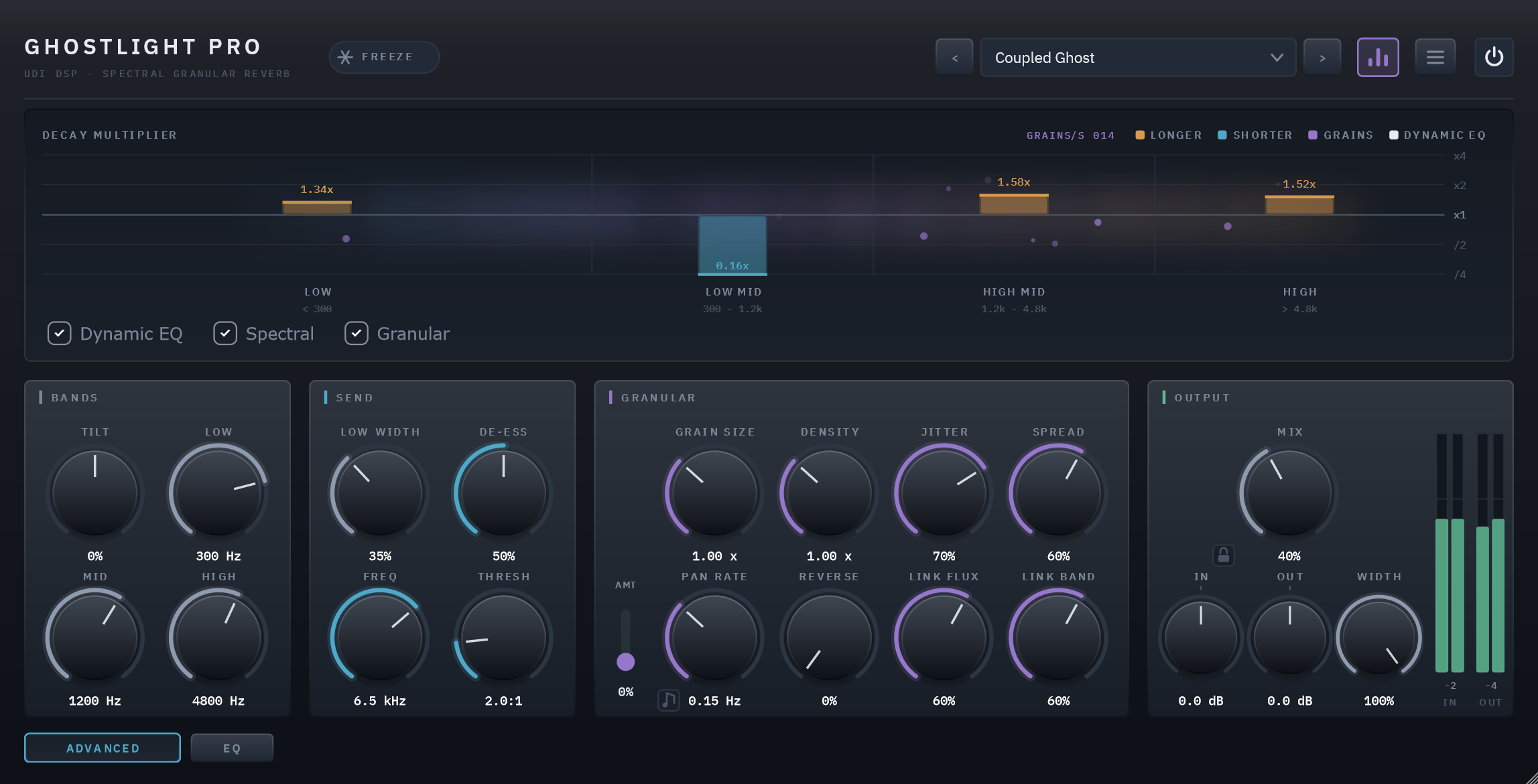
Seventeen more controls, out of the way until you want them
The button at the bottom left swaps the three main sections for seventeen detail controls -- Tilt, Low/Mid/High Crossover, Low Width, De-Ess and Pan Rate among them, plus grain size, density, jitter, spread, reverse, shimmer pan amount, and the two halves of Link split apart. The defaults are chosen so you never need to open it, and OUTPUT stays put either way, so you keep your levels and meters while you work.
A dynamic EQ on the tail — static and reactive at once
A three-band dynamic equaliser sits on the finished wet tail — low shelf, bell, high shelf — and never touches your dry signal. Each band pairs a fixed Static setting with a level-reactive Dynamic amount that follows the wet bus's own level, plus movable Frequency and Q. A High band on a small negative Dynamic tames a tail's sibilant sheen only when the tail is bright; a Mid cut opens a boxy resonance only while it's ringing. It's parallel and bit-transparent at its neutral defaults, so it costs nothing until you move it — and the whole curve draws over the display in off-white as it works.
Ghostlight vs. Ghostlight Pro
| Ghostlight | Ghostlight Pro | |
|---|---|---|
| Space (Size, Decay, Pre-Delay, Diffusion, Low Cut, Damp) | Yes | Yes |
| Reactive spectral decay (Bias, Reactivity — Bloom/Ghost) | Yes | Yes |
| Granular tail (Scatter, Grain, Shimmer, Air, Link) | — | Yes |
| Dynamic EQ (3-band, static + level-reactive, movable Freq/Q) | — | Yes |
| Advanced drawer | — | Tilt, Low/Mid/High Crossover, Low Width, Grain Size, Density, Jitter, Spread, Reverse, Pan Rate, Shimmer Pan Amount, Link Flux, Link Band, De-Ess, De-Ess Frequency, De-Ess Threshold |
| Tempo sync | Pre-Delay | Pre-Delay + Shimmer Pan Rate |
| Freeze | Holds the tank | Holds the tank and latches the grain buffer |
| Live parameters | 18 | 53 |
| Factory presets | 45 | 45 |
Ghostlight is Ghostlight Pro's reactive spectral engine at its core — the same Bloom/Ghost decay behavior, without the granular tail or the deeper control set. Ghostlight Pro adds a second, completely different kind of tail and the detail controls to shape both — reach for it when you want the full instrument. Ghostlight is for when you want a reverb that's just really good at the one thing, with nothing in a drawer you'll never open.
Specifics, stated plainly
| Engine | 8-line FDN, Hadamard mixing, Lagrange-interpolated modulated delays |
|---|---|
| Bands | 4-band decay, LOW/LOW MID adjustable 80 Hz–500 Hz (default 300 Hz), fixed at 1.2 kHz / 4.8 kHz above |
| Spectral analysis | 1024-point FFT, Hann window, 50% overlap, side-chain only |
| Granular pool | 48 voices, 6-second circular buffer |
| Dynamic EQ | 3 bands (low shelf / bell / high shelf) on the wet tail — Static ±6 dB, Dynamic ±100% level-reactive, movable Freq and Q; transparent at neutral |
| Latency | 0 samples |
| CPU | 5.46% idle, 6.86% worst case, 7.22% worst case with display active — one core, 48 kHz stereo |
| Licensing | Free UDI DSP account, one-time online activation — no subscription, works offline for a week between checks |
| Footprint | Lightweight binary, zero background services or daemons |
Compatibility
- VST3, 64-bit — Windows 10/11 (a Standalone app is included in the installer). AU, AAX and macOS are coming soon.
- Verified: Cubase 15 (full checklist), FL Studio (use the panel's own power switch — FL's mixer bypass deactivates the plugin instead of crossfading it)
- Not yet tested: Reaper, Ableton Live, Studio One, Bitwig
- Internet needed once, briefly, to activate (a short browser sign-in) — day-to-day use after that works offline for up to a week between checks