Prismwave: flanger, chorus and phaser are one effect, with recipes
October 25, 2026
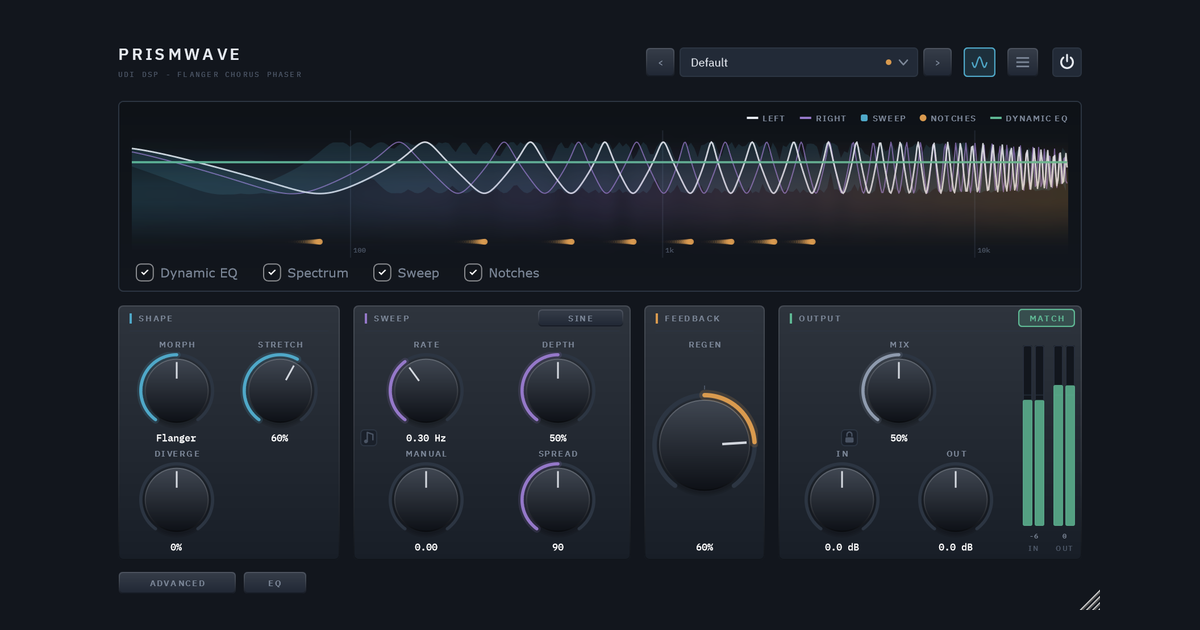
Most modulation plugins give you three effects and a switch. Prismwave starts from a different observation: a phaser, a flanger and a chorus are not three effects. Each one carves a pattern of notches, narrow dips in the spectrum, and moves it. What makes one hollow, one metallic and one thick isn’t the circuit behind it. It’s how many notches there are, how they’re spaced, and how they move.
So Prismwave is one engine whose notch pattern you shape, with the three classics sitting on it as stations you can reach exactly. Every control is a statement about notches: where they sit, how they’re spaced, or how they move.
The animations below illustrate that idea. They are drawn from the notch arithmetic the user guide describes, as illustrations rather than measurements of the plugin itself.
Notches, and why they move
Add a signal to a slightly delayed copy of itself. At some frequencies the copy arrives exactly half a cycle late and the two cancel: a notch. The notches repeat at an even step of one divided by the delay, so a 1 ms delay puts one every 1000 Hz. Evenly spaced notches form a harmonic series, which the ear hears as a pitch. That is why a flanger rings, and why a phaser, whose few broad notches are spaced evenly in octaves instead, sounds hollow.
A static comb is only a colour. What makes it an effect is motion. Rate sets how long one sweep takes, Depth how far the notches travel (up to an octave either way), and Spread offsets the right channel’s sweep from the left’s. That offset is the width you hear.
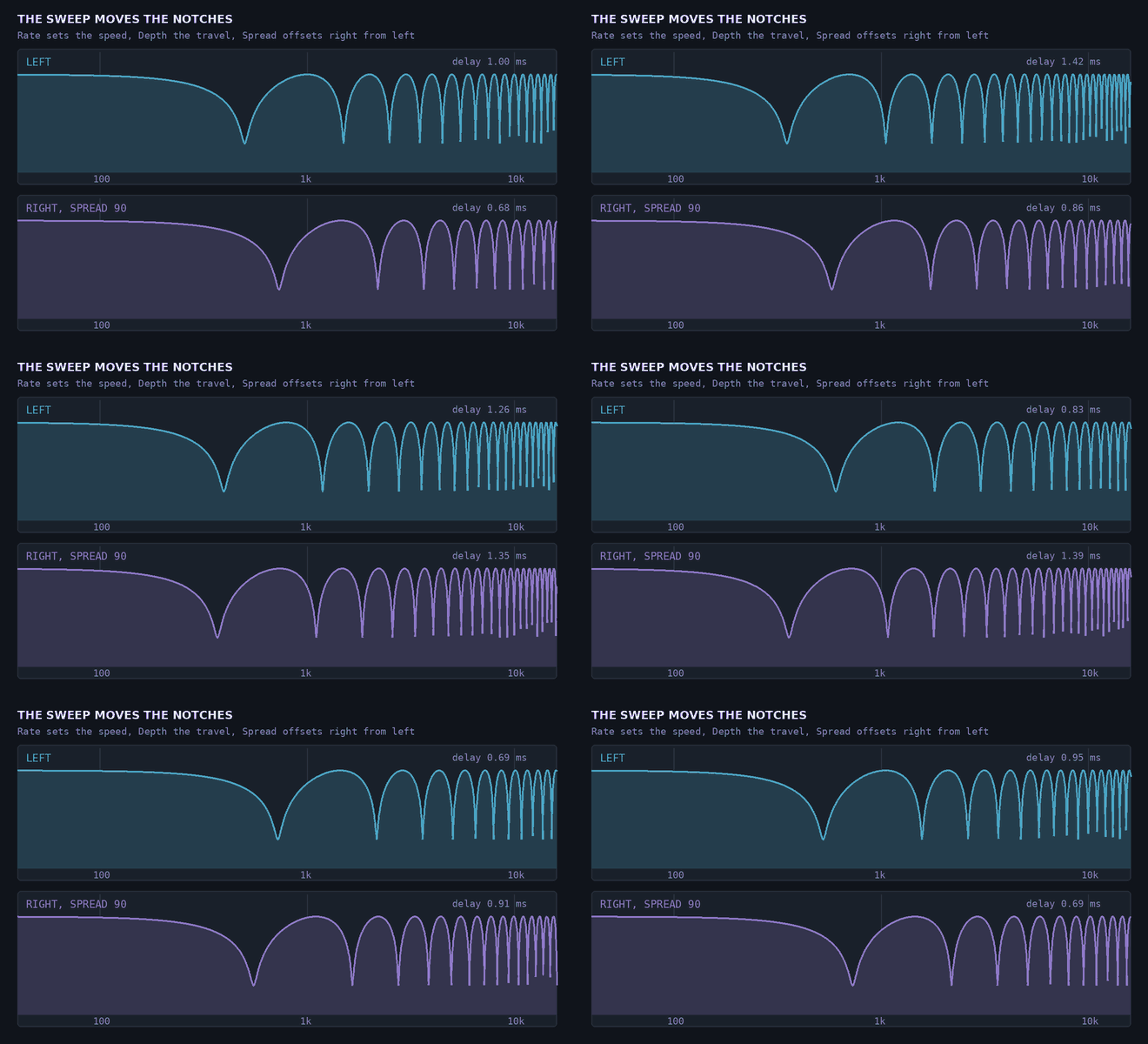
Left and right sweeps a quarter cycle apart, which is Spread at 90°.
Morph: one axis from phaser to chorus
Morph is an axis of time. At the phaser the delay is a single sample and four allpass sections make a few broad notches. Toward the flanger the delay grows to about a millisecond and the notches multiply. Toward the chorus it grows past 12 ms, feedback falls away, and two extra voices come in. Nothing is crossfaded between effects: every point on the way is a real setting of the same engine, so you can sit anywhere on it.
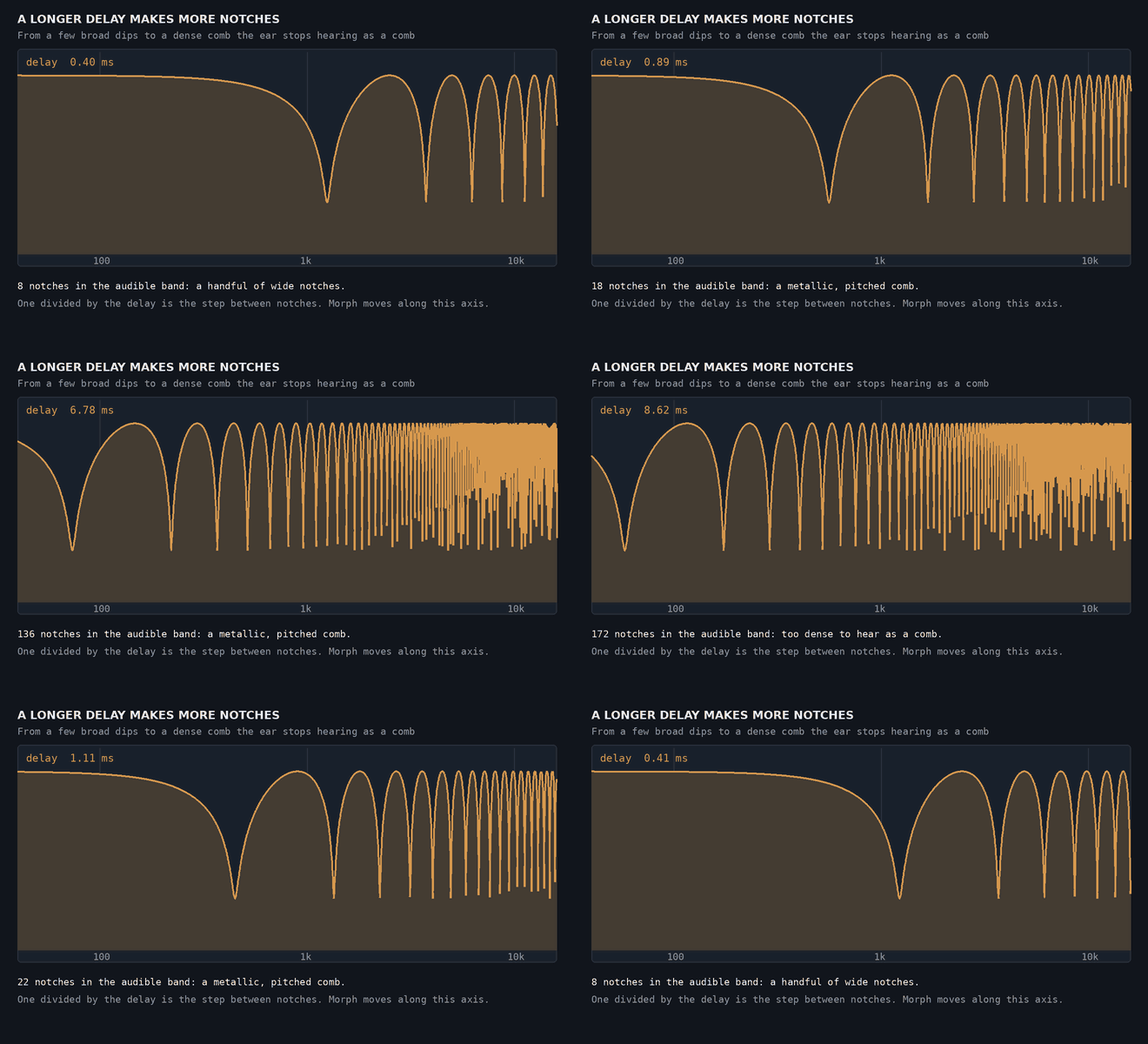
The longer the delay, the more notches fit in the audible band. By the chorus they are too dense to hear as a comb, and what you hear is the pitch drift of a moving delay instead.
Diverge goes further. It splits the effect into two engines and pulls them apart along Morph, one toward the phaser and one toward the chorus. The Advanced page’s routing then combines them in Series, in Parallel, one per side (L / R), or across a crossover, so you can have a phaser in the body of a sound and a chorus shimmering on top.
Stretch: from a tube to a struck object
An even comb is the spectrum of a tube. Real struck objects aren’t so tidy: a stiff string or a metal bar spreads its partials further apart as they rise. Stretch respaces Prismwave’s notches along that kind of law, so the comb stops sounding like a tube and starts sounding like one struck, ringing object. Most of the change happens in the first two thirds of the knob.
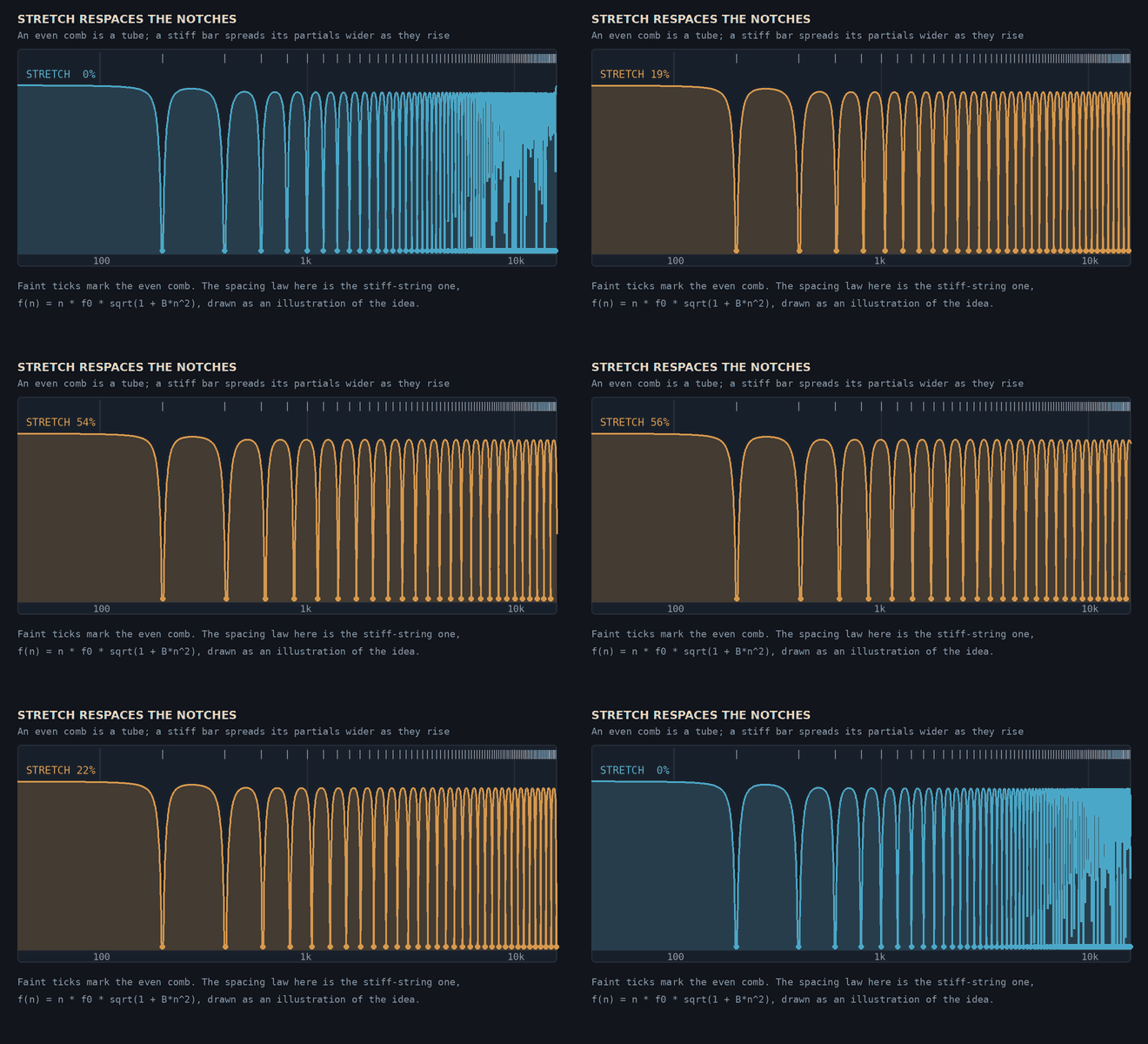
From an even comb (the faint ticks) to uneven spacing. The spacing law drawn here is a standard stiff-string one, to show the idea.
Combine Stretch with Regen (feedback, which makes the notch pattern ring) and you can get struck strings, bells and metallic resonators out of an ordinary-looking modulation plugin.
Through-zero: the tape jet
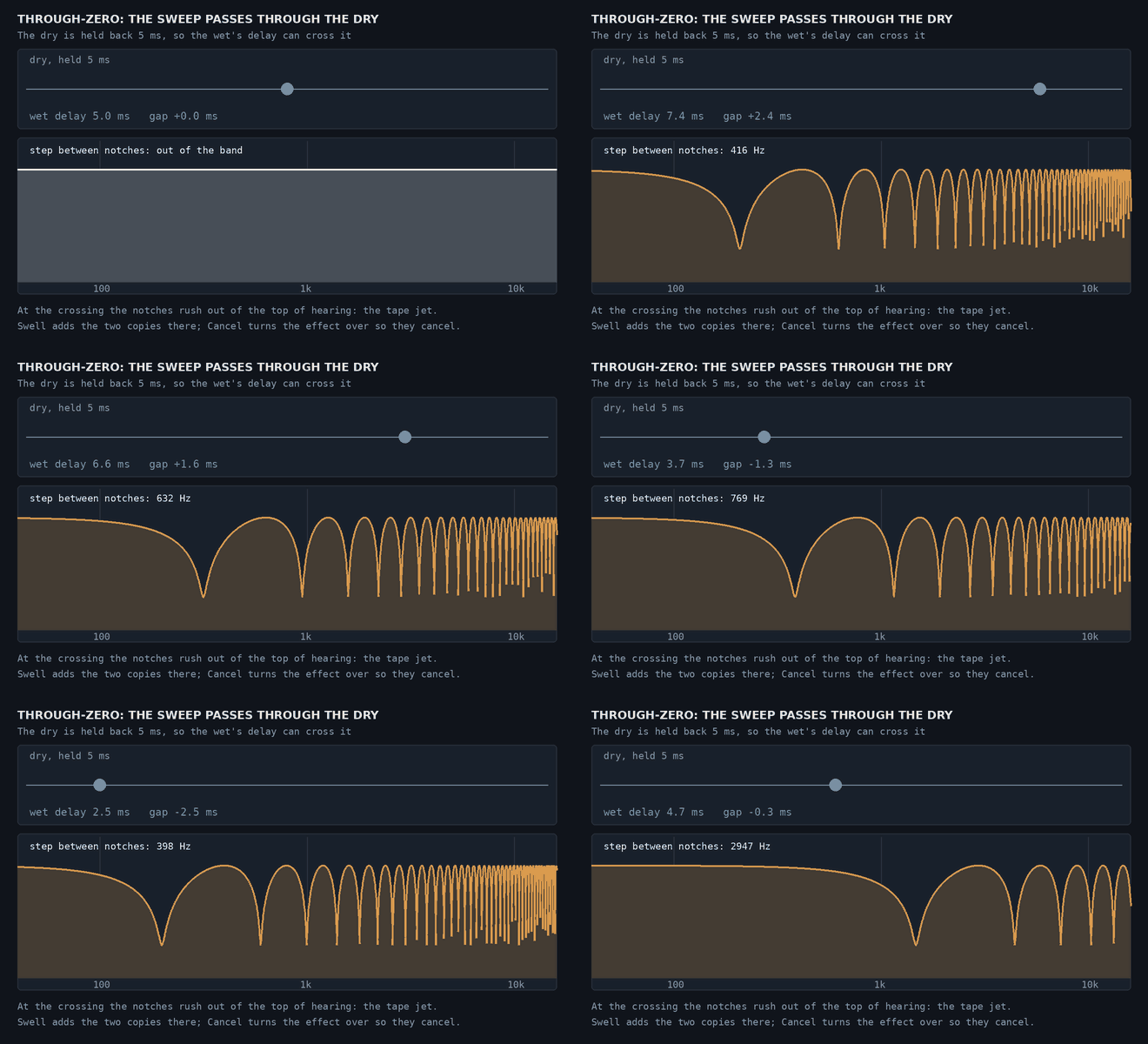
An ordinary flanger’s delay can come close to the dry signal but never reach it, since nothing can arrive before it was played. Through-zero holds the dry signal back by 5 ms so the sweep can pass right through it, as it does with two tape machines.
As the gap between the wet and the dry closes, the comb’s step widens past the top of hearing and the notches rush out of the band: the jet. At the crossing itself the two copies either add (Swell) or, with the effect turned over, cancel (Cancel, down as far as Cancel to allows). Through-zero reports 5 ms of latency to your DAW while it is on.
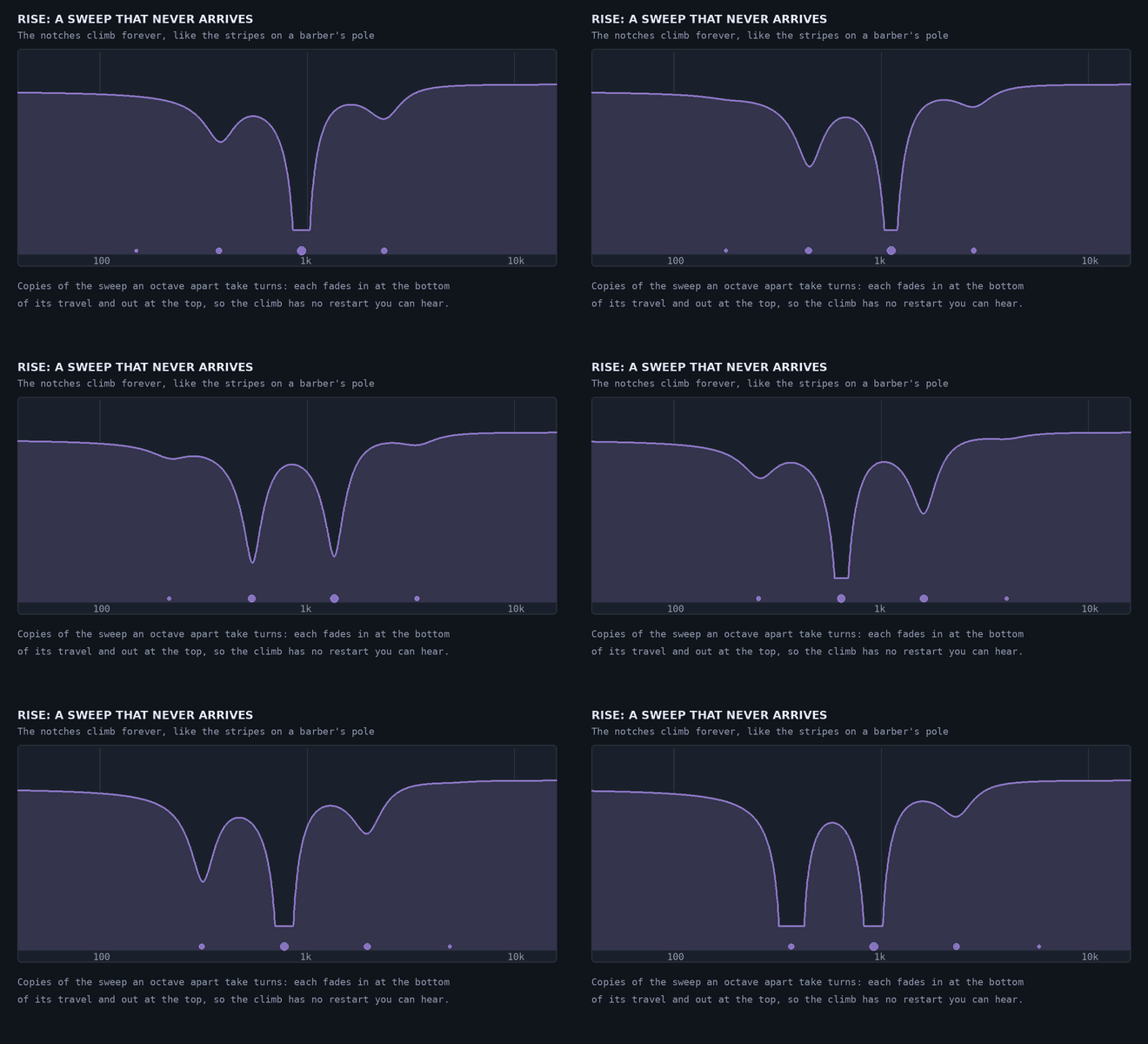
Rise and Fall: a sweep that never arrives
Set the sweep’s shape to Rise or Fall and the notches climb, or fall, forever without ever arriving, like the stripes on a barber’s pole. Three copies of the engine an octave apart take turns, each fading in at the bottom of its travel and out at the top, so the climb has no restart you can hear. Rate sets the speed at one octave per cycle, so synced to 1 bar it climbs an octave every bar. It is clearest on a phaser and on bright, sustained sounds.
More motion: the Modulator, Key and MIDI
The Advanced page adds a second source of movement, much slower than the sweep, for changes across a whole phrase. The Modulator can be an LFO (down to one cycle every 100 seconds, or locked to the song’s bars), the input’s Envelope, or smooth Random steps, and it drives two destinations from Morph, Stretch, Regen, Mix, Sweep, Diverge and Pan.
Key tunes the feedback loop so it rings on a note of your song. Route MIDI to Prismwave and up to eight held notes ring at once, so a chord becomes a resonance made out of the audio passing through. Other controls worth knowing about:
- Guard turns the effect down briefly after each hit, so attacks come through clean and the effect blooms after them.
- LF Split keeps the bass out of the effect and centred, so a wide sweep survives a fold to mono.
- Match keeps the output as loud as the input at any setting, so you judge a setting on how it sounds rather than how loud it is.
Recipes
These come from the Prismwave user guide, and most start from a factory preset, so you can load it first and hear it before changing anything. Anything not mentioned stays at its default.
1. The jet flanger (start from Guitar/Jet Flanger) Morph at Flanger, Rate 0.10 Hz, Depth 90%, Regen +80%, Spread 60°, and Loop LP at 7 kHz on the Advanced page. The slow, deep sweep moves the pitch of the whoosh, and Regen is the whistle. Try Regen at -80% for a hollow jet an octave lower.
2. Tape flanging, through zero (start from Guitar/Tape Flange) Through-zero on, At zero: Cancel, Cancel to -12 dB, Regen +20%, Spread 0°, Rate 0.15 Hz, Depth 80%. Two tape machines side by side, one slowed with a thumb on the reel. Set Cancel to Full for the classic complete cancellation, or switch to Swell for a crossing that rises instead of dipping.
3. A wide chorus that stays solid in mono (start from Guitar/Clean Chorus) Morph at Chorus, Rate 0.6 Hz, Depth 35%, Spread 150°, LF Split 150 Hz, Mix 45%. Wide and shimmering, and the low end can’t hollow out when the mix is folded to mono.
4. A struck bell, with the sweep parked (start from Sound Design/Inharmonic Bells) Depth 0%, Stretch 100%, Regen +90%, Loop HP 300 Hz, Mix 60%. Not a sweep but an object: with the notches standing still, every hit rings like struck metal. Drums and percussion pull the most out of this one.
5. An endless climb (start from Default) Shape: Rise, Morph at Phaser, Regen +60%, Rate synced to 1 bar, Mix 60%. An octave rise every bar, in time with the song. Try Fall for a build into a drop.
6. A phaser that circles the source (start from Guitar/Slow Phase Swirl) Modulator: LFO, Dest A Pan, Depth A 100%, both rates synced to 4 bars, Phase 90°. Pan moves only the effect, so the dry guitar stays planted in the middle while the phasing travels around it.
7. Phaser in the lows, chorus on top (start from Guitar/Lead Split) Diverge 100%, Routing: Crossover, Split 900 Hz, Regen +40%, Rate 0.35 Hz. Phasing in the body, shimmer above. Switch to L / R routing for the phaser on one side and the chorus on the other.
8. A pad that evolves across a phrase (start from Synth & Pads/Evolving Pad) Modulator: LFO, Rate 0.03 Hz, Dest A Morph, Depth A 100%, Rate 0.2 Hz, Spread 120°. Over about half a minute it travels from phaser through flanger to chorus and back. Sync the Modulator to 8 or 16 bars to line the journey up with your arrangement.
9. A phaser that follows your playing (start from Bass/Envelope Phaser) Modulator: Envelope, Dest A Sweep, Depth A 90%, Morph at Phaser, Rate 1.5 Hz, Regen +55%, Spread 0°, LF Split 80 Hz. Play softly and it barely moves. Dig in and the sweep opens right up.
Try it
Prismwave has 50 factory presets in eight categories (Guitar, Bass, Keys, Synth & Pads, Vocals, Drums, Mix Bus and Sound Design), each a complete starting point.
See Prismwave → with audio examples, or read the full user guide.