Prismwave
A flanger, chorus and phaser built as one engine whose notches you shape. Morph travels from phaser through flanger to chorus without crossfading between effects, and Stretch respaces the notches like the partials of a struck bar, a colour we haven't found in any other modulation plugin.
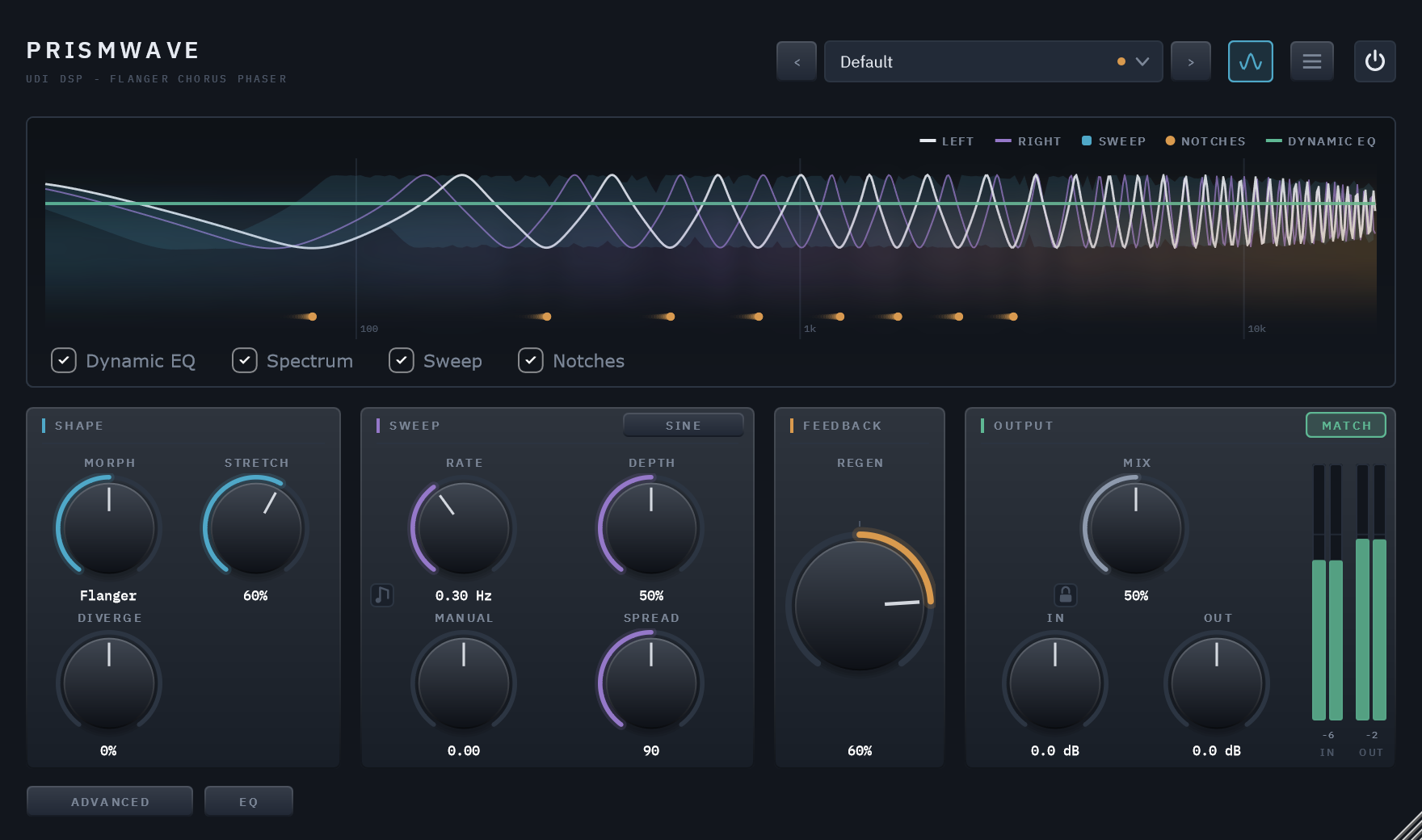
Three effects, one engine
Most modulation plugins give you three effects and a switch. Prismwave starts from a different observation: a phaser, a flanger and a chorus are not three effects. Each carves a pattern of notches into the spectrum and moves it, and what makes one sound hollow, one metallic and one thick is how many notches there are, how they are spaced, and how they move.
So Prismwave is one engine whose notch pattern you shape, with the three classics sitting on it as stations you can reach exactly, and every setting between them a real sound of its own. It holds itself to one rule: every control is a statement about notches, where they sit, how they are spaced, or how they move.
The same clip, dry and wet
8 sources, each run through the factory preset built for it. Toggle Dry/Wet mid-playback — it crossfades from the same instant rather than restarting.
One engine, one axis
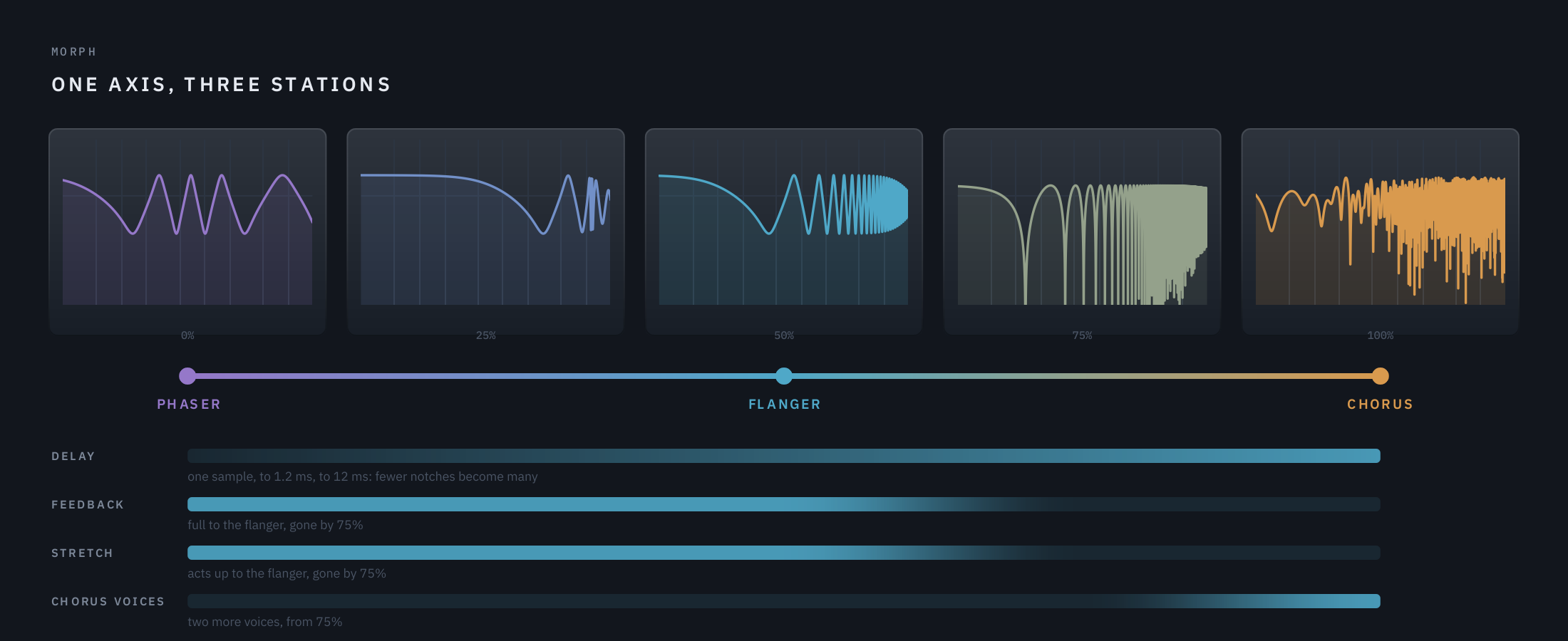
Morph travels continuously from phaser through flanger to chorus. Nothing is crossfaded: every point in between is a real setting of the same engine, so you can sit anywhere on it.
Stretch — a struck object
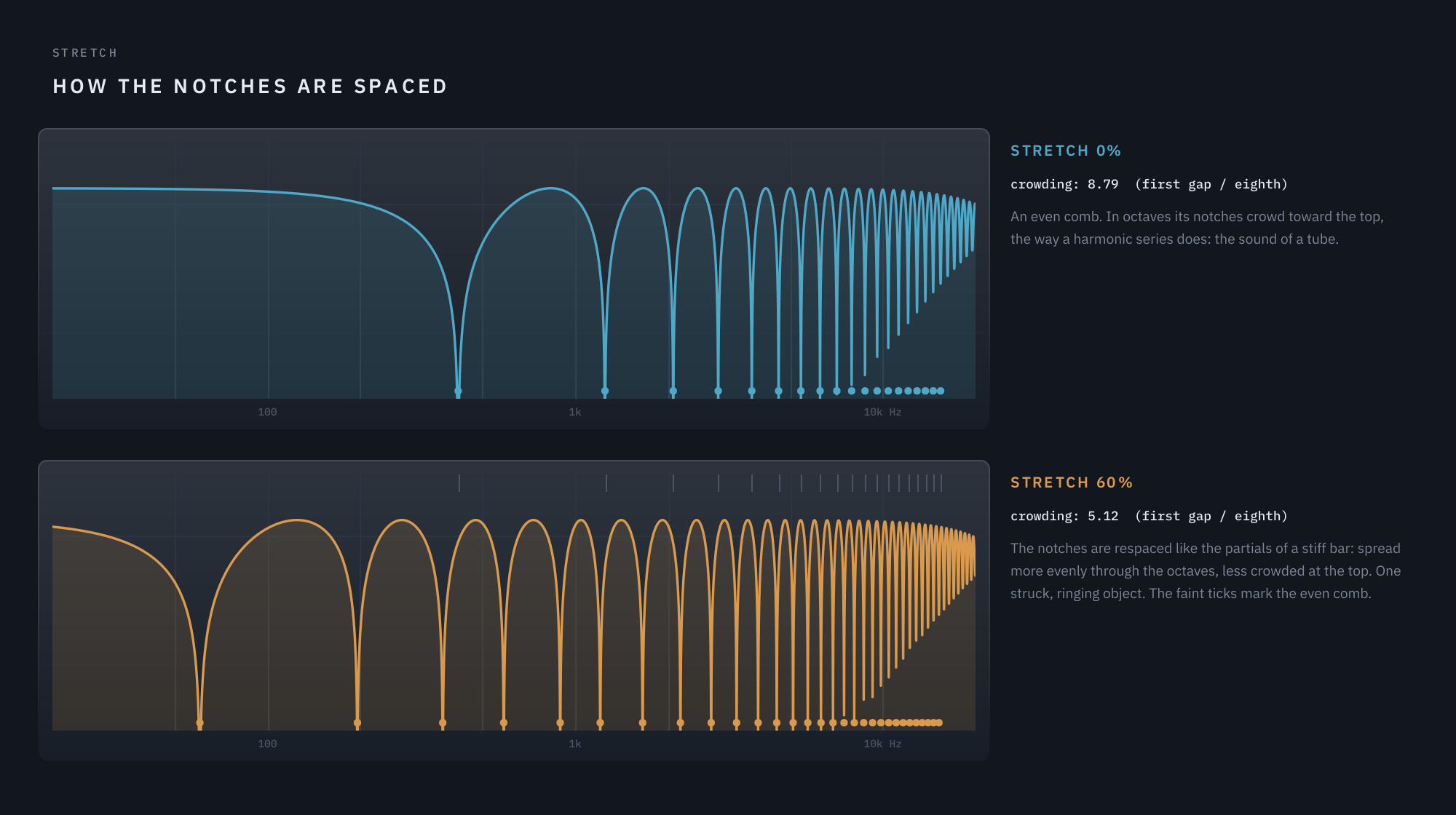
An even comb sounds like a tube. Stretch respaces the notches along a stiff bar's law, so the comb turns into one struck, ringing object. Heard on guitar and drums alike.
Two engines, pulled apart
Diverge splits the effect into two engines and pulls them apart along Morph. Routing combines them in Series, in Parallel, one per side, or across a crossover with the phaser low and the chorus high.
Through-zero flanging
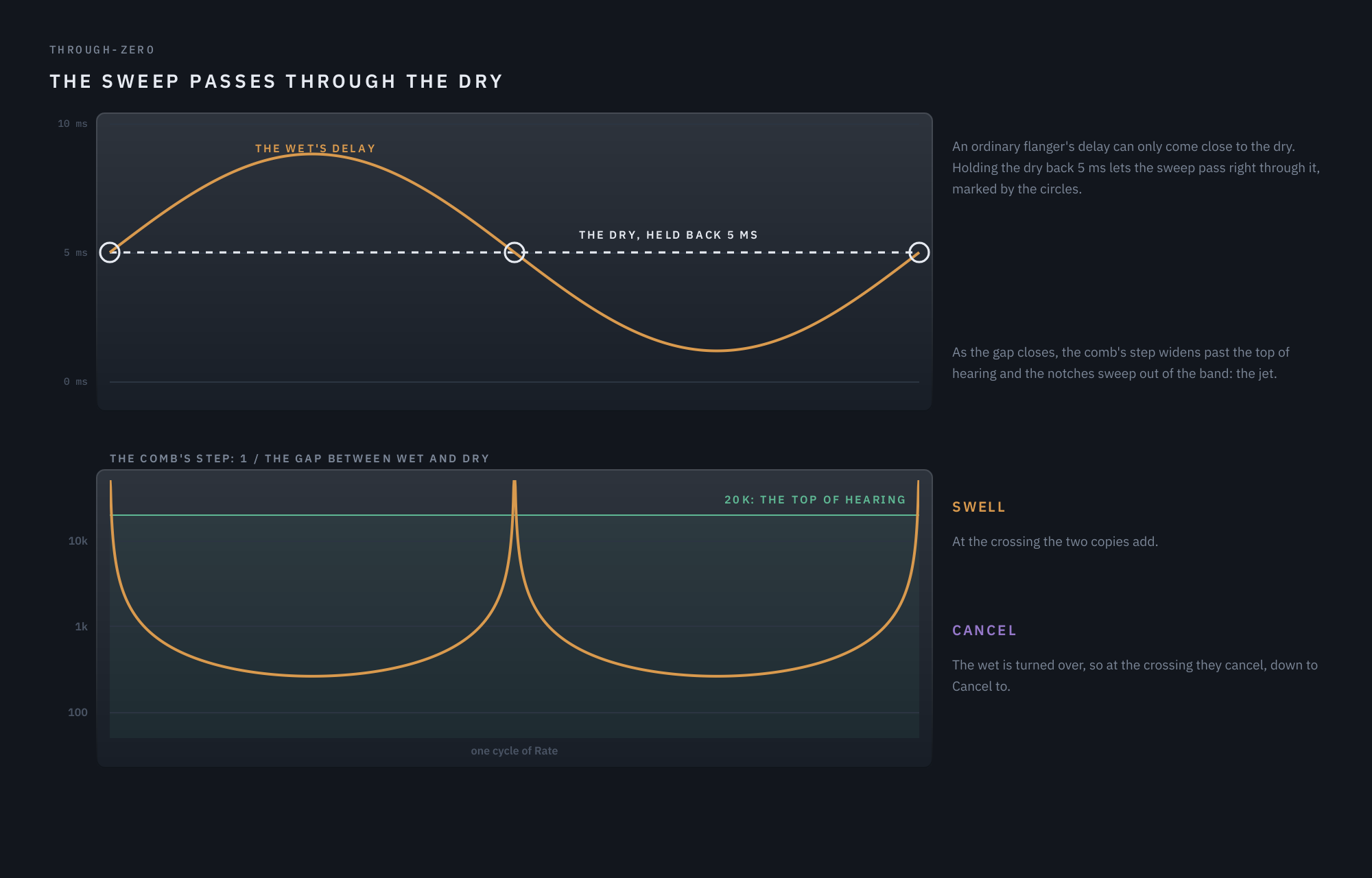
The dry is held back 5 ms so the sweep can pass right through it: the tape jet. At the crossing the sound swells or cancels, as far as you choose. Latency only while it is on.
A Modulator for whole phrases
A second source of motion, down to one cycle every 100 seconds or locked to the song's bars: LFO, the input's envelope, or smooth random steps, on two destinations such as Morph, Stretch, Regen, Diverge or Pan.
Locked to the song
Rate follows your DAW's tempo in straight, triplet or dotted values from 1/32 to 16 bars, and stays in step after a loop or a jump. Or leave it free, in Hz.
A sweep that never ends
Sine or Triangle, or Rise and Fall: a barber-pole sweep whose notches climb, or fall, forever without ever arriving, at the phaser end and the flanger end alike.
Tuned to a key, played with MIDI
Key tunes the feedback loop so it rings on a note of your song. Route MIDI to Prismwave and up to eight held notes ring at once, chords made out of the audio passing through.
Match — level held
On by default, Match keeps the output as loud as the input at any setting, predicted from the plugin's own response so it follows a knob as you turn it. A ceiling keeps peaks below 0 dBFS.
Kind to the low end
Below the LF Split the bass never enters the effect and stays centred, so a wide sweep survives mono. At the chorus end the lowest octaves stay dry, so a kick doesn't boom. Pan moves the effect alone, and the dry stays where it was.
A Guard for attacks
Turns the effect down for a moment after each hit or pick, by as much as the hit is big, so attacks come through clean and the effect blooms after them. Held notes are left alone.
50 presets in eight categories
Guitar, Bass, Keys, Synth & Pads, Vocals, Drums, Mix Bus and Sound Design, each a complete starting point that uses the whole plugin, from struck strings to tape-flanged breaks.
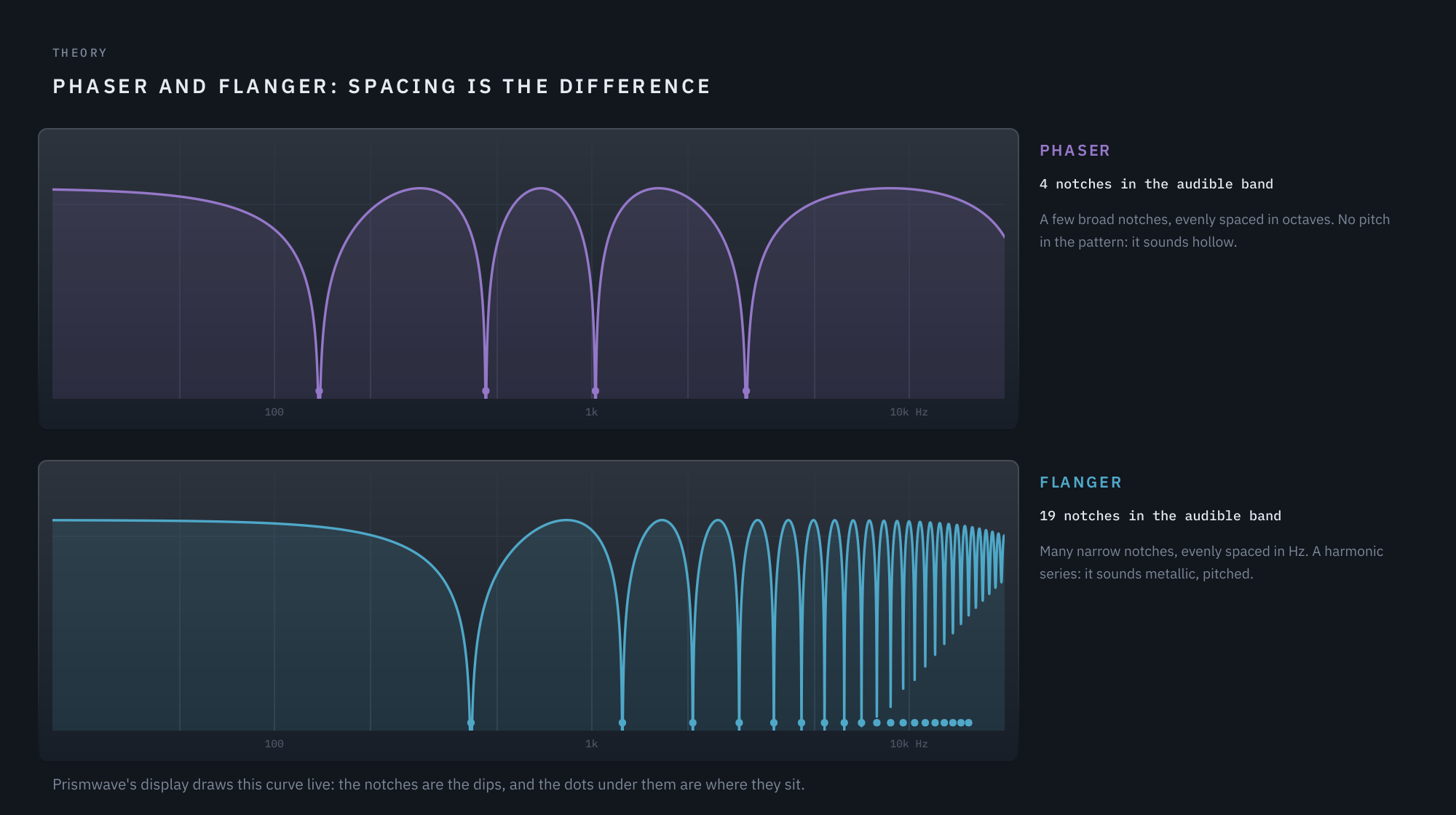
Phaser and flanger differ only in spacing
A flanger adds a signal to a delayed copy of itself. Wherever the copy arrives half a cycle late the two cancel, and the notches repeat at an even step: a harmonic series, which the ear hears as a pitch. That is why a flanger rings. A phaser's notches come from allpass stages instead: few, broad, and spaced evenly in octaves, with no pitch in the pattern, which is why it sounds hollow.
Stated that way, the question Prismwave answers is why only those two endpoints. The illustrations here, like the ones in the user guide, are drawn from the plugin's own code, so each curve is exactly what Prismwave does.
One axis from phaser to chorus
Morph is an axis of time. At the phaser the delay is a single sample and four allpass sections make the notches. Toward the flanger the delay grows to about a millisecond and the notches multiply. Toward the chorus it grows past 12 ms, feedback falls away, and two more voices come in. Because the axis only ever moves one way in delay time, each half changes different things and nothing doubles back.
A comb tuned like a struck object
Real struck objects are not tidy combs: a stiff string or a metal bar spreads its partials further apart as they rise. Stretch respaces Prismwave's notches along that same physical law, so the pattern stops sounding like a tube and starts sounding like one struck, ringing object, sweeping as one.
The sweep passes through the dry
An ordinary flanger's delay can come close to the dry signal but never reach it. Holding the dry back 5 ms lets the sweep pass right through it: as the gap closes, the comb's step widens past the top of hearing and the notches sweep out of the band, the tape jet. At the crossing the two copies either add, Swell, or cancel, Cancel, down to a floor you set.
The feedback loop as an instrument
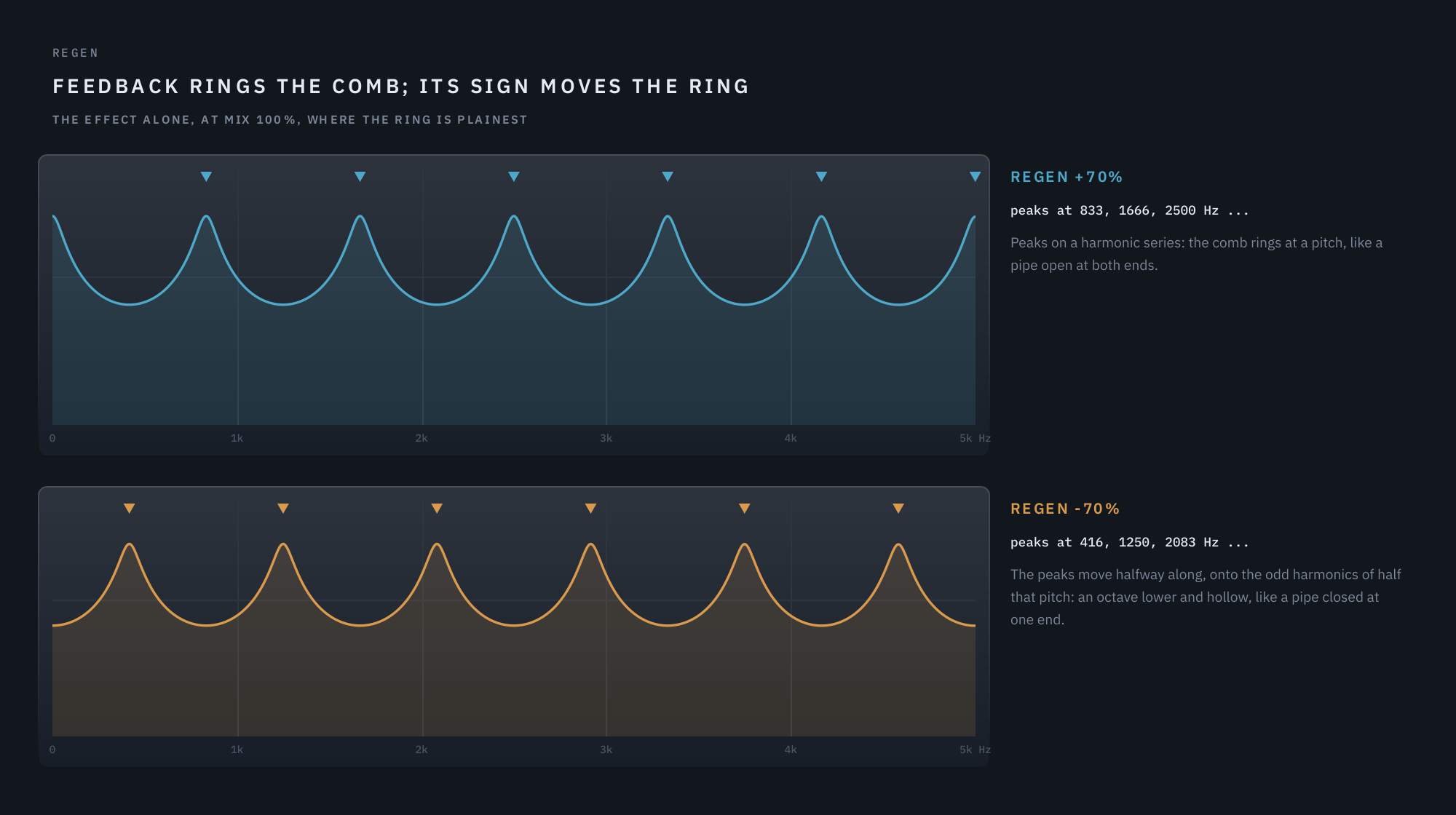
Turn Regen up and a flanger's feedback loop stops being an effect and becomes a resonator: its peaks sit on a harmonic series, and it rings. Key chooses the note it rings on, solved from the loop's whole path so it lands in tune, and Ring chooses how long it sustains.
Route a MIDI track to Prismwave and each held note opens a loop of its own, up to eight at once. Whatever audio passes through excites them, so a drum loop or a guitar becomes the chord you play, and it fades away when you let go. Only the notes you hold cost any CPU.
A display that draws the notches
The display is Prismwave's own response, drawn live from the engine as it runs: the left and right channels' curves, their dips the notches, a dot under each notch trailing as it moves, and the band the notches travel across over a full sweep. It is computed from the same code the audio uses, the loop's damping included, so the picture cannot drift from the sound, even at high Regen.
The Dynamic EQ's curve and the output's spectrum sit behind it, a legend names every layer, and checkboxes turn each one on and off. Hide the display from the header and the window shrinks rather than leaving a gap.
The Modulator, tuning, routing and through-zero, one button away
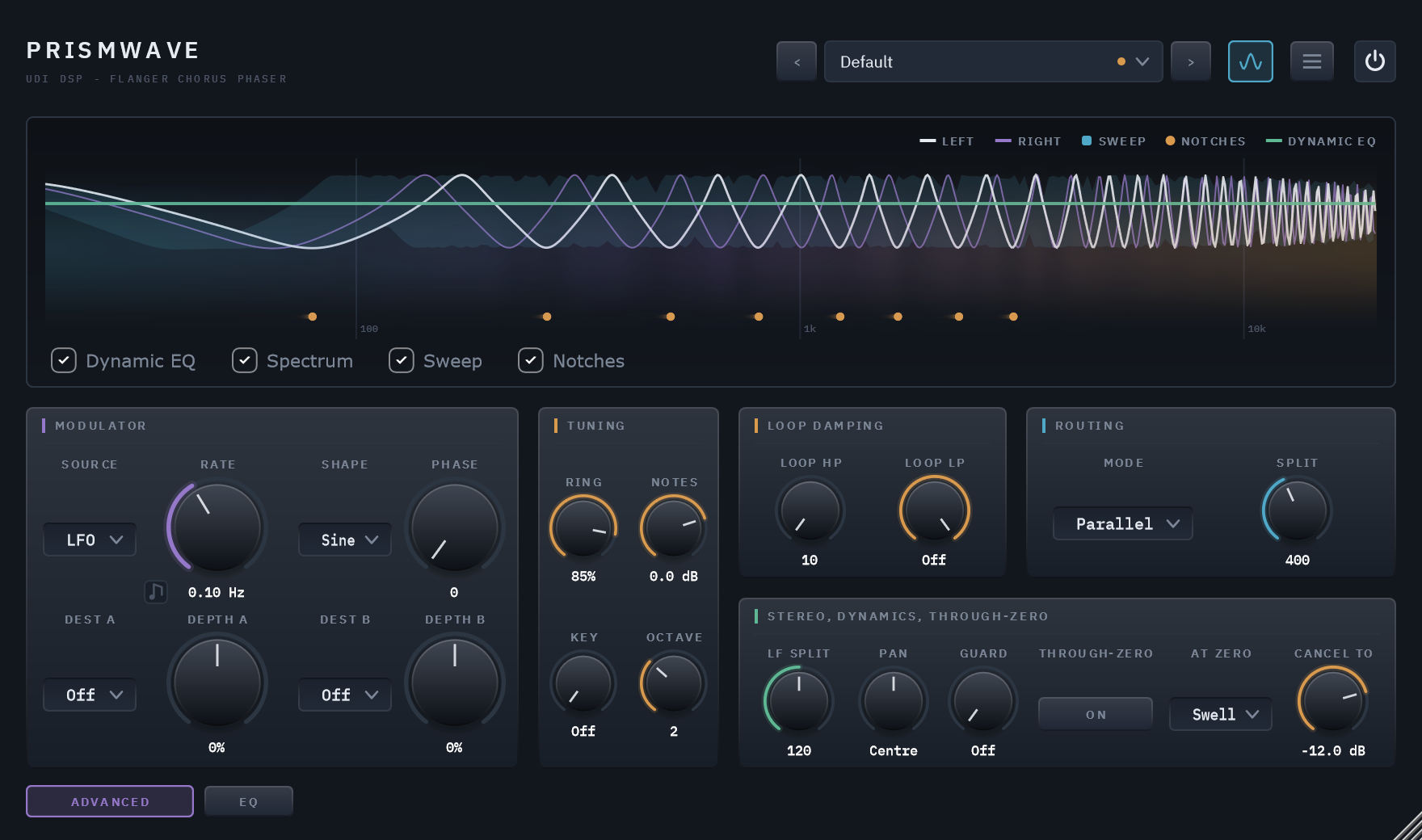
The ADVANCED button swaps the main sections for the Modulator (LFO, envelope or random, free or synced, on two destinations), Tuning (Ring, Notes, Key and Octave, for playing the loop), loop damping, Routing for Diverge's two engines (Series, Parallel, L / R, Crossover), and the LF Split, Pan, the Guard and through-zero. Everything there starts neutral or off, except the LF Split, which keeps the bass out of the effect from the moment you insert the plugin.
A dynamic EQ on the effect
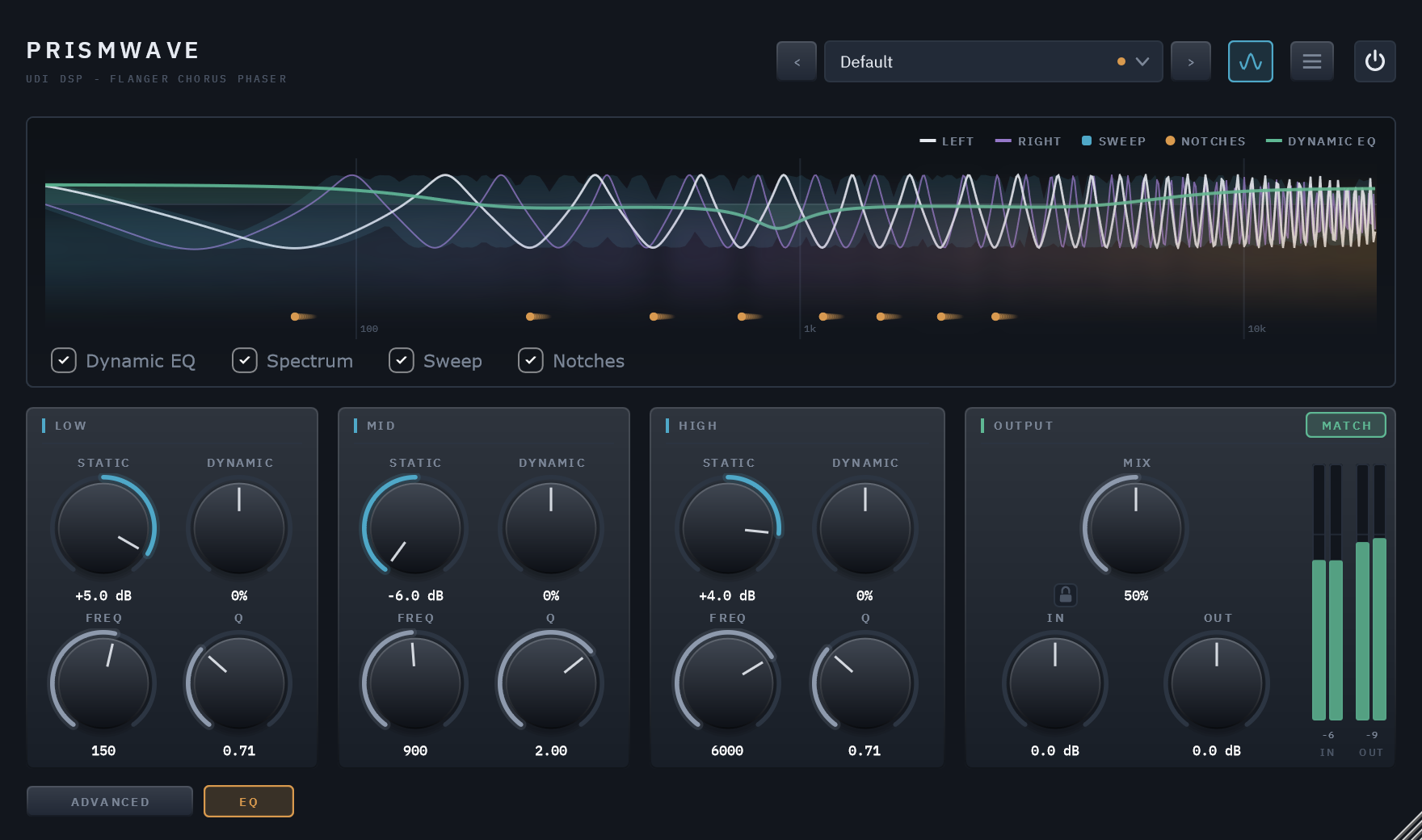
Three bands, a low shelf, a mid bell and a high shelf, each with a steady Static boost or cut (±6 dB), a level-reactive Dynamic amount, and movable Frequency and Q. It works on the effect alone, never the dry signal, and does nothing at all until you move a band. The display draws its curve live.
Specifics, stated plainly
| Engine | Two engines, each a modulated delay with up to three chorus voices, four allpass sections and a softly saturated feedback loop with damping |
|---|---|
| Morph | Phaser, Flanger, Chorus — continuous, with Stretch (notch spacing), Diverge and four routings |
| Latency | 0 samples; 5 ms while Through-zero is on, reported to the host |
| Loudness | Match (on by default) holds the input's loudness; a ceiling keeps the output below 0 dBFS while the effect is in |
| MIDI | MIDI in — up to eight held notes from C1 up, each ringing a loop of its own |
| Output | Mix against the dry signal, with a padlock that holds Mix, In and Out through preset changes (Match loads with each preset); In and Out trims, ±24 dB |
| CPU | 2.42% of one core at the phaser, 3.43% worst case, 3.92% with Through-zero on; up to 7.7% with a Rise or Fall sweep or eight MIDI notes held — 48 kHz stereo, 512-sample blocks |
| Parameters and presets | 52 parameters, all automatable; 50 factory presets in eight categories, plus Default |
| Licensing | Free UDI DSP account, one-time online activation — no subscription, works offline for a week between checks |
Compatibility
- VST3, 64-bit — Windows 10/11 (a Standalone app is included in the installer). AU, AAX and macOS are coming soon.
- In active development — full per-host verification across DAWs is ongoing.
- Internet needed once, briefly, to activate (a short browser sign-in) — day-to-day use after that works offline for up to a week between checks.