Mastering with a multiband saturator: a practical guide to Crestwave Multibend
October 25, 2026
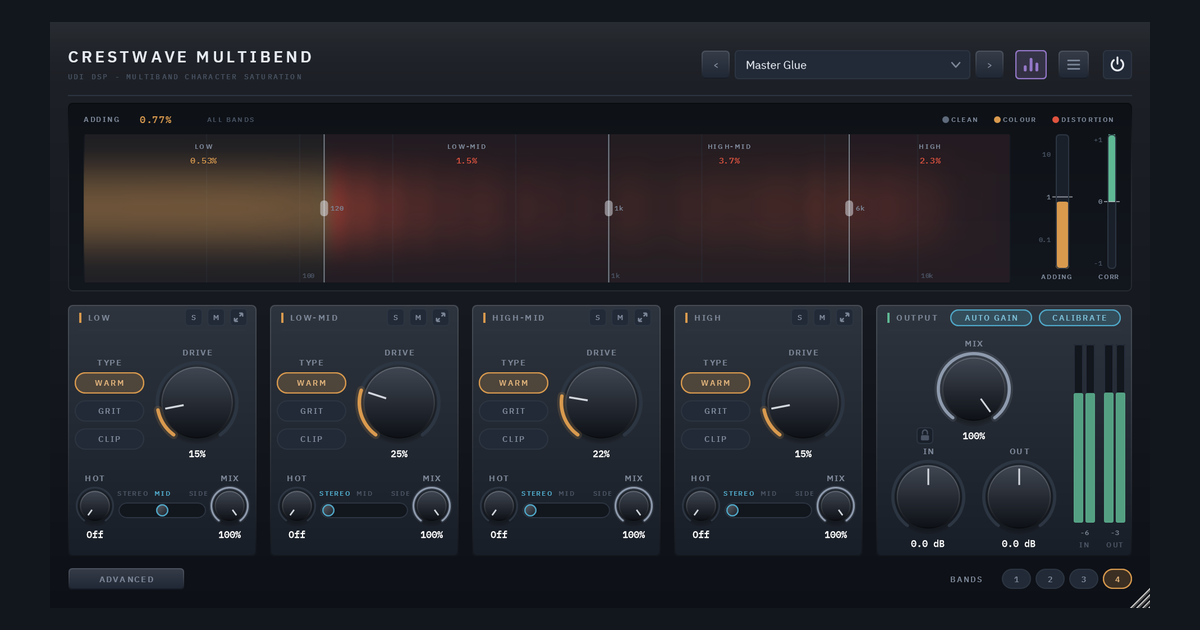
Saturation is one of the oldest tools in mastering, and one of the easiest to overdo. A master leaves very little room for error, because whatever you add, you add to everything at once. This post is about using it with intent: what it is for, why it works better band by band, and how to set up Crestwave Multibend for the job.
What saturation is for
Saturation rounds off a waveform’s peaks, and that adds harmonics, new tones above each note. Depending on how the curve bends, those harmonics read as warmth, density, presence or edge. On a master the goal is almost always modest: a little more body, a little more cohesion, a little more perceived loudness, and nothing that announces itself.
A few ideas shape how it is used well:
- Different parts of the spectrum want different colour. Low end wants weight without mud. The mids want body and density. The top wants presence, and it is the quickest part to turn harsh. One setting across the whole signal compromises all three, which is why splitting the spectrum helps.
- Low harmonics feel full; higher ones feel bright. Even-order, octave-above harmonics blend in as body. Higher odd harmonics read as edge. So the gentlest colour goes where you want weight, and the most restraint goes on the top.
- The centre and the sides have different jobs. Kick and bass live in the middle, and the sides carry more of the high-frequency detail and space. Colour the low end on the mid so it stays tight and mono, and add presence on the sides so the top opens up without disturbing the centre.
- A mild amount works better than a loud one. When saturation is obvious on a master, it has usually already gone too far. It shows up as dullness, harshness or a loss of punch.
- Quality settings matter more on a master. Saturation creates tones above what the session can hold, and they fold back down as inharmonic fizz. Oversampling prevents it, and a phase-neutral split keeps each band’s timing intact.
- Level is the trap. Saturation raises the level, and anything louder tends to sound better. A fair comparison has to be level-matched, or you are judging volume rather than tone.
How Crestwave Multibend is built for this
Crestwave Multibend splits the sound into four bands (LOW, LOW-MID, HIGH-MID and HIGH, with crossovers you drag on the spectrum) and gives each band its own saturation.
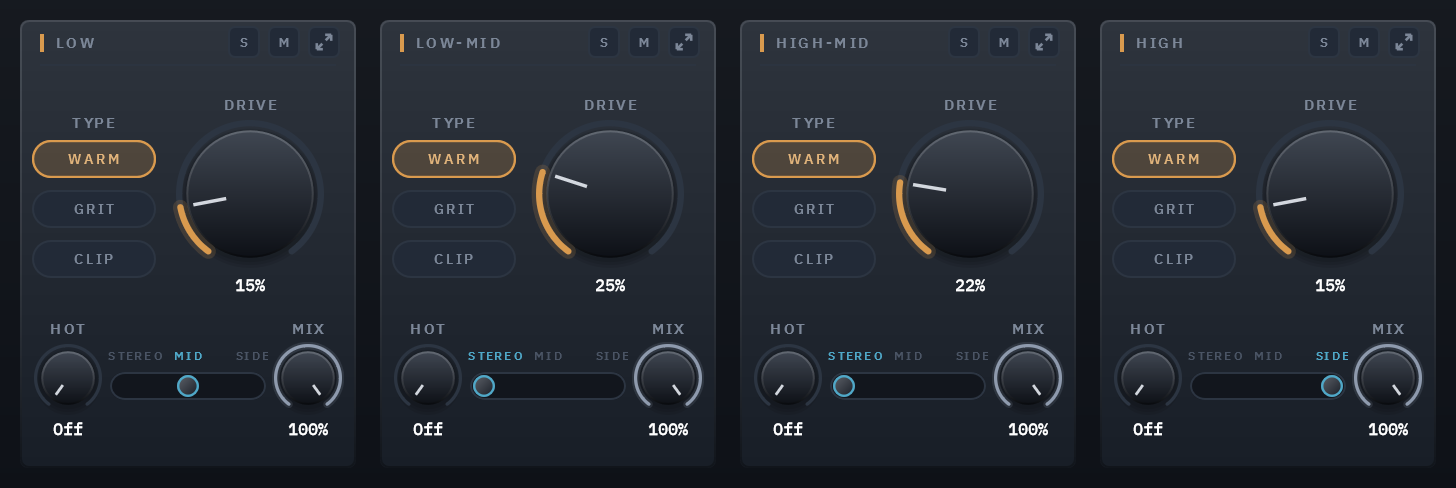
- Three types per band. WARM is tube-style: it adds mostly the tone an octave above each note, which blends in as body. GRIT is transistor-style and reads as edge and presence. CLIP is a clipper whose corner gets sharper as you drive it, for transients and loudness.
- Transparent first. At DRIVE 0 a band adds nothing, and a fresh instance opens gently, with every band on WARM at 12%. Every type still goes all the way to obvious distortion when a part calls for it.
- Mid/Side per band. Each band can saturate STEREO, only the MID, or only the SIDE. Whatever isn’t saturated passes through untouched.
- MIX per band. Drive a band hard and blend a little of it back in, and you have parallel saturation for just that part of the spectrum, lined up to the sample.
- A readout of what you’re adding. Each band’s part of the spectrum is coloured by how much harmonic content it adds: steel for clean, amber for colour, red past the line where that type starts to be heard as distortion. The lines, set by ear, are 1% for WARM, 0.75% for GRIT and 0.6% for CLIP. On a master, staying in amber is usually the point.
- AUTO GAIN takes the level rise back out in every band, so you compare colour rather than volume. CALIBRATE brings each band to one working level before the saturation, so the same DRIVE means the same in every band, even when the top of a dark mix is far quieter than its lows.
- CORR, the mono-safety meter at the top of the panel, reads +1 when the two channels are identical and turns red below 0, where the mix would start to cancel in mono.
Setting it up for a master
Three settings in the menu matter most, because they change the plugin’s quality and latency:
- Linear Phase crossovers. The default Zero Latency split adds no delay of its own but shifts timing very slightly around each crossover. Linear Phase splits with no timing shift: with every band at rest, the output is exactly your input, delayed. The cost is about 27 ms of latency, and a faint pre-echo is possible on very low crossovers just before sharp hits like a kick. It is the right choice for mastering, where a band’s timing has to stay exactly where it was.
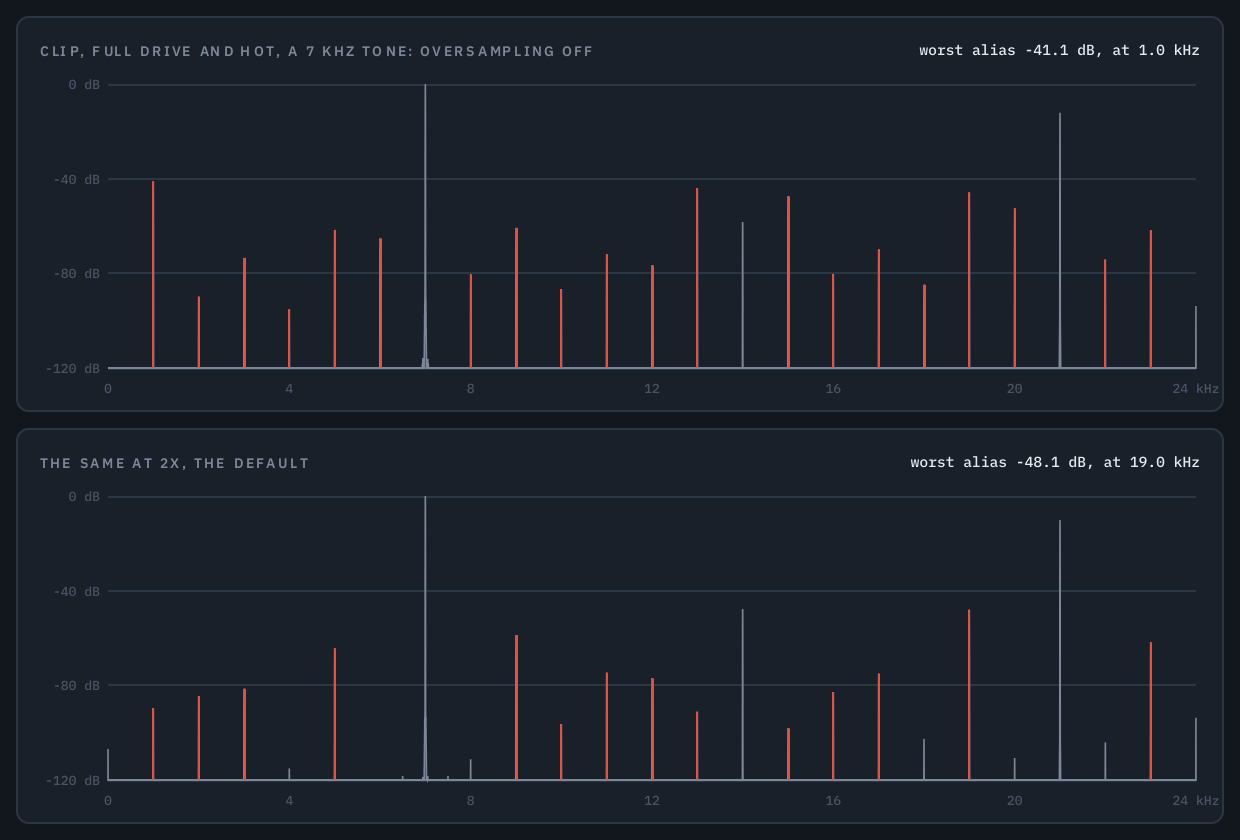
- Higher oversampling. The default is 2×, which is fine for most work. For a master, or CLIP driven hard on bright material, use 4× or more. In the hardest case we measured (a 7 kHz tone through CLIP at full drive in every band), the worst alias sat 48 dB under the tone at 2×, 75 dB at 4× and 88 dB at 8×.
- Playing and Exporting are separate. Work at 2× to keep the CPU down, and set Exporting to 8× or 16× for the final render. The latency doesn’t change when it switches, so the export lines up with what you heard.
Four starting points
These are starting points built from the controls above, not factory presets, and they are meant to be adjusted by ear. For all of them, leave AUTO GAIN and CALIBRATE on, switch to Linear Phase, set oversampling to 4× or higher, and compare against the unprocessed signal with POWER.
1. Gentle cohesion and warmth. All four bands on WARM at low DRIVE, around 10 to 15%, with a touch more on the LOW-MID where body lives. Each band should stay amber and below its line on the spectrum. The result should feel a little fuller and more glued together, without sounding processed.
2. A mono low end and a wider top. Set the LOW band to MID only, with a little WARM, so the bottom stays mono and tight. Set the HIGH band to SIDE with a small amount of WARM or GRIT, so its colour is added on the sides and the centre stays untouched. Watch CORR to confirm the mix still holds up in mono.
3. Parallel colour on the mids. Put the HIGH-MID band on GRIT with a stronger DRIVE, and bring that band’s MIX down to around 20 to 30%. A driven signal blended behind the clean one gives edge and presence without thinning the original. Use the band’s solo and mute buttons to hear what it contributes.
4. A little loudness from the peaks. Use CLIP on the upper bands at low DRIVE, where its corner is still rounded, to shave the very top of transient peaks before a limiter. CLIP’s warning line is the lowest at 0.6%, and crossing it on a master is usually where the clipping starts to be heard. On percussive material, ENVELOPE on the ADVANCED page adds a little push on each hit, and DUCKING takes the drive back while a hit plays, so the attack comes through clean and the body behind it carries the saturation.
Habits that help
- Level-match every comparison. With AUTO GAIN on, the level stays put as you drive each band, so you hear tone rather than volume. Check the result through your limiter too, since saturation changes the peaks it sees.
- Restraint wins. If you can clearly hear the saturation on a master, back off. The best result is usually the one you notice only when you bypass it.
- Saturation comes after the big decisions. Settle your EQ and dynamics first, then add saturation as the finishing colour.
- It isn’t only for the master. The same ideas apply on a mix bus, a drum bus or a stem.
Try it
Crestwave Multibend has 30 factory presets in six groups, including a Mix Bus & Master group, and you can try it before you buy. If one character across the whole sound is all you need, its single-band sibling Crestwave is the simpler tool.
See Crestwave Multibend → with audio examples, or read the full user guide.