Dronevoice: how to turn a spoken line into a monster, with recipes
October 25, 2026
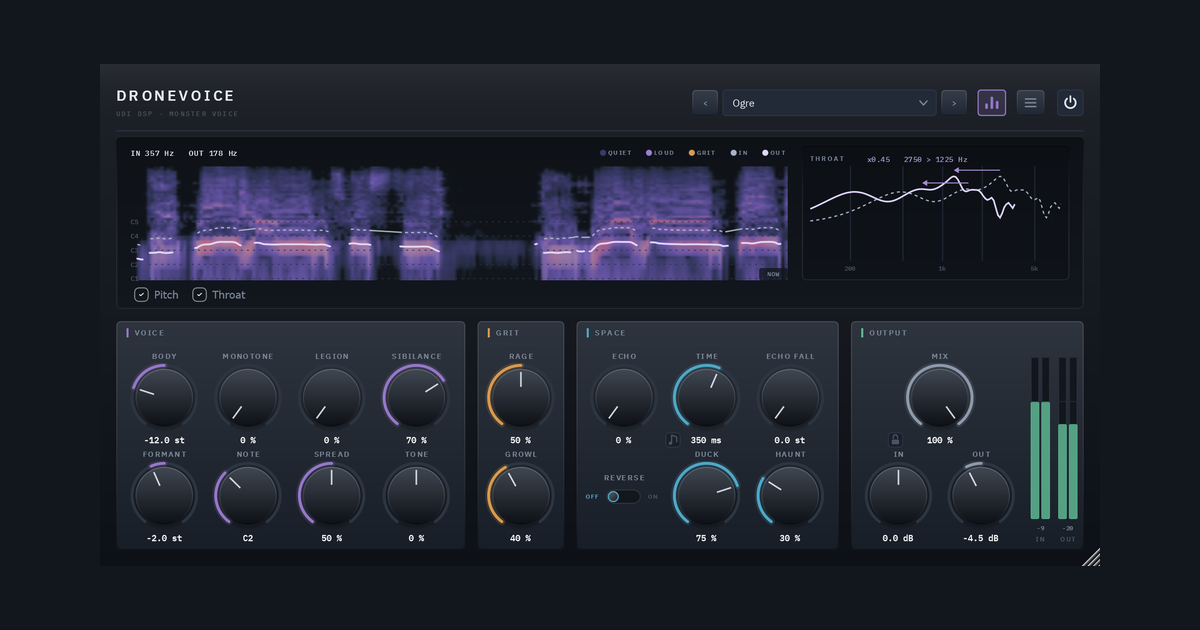
A good monster voice isn’t a pitch shift. Slow a voice down and you get a recording played slowly. A convincing creature is bigger in the throat as well as lower in pitch, angrier in the texture, and sits in a space that matches its size. Dronevoice is built around that idea: a spoken line goes in, something else comes out, and a handful of controls say how big, how angry and how haunted it is.
The guide groups the main controls that way:
- How big: BODY and FORMANT.
- How angry: RAGE and GROWL.
- How haunted: ECHO and HAUNT.
- How many, and how fixed: LEGION and MONOTONE.
The animations in this post illustrate each idea. They are drawn from the behaviour the user guide describes, not recorded from the plugin, and some sizes are exaggerated where the real values are too small to see.
Start with a bigger mouth: BODY and FORMANT
BODY is the whole idea. It takes the pitch down by up to two octaves, or up by one, and the voice’s throat goes with it, so the result sounds like something larger rather than a slowed-down recording. Down is bigger and heavier, up is smaller, for the imps and the things that live in walls.
FORMANT moves the throat on its own. Bring it down for a bigger throat at the same pitch, up to make the same pitch sound smaller. A low pitch with a small throat is a different creature from the same pitch with a big one, and FORMANT is how you choose.
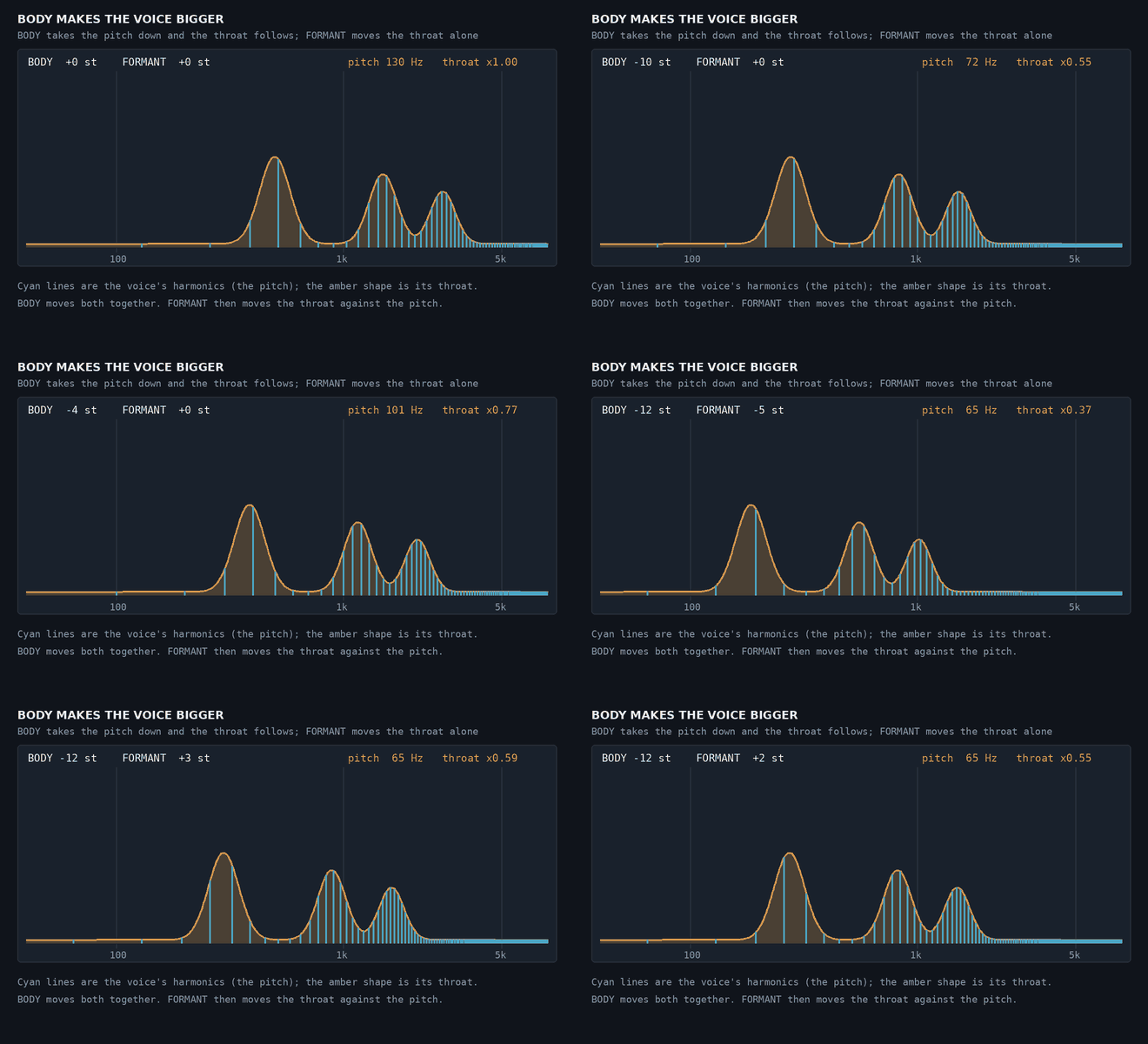
The cyan lines are the voice’s harmonics, which set the pitch. The amber shape is its throat. BODY slides both down together. FORMANT then moves only the throat.
Two finishing controls put back what a bigger voice loses. SIBILANCE tames the sharp “s” and “sh” that stand out as the voice goes down. It works harder the further BODY goes down, and it touches only unpitched sound, so the words keep their body. TONE tilts the whole voice from dark to bright.
Give it teeth: RAGE and GROWL
RAGE is distortion in two halves. The first half of the knob saturates, and the second half clips harder. It runs at twice the sample rate, always, so it stays clean at the top, and it sits after the voice stage, so a whole crowd of voices is distorted as one body.
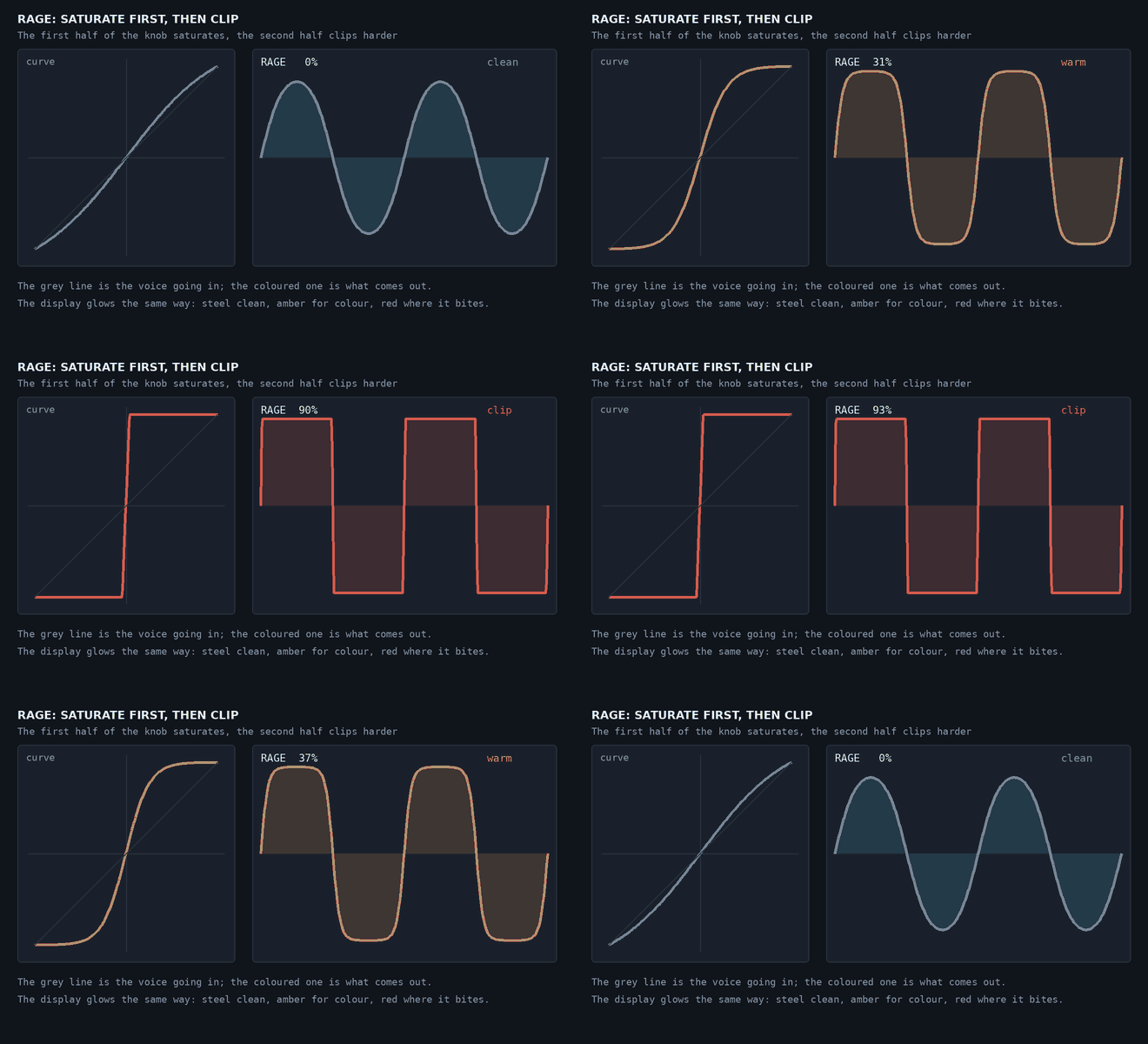
The grey line is the voice going in. The coloured line is what comes out: steel while clean, amber for colour, red where it bites. The panel’s display glows the same way.
GROWL adds a throat rattle: a fast, uneven flutter of the voiced sound, about 55 Hz at BODY 0 and slower as BODY goes down. The “s” and the breath are left alone, so the words stay intelligible.
Bring friends, or chant: LEGION and MONOTONE
LEGION brings in up to four more voices around the main one, each a little off in pitch and in time (11 to 35 ms behind). They arrive one at a time as you turn it up, and the level is held, so you get a crowd rather than a louder voice. SPREAD sets how far the copies stray, up to the full width of the stereo field.
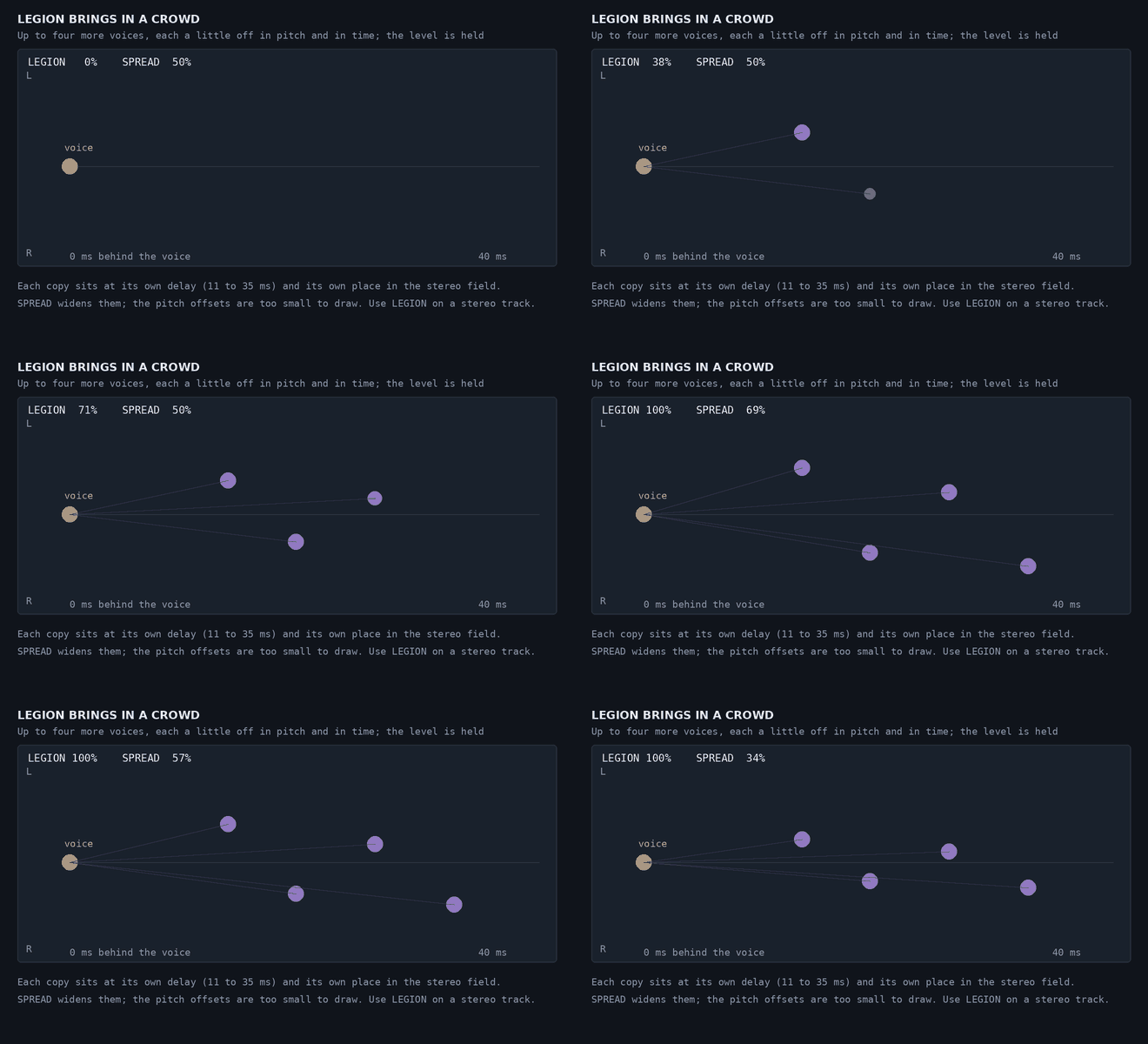
MONOTONE pulls each pitch of the voice toward the note you choose with NOTE (C1 to B3): a little for a flatter, colder delivery, all the way for a chant on one note. Together, the two are a cult at midnight. Use LEGION on a stereo track, since a mono track can’t spread the copies.
Let it linger: ECHO, REVERSE and HAUNT
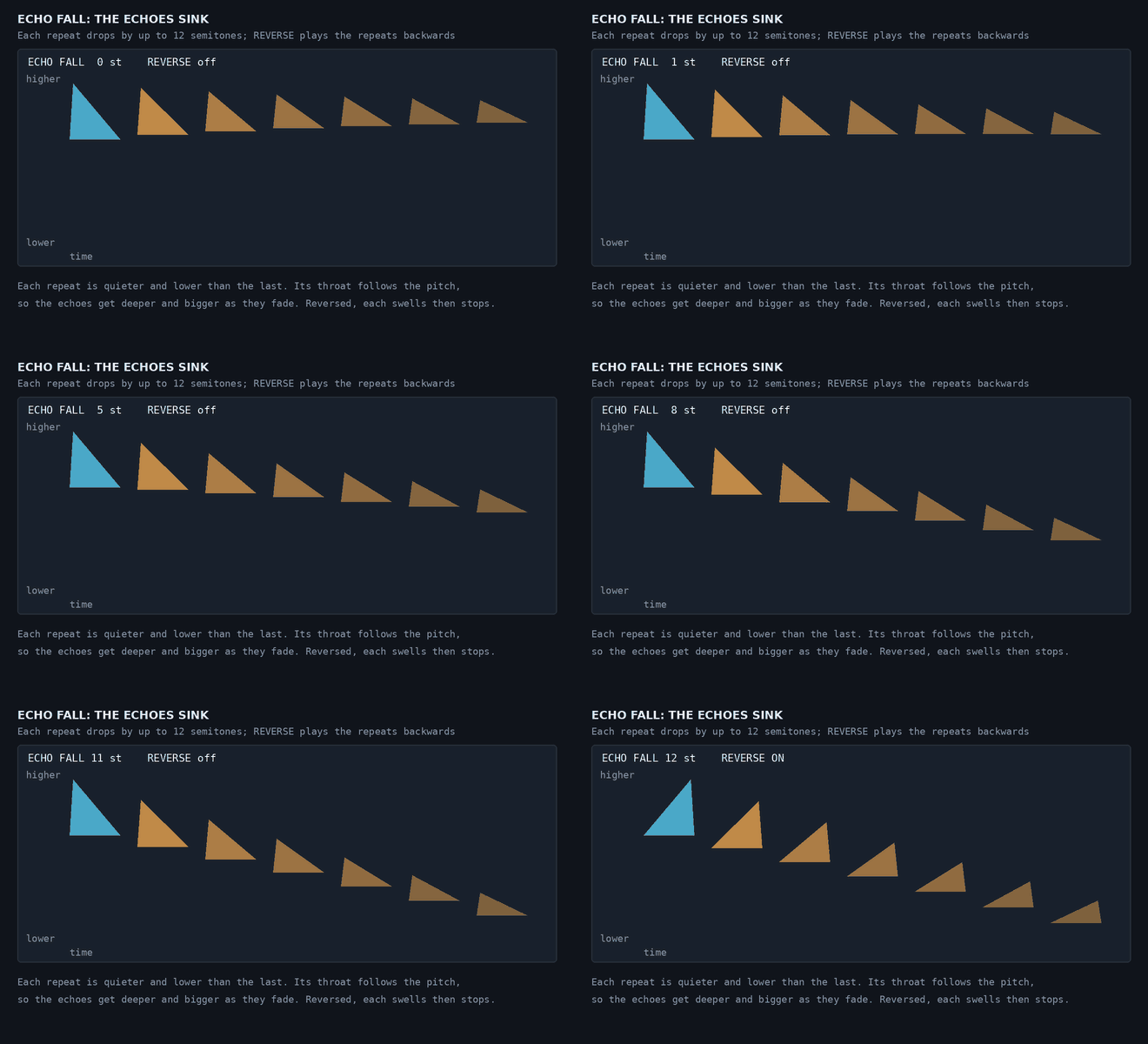
ECHO sets the echoes’ level, and with it how many repeats you hear. TIME is free (20 ms to 1 second) or locked to your song from 1/32 up to a bar. ECHO FALL drops each repeat by up to 12 semitones, and each repeat’s throat follows the pitch, so the echoes sink and grow as they fade. REVERSE plays the repeats backwards, for the echo that arrives wrong.
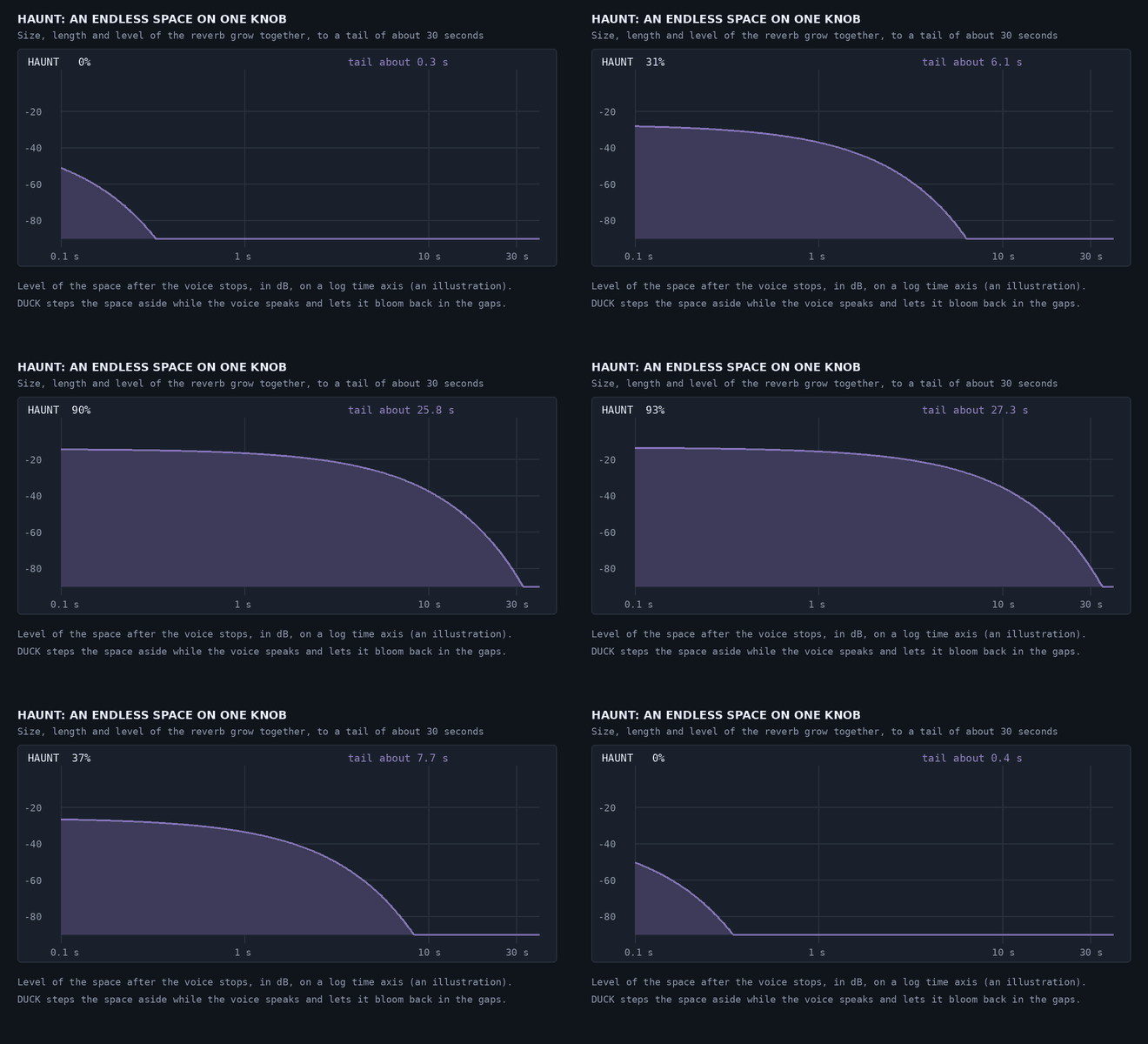
HAUNT is a whole space on one knob. It grows the size, the length and the level of the reverb together, from a hint of room to a tail of about 30 seconds. The “s” is held out of the space so it doesn’t feed the reverb, and DUCK steps the space aside while the voice speaks, by up to 12 dB, then lets it bloom back in the gaps. The line stays clear, and the dark stays around it.
Recipes
Take BODY down first, then correct it, then add the rest. Put SIBILANCE up as BODY goes down, and use LEGION on a stereo track. Anything not mentioned stays at its default, and a fresh Dronevoice starts as the dry voice. Recipes 1 to 3 are from the guide. Recipes 4 to 8 are my starting points, built from the controls above, and I haven’t listened to them, so adjust by ear.
1. The ogre BODY -12, FORMANT -2, RAGE 50%, GROWL 40%, SIBILANCE around 70%. A voice an octave down with a bigger throat than its pitch alone would give, some distortion and a throat rattle. The SIBILANCE keeps the “s” from whistling through it.
2. The whisper in the walls FORMANT -4, LEGION 40%, ECHO 30% with REVERSE on, HAUNT 80%. Leave the pitch where it is, make the throat bigger, and let a few voices and a backwards echo play in a long, dark space.
3. The chant MONOTONE 100%, LEGION 80%, HAUNT 70%. Everyone on one note, many mouths at once, and a space that doesn’t end.
4. The dragon BODY -18, FORMANT -6, RAGE 60%, GROWL 60%, SIBILANCE around 70%, HAUNT 40%. The deepest voice in the set: a huge throat, a lot of rattle and a big room around it.
5. The imp BODY +7, FORMANT +4, LEGION 30%, ECHO 20% with TIME around 120 ms. Smaller in both pitch and throat, with a few copies fluttering around it and a quick slap of echo. SIBILANCE exists for voices taken down, so leave it at 0 here.
6. Echoes that sink Leave the voice alone and set ECHO around 40%, TIME to a dotted 1/8 locked to the song, ECHO FALL around 7 semitones. Each repeat is lower and bigger than the last, for a creature that trails off into the dark. Add REVERSE for a stranger version.
7. A clear voice in a vast space BODY a few semitones down, HAUNT 70%, DUCK 100%. DUCK pulls the space down by 12 dB while the voice speaks and lets it swell back between phrases, so a huge tail never covers the words. This one suits a narrator.
8. A crowd at the wall LEGION 100%, SPREAD 100%, BODY -4, RAGE 20%, ECHO 25% with REVERSE on. Several voices wide across a stereo track, slightly lowered and lightly distorted as one body, with backwards echoes behind them. It sounds like something moving in the next room.
Using it well
- Feed it one voice. Dronevoice follows a single pitch at a time, so a close, clean solo line works best. Music or several voices at once isn’t what it follows.
- Take BODY down first, then correct. BODY and FORMANT answer “how big”, SIBILANCE and TONE put back what a bigger voice loses, then RAGE and GROWL, then ECHO and HAUNT, add the rest.
- Mind the latency. It is fixed at about 78.8 ms (3782 samples at 48 kHz) at every setting, and your host moves the track back into time. Bypassing keeps the same delay, so nothing shifts.
- Let tails finish when you bounce. The echo and the space ring on after the voice stops. Dronevoice tells your host how long, worked out from the settings.
Try it
Dronevoice has 20 factory presets in two groups, Creature (Ogre, Demon, Lich, Wraith, Imp, Dragon and more) and Scene (Trailer Narrator, Game Boss, Cult Chant, Horror Whisper and more), and every preset is voiced to the same loudness so you can compare them by ear.
See Dronevoice → with audio examples, or read the full user guide.