Granularmotion: turn pads, strings and anything else into a shimmering cloud
October 25, 2026
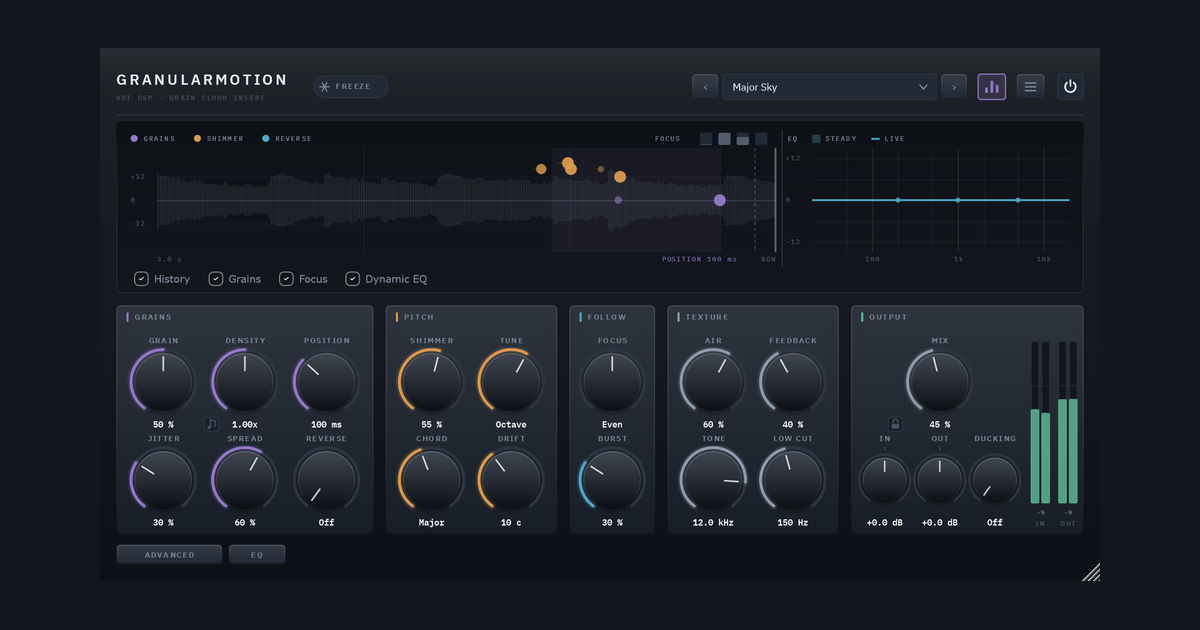
Some effects change a sound. Granularmotion grows something new out of it. Put it on a pad, a string section, a piano, a vocal or a guitar and it keeps a recording of the last few seconds, then replays that recording as a cloud of tiny overlapping slices called grains. Each grain has its own moment in the past, length, pitch, direction and place in the stereo field. The result is a shimmering bloom that follows what you play and keeps its own life.
It is the grain engine from Ghostlight Pro, taken out of the reverb and given the controls a grain instrument needs. The guide holds it to one rule: every control is a statement about grains, meaning what they are cut from, where in time, how long they last, how many there are, what pitch they sound at, and where they land.
The animations below illustrate the ideas. They are drawn from the behaviour the user guide describes, not recorded from the plugin, and the grain positions are a simple simulation.
A grain is a slice of the past
A grain is a short slice of the recording, from a few milliseconds to over a second, faded in and out so it never clicks, and played back. Dozens overlap at once, and together they make the cloud.
Two controls decide where in time a grain is cut from. Position is how close to now the newest grain may read. Jitter is how much further back grains may start. Close and tight, and the cloud follows the phrase you are playing. Far and wide, and it becomes a haze of what was played seconds ago.
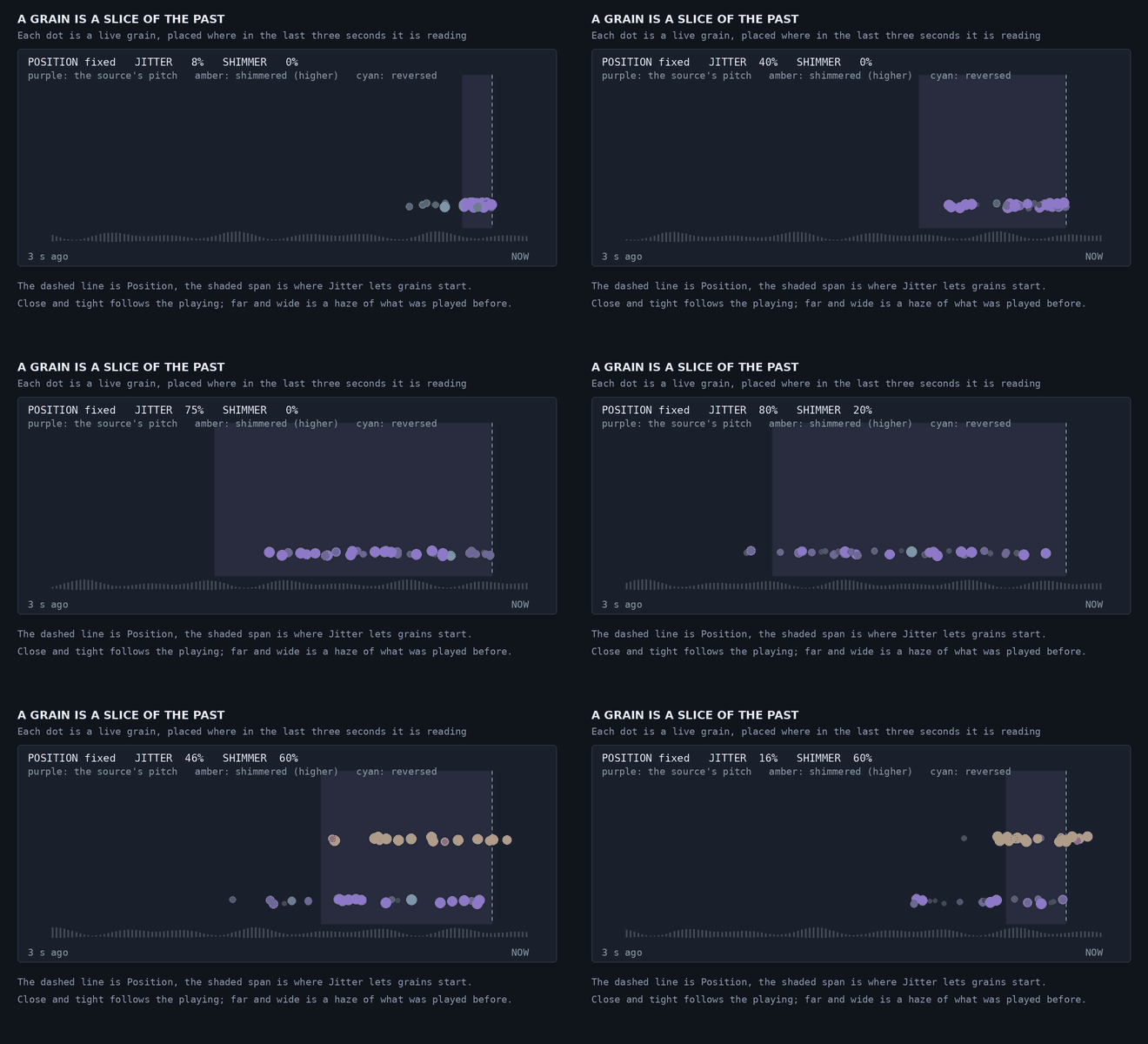
Each dot is a live grain. The dashed line is Position, and the shaded span is where Jitter lets grains start. Purple grains play at the source’s pitch, and amber ones are shimmered.
Grain sets how long and how many together, from long sparse grains (about 1.2 seconds, a few a second) that make a smooth wash, to short dense ones (25 milliseconds, up to 180 a second) that make a fizz. The level stays steady across its travel. Air then runs the grains through a diffuser, from separate grains to a smooth cloud.
Shimmer, and shimmer that sings
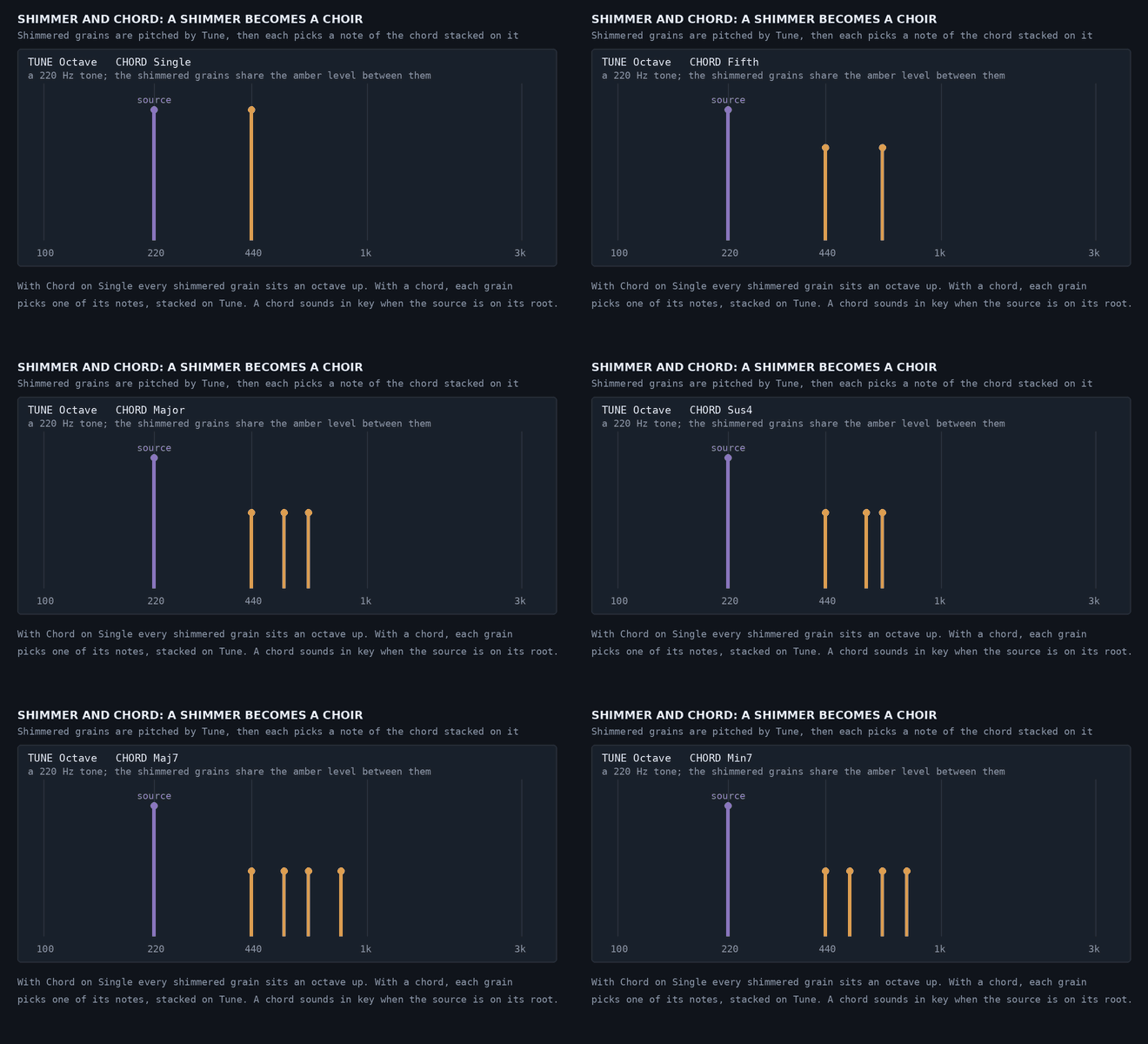
A grain played faster than it was recorded sounds higher. Shimmer sets the share of grains that are pitched, and Tune sets by how much: an octave down, a fifth, a minor seventh, an octave, an octave and a fifth, or two octaves. Hold Shift to tune anywhere in between.
Chord is what turns a shimmer into a choir. Each shimmered grain picks a note of the chord, stacked on Tune. With Tune on Octave and Chord on Major, grains land an octave up, an octave and a major third up, and an octave and a fifth up. The choices are Single, Fifth, Octaves, Major, Minor, Sus4, Maj7 and Min7. A chord sounds in key when your source sits on its root.
Drift adds a little random pitch to every grain. A little thickens the cloud like a chorus, and a lot unpitches it. Shimmer Pan sweeps the shimmered grains from side to side, and Pan Rate can lock the sweep to your song’s bars.
Freeze, and keep it moving
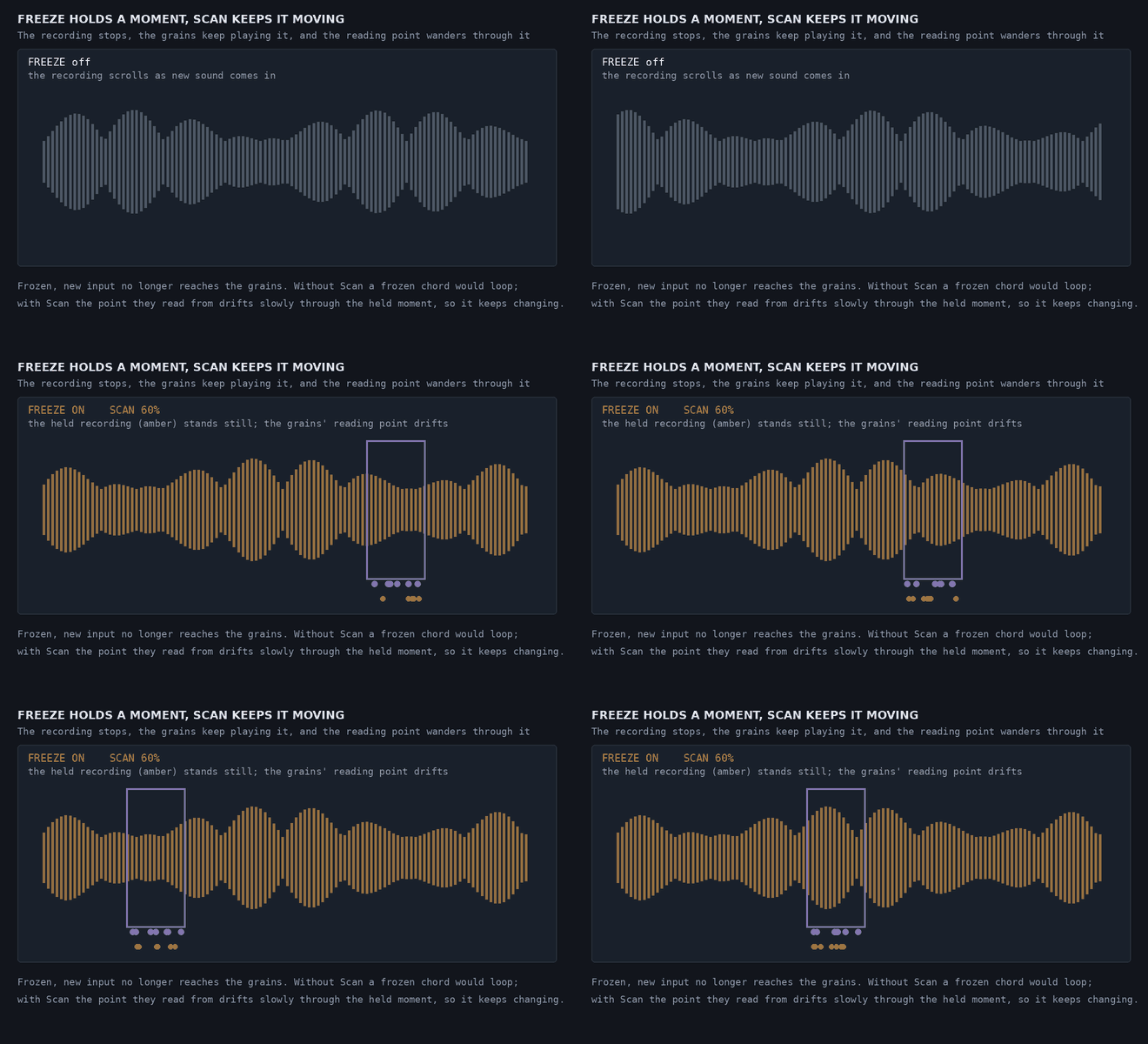
Freeze stops the recording while the grains keep playing the moment you froze. On its own, a frozen chord would loop. Scan makes the point the grains read from drift slowly through the held moment, so it keeps changing. The frozen sound is saved with your project and is still playing when you reopen it.
Grains on the grid
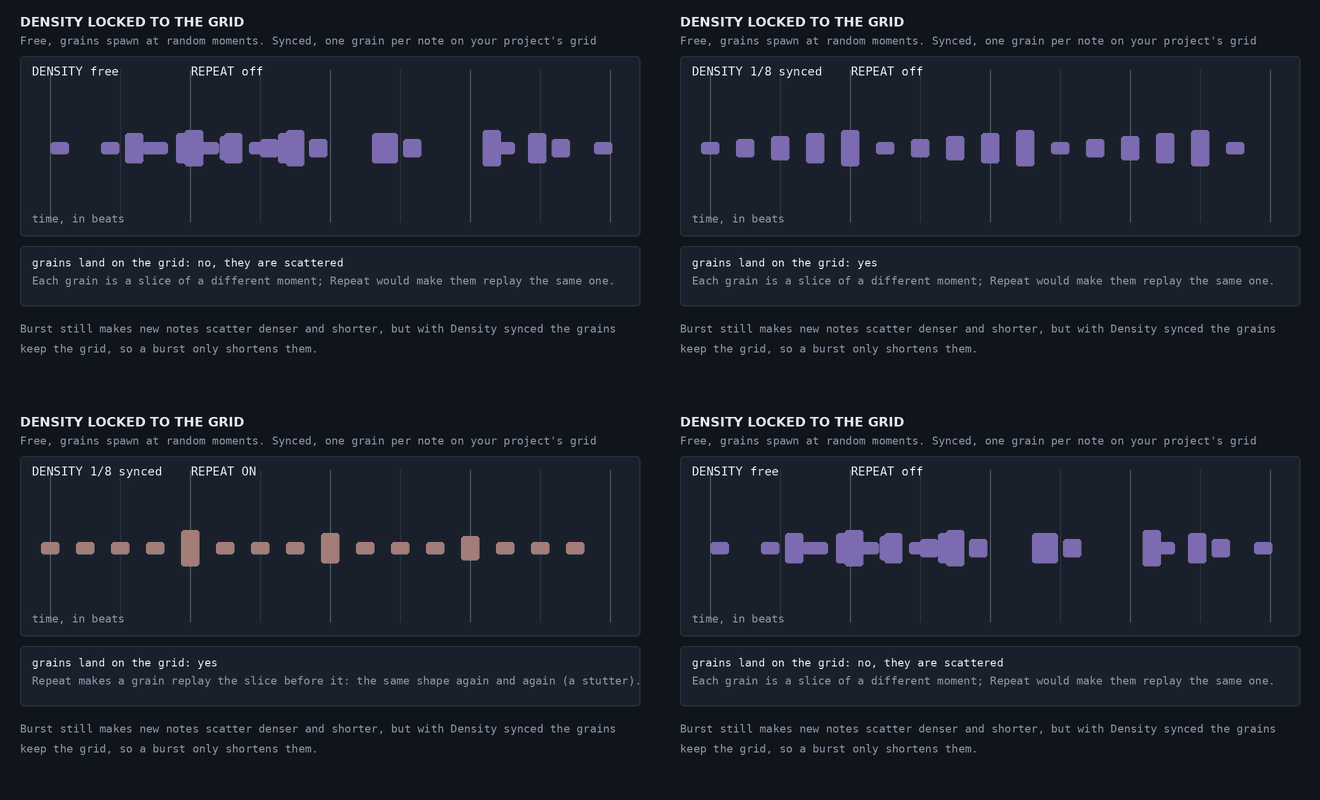
Density has a note button. Click it, and instead of grains spawned at random moments you get one grain per note value, locked to your project’s tempo. Repeat is the chance a grain replays the slice the grain before it played, so with Density synced you get a stutter. Reverse plays a share of the grains backwards, which swells them into the beat.
Feedback that always ends
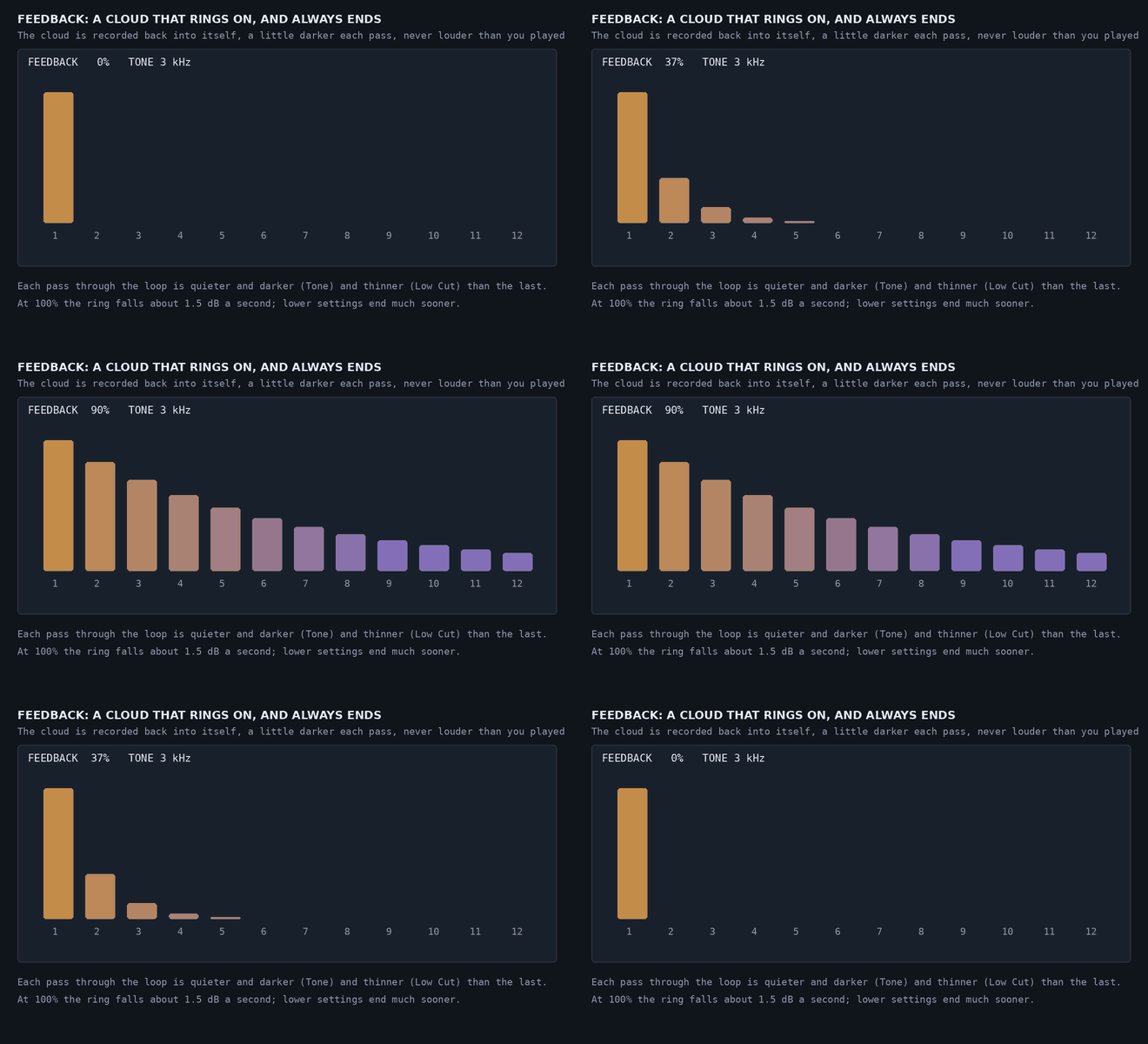
Feedback records the cloud back into itself, so it rings on after you stop. Tone and Low Cut act on what the grains record, so every pass is darker and thinner than the last. Granularmotion never lets what it feeds back grow louder than what you played, and the ring always dies away: about 1.5 dB a second at 100%, gone within about two minutes, and much sooner lower down.
Where to put it
- After a reverb or delay. This is where it is most at home. A tail sounds much the same wherever you slice it, so grains cut from it read as a shimmering bloom growing out of the space.
- On a dry source. Keep Position short and Jitter low so the cloud stays on the playing, and raise Ducking so the cloud sits behind the phrase and swells into the gaps.
- On drums and loops. Switch Density to a note value, and add Repeat and Reverse.
Two controls make the grains follow what you play: Focus draws grains from the loud or the quiet frequencies of your input, and Burst makes every new note scatter denser and shorter for a moment, then settle.
Recipes
These are starting points built from the controls above, not factory presets, and I haven’t auditioned them. Anything not mentioned stays at its default. Adjust Mix to taste, and level-match against the dry sound as you go.
1. A shimmering halo on a pad (after a reverb) Tune Octave, Chord Single, Shimmer about 50%, Grain around 40%, Jitter around 60%, Air around 60%, Mix about 40%. Put it after the reverb so the grains are cut from the tail. The octave halo grows out of the space around the pad.
2. A choir behind the strings Tune Octave, Chord Major, Shimmer about 60%, Grain around 30% for long smooth grains, Spread about 80%, Air about 50%, Ducking about 30%. Make sure the strings sit on the chord’s root, so the chord notes land in key. The cloud sits behind the section and swells into the gaps.
3. Minor mist on keys Chord Minor, Tune Octave, Shimmer about 40%, Drift around 25 cents, Air about 50%, Position around 300 ms. A soft, dark haze that follows the playing. Try Sus4 instead for something more open and unresolved.
4. A frozen nebula Play a chord, then switch on Freeze. Set Scan to about 60%, Grain around 30%, Air about 70%, Feedback about 40% with Tone around 3 kHz. The held chord keeps evolving instead of looping, and the feedback lets it ring on, a little darker each time.
5. A halo that follows a vocal (dry voice) Position short (around 80 ms), Jitter low (around 15%), Shimmer about 35%, Tune Octave, Burst about 40%, Ducking about 60%. The cloud stays on the phrase being sung, each new word scatters it for a moment, and Ducking keeps it behind the voice.
6. Reverse ghost notes on guitar Reverse about 60%, Position around 400 ms, Jitter around 40%, Grain around 40%, Air about 40%, Mix about 35%. Backwards grains of what was just played, drifting in behind each chord.
7. A stutter on a drum loop Density synced to 1/16, Repeat about 50%, Grain about 80% for short grains, Position short, Jitter low, Reverse about 15%. Grains land on the grid, and Repeat makes them replay the same slice.
8. An endless shimmer wash Feedback about 60%, Tone around 3 kHz, Low Cut around 200 Hz, Shimmer about 70%, Tune Octave, Shimmer Pan about 50% with Pan Rate synced to 4 bars. The cloud feeds itself, gets darker with every pass, and the shimmered grains drift slowly from side to side.
Try it
Granularmotion has 33 factory presets in six categories: Post-Reverb, Vocals, Keys & Pads, Guitar, Drums & Loops and Sound Design. Each is voiced to about the same loudness so you can step through them without it becoming a volume contest. A padlock beside Mix holds Mix, In and Out through preset changes, so you can hear each one at your own blend.
See Granularmotion → with audio examples, or read the full user guide.