Dronevoice is a monster-voice insert by UDI DSP.
01 What Dronevoice is
Dronevoice turns a spoken line into a creature. Put it on a voice track, bring BODY down, and the voice gets bigger: its pitch falls and its throat falls with it, so it sounds like a larger mouth, not a recording played slowly. Then add as much anger, as many voices and as much haunting as the scene needs.
It is built for one thing, a spoken voice, and it keeps the controls few. The main controls are each a statement about how big, how angry or how haunted the speaker is:
- How big: BODY and FORMANT.
- How angry: RAGE and GROWL.
- How haunted: ECHO and HAUNT.
- How many, and how fixed: LEGION and MONOTONE.
The rest finish the sound: SIBILANCE and TONE put back what a bigger voice loses, DUCK keeps the space out of the words’ way, and OUTPUT blends and levels.
Dronevoice is for sound designers, trailers, games, podcasts and anyone putting a creature on top of a line of dialogue. It is not a mixing tool and it is not a transparent pitch corrector.
At a glance
- VOICE: BODY, FORMANT, MONOTONE with its NOTE, LEGION with its SPREAD, SIBILANCE and TONE.
- GRIT: RAGE (distortion) and GROWL (a throat rattle).
- SPACE: ECHO with its TIME and ECHO FALL, REVERSE, HAUNT (an endless space) and DUCK.
- OUTPUT: IN, MIX and OUT, with meters and a lock for the three.
- Opens as the dry voice: every creative control starts at 0 (or off), so a fresh Dronevoice changes nothing. The monsters live in the presets.
- A display that shows the voice: the spectrum as it plays, the voice’s pitch in and out, and its throat before and after.
- 20 factory presets in two groups, Creature and Scene, plus Default.
- Light: about 1.4% of one CPU core at the defaults, and almost nothing in digital silence.
- One fixed latency: about 78.8 ms, the same at every setting, reported to your host.
02 Getting a creature in five minutes
- Put Dronevoice on a voice track, as an insert. A single, clean voice works best.
- Open the preset field in the header and pick Ogre in the Creature group. Play the line.
- Turn BODY up and down. This is the control the whole plug-in is built around: down is bigger, up is smaller.
- Move FORMANT against it. Bring FORMANT down to make the throat bigger without changing the pitch; bring it up to make the same pitch sound smaller.
- Add LEGION (on a stereo track) for a crowd, RAGE for anger, HAUNT for a space that never quite ends.
- If the “s” sounds stand out as the voice goes down, turn up SIBILANCE.
- Use MIX to blend the creature back with the real voice.
03 Signal flow
The voice goes through the stages in this order, so every later stage works on the creature, not on the human:
IN  →  VOICE (BODY, FORMANT, MONOTONE, LEGION, SIBILANCE)  →  TONE  →  GROWL  →  RAGE
    →  ECHO  →  HAUNT  →  OUT  →  a safety ceiling  →  MIX (against the dry voice, kept in time)
Grit comes after LEGION, so the whole crowd is distorted as one body. The echo and the space come last, so they play the finished creature. The safety ceiling sits just under 0 dB on the processed sound and works only while something is changing it; with every creative control at 0 and IN and OUT at 0 dB, the output is the input, delayed, bit for bit.
04 The panel
The panel has a header, a display, and four cards: VOICE, GRIT, SPACE and OUTPUT.
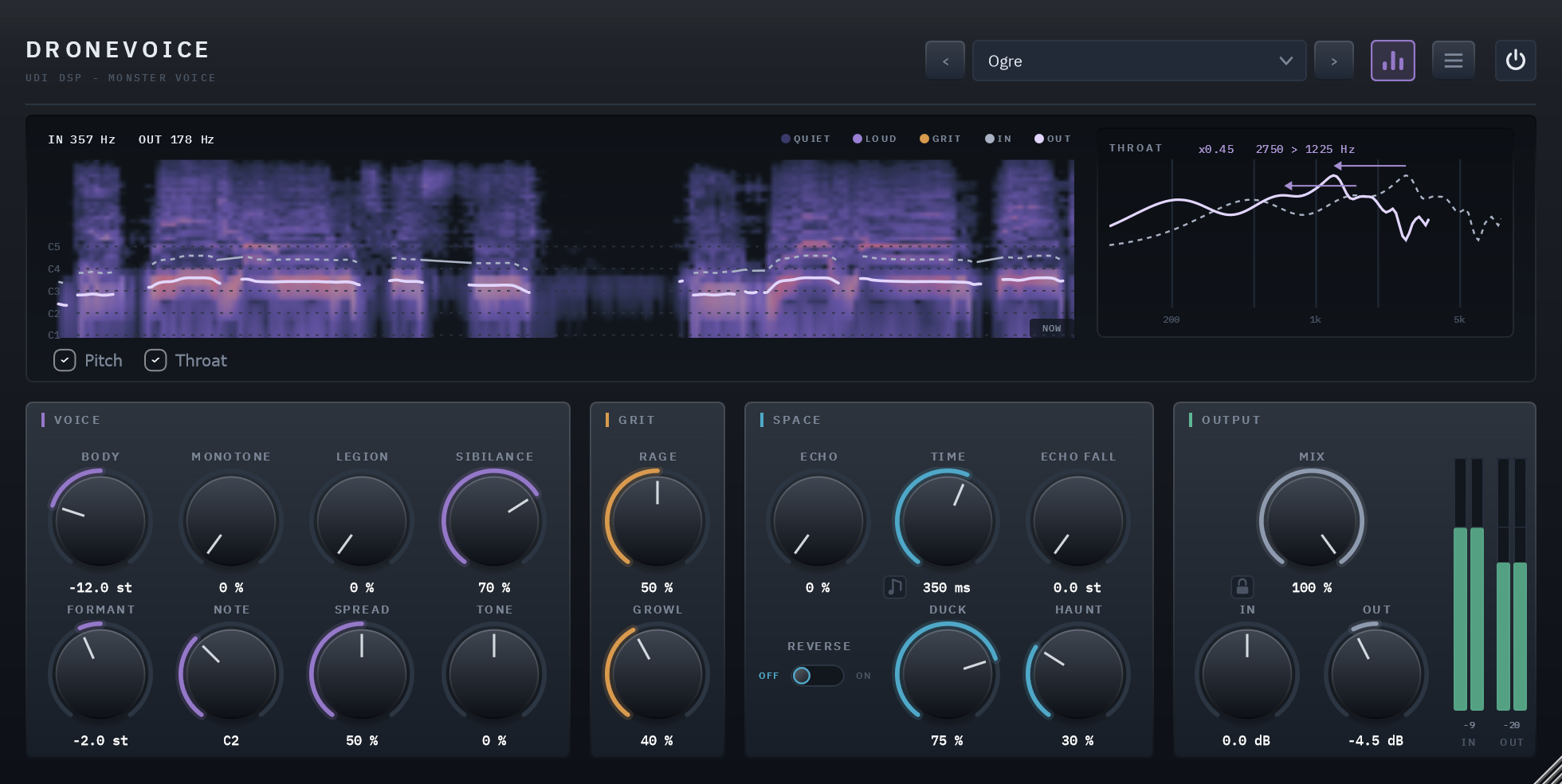
The panel playing a line with the Ogre preset (Creature group): the display above, VOICE, GRIT, SPACE and OUTPUT below.
The header. The name at the left. At the right: the preset field with an arrow either side, the visualizer button, the menu (☰) and the power switch.
The power switch is Dronevoice’s bypass. It crossfades over 20 ms rather than switching hard, and the bypassed sound is the voice delayed by the same latency, so switching it never moves a track in time. Your host’s own bypass button does the same thing.
The menu holds Panel Size (75%, 100%, 125% or 150%), Show Visualizer, Show Tooltips, the licence card (Activate), Check for Updates once you are licensed, and About. You can also drag the bottom-right corner to resize this one window.
Tooltips say in a sentence what each control does; they are on by default.
Reading the display
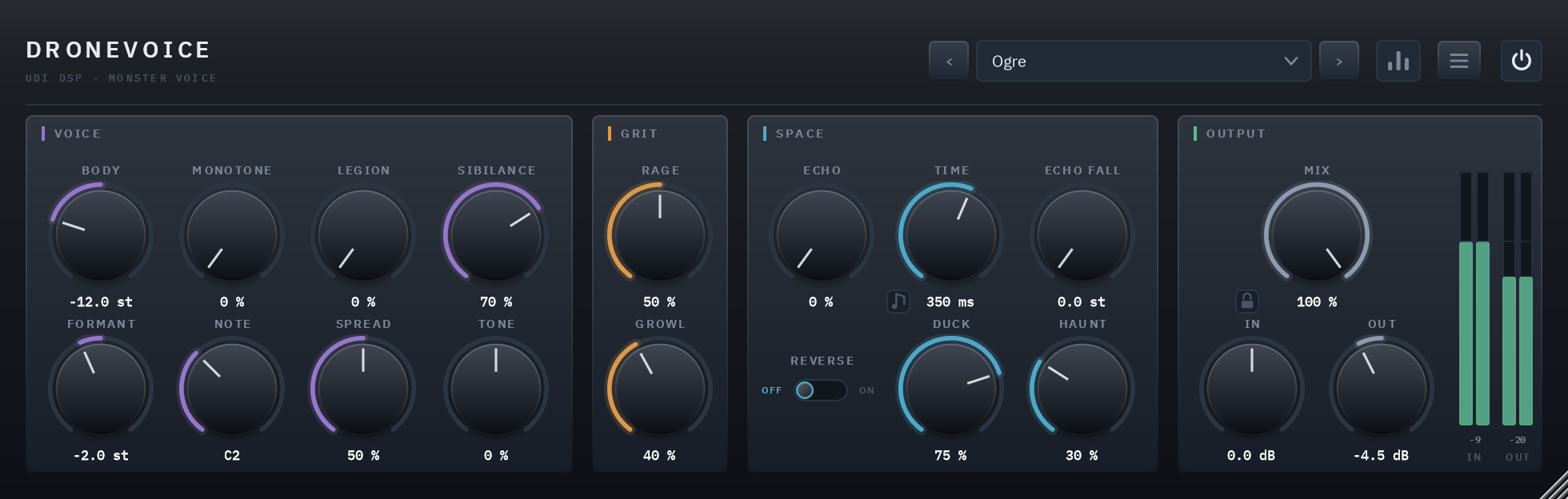
With the visualizer hidden the window shrinks to the four cards.
The display shows what the voice is doing, live:
- The cloud is the output’s spectrum over the last four seconds, 30 Hz to 8 kHz on a log axis, the present moment at the right edge (marked NOW). Louder is brighter. Where RAGE is bending the sound it glows, amber to red, by how hard it is driven, so you can see the grit bite. The glow is what you hear: nothing while bypassed, and scaled by MIX.
- Pitch (a layer you can switch off under the display) draws the voice’s pitch on the same axis: the input as a dashed line, the
output as a solid one, so you see BODY and MONOTONE move it. LEGION’s spread shows as a glow around the output, and while MONOTONE is
on, a dashed line marks NOTE. The readout at the top left says IN and OUT in hertz, and
--when there is no voice to read. - Throat (the other layer, the strip at the right) draws the voice’s formants, its resonances, dashed, and where BODY and FORMANT
move them, solid. The number is how far the throat moved:
x0.45is a throat at 45% of its natural frequencies,x2.00double. Arrows mark the voice’s two strongest resonances and where they now sit, and the text beside the number,2750 > 1225 Hz, gives the strongest one’s move. With no voice it fades away and says NO VOICE.
The display never changes the sound; with the panel closed none of it is computed.
05 Controls
VOICE
BODY
How big the creature is: the voice’s pitch, down two octaves or up one (-24 to +12 semitones), with its throat following. 0 is the voice as it is. The knob’s travel is two straight halves, so 0 sits at the top. Down makes the voice larger and heavier; up makes it smaller. Most monster presets take it down somewhere between -2 and -24; add SIBILANCE as you go down (below).
FORMANT
The throat on its own, -12 to +12 semitones against BODY. Down is a bigger throat, up a smaller one, without changing the pitch. At BODY 0, FORMANT changes only the character of the voice; with BODY down, it decides whether the bigger voice also has a bigger throat. A low pitch with a small throat is a different creature from the same pitch with a big one.
MONOTONE and NOTE
MONOTONE pulls each of the voice’s pitches toward NOTE: a little for a flatter delivery, all the way for a chant on one note. At 100% the voice sits on NOTE. NOTE runs C1 to B3 in semitones, with the name in the readout (default C2). Neither changes anything until MONOTONE is above 0. While MONOTONE is on, the display draws a NOTE line so you can see what the voice is being pulled toward.
LEGION and SPREAD
LEGION brings in up to four more voices around the main one, each a little off in pitch and in time (11 to 35 ms behind). Each comes in over a quarter of the knob, so turning it up adds one voice, then another. The level is held as they arrive, so LEGION adds a crowd, not volume.
SPREAD (default 50%) is how far the copies stray from the voice: up to about 32 cents in pitch, 1.5 semitones in throat, and the full width of the stereo field. At 0 they all sit in the middle and in tune. Use LEGION on a stereo track. On a mono track your host keeps the insert mono, so the copies cannot spread: the crowd comes out one-sided and thinner.
SIBILANCE
As a voice goes down, its “s” and “sh” sounds can stand out from the rest of the word. SIBILANCE tames them: 0 does nothing (the default), 100% the most. It follows BODY, working harder the further BODY goes down, and it touches only unpitched sound, so the words keep their body. At BODY 0 it does nothing at any setting. The presets that take BODY down carry SIBILANCE at 70%.
TONE
A dark-to-bright tilt of the whole voice: down for rounder and darker, up for sharper and brighter, -100% to +100% (up to about 9 dB each way, measured 7 to 9, around 1 kHz). 0 leaves the voice exactly as it is.
GRIT
RAGE
Distortion, 0 to 100%: the first half saturates, the second clips harder. It runs at twice the sample rate, always, so it stays clean at the top; there is no oversampling menu item because there is no choice to make. The display glows where it bites.
GROWL
A throat rattle: a fast, uneven flutter of the voiced sound, about 55 Hz at BODY 0, slower as BODY goes down. Unpitched sound, the “s” and breath, is left alone.
SPACE
ECHO
The echoes’ level, and with it how many repeats: more ECHO, more times it comes back. At 0 there is no echo. Each repeat is a little darker than the last.
TIME
How far apart the repeats are. Drag for milliseconds (20 to 1000, default 350), or press the note button on the knob to lock it to the song: Straight, Triplet or Dotted, with the knob then choosing the note, 1/32 up to one bar, at your host’s tempo. The echo holds two seconds at most, so one bar below 120 BPM, and the longer dotted notes sooner, play as two seconds.
ECHO FALL
Each repeat drops by this many semitones, 0 to 12, so the echoes sink as they fade. Each repeat’s throat follows the pitch, deeper and bigger every time.
REVERSE
A switch under ECHO: what you hear of the echoes plays backwards. It acts at once; it never waits for an echo to finish.
HAUNT
One knob for an endless space: it grows the size, the length and the level of the reverb together, from a hint of room to a tail of about 30 seconds at 100% (VoiceChecks V18 measures 30.0 s). The “s” is held out of the space, so it does not feed the reverb.
DUCK
How far the space steps aside while the voice sounds, so the words stay clear: 0 never, 100% by 12 dB (default 75%, 9 dB). The space blooms back in the gaps.
OUTPUT
MIX
The blend of the creature with your original voice, 0 to 100% (default 100%). The dry voice is delayed by the same latency, so the blend stays in time. At 0 the output is the input, delayed, to the bit.
IN and OUT
The level into and out of Dronevoice, -24 to +24 dB each, with meters beside them. The processed sound is held under a safety ceiling just below 0 dB on the way out; the dry voice you blend back in is not limited.
The lock
The padlock beside MIX holds MIX, IN and OUT where they are while a preset loads, so you can audition presets at one blend and one level.
06 Presets
20 factory presets ship with the plug-in, plus Default. Default holds no settings of its own: loading it returns every control to its factory value, which is the dry voice, and it is the way back to zero. A fresh instance opens on Default.
They come in two groups, each its own submenu in the preset field:
- Creature (14): Ogre, Demon, Lich, Possessed, Kraken, Troll, Golem, Wraith, Goblin, Imp, Dragon, Beast, Swarm, Titan.
- Scene (6): Trailer Narrator, Game Boss, Subtle Menace, Cult Chant, Horror Whisper, Creature Foley.
Selecting a preset sets every control, so a preset is an absolute starting point, not a change on top of what you had. Each is voiced to Default’s loudness (within about 1.5 dB, measured on a spoken line) so you can compare them by ear, not by volume. A preset never moves the power switch, and it leaves alone whatever the padlock holds. The arrows either side of the field step through the list.
07 Using it well
- Feed it one voice. Dronevoice follows a single pitch at a time. A solo, close, clean line works best; several voices at once, or music, is not what it follows.
- Use LEGION on a stereo track, and listen on stereo (see LEGION and SPREAD).
- Take BODY down first, then correct. BODY and FORMANT answer “how big”, and SIBILANCE and TONE put back what a bigger voice loses. RAGE and GROWL, then ECHO and HAUNT, add the rest, in that order.
- Latency. Dronevoice delays the sound by about 78.8 ms (3782 samples at 48 kHz) at every setting. Your host is told and moves the track back into time. When you bypass it the track keeps the same delay, so nothing shifts.
- Bouncing and freezing. The echo and the space ring on after the voice stops. Dronevoice reports how long, worked out from the settings and erring long (see the table below), so a bounce lets the tail finish.
- Silence is free. When nothing is coming in (digital silence: a track with a noise floor does not rest) and the tail has run out, Dronevoice rests and costs almost nothing.
08 Technical specifications
| Format | VST3 and AAX, 64-bit (Windows 10/11); AU, VST3 and AAX (macOS 11 or later, Apple silicon) |
| Channels | Mono or stereo in, mono or stereo out, and mono in with stereo out (a mono source on a stereo track). LEGION’s width needs a stereo track |
| Latency | 3782 samples at 48 kHz, about 78.8 ms; 3479 at 44.1 kHz, 7510 at 96 kHz (78.2 ms), 14967 at 192 kHz (78.0 ms). No control moves it |
| Bypass | The power switch, a 20 ms crossfade to the input delayed by the latency, so the track’s timing never moves. Your host’s own bypass does the same |
| At the defaults | Every creative control at 0 and IN and OUT at 0 dB: the output is the input delayed by the latency, bit for bit |
| Live parameters | 21 |
| Factory presets | 20 plus Default, in two groups |
| Voice range | Voices from 65 to 600 Hz (outside that the sound takes the unpitched path); BODY to -24 semitones with the throat following to a quarter |
| HAUNT | A decay of up to about 30 seconds at 100% |
| CPU (measured) | About 1.4% of one core at the defaults, about 4.3% with a creature (the Ogre preset’s settings: BODY, FORMANT, RAGE, GROWL, HAUNT and SIBILANCE up), 5.2% in the heaviest case measured (every voice, full grit, echo falling and reversed, full reverb); about 0.2% in digital silence at the defaults; 48 kHz stereo, 512-sample blocks, panel closed. |
| Tail reporting | Worked out from the settings and reported to the host: 0.58 s at the defaults, about 77 s with HAUNT at 100%, about 60 s with ECHO at 100% and TIME at 1000 ms. The time the tail takes to fall 140 dB, erring long |