Crestwave
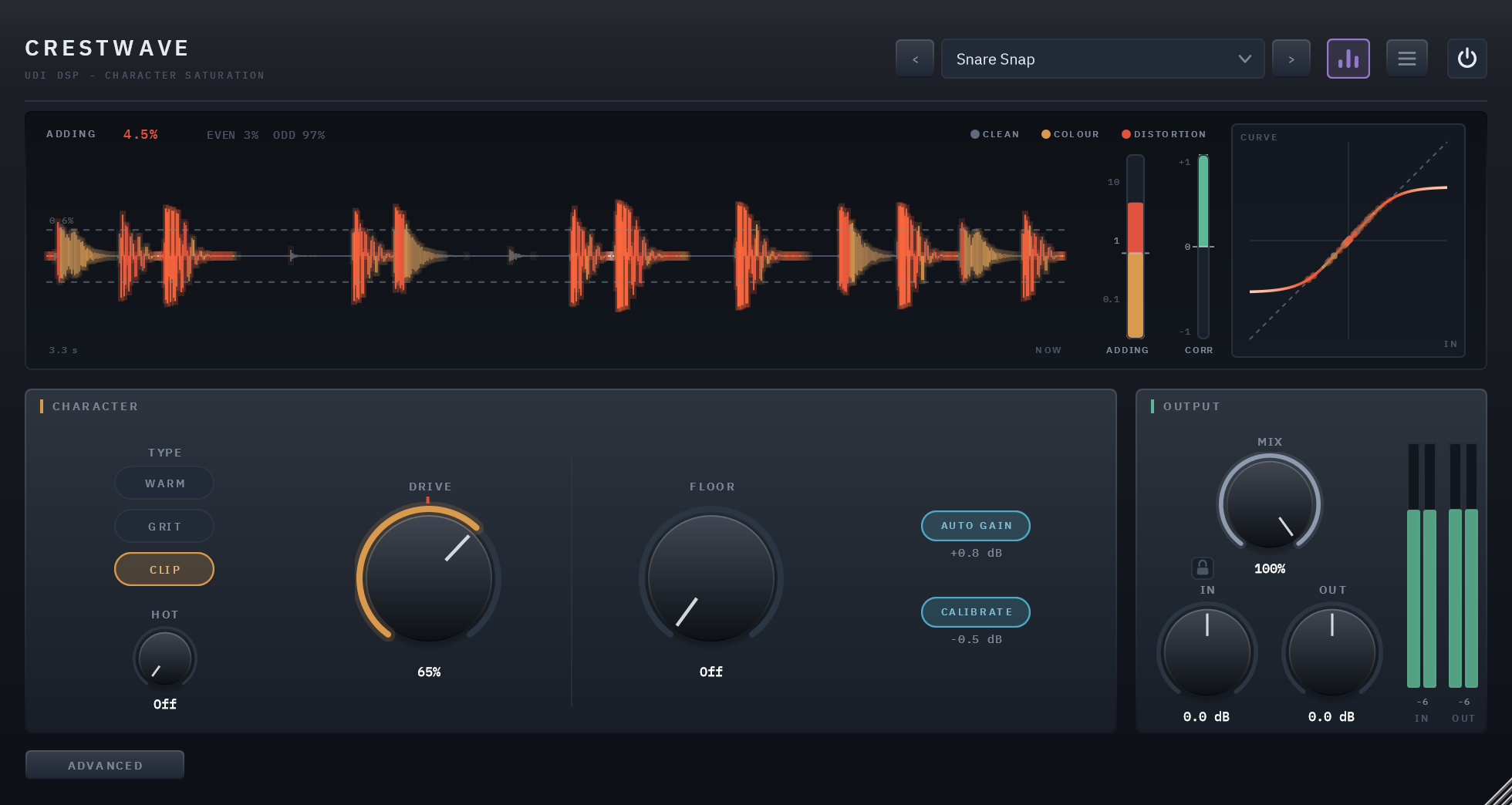
A saturator you can trust. Three types, WARM, GRIT and CLIP, each running from inaudible to obvious on one DRIVE knob, with a live reading of how much it is adding to your track and a mark where colour turns into distortion.
Colour you can measure
Crestwave adds harmonics: the extra tones above each note that make a sound feel denser, warmer or more present. Choose a TYPE, WARM, GRIT or CLIP, and turn DRIVE. Each type covers its whole range on that one knob: at the bottom you can't hear it, at the top there's no mistaking it, and in between it stays one character getting stronger rather than turning into a different sound halfway up.
A lot of saturation colours a sound before you've asked for colour, and gets louder as you turn it up, so more always seems better for the first few seconds. Crestwave opens clean, holds the loudness steady while you turn DRIVE, and shows you, as a number, how much it is adding and where that colour turns into distortion. That is where it starts, not where it stops: every type goes all the way to obvious, deliberate distortion when a part calls for it. The name is the job: a sound's crest factor is the distance between its peaks and its average level, and saturation narrows it, which is how a track gets denser without its peaks getting louder.
The same clip, dry and wet
8 sources, each run through the factory preset built for it. Toggle Dry/Wet mid-playback — it crossfades from the same instant rather than restarting.
Three types, one knob each
WARM is tube-style and rounded, GRIT is transistor-style bite, CLIP is a clipper whose corner sharpens as you drive it. Each runs from inaudible to obvious on DRIVE.
Opens clean
At DRIVE 0 what comes out is exactly what went in, bit for bit. It opens at 12%, the setting you put on a mix bus and feel rather than hear.
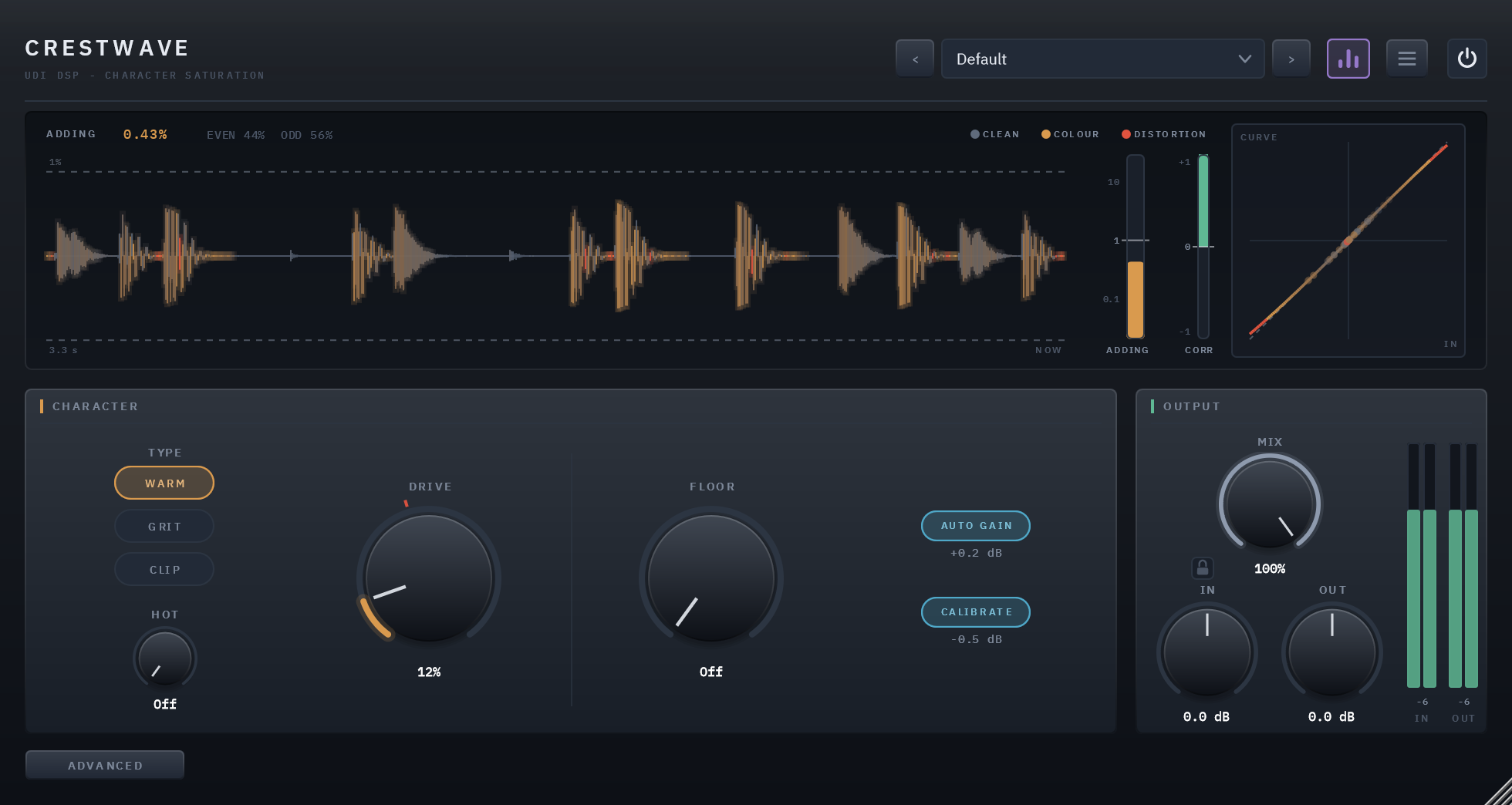
ADDING, as a number
A live reading of how much harmonic content is reaching your track, with MIX counted: a copy driven hard and blended low adds far less, and the number says so.
A mark where distortion starts
A red tick on DRIVE marks where the type you're on crosses from colour into distortion, at the line set by ear for each type: WARM 1%, GRIT 0.75%, CLIP 0.6%.
HOT, on purpose
HOT sets how far DRIVE reaches. Off, a full turn covers a little over half of each type's range; at 100% the same turn goes all the way. Reaching further is a decision.
FLOOR
Keeps the low end out of the saturation without removing any of it, from Off up to 500 Hz. Only what's above it is shaped; the lows rejoin untouched.
Judge the tone, not the volume
AUTO GAIN takes the level rise back out as you turn DRIVE, so switching POWER compares colour, not loudness. It's right the moment you move the knob.
The same setting on every track
CALIBRATE brings any track to one working level before the saturation and back after it, so a DRIVE you like on a quiet bass means the same on a loud drum bus.
30 presets in six groups
Mix Bus, Drums, Bass, Vocals, Guitars & Keys and Creative, each marked by where it sits: colour, or past the line.
Three kinds of saturation, one knob each
Saturation is what happens when a sound is pushed into a curve that bends: its peaks are rounded, and the bending adds harmonics, new tones above each note, that make a sound denser, warmer or more present. How the curve bends decides which harmonics you get, and that is what a type is. Each is voiced so that turning DRIVE from the bottom to the top sounds like one character getting stronger, not several sounds glued end to end.
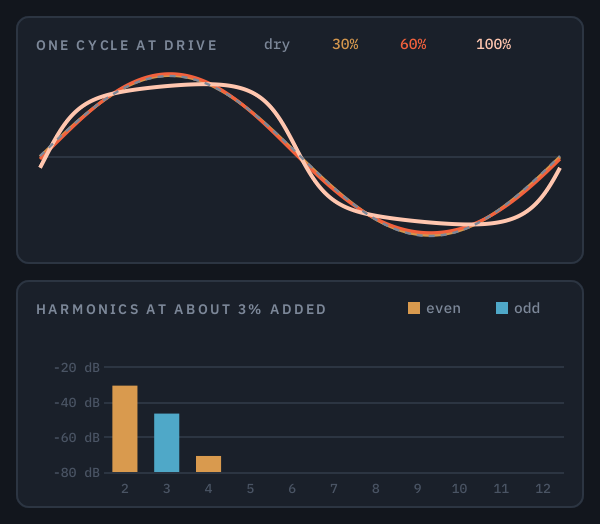
WARM
Tube-style body and warmth
At the gentle end it adds mostly the 2nd harmonic, the tone an octave above each note, which blends in as body rather than being heard as an effect. Pushed harder, the odd harmonics catch up and it thickens into a driven stage.
For low end, mix buses, and anything that should feel fuller without sounding processed.
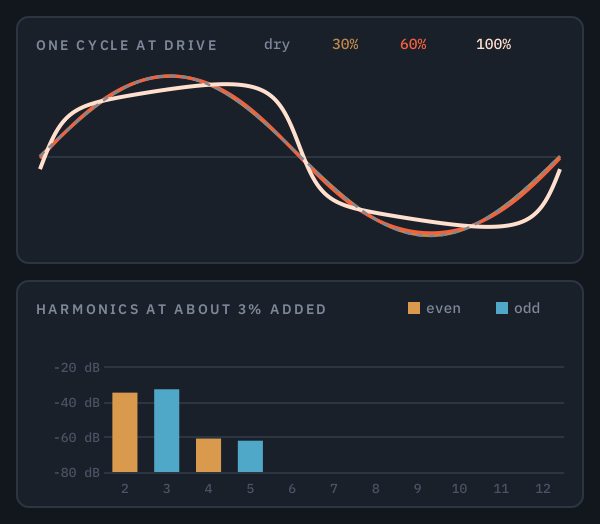
GRIT
Transistor-style edge and presence
Its curve reaches its ceiling more slowly, so the 3rd harmonic comes through as strongly as the 2nd, with more above them than WARM gives. It reads as edge and bite rather than warmth.
For parts that need to cut through: vocals, guitars, snares, the attack of a bass.
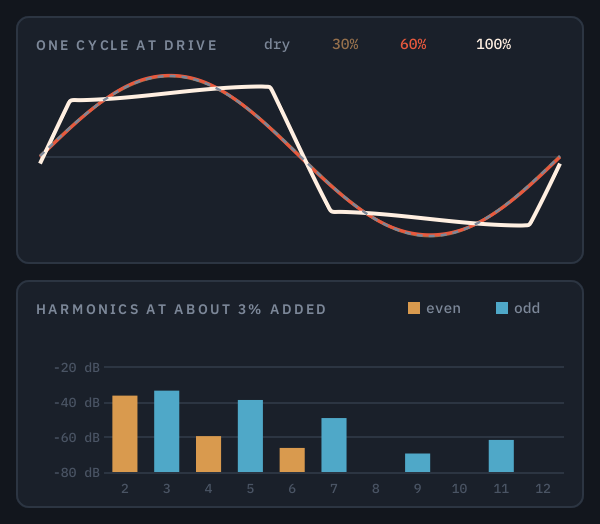
CLIP
A clipper that arrives gradually
Its corner sharpens as you drive it: rounded at the bottom of the knob, a hard edge at the top, so clipping arrives gradually instead of switching on at a threshold. Driven, it runs the odd series, the 3rd, 5th and 7th, up high.
For transients and loudness: shaving peaks, an 808's growl, a master pushed hard.
The top of each picture shows one cycle of a sine at DRIVE 30, 60 and 100%, HOT at 100%, each line coloured by what that setting adds, as the panel colours it; the dashed line is the input. The bottom shows the harmonics each type adds, in dB under the note, with all three adding the same amount, 3%, so the bars compare character rather than quantity.
Each type has its own warning line, set by ear, where colour becomes distortion: WARM at 1% of added harmonics, GRIT at 0.75%, CLIP at 0.6%. Each carries a few dB of gentle compression as part of its character, linked across both channels so the stereo image stays put.
Its starting point is a sound you can't hear it on
At DRIVE 0 Crestwave isn't there: the input, bit for bit, delayed only by the oversampling's latency, which your host makes up for. The 12% it opens at is colour you feel more than hear, and HOT keeps the whole turn of the knob in the gentler part of each type until you choose otherwise.
Three things on the panel answer how much you're adding, and they come from one measurement, so they can't disagree: the ADDING number, the red tick on DRIVE, and the heat scope, which colours your signal by what each moment adds to it. Below the line is colour; past it, distortion. Neither is wrong, and plenty of the best uses of a saturator are past the line, but you always know which side you're on.
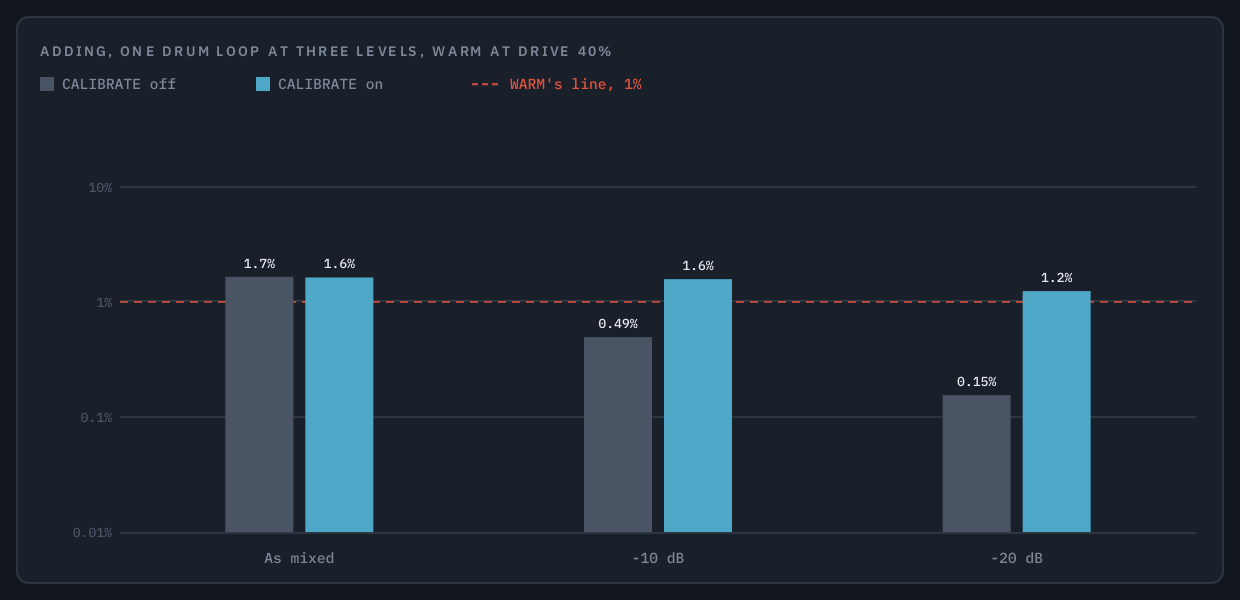
One DRIVE setting, any track
A saturator reacts to how loud the signal is, so the same DRIVE on a quiet bass DI and a loud drum bus would normally be two very different amounts. CALIBRATE measures the track's level over a couple of seconds, brings it to one fixed working level before the saturation and undoes that exactly afterwards. It never changes how loud Crestwave is, only where the signal sits on the curve, and it holds its level through the pauses in a track rather than driving the next phrase harder.
The picture is measured: one drum loop played as mixed, 10 dB down and 20 dB down, through WARM at DRIVE 40%. With CALIBRATE off, the quieter the track, the less it is saturated: a tenth as much 20 dB down. With it on, the three stay together, between 1.2% and 1.6%. The figure under CALIBRATE on the panel shows the lift or cut it is applying now; it lifts by up to 18 dB and leaves silence alone.
AUTO GAIN works out the level change the saturation will make from the input rather than chasing the output, so there's no dip or swell while it catches up, and switching POWER compares colour, not loudness. The MIX knob's dry side is delayed to match the saturated side to the sample, so a parallel blend lines up and doesn't comb.
Harmonics that stay harmonics
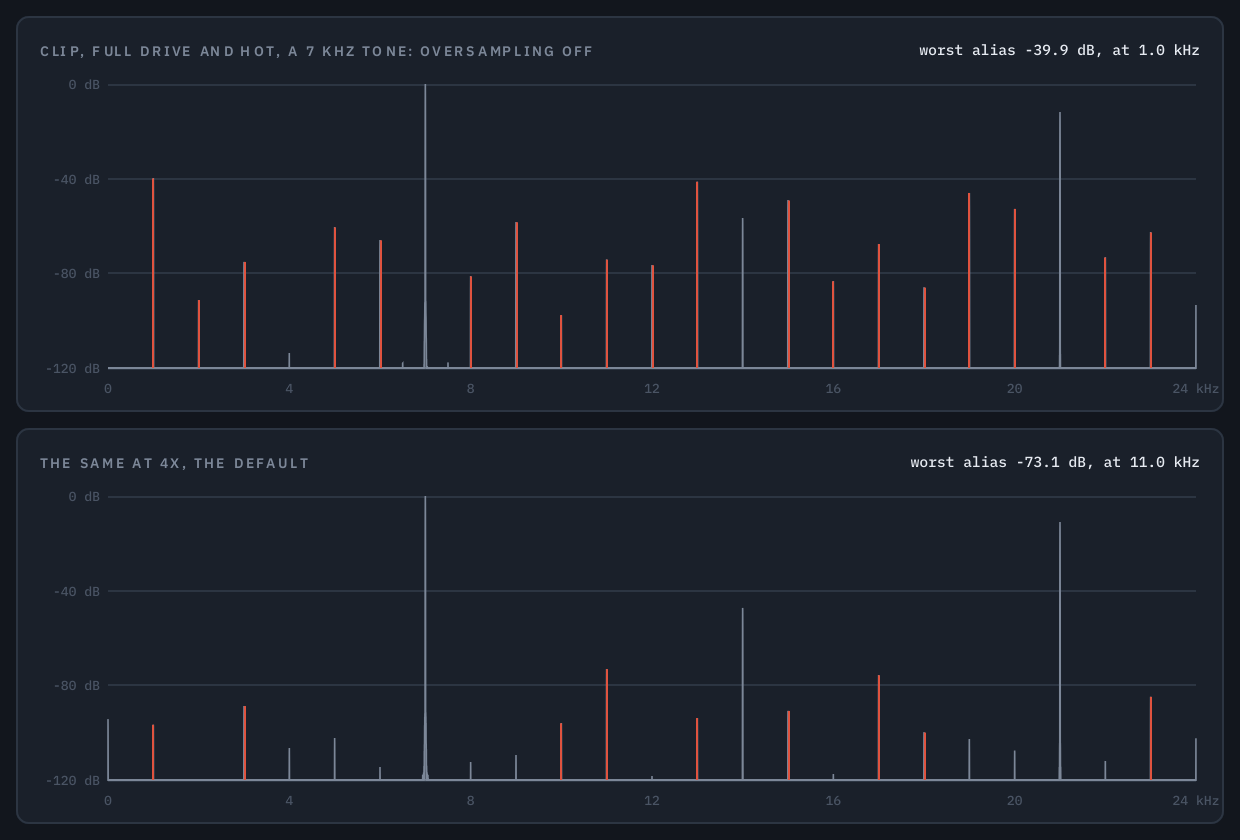
Saturation adds harmonics, and a hard curve adds them far above the audible range. Inside a plugin running at your session's rate, nothing above half that rate can exist: it folds back down as aliasing, tones no longer related to the note, heard as a grainy, metallic harshness. Oversampling runs the saturation at a multiple of the session's rate, so those harmonics have room to exist, and filters them away cleanly before the signal comes back down.
Choose Off, 2×, 4×, 8× or 16× in the menu. The default is 4×: it keeps even CLIP at full DRIVE and HOT, the hardest case there is, 73 dB clear of aliasing, at 2.6% of one CPU core. 2× gets to 47 dB for about half the CPU, 16× to 102 dB, and Off, with no latency at all, suits gentle settings, where there is little to fold back. With no audio playing, every setting costs almost nothing.
The menu holds two settings: PLAYING, what runs while you play and mix, and EXPORTING, what an offline export runs at — Same as Playing by default, or any setting, higher or lower. Play at 2× and export at 16× to mix light and render at the highest quality. The latency doesn't move when it switches, so the export lines up with what you heard.
Latency is set by this choice alone (with Exporting set apart from Playing, by the larger of the two), never by a knob, a TYPE or a preset, and reported to your host in whole samples, so its delay compensation lines everything up exactly: 49 samples at 2×, 61 at 4×, 59 at 16×, none with oversampling Off. The choice is saved with your session; a new Crestwave always opens at 4×.
The picture is that hardest case, measured: a 7 kHz tone through CLIP at full DRIVE and HOT. Every red line is an alias, a harmonic folded back to a frequency unrelated to the note.
A display that shows the heat
The heat scope shows your signal as the saturation sees it, scrolling in from the right, with each thin slice coloured by what that moment adds to your track: steel where nothing is added, amber for colour, red past the type's line, white-hot at the very top. The peaks glow first, because that's where a curve does its work, and dashed lines mark the peak level at which this setting reaches the line.
Beside it are the ADDING gauge, the same number as a bar with the line marked on it; CORR, a mono-safety meter read on what leaves the plugin; and CURVE, the shape this setting pushes the signal through, drawn with the same maths the audio uses, with the last fraction of a second of peaks marked where they landed on it. Hide the display from the header and the panel gets shorter; nothing else moves.
Which part is saturated, and what hits and time do to it
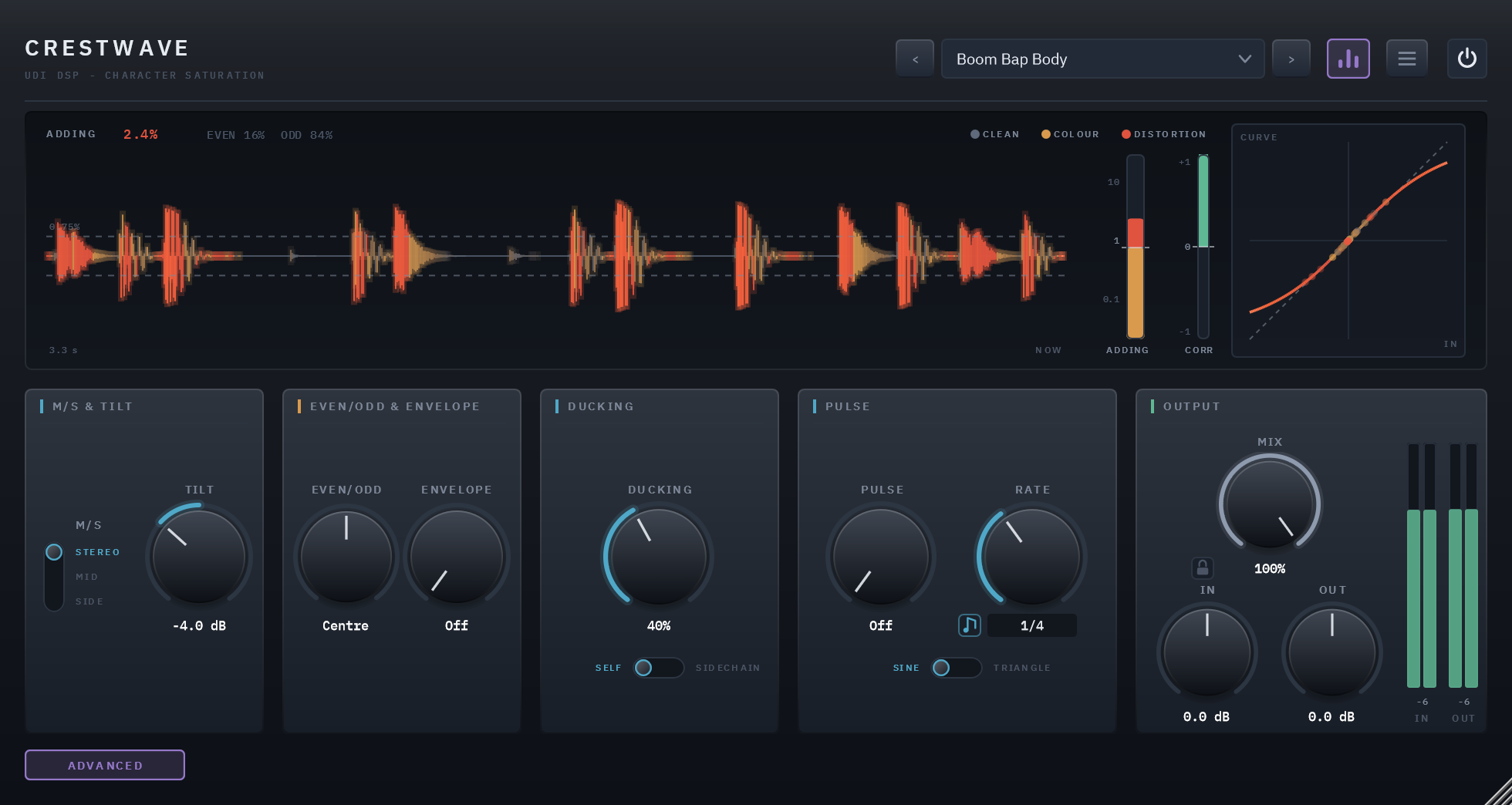
The ADVANCED button swaps the CHARACTER card for four more, and everything on them starts off or centred, so opening the page changes nothing until you turn something. The display and OUTPUT stay where they are.
M/S and TILT
M/S saturates the whole signal, only its middle or only its sides, with the other part passed through untouched: measured, it matches the input to 145 dB below the signal, which is rounding. So you can put warmth on the centre of a mix without its width moving, or edge on the sides alone. TILT, ±12 dB about 1 kHz, decides whether the lows or the highs reach the curve first, and is undone afterwards, so it moves where the harmonics come from rather than the tone.
EVEN/ODD and ENVELOPE
EVEN/ODD leans the type toward the even harmonics, which read as fullness, or away from them; toward ODD the sound mostly gets cleaner. ENVELOPE makes each hit bloom for a moment, warmer and a little harder, then settle back, while a sustained sound is left alone.
DUCKING and PULSE
DUCKING takes DRIVE back while a hit plays, listening to the track itself or to a sidechain, so a kick's attack stays clean while its tail is saturated. PULSE moves DRIVE in time with your song, from 1/32 to 8 bars or free in Hz, on a sine or a triangle. Both only ever take DRIVE away, so the knob and its red tick keep their meaning.
Specifics, stated plainly
| Types | WARM (tube-style), GRIT (transistor-style) and CLIP (a clipper whose knee sharpens with DRIVE), plus a warning line for each, set by ear |
|---|---|
| Oversampling and latency | Off, 2×, 4× (default), 8× or 16×, in the menu; set separately for playing and for exporting (Same as Playing by default); 61 samples at the default, 0 with oversampling Off. No knob or preset moves it |
| Sidechain | Optional, mono or stereo; keys DUCKING when its SOURCE is SIDECHAIN |
| Output | MIX against the dry signal, with a padlock that holds MIX, IN and OUT through preset changes; IN and OUT trims, ±24 dB |
| CPU | 2.6% of one core at the defaults (4× oversampling), 0.8% with oversampling Off, 4.1% at the menu's 16×, about 0.2% at any setting with no audio playing — 48 kHz stereo, 512-sample blocks, the panel closed (3.0% at the defaults with it open) |
| Parameters and presets | 21 parameters, all automatable; 30 factory presets in six categories, plus Default |
| Licensing | Free UDI DSP account, one-time online activation — no subscription, works offline for a week between checks |
Compatibility
- VST3, 64-bit — Windows 10/11 (a Standalone app is included in the installer). AU, AAX and macOS are coming soon.
- In active development — full per-host verification across DAWs is ongoing.
- Internet needed once, briefly, to activate (a short browser sign-in) — day-to-day use after that works offline for up to a week between checks.