Echolight is a delay by UDI DSP.
01 What Echolight is
Echolight is a stereo delay that dissolves into a cloud.
With Diffusion at zero it is a clean, honest delay: repeats on the beat, each a little darker than the last. Turn Diffusion up and a wash grows around the repeats until they melt into it. Keep going and the wash becomes a reverb, until at the top only the cloud the echoes feed is left. Grains from Ghostlight Pro, UDI DSP’s flagship reverb, work on that cloud, so Shimmer is a sparkling haze over a tail rather than a pitched copy of every echo.
Around that one idea sit the things a delay is really played with: colour that builds on every repeat, echoes that move across the stereo field and swing, a filter that moves with the tempo and with your hands, a tape stop, and echoes that step aside while you play.
At a glance
- One knob from delay to reverb — Diffusion, with Dissolve setting where on its travel the repeats vanish.
- Grains on the cloud — Scatter, Grain, Shimmer, Tune, Air and Link, from Ghostlight Pro.
- Colour inside the loop — Tone, Low Cut, Warm, Clipper, Wow and Flutter, so every repeat comes back a little more changed than the one before.
- Echoes that move — Direct, Ping-Pong with swing, or Orbit, where each repeat steps further across the field.
- A filter page — seven types, after the loop or inside it, moved by a tempo-synced LFO and by your playing.
- Tape where it counts — Time bends when you drag it, and Stop winds the echoes down to a halt and back.
- Echoes that make room — Ducking pulls the repeats down while you play and lets them swell back in the gaps.
- Up to 30 seconds of delay, free or locked to the host tempo as straight, triplet or dotted notes.
- A display that shows the sound — where the repeats land, how fast they fall, where they dissolve, and the EQ’s and filter’s curves.
02 The ideas behind Echolight
Echolight is built on a handful of ideas. You don’t need any of them to use it, but each one explains why a control behaves the way it does, and together they are the reason the plugin looks the way it does. The pictures in this chapter are computed from Echolight’s own code, so each curve is what the plugin actually does.
A delay is a memory that fades; a reverb is a memory that blurs
An echo is a copy of what you played, arriving later and a little quieter. A reverb is the same thing taken to its end: so many copies, so close together, that they stop being copies and become a space. Most plugins put these on either side of a switch. Echolight puts them at either end of one knob.
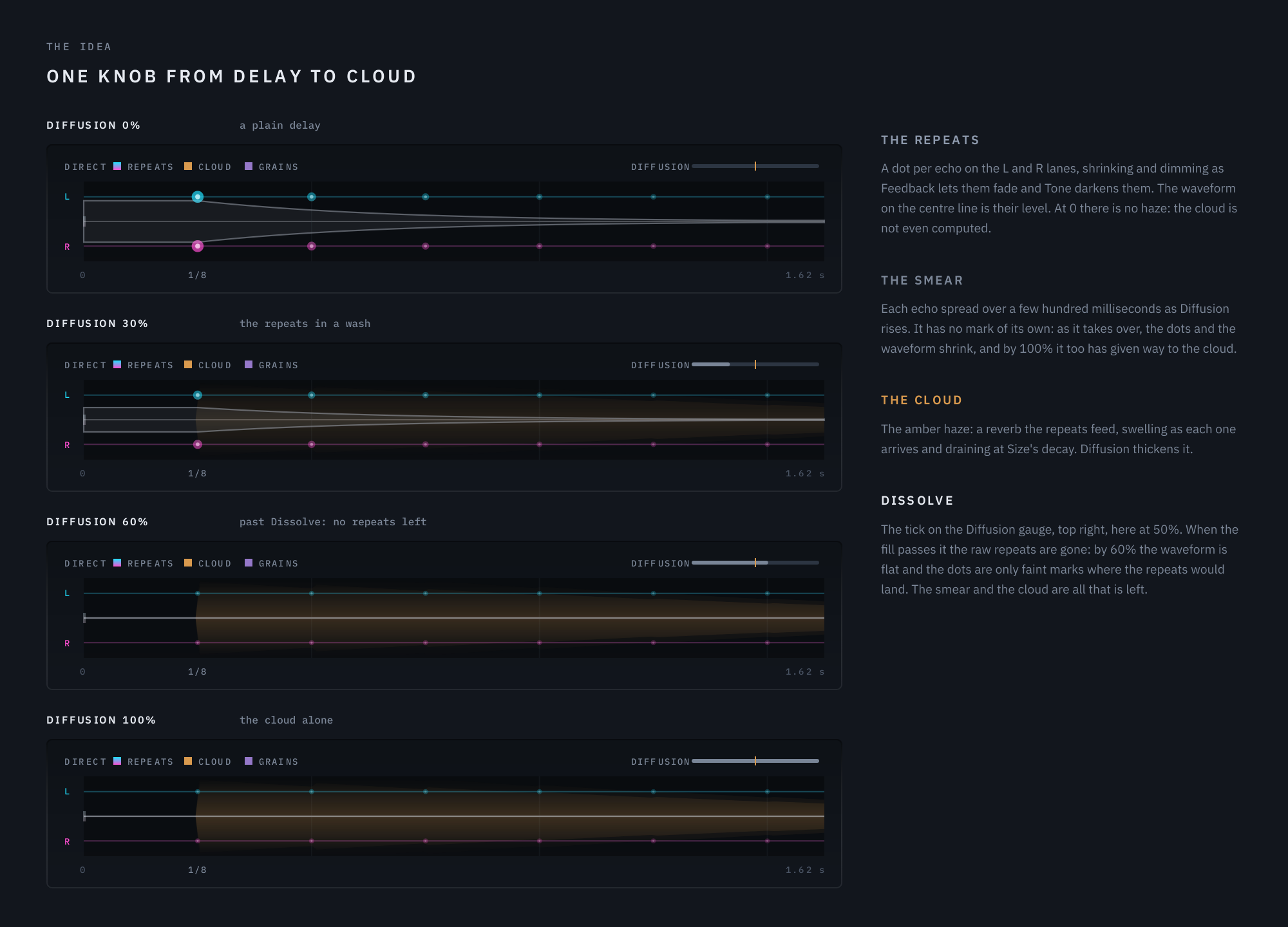
The display, Direct at 1/8, Feedback 55%, Dissolve 50%: the same hit at four settings of Diffusion.
Diffusion blends three things: the raw repeats, a smeared version of them, and a cloud — a reverb fed by the repeats. At 0 you hear only the raw repeats; the cloud is not even computed. As Diffusion rises, the raw repeats give way to the smear and the cloud, and at the top only the cloud is left.
Why Dissolve is its own control. A raw echo left in the mix keeps its attack: even one sitting 12 dB under the cloud still strikes again audibly each time it arrives. So repeats only stop reading as repeats once the raw echoes are completely gone, and Dissolve decides where on Diffusion’s travel that happens. Set it low and the repeats melt early, leaving most of the knob for shaping the wash; set it high and they stay audible across most of the travel, with the cloud growing around them.
What happens inside the loop, and what happens once
A delay is a loop: what comes out goes back in. Anything placed inside that loop acts on every repeat again, so its effect compounds: the first echo is shaped once, the fifth five times. Anything placed after the loop hears the echoes but feeds nothing back, so it shapes every repeat alike.
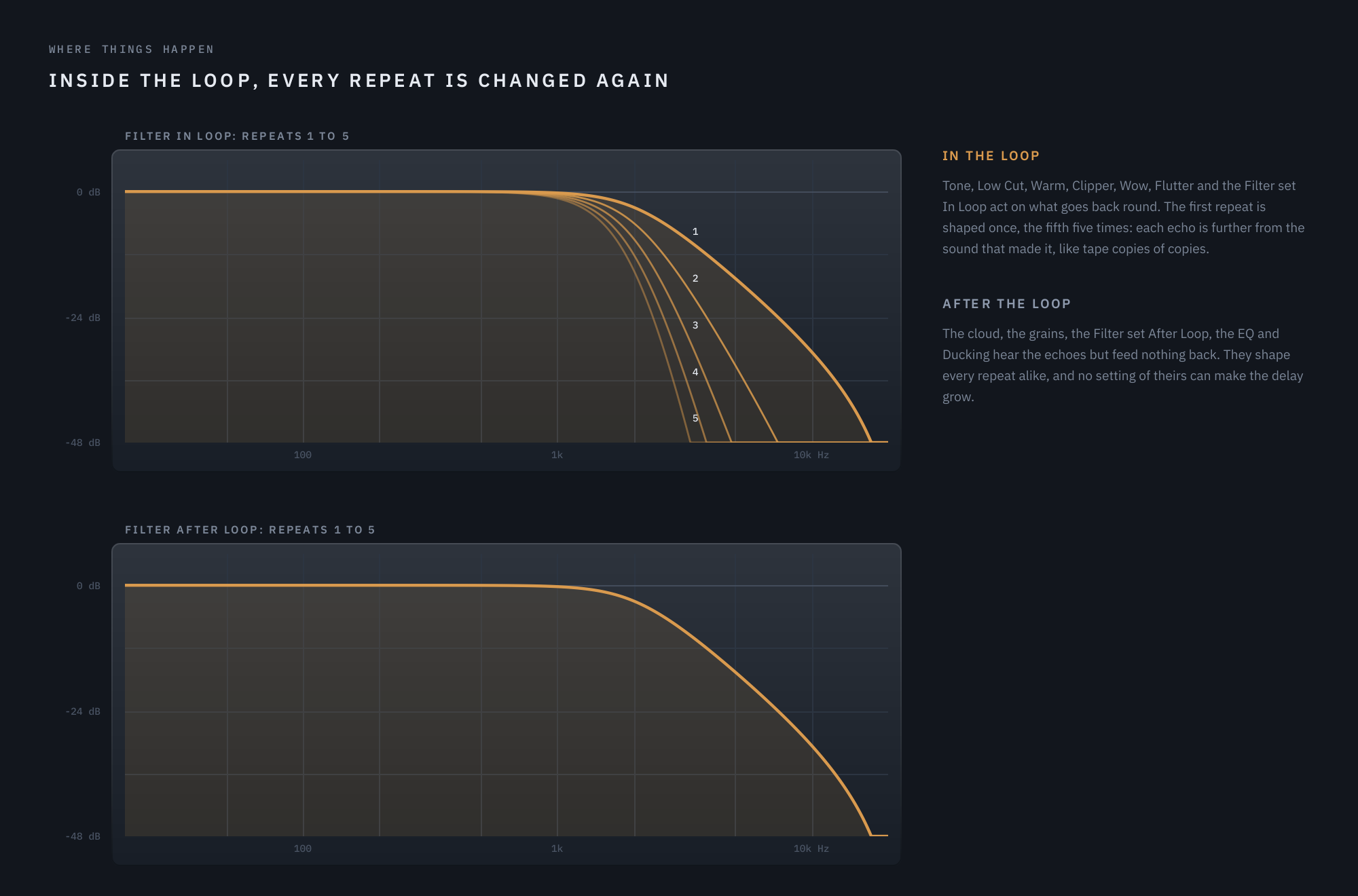
A low-pass at 2 kHz: In Loop the fifth repeat has passed it five times; After Loop every repeat once.
Echolight uses both, deliberately:
- Inside the loop: Tone, Low Cut, Warm, Clipper, Wow and Flutter, and the Filter page’s filter when it is set In Loop. This is where character accumulates, the way a tape echo’s repeats grow darker, softer and more worn with every pass.
- After the loop: the cloud, the grains, the Filter set After Loop, the EQ, Ducking and Stop. These shape the whole wet sound without ever changing how many repeats there are or where they land.
That is also why the cloud has no damping of its own: its repeats arrive already darkened by Tone.
Nothing runs away
A delay that can grow without limit is a delay you can’t trust with a live mix. Every part of Echolight is arranged so that it can’t:
- Feedback stops at 100%. At 100% nothing decays while new material keeps arriving; to hold a tail with the input muted there is Freeze, a separate control.
- Everything that could lift a frequency stays out of the loop. The cloud, the grains and the EQ sit after it, so no setting of theirs can make the delay grow.
- The Filter never lifts anything while it is in the loop. A resonant filter normally stands well above 0 dB at its peak, and in a loop at Feedback 100% that frequency would grow on every pass. In Loop, Echolight scales every filter type so its highest point is 0 dB: resonance still rings, but no repeat is ever louder than the one before it. After the loop a peak may stand up to 6 dB proud, and no more.
- Two safety ceilings, with no knob. One on the loop’s input and one on the finished wet signal. Below them nothing changes, to the bit; above them the level bends smoothly rather than clipping or growing.
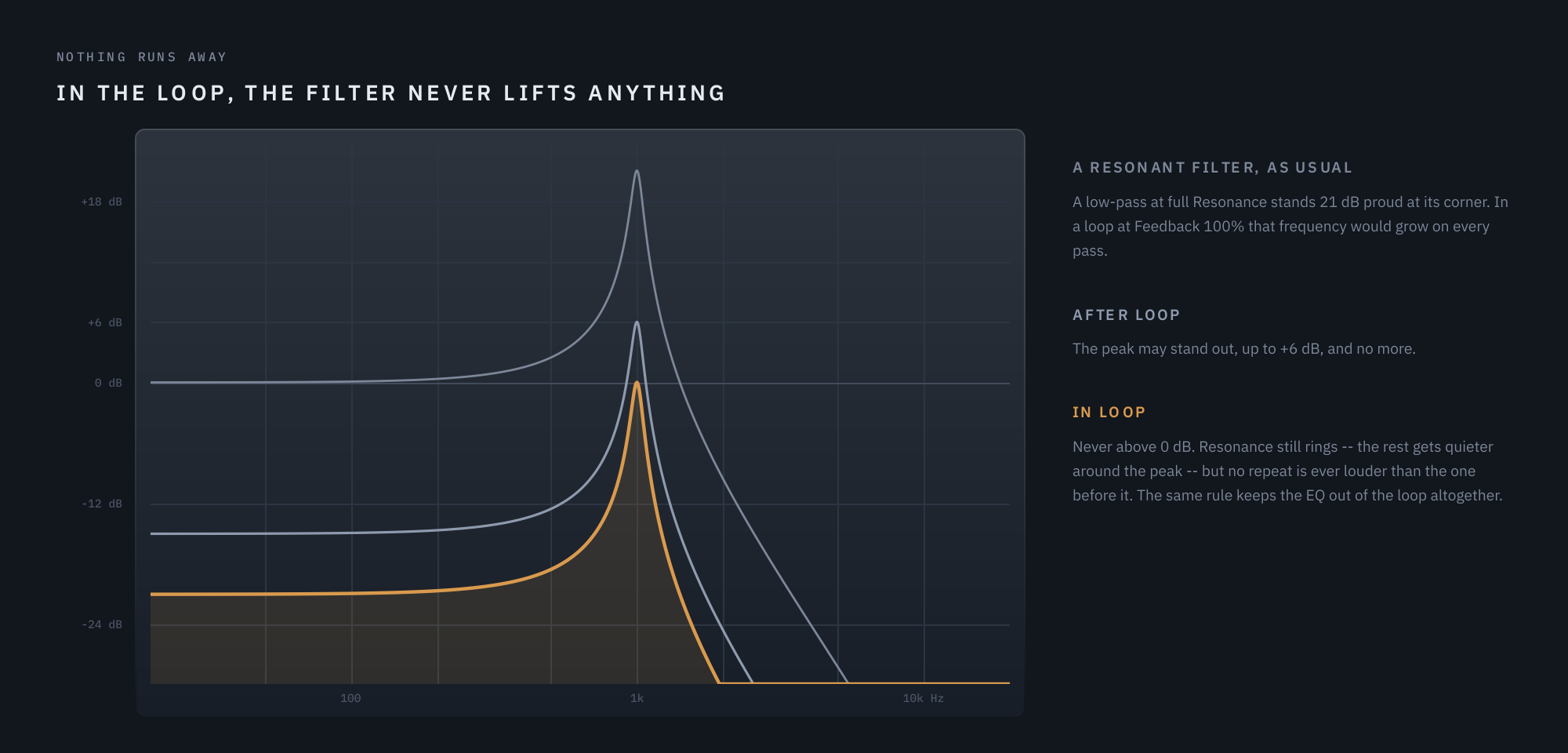
A low-pass at 1 kHz with Resonance at 100%, as a filter usually is, After Loop, and In Loop.
Off means off
Every control that shapes the sound has a setting where it is simply not there. Diffusion at 0, Scatter at 0, Warm, Clipper, Wow, Flutter, Low Cut and Ducking at Off, the Filter’s Type at Off, every EQ band at neutral: each of these is not computed at all, so the plugin at its defaults is a plain delay, to the bit. Nothing colours your sound until you ask it to.
It behaves like tape
Where a tape machine’s behaviour is musical, Echolight borrows it:
- Dragging Time bends the pitch, as a tape delay does when its heads move apart. A jump too big to be a drag — a new note value, a new feel, a preset, a tempo change — crossfades instead, so switching from an eighth to a quarter note never dives three octaves.
- Wow and Flutter drift the repeats’ pitch irregularly, left and right independently, the way a real transport never repeats itself.
- Stop winds the echoes down to a halt, their pitch falling with the speed, and spins them back up when you let go.
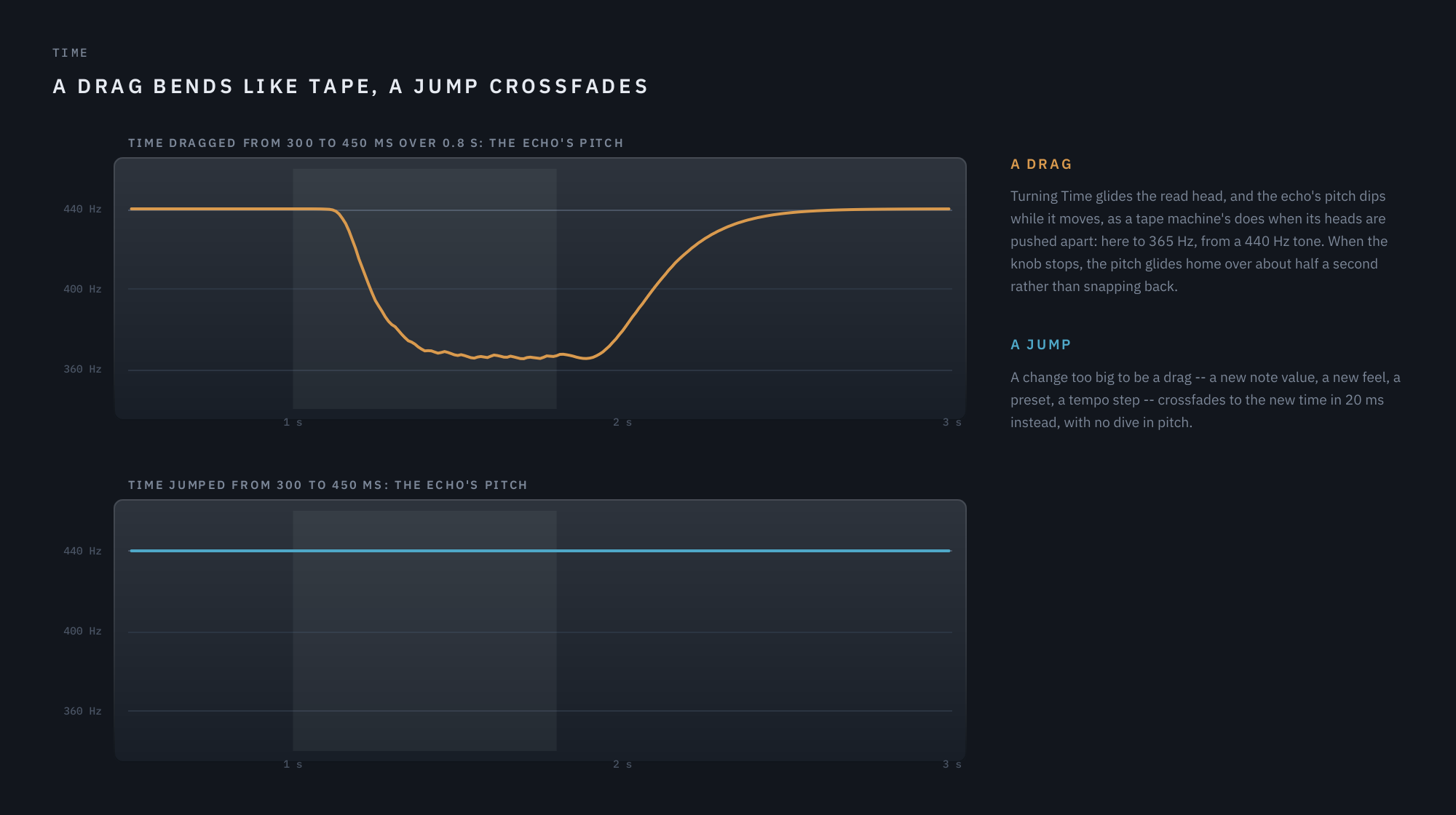
Measured through Echolight’s own engine on a single echo of a 440 Hz tone.
In time with the music
A delay lives on the grid, so its movement does too. Time’s note button picks a feel — Straight, Triplet or Dotted — and the knob a note value. Pong Swing shuffles Ping-Pong’s bounce while each pair of repeats stays on the beat. The Filter page’s LFO uses the same feel-and-rate knob, and while the song plays it follows the song’s position: a sweep lands on the same beat every playback.
It listens to your playing
Three things follow what you play — always the dry input, never the echoes of it, so a loud echo can’t hold them open. Ducking pulls the echoes down while you play and lets them swell back in the gaps. Link bursts the grains denser on each new note. The Filter’s envelope opens or closes the filter as you play harder or softer.
What you see is what it does
The display is drawn from the same code the audio runs through. The repeats sit where Time puts them and fall as Feedback says; the EQ’s and the Filter’s curves are the responses the audio actually has, moving as the audio moves. When the picture and the sound disagree, that is a bug.
03 Signal flow
The Filter page’s filter goes where you put it: after the loop, on the echoes, the cloud and the grains together, or inside the loop with the controls below.
Tone, Low Cut, Warm, Clipper, Wow and Flutter are inside the loop, so they compound: every repeat passes through them again on its way round, and the cloud inherits repeats that have already been shaped (section 02).
Freeze holds the loop: the input mutes and the repeats circulate without decaying. The cloud keeps ringing on the held repeats and the grains hold too. Low Cut, Warm and Clipper ease off while Freeze holds, so a frozen tail does not keep thinning or saturating itself, and come back when you release it; Wow and Flutter keep drifting.
Two safety ceilings, with no knob. One on the loop’s input and one on the finished wet signal before Mix. Below them nothing changes, to the bit. With Feedback at 100% and a source still playing, the loop’s ceiling saturates the repeats instead of letting them grow without bound.
04 The panel
Five sections sit in a row — Delay, Cloud, Shimmer, Color and Output — with the display above them. Three more pages, Advanced, Filter and EQ, open from the buttons at the bottom left.
Along the header, from the left: the name, then Freeze and Stop. From the right: the power switch at the far edge, the menu (☰) with Panel Size, Show Tooltips, Show Visualizer, Activate…, Check for Updates… (once activated) and About Echolight, the visualizer show/hide button, and the preset field with its < and > arrows.
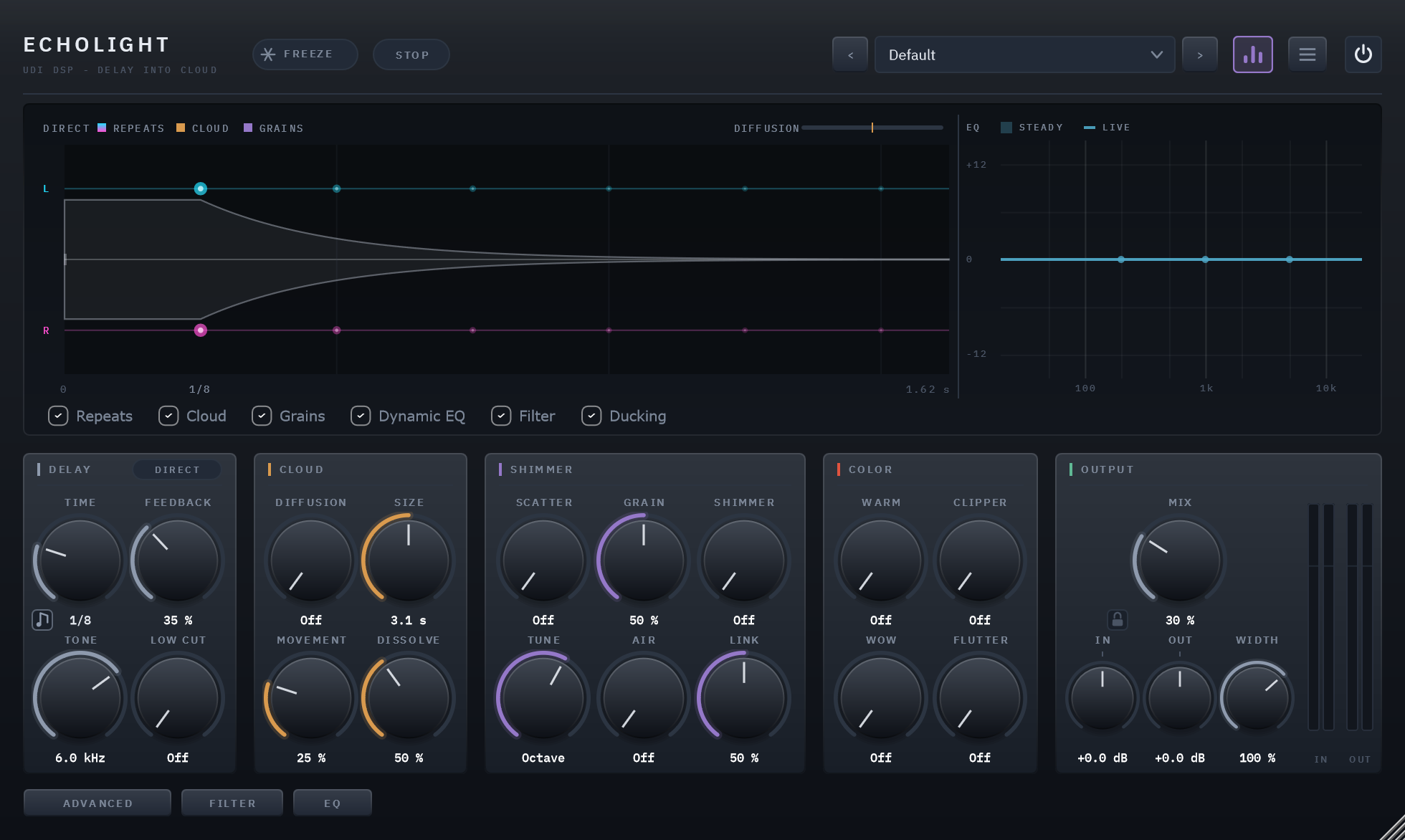
The front panel at its defaults: a plain delay, its repeats drawn above the controls.
The power switch
The circle at the top right is Echolight’s bypass. It crossfades over 20 milliseconds rather than hard-switching.
Reading the display
The display is a scope. Time runs left to right: a note is played at the left edge and its echoes travel out to the right, fading as they go. How far up or down something sits is where it is in the stereo field — L at the top, R at the bottom, centre in the middle.
Two facts, two channels. The waveform on the centre line is the level; the dots are where each echo is.
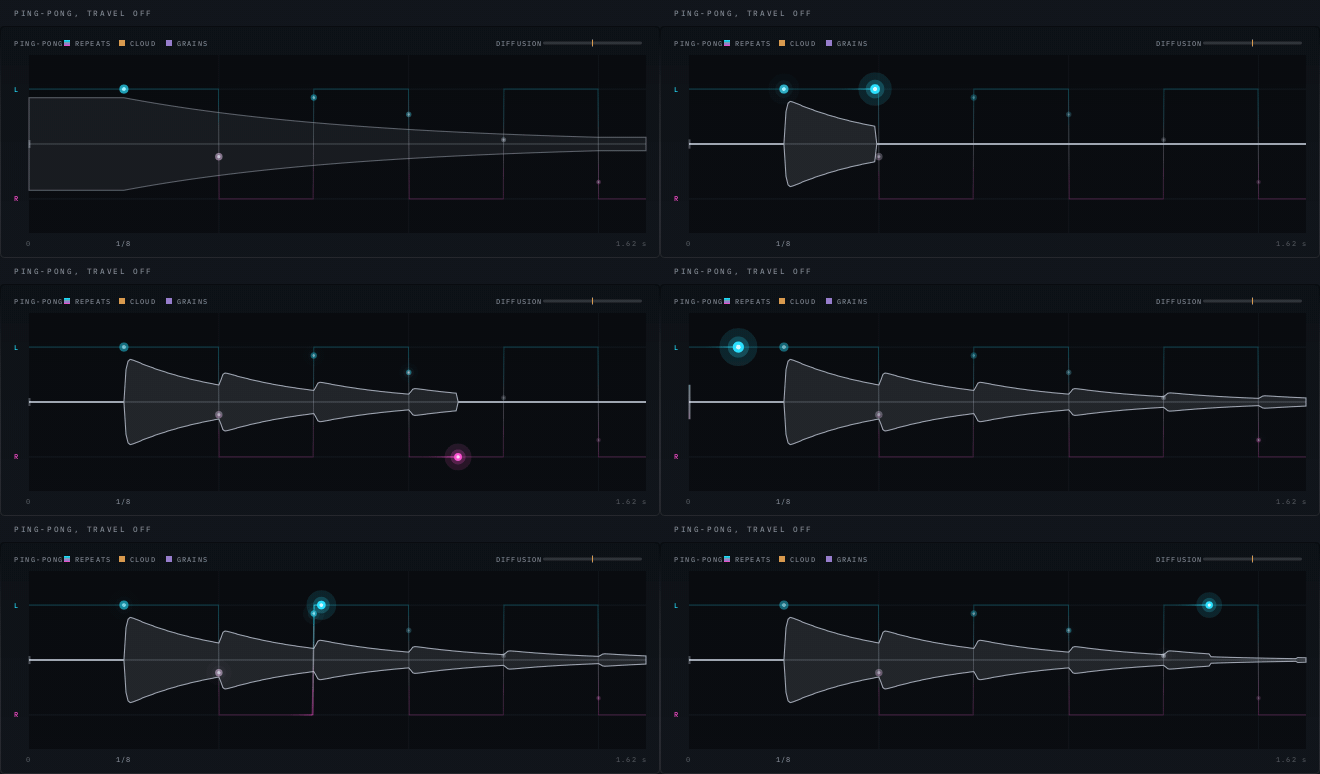
Ping-Pong at 1/8, Feedback 68%. The waveform states the level; the dots state the position; the bright one is where the sound is now.
- One waveform, on the centre line. It is the echoes’ level over time, not a stereo picture — that job belongs to the dots. It swells where a repeat arrives and shrinks as Feedback lets the tail go, and it is drawn from the signal you are actually playing.
- The dots are the repeats, each at its own place in the field. Their colour is that place: cyan at hard left, near-white in the middle, magenta at hard right. A mono source sits on the centre line and is colourless, and the further an echo is pushed to a side the stronger its hue.
- The bright dot is where the sound is now, travelling left to right as the note ages. It is the one thing on the display that glows, so it is the one thing the eye follows.
- The thin line through the dots is the pan the engine is applying, drawn ahead of the sound so you can see where it is about to go. The three Modes make three shapes and you can tell them apart without reading the Mode pill: Direct is two flat lanes, Ping-Pong is a staircase, and Orbit is a sweep across and back.
- Travel turns Ping-Pong’s jump into a lean. At Off the dot crosses the whole height between one repeat and the next; turn it up and it slides across the gap instead.
- Orbit Depth sends the dots behind you. They shrink and dim as they swing away and grow coming back, which is the same cue the audio gets.
- A dot’s size and brightness are its level, so Feedback sets how fast they fade, and they dim as Tone darkens each pass. The L and R marks are the speakers: with Width above 100% the dots sit outside them, which is what being wider than the speakers looks like.
- The bar at the left edge is your dry input, lighting as you play. It is the one thing that tells you at a glance that the picture is being driven by your signal rather than redrawn.
- The grid marks beats, with a stronger line every bar, when Time is synced. Time runs along the bottom: 0 at the left where the note is played, the span at the right, and Time’s own readout under the first repeat.
- The amber haze is the cloud. It thickens as Diffusion goes up and drains at Size’s decay, and the repeats dissolve into it.
- The pattern worked out from the knobs is always there, drawn faint, so a preset reads at a glance with nothing playing. As you play, the notes light their own echoes. Nothing on the display moves while nothing is playing.
- The Diffusion gauge, top right, shows Diffusion’s position with a tick at Dissolve. When the fill reaches the tick, the repeats are gone: that is where they have dissolved into the cloud.
- The purple sparks are grains, one per grain the engine spawns.
- While Ducking pulls, the display shows how far, in dB. FROZEN appears while Freeze holds.
- The strip at the right is the dynamic EQ’s curve, on every page: the steady curve filled, and the live curve over it, which moves as the Dynamic controls react to your playing. It is calculated from the same filters the audio runs through, so what you see is what the EQ does.
- The amber line in the same strip is the Filter page’s filter, once a Type is chosen: a thin line where its knobs set it, and a bold one that moves with the LFO and your playing. It is calculated from the same filter the audio runs through. Cuts deeper than the strip’s 15 dB run along its floor.
- The checkboxes along the bottom take a layer away: Repeats, Cloud, Grains, Dynamic EQ, Filter and Ducking. Unticking both Dynamic EQ and Filter gives the scope the whole display.
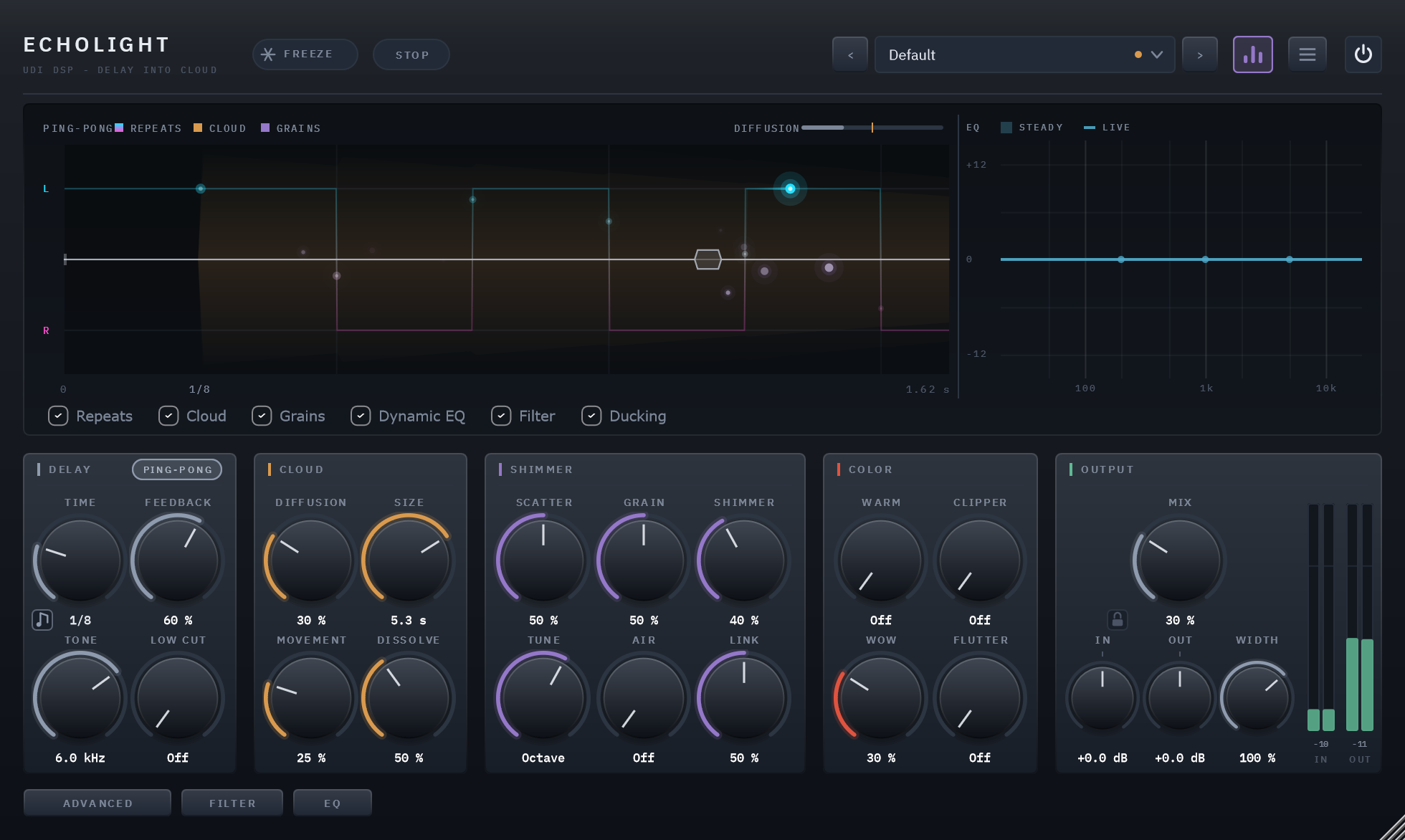
The whole panel: Feedback 60%, Diffusion 30%, Scatter 50%, with the scope at the top and the EQ’s curve beside it.
The visualizer can be hidden with the button in the header, the three purple bars left of the menu, or the menu’s Show Visualizer item. That shrinks the window rather than leaving an empty gap.
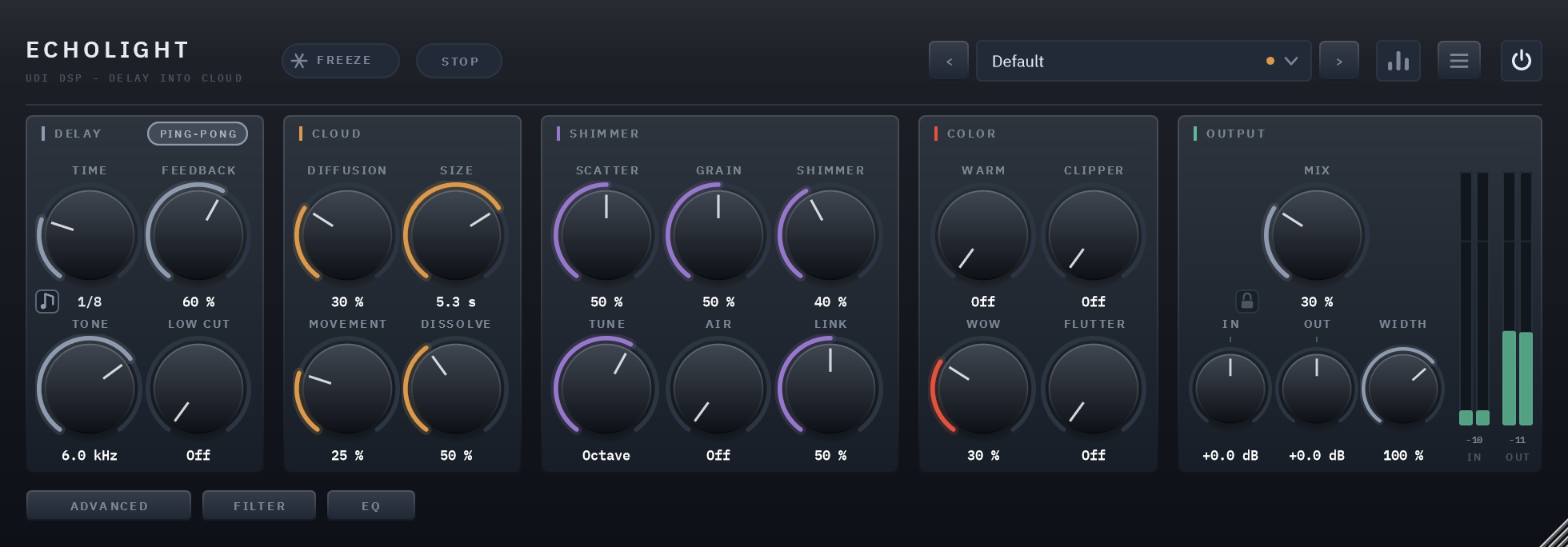
The Advanced, Filter and EQ pages
The Advanced, Filter and EQ buttons at the bottom left switch the row of sections. Each page replaces everything left of Output, which stays where it is; click the lit button again to return to the main page.
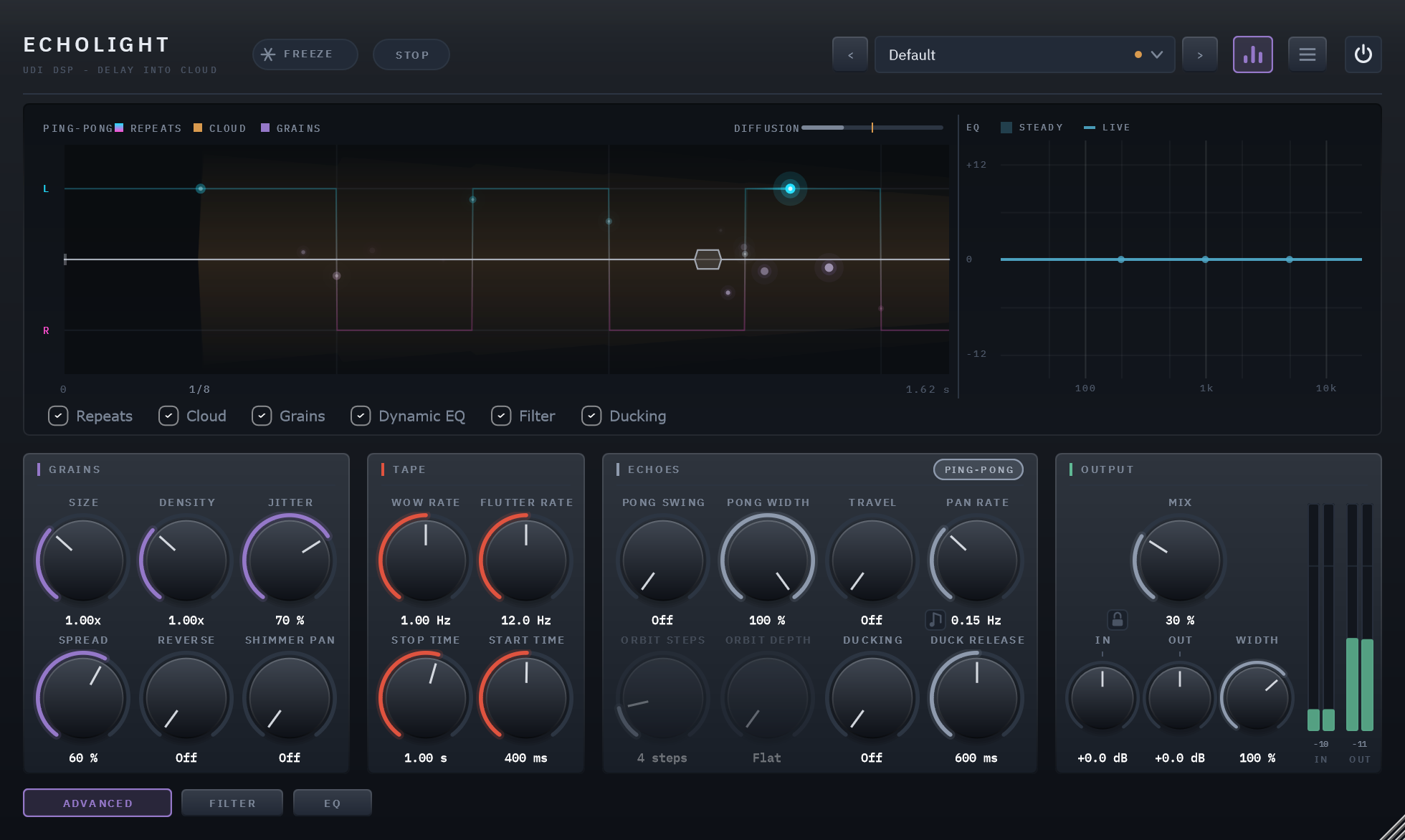
The Advanced page: Grains holds the grain engine’s detail, Tape the machine’s speeds and ramps, and Echoes what the repeats do — where they travel, and how they step aside while you play.
The Filter page and the EQ page each have a chapter of their own: 06 and 07.
Activation and the trial
Until Echolight is activated it runs as a demo: every 45 seconds of playing a short burst of soft noise passes through the output, and the header shows START TRIAL. Click it — or wait for the card that appears the first time you open Echolight — and choose Start trial or activate: your browser opens a quick sign-in, and a free 14-day trial begins. During the trial the header counts the days left and there is no noise; once it ends the header reads DEMO and the bursts return. Buy Echolight and activate it the same way, from the badge or the menu’s Activate… (online, or offline without an internet connection), and both go away. Check for Updates… appears in the menu once you are activated.
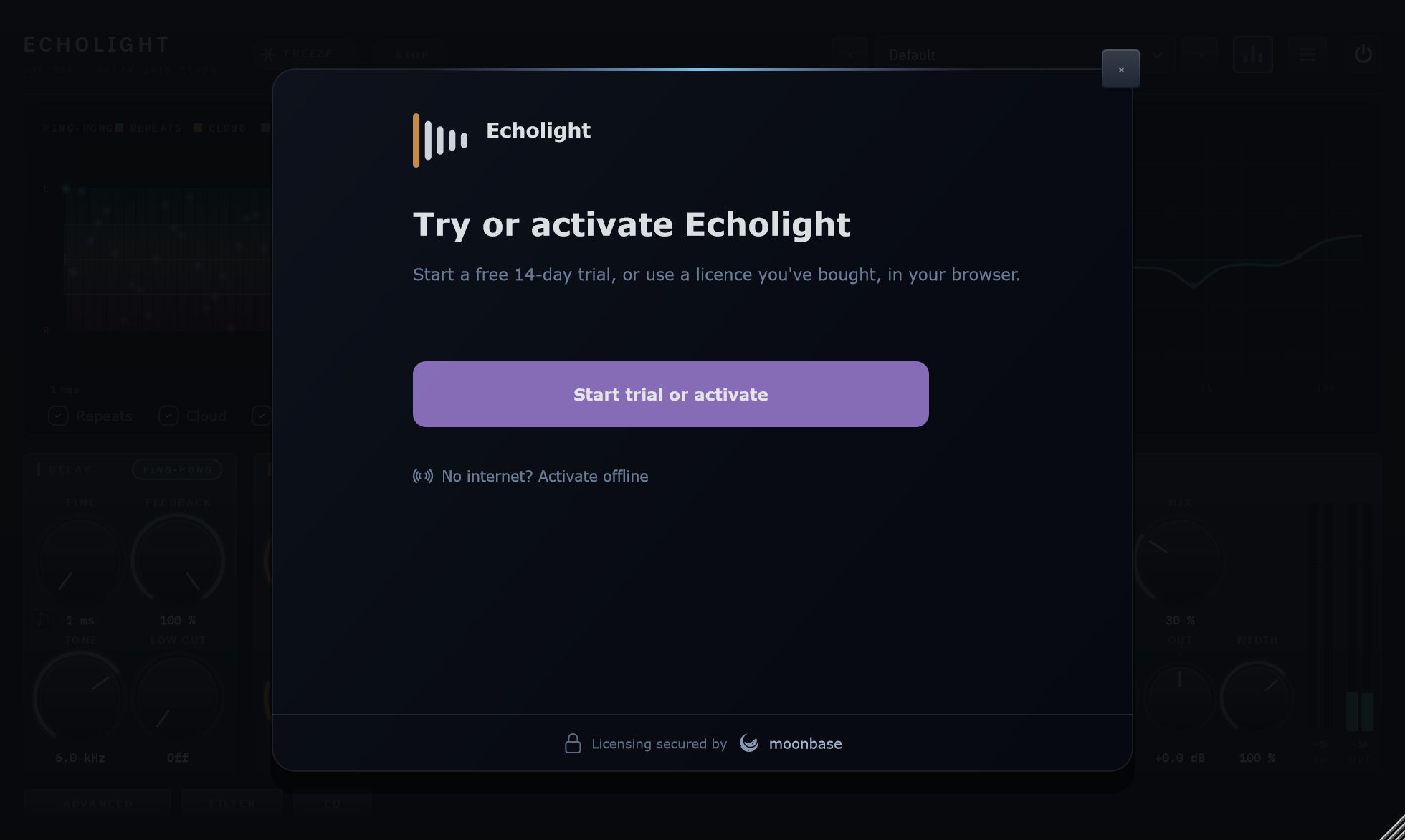
The activation card, opened from the badge or from Activate… in the menu.
Presets
The field in the header shows the loaded preset; see chapter 08.
Resizing
Drag the bottom-right corner, or pick a size from the menu’s Panel Size. The panel holds its proportions anywhere between 75% and 150%.
05 Controls
Listed in the order they appear on the panel, left to right and top to bottom, so you can read this with the plugin open. The Filter and EQ pages’ controls are in their own chapters, 06 and 07. All parameters are automatable from your DAW and saved with your project.
DELAY — The loop itself. Top left.
Time
1 ms – 30 s free, or 1/32 – 8 Bars synced · default 1/8
The delay time. The note button beside the knob cycles its feel — Free, Straight, Triplet, Dotted — and the knob then picks the length: milliseconds and seconds when free, a note value when synced. The readout names the feel, so a dotted eighth reads 1/8 D. Synced times follow the host’s tempo; with no tempo from the host, 120 BPM.
Dragging Time smoothly bends the repeats’ pitch, the way a tape delay does. A jump — a new note value, a new feel, a big leap — crossfades instead (section 02).
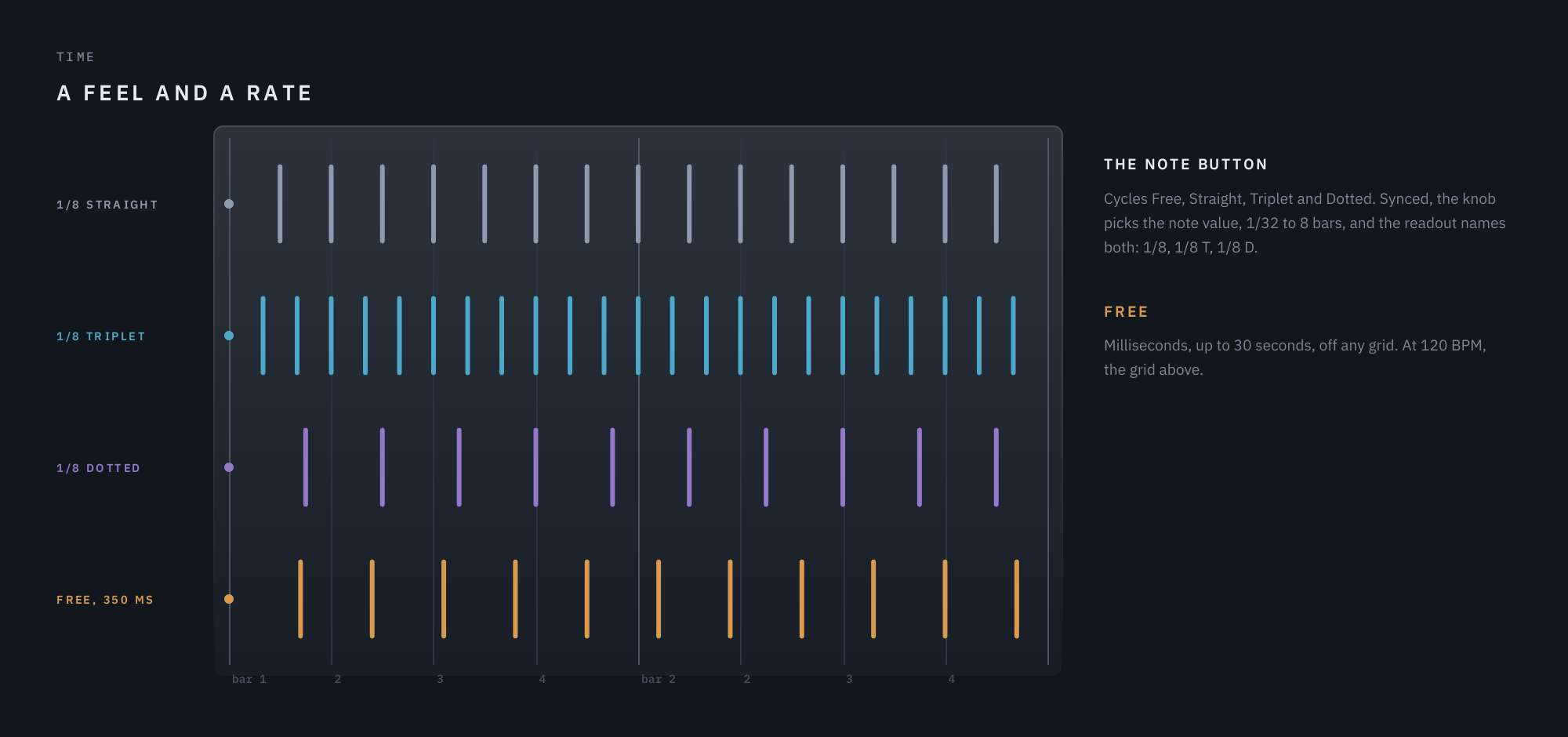
Time’s feels at 120 BPM, and a free time off the grid.
Feedback
0 – 100% · default 35%
How many repeats, and so how much feeds the cloud. At 100% nothing decays while new material keeps arriving; the loop’s safety ceiling saturates the build-up rather than letting it grow. To hold a tail with the input muted, use Freeze.
Direct, Ping-Pong, Orbit
the pill in Delay's title row · default Direct
Where the echoes go. The pill shows the mode, and a click moves to the next:
- Direct — each side echoes itself, and a stereo source keeps its image.
- Ping-Pong — the echoes bounce between left and right.
- Orbit — each repeat steps further across the stereo field, from left to right and back.
The pill lights while the echoes move. The same pill sits in the Echoes section’s title row on the Advanced page, beside Pong Swing, Pong Width and Orbit Steps, which shape Ping-Pong and Orbit, so you can switch the mode where you shape it.
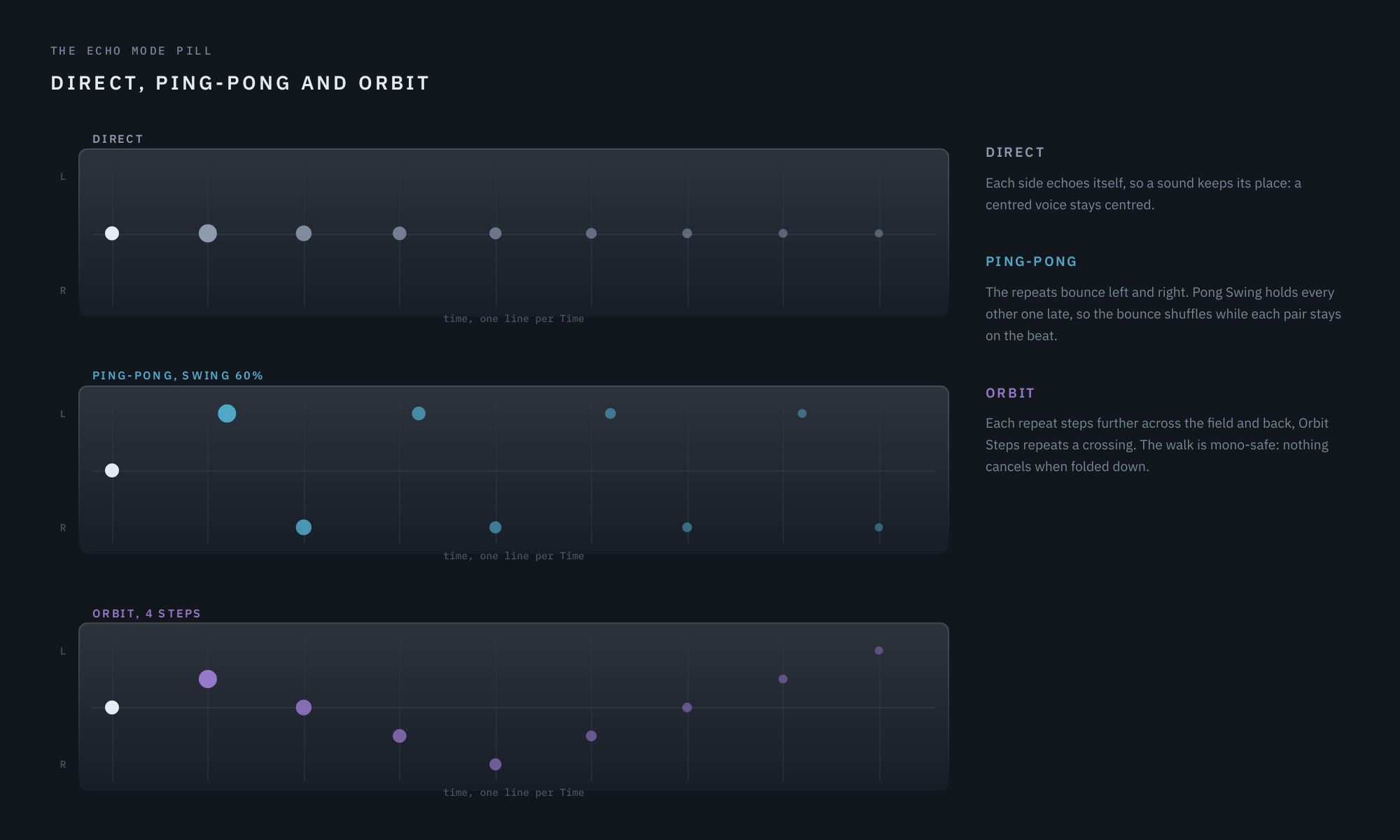
Eight repeats of one centred hit at Feedback 80%, in each echo mode.
Tone
400 Hz – Open · default 6.0 kHz
A low-pass inside the loop, so it compounds: each repeat is darker than the one before it, which is what makes an echo sound like an echo rather than a copy. The cloud has no damping of its own — it inherits Tone through the repeats that feed it. Turned fully up it reads Open.
Low Cut
Off – 1 kHz · default Off
A high-pass inside the loop, 12 dB an octave, on the way into the delay line. The first repeat already comes back thinner at the bottom, and every pass thins it again, as Tone makes it darker at the top, so a long tail — and the cloud it feeds — stays clear instead of building up low end. It compounds: the higher it is set, the faster the lows leave the tail. It eases off while Freeze holds, so a frozen tail keeps its body, and at Off it is not there at all.
CLOUD — What the repeats dissolve into (section 02).
Diffusion
0 – 100% · default Off
From raw repeats, through smeared repeats and a growing cloud, to the cloud alone at 100%. At Off the cloud is not computed at all.
Size
0.8 – 12 s · default 3.1 s
How big the cloud is and how long it rings. It reads out as the cloud’s decay time, because that is how you hear it.
Movement
0 – 100% · default 25%
How far the cloud’s internal lines drift: still and glassy at 0, a slow chorus-like swirl at the top.
Dissolve
20 – 100% · default 50%
Where on Diffusion’s travel the raw repeats are gone. See section 02; on the display, it is the tick on the Diffusion gauge.
SHIMMER — Ghostlight Pro’s granular cloud, working on the cloud rather than on each echo.
Scatter
0 – 100% · default Off
How much of the wet signal becomes a cloud of grains.
Grain
0 – 100% · default 50%
From long, sparse grains to short, dense ones, at a steady level.
Shimmer
0 – 100% · default Off
The share of grains pitched by Tune. Heard only with Scatter up.
Tune
Oct down · 5th · m7 · Octave · Oct+5th · 2 Oct · default Octave
The interval the shimmering grains are pitched to. The knob lands on these intervals; hold Shift while dragging to tune anywhere between them. The readout then names how far you are from the nearest one, such as Octave +12c, or the semitones, such as +15.5 st.
Air
0 – 100% · default Off
Washes the grains through Ghostlight Pro’s own diffuser, softening them from distinct sparks into a haze.
Link
0 – 100% · default 50%
How far the grains follow your playing: each new note bursts them denser and shorter for a moment, then they settle. Heard only with Scatter up.
COLOR — Sound shaping, all inside the loop, so each repeat comes back more shaped than the last. All four do nothing at Off.
Warm
0 – 100% · default Off
A saturator in the loop, with even harmonics leading. Each repeat comes back warmer than the one before, and the cloud inherits it. Its colour holds up as the repeats fade, so quiet echoes are still warm, and loud ones are coloured rather than squashed: through one pass at 100% a repeat comes back at most about 3 dB quieter. Anti-aliased, with no added latency.
Clipper
0 – 100% · default Off
Drives the loop’s safety ceiling harder — up to 36 dB — with makeup gain, so the repeats come back with a firmer, harder edge: halfway, ordinary levels already bend; at 100%, anything above about −33 dBFS does. Quieter echoes pass untouched. At Off the ceiling is only a guard against runaway levels.
Wow
0 – 100% · default Off
Slow tape drift in the repeats’ pitch, around once a second and up to about 40 cents at 100%. The drift is irregular rather than a steady wobble, and left and right drift independently, the way a real transport never repeats itself. The dry signal is untouched.
Flutter
0 – 100% · default Off
The fast, shallow cousin of Wow: around 12 wobbles a second, up to about 19 cents at 100%. Together with Wow, it is the difference between a delay that sounds digital and one that sounds like it has a motor.
OUTPUT — Levels, the mix and Width, with the meters beside them. Ducking follows here too, though it sits on the Advanced page.
Mix
0 – 100% · default 30%
Dry/wet balance. Use 100% on a send.
The padlock beside Mix’s readout locks Mix, In and Out while you try presets. Closed, loading a preset leaves the three where you have them, so each preset arrives at your blend and your levels instead of resetting them every time; everything else in the preset loads as usual, Width included, so each step still sounds like the preset it is. It holds whichever way the preset arrives — the preset field, its < and > arrows, or your host’s own preset list — and through Default too. A preset you save still stores all three, and moving them while the padlock is closed does not put the dot in the preset field. The lock belongs to this instance of Echolight and is saved with your project, never in a preset.
In / Out
±24 dB · default 0 dB
Utility trims at either end of the chain. In applies before anything else touches the signal, Out after the Mix, so the meters beside them read the level the delay receives and sends. Each meter shows a bar per channel with its peak held as a number for about a second and a half; the Out meter also carries a clip lamp. While the padlock beside Mix is closed, presets leave both where you have them.
Width
Mono (0%) – 150% · default 100%
How wide the echoes spread: the repeats, the cloud and the grains together, in every Mode. 100% leaves them exactly as they are, below it draws them toward the middle, Mono puts them dead centre, and above 100% pushes them outside the speakers. The mono fold-down never changes, at any setting: what widening adds, a mono sum takes away again exactly, so widening here can never make the track fall apart on a mono system. It never touches your dry signal.
Ducking
0 – 100% · default Off
On the Advanced page, in Echoes, beside Duck Release.
Uses your dry input as the key: the repeats, the cloud and the grains duck while you play and swell back when you stop, so a long tail never buries the part that feeds it. Higher settings duck deeper — up to 12 dB — and react to quieter playing. The duck arrives in about 10 milliseconds; how slowly it lets go is Duck Release, the knob beside it.
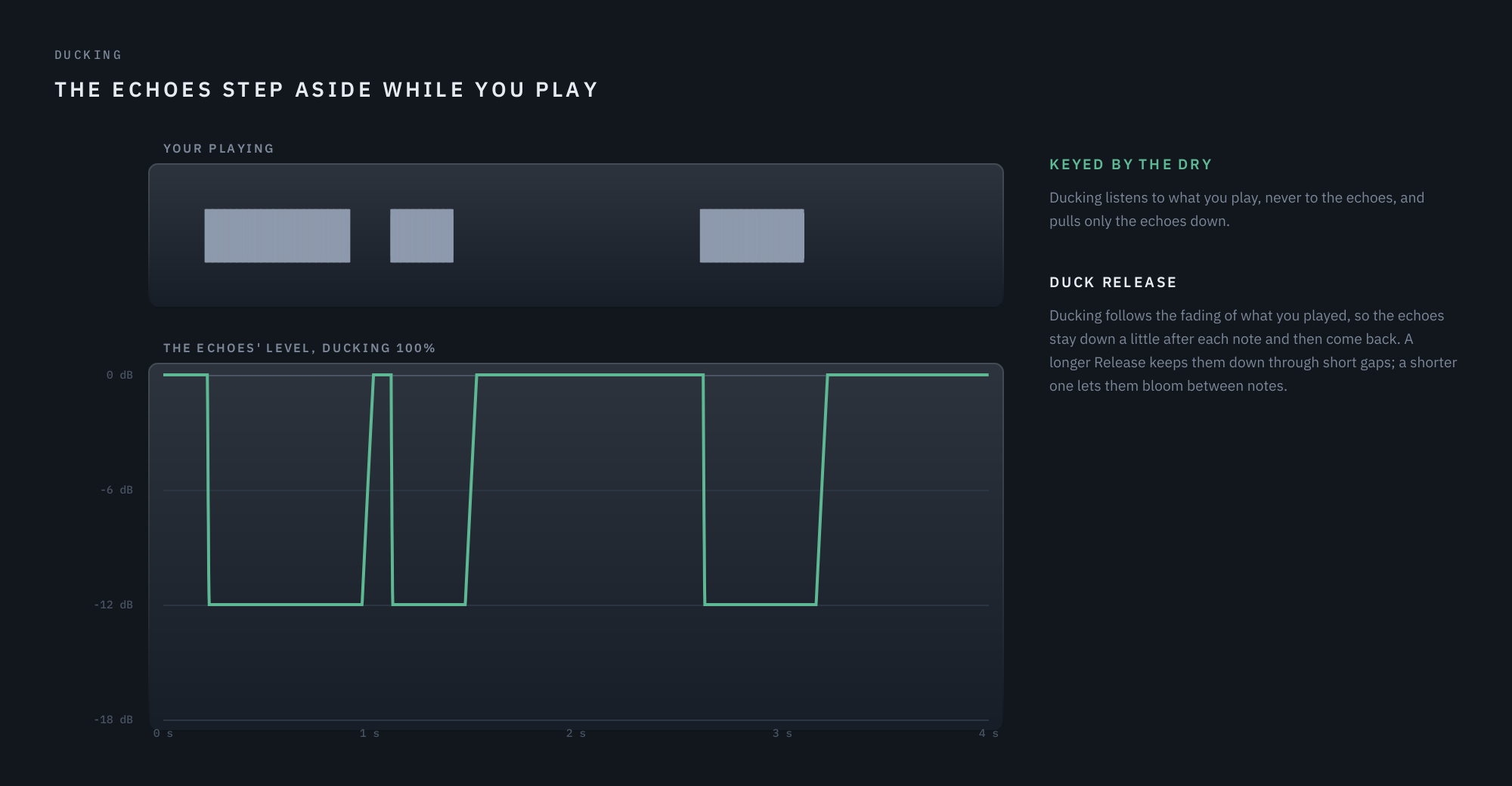
Three phrases of playing, and the echoes pulled down 12 dB under each.
ADVANCED PAGE — The grain settings from Ghostlight Pro, and the rates. Open it with the Advanced button at the bottom left.
Size and Density
0.5 – 2x · default 1x
How long each grain is, and how many there are, around what Grain sets on the main page. Grain moves both together, from long and sparse to short and dense; these move each on its own.
Jitter
0 – 100% · default 70%
How far back into the cloud a grain may reach for its material. Low settings keep the grains close to what is sounding now; high settings scatter them through the recent past.
Spread
0 – 100% · default 60%
How widely the grains are placed across the stereo field.
Reverse
0 – 100% · default Off
The share of grains played backwards.
Shimmer Pan and Pan Rate
Shimmer Pan 0 – 100% · default Off; Pan Rate 0.02 – 2 Hz free, or 1/32 – 8 Bars synced · default 0.15 Hz
The pitched grains sweep slowly from side to side, and Pan Rate sets how fast. Its note button works as Time’s does: Free, Straight, Triplet, Dotted, and synced the knob picks a note value, one sweep for each.
Wow Rate and Flutter Rate
Wow Rate 0.5 – 2 Hz · default 1 Hz; Flutter Rate 6 – 20 Hz · default 12 Hz
How fast Wow drifts and Flutter wobbles. The drift stays irregular at any rate; these set the pace it wanders around.
Duck Release
50 ms – 2 s · default 600 ms
How long the echoes take to swell back once you stop playing. Short settings let them bloom between notes; long ones keep them down through a phrase and bring them back only in real pauses.
Pong Swing
Off (50%) – 75% · default Off
Ping-Pong’s groove: every other repeat lands late, while each pair of repeats stays on the beat. About 67% is a triplet shuffle. It acts only on the bounce, so it is dimmed while Ping-Pong is off.
Pong Width
Centre (0%) – 100% · default 100%
How far apart Ping-Pong’s two sides sit. At 100% the bounce is hard left and right, which is how the plugin has always sounded; turn it down and the two sides move toward the middle, and at Centre the bounce is gone while the rhythm, Pong Swing and all, stays exactly as it was. It is a proper pan, not a narrowing, so the repeats keep their level as they close in. Dimmed while Ping-Pong is off. It combines with Width in Output: half a bounce inside a half-width image sits at a quarter of full.
Travel
Off – 100% · default Off
Ping-Pong’s repeats cross the field instead of jumping between the sides. At Off each repeat lands on its own side and stays there, which is how the bounce has always worked. Turn it up and the sound is born at one side and walks to the other over a delay, so the two streams pass through each other in the middle. It is a pan, not a fade, so nothing gets quieter on the way across. Dimmed while Ping-Pong is off.
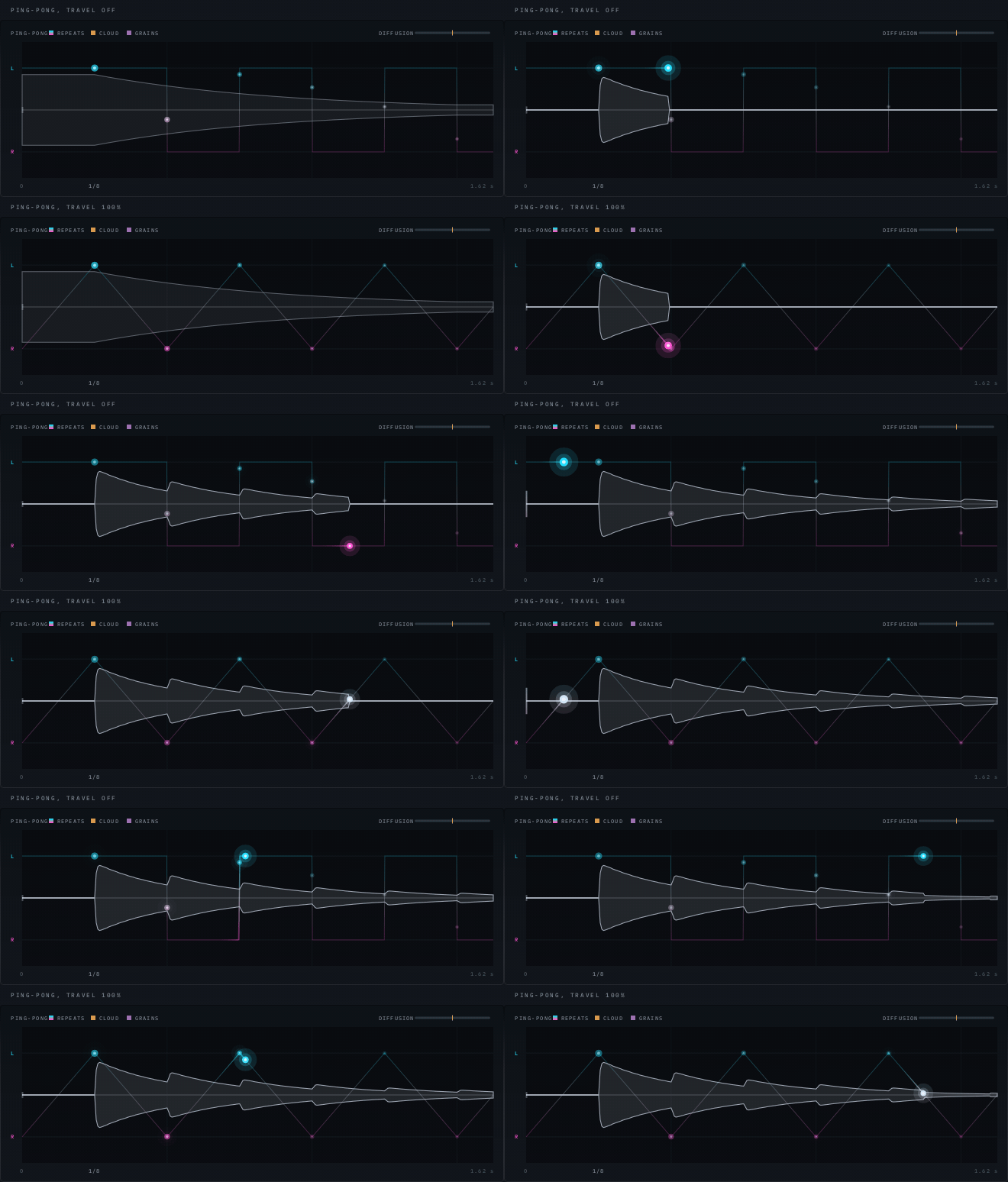
The same settings apart from Travel. Above, the dot crosses the full height between one repeat and the next; below, it leans across the whole gap.
Worth knowing: it sweeps sustained material. A short percussive repeat has already stopped before the walk has moved, so drums still land on one side and stay there; pads, guitars and held notes travel.
Orbit Steps
2 – 16 · default 4
In Orbit, how many repeats one crossing from left to right takes; dimmed in the other modes. Where a note’s walk starts depends on where it lands against the walk; notes on the beat, with Time synced, land on its steps.
Orbit Depth
Flat – 100% · default Flat
How much of Orbit’s walk is a circle rather than a line. Two speakers can only place a sound between them, so a circle needs a second direction, and that one is distance: as the echoes go round they also move away and come back, growing quieter and duller behind you and louder and brighter in front. At Flat it is the plain walk across. Dimmed in the other modes.
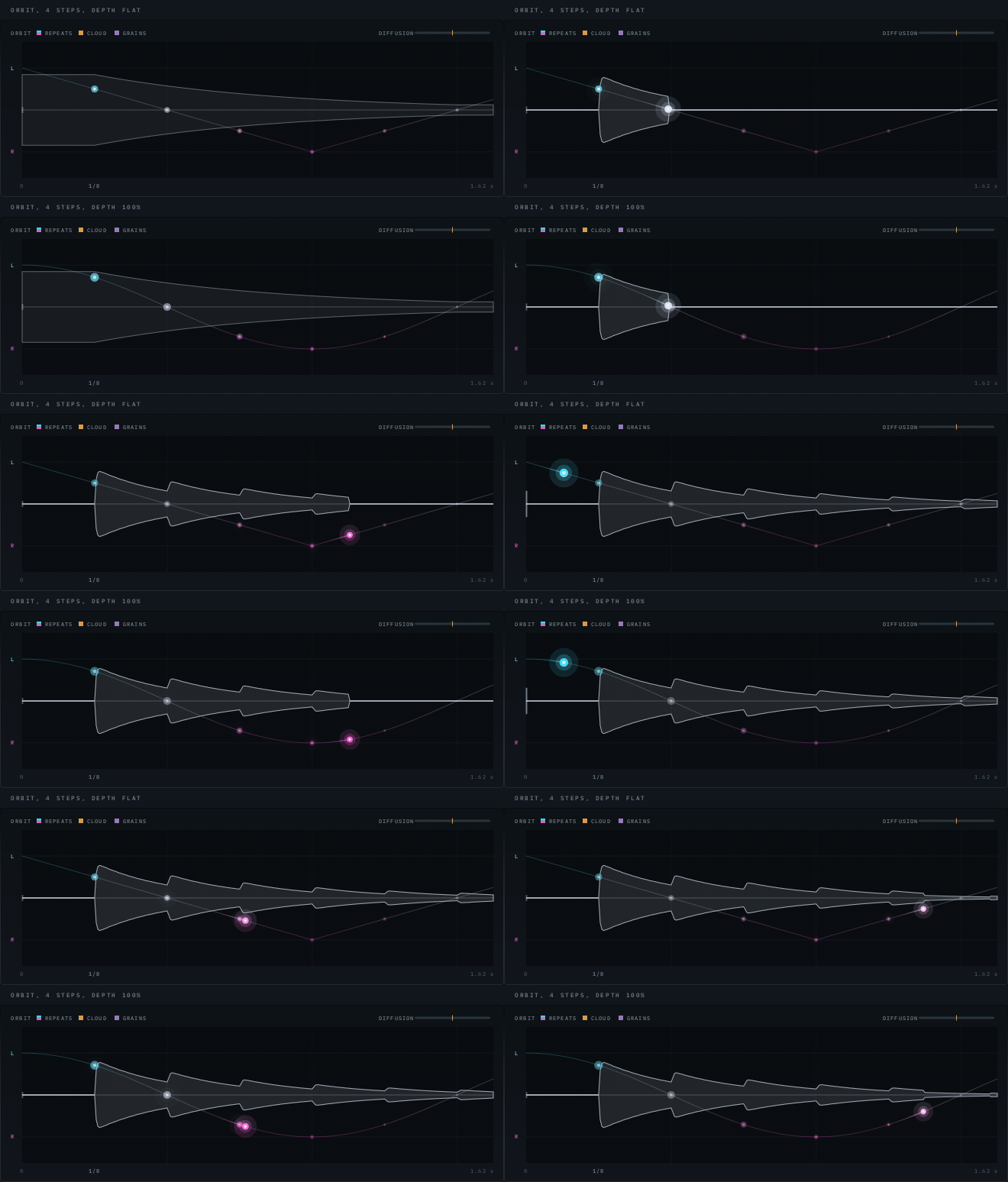
Four steps in both. Above, the plain walk across; below, the dots shrink and dim as they pass behind you and grow coming back.
It is built from level and tone alone — no phase tricks, no inter-channel delay — so nothing collapses if the track is folded to mono. The sound does get quieter as it passes behind, by up to 6 dB, and that is the effect rather than a fault.
Stop Time and Start Time
Stop Time 100 ms – 4 s · default 1 s; Start Time 50 ms – 2 s · default 400 ms
How long Stop takes to wind the echoes down to a halt, and how long they take to spin back up once you let go.
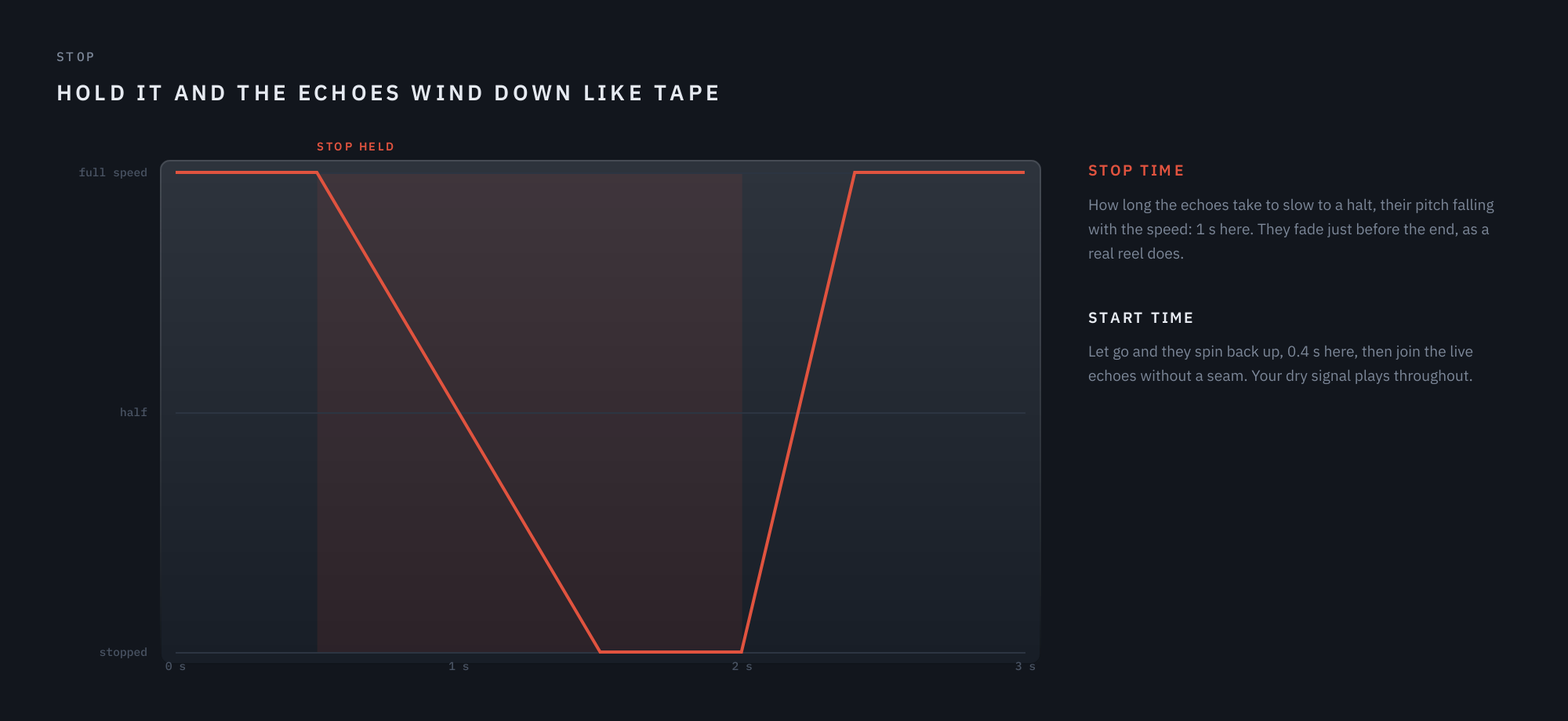
Stop Time 1 s, Start Time 400 ms.
HEADER — Along the top of the panel.
Freeze
Holds the repeats with the input muted. The cloud keeps ringing on them and the grains hold too. Low Cut, Warm and Clipper ease off while it holds and come back when you release it; Wow and Flutter keep drifting.
Stop
Hold it and the echoes wind down to a halt, their pitch falling like tape when the motor stops, the cloud and the grains with them; let go and they spin back up. Your dry signal keeps playing throughout. Over Freeze, it winds the held tail down. How long each way takes is Stop Time and Start Time, on the Advanced page.
06 The Filter page
A filter with a life of its own. Choose a Type and it is there; at Off it is not there at all, and every knob on the page but Type is dimmed. Open the page with the Filter button at the bottom left; Output stays where it is.
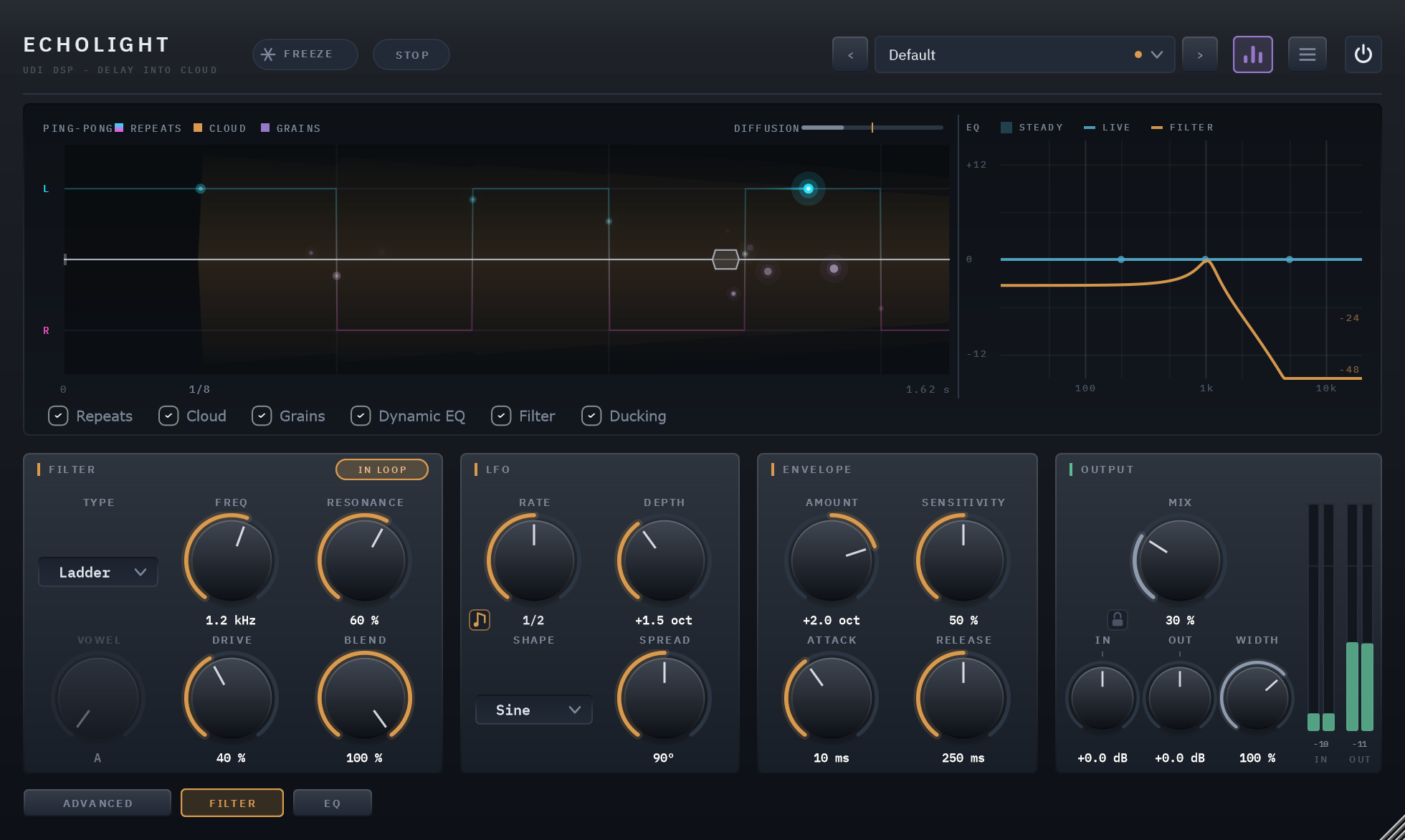
A ladder filter inside the loop, swept by the LFO and pushed up by your playing. Vowel is dimmed: only Formant uses it.
The page has three sections. Filter is the filter itself, with the pill in its title row that decides where it sits. LFO moves it in time with the song. Envelope moves it with your playing. The LFO and the envelope add together: each moves the filter by octaves from where Freq sets it, so a filter at 800 Hz with the LFO one octave deep sweeps between 400 Hz and 1.6 kHz, and a loud note can push it further.
Where it sits: After Loop or In Loop
The pill in the Filter section’s title row switches between the two places a filter can be in a delay, and the difference between them is the idea of chapter 02: what happens once, and what compounds.
- After Loop (the default, unlit) filters everything the echoes became — the repeats, the cloud and the grains — once, just before the EQ. Every repeat is filtered alike, and the filter’s motion is heard on the whole wet sound, crisp even over a long cloud. Think of it as a filter on the effect’s return.
- In Loop (lit) puts the filter inside the delay, on the way into the delay line, where Warm is. The first repeat passes it once, the second twice, the fifth five times. A low-pass darkens each echo further than the last; a high-pass thins them away; a band-pass narrows them toward a ringing tone; a comb or a formant grows stronger with every pass. Motion is written into the echoes as they are made, so a sweep comes back a delay later and sweeps again on top of itself.
In the loop the filter never lifts any frequency, however high Resonance goes (chapter 02, Nothing runs away): a resonant peak stays at 0 dB and the rest of the spectrum gets quieter around it, so no repeat is ever louder than the one before. After the loop a peak may stand up to 6 dB proud. Freeze eases an In Loop filter out while it holds, so a frozen tail is not filtered away on every pass, and brings it back when you release it. Switching between the two places crossfades, as does changing Type.
Seven types
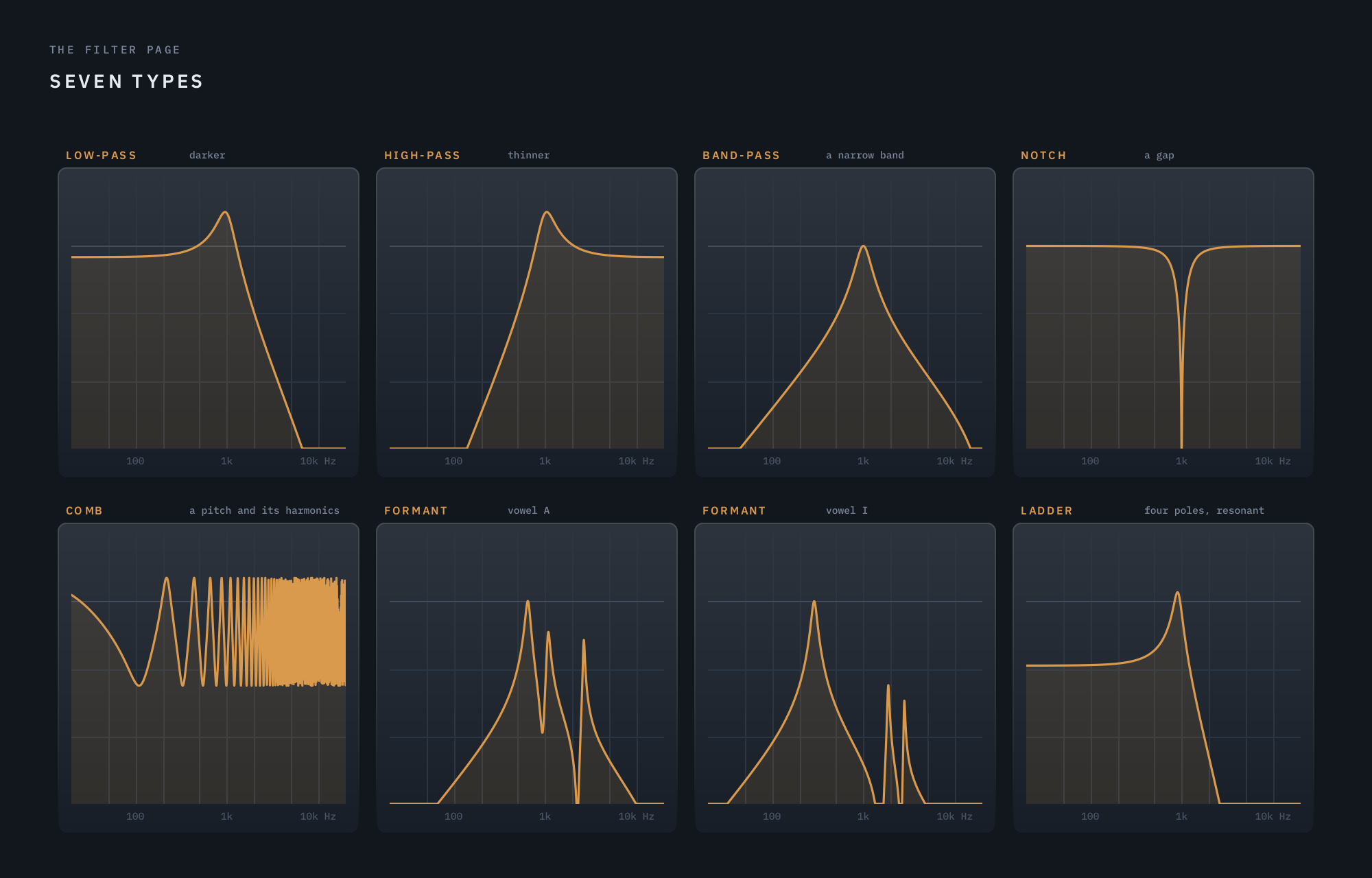
Each type After Loop, at a middle Resonance.
- Low-Pass keeps what is below Freq and rolls off above it at 12 dB an octave. Resonance adds a peak at Freq. The classic way to push echoes back in a mix, or, In Loop, to make each repeat duller than the last.
- High-Pass is its mirror: it keeps what is above Freq. Useful for keeping a long tail out of the bass, or for echoes that thin away to air.
- Band-Pass keeps a band around Freq, narrower as Resonance rises — telephone echoes, or with motion the classic wah.
- Notch cuts a gap at Freq and keeps everything else. Swept by the LFO, it is a gentle phaser-like movement.
- Comb is pitched at Freq: it lets through Freq and its harmonics and cuts between them, so the echoes take on a note. Resonance makes it ring longer. Moved by the LFO it becomes a flanger; In Loop the pitch builds with every pass.
- Formant makes the echoes speak a vowel: three bands placed where a voice places them for A, E, I, O and U, with Vowel moving between them and Resonance narrowing them. Freq does nothing here; the LFO and the envelope move Vowel instead, one vowel per octave of movement, so the echoes can talk.
- Ladder is the four-pole analog low-pass: 24 dB an octave, twice as steep as Low-Pass, with the rounder resonance of the classic synthesizer circuit — the low end thins as Resonance rises, as on the original. Drive pushes it into saturation, taking the level back afterwards so quiet sounds stay where they were and loud ones thicken.
Motion: the LFO and the envelope
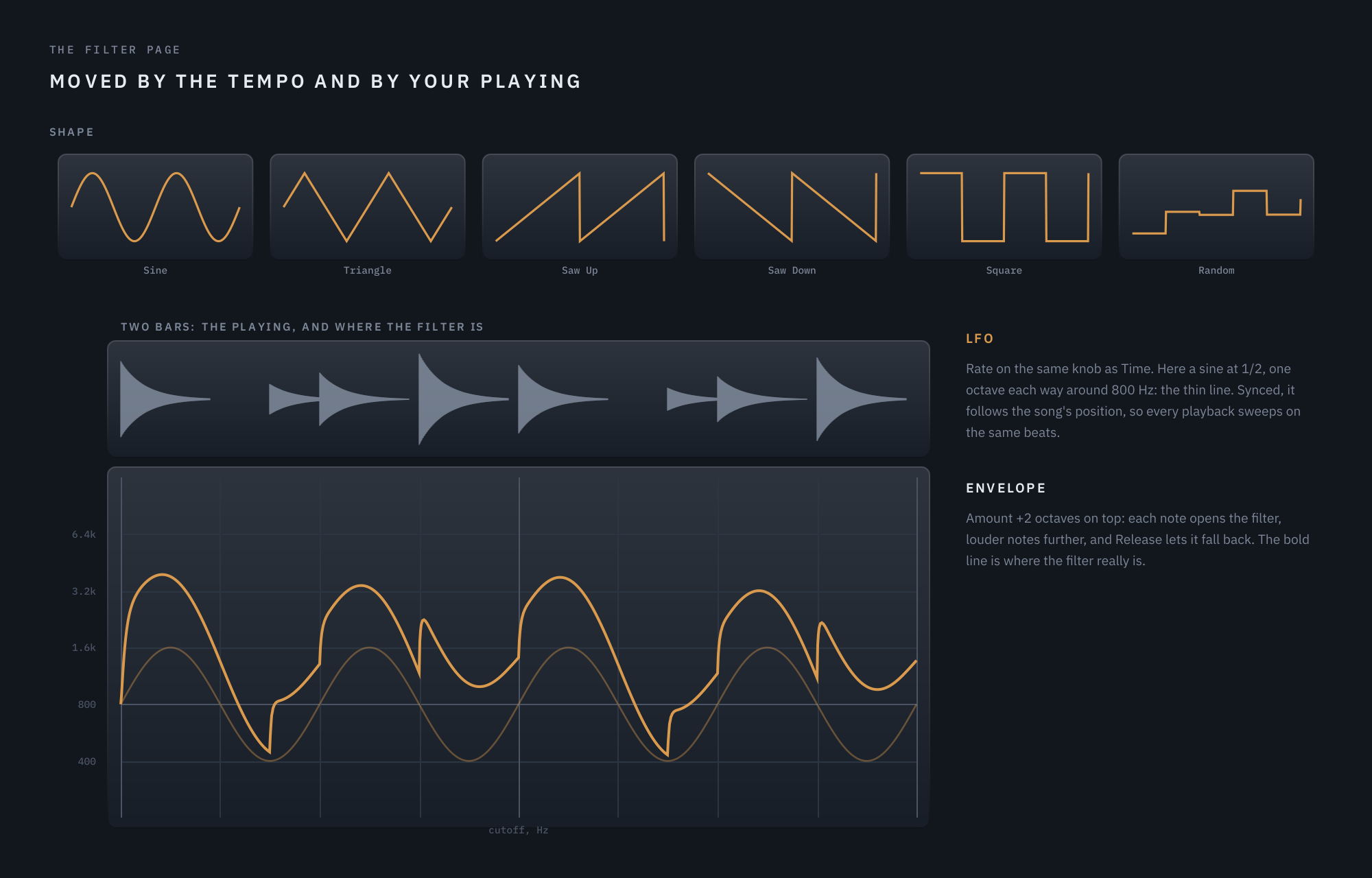
A low-pass at 800 Hz: the LFO alone, thin, and with the envelope following the playing, bold.
The LFO moves the filter on its own. Rate uses the same knob as Time: in Free it is in hertz, and the note button syncs it to the tempo, one cycle a note value, straight, triplet or dotted. Synced, it follows the song’s position while the host plays, so a sweep lands on the same beat every time the song plays from the same place — the filter moves with the music rather than beside it. Depth sets how far it moves each way, up to 4 octaves. Shape picks the movement: a smooth Sine or Triangle, a rising Saw Up or falling Saw Down, a two-step Square, or Random, a new step each cycle that repeats the same way on every playback. Every step is softened over a few milliseconds, so none of them clicks. Spread holds the right side’s sweep behind the left’s, up to half a cycle, so the movement crosses the stereo field.
The envelope follows your playing. It listens to your dry input, never to the echoes, so a loud echo cannot hold the filter open. Amount sets how far it moves the filter at the top of its range: to the right the filter opens as you play harder, to the left it closes. Sensitivity sets how loud you need to play for it to move: at 50% it starts to respond at about -33 dBFS and reaches its full Amount by about -3 dBFS; higher settings respond to quieter playing. Attack sets how quickly it follows a note as it starts, Release how slowly it lets the filter return once the note is over. In Loop, the envelope’s movement is written into each echo as it is made, so the echo of a hard-played note comes back with the same bright opening.
On the display
With a Type chosen, the display’s strip at the right draws the filter’s curve in amber beside the EQ’s: a thin line where the knobs set it, and a bold line that moves with the LFO and the envelope, exactly as you hear it. It is calculated from the same filter the audio runs through. The Filter checkbox takes it away.
The controls, in the order they appear on the page:
Type
Off, Low-Pass, High-Pass, Band-Pass, Notch, Comb, Formant, Ladder · default Off
Low-Pass, High-Pass, Band-Pass and Notch are the classic shapes. Comb is pitched at Freq: it colours the sound with a note and its harmonics, ringing longer as Resonance rises, and swept it becomes a flanger. Formant makes the echoes speak a vowel. Ladder is the analog four-pole low-pass, steeper and warmer than Low-Pass, with Drive. Changing type crossfades, so it never clicks.
After Loop / In Loop
the pill in the Filter section's title row · default After Loop
After Loop filters everything the echoes became — the repeats, the cloud and the grains — once, before the EQ. In Loop puts the filter inside the delay: the first repeat is filtered once and every repeat after it again, so a low-pass darkens each echo further than the last and a band-pass narrows them toward a tone. In the loop the filter never boosts anything, however high Resonance goes, so the echoes can never run away; after the loop a resonant peak may stand up to 6 dB proud. Freeze eases an In Loop filter out while it holds, so a frozen tail is not filtered away.
Freq
20 Hz – 20 kHz · default 1 kHz
Where the filter sits, and Comb’s pitch. The LFO and the envelope move it from here.
Resonance
0 – 100% · default 25%
How sharply the filter rings at Freq: a peak for the classic shapes and Ladder, a longer ring for Comb, narrower vowels for Formant.
Vowel
A – E – I – O – U · default A
Formant’s vowel, and every shade between. The LFO and the envelope move it a vowel an octave, so the echoes can talk.
Drive
Off – 100% · default Off
Ladder’s drive, pushing it into saturation. Quiet sounds keep their level; loud ones thicken and growl.
Blend
0 – 100% · default 100%
How much of the filtered sound replaces what it filters. Below 100% the filter is a colour rather than a cut.
Rate
Free 0.02 – 20 Hz, or 1/32 – 8 bars straight, triplet or dotted · default 1/2
How fast the LFO moves the filter. The note button cycles Free, Straight, Triplet and Dotted, as Time’s does. Synced, the LFO follows the song’s position while it plays, so a sweep lands on the same beat every time.
Depth
Off – 4 octaves · default Off
How far the LFO moves the filter each way.
Shape
Sine, Triangle, Saw Up, Saw Down, Square, Random · default Sine
The LFO’s shape: smooth sweeps, rising or falling ramps, a two-step square, or a random step each cycle, which repeats the same way each time the song plays.
Spread
Off – 180° · default Off
Holds the right side’s sweep behind the left’s, so the movement travels across the stereo field.
Amount
−4 – +4 octaves · default Off (centre)
How far your playing moves the filter: to the right it opens as you play, to the left it closes. The envelope listens to your dry input, so the echoes of a loud note do not keep it open.
Sensitivity
0 – 100% · default 50%
How quiet a note may be and still move the filter all the way.
Attack and Release
Attack 1 – 500 ms · default 10 ms; Release 10 ms – 2 s · default 250 ms
How fast the filter follows a note as it starts, and how slowly it returns once the note is over.
07 The EQ page
A three-band dynamic EQ on the wet signal — the echoes, the cloud and the grains — after the Filter and before Ducking. It never touches your dry signal, and with every band at its defaults it is not there at all, to the bit. Open the page with the EQ button at the bottom left.
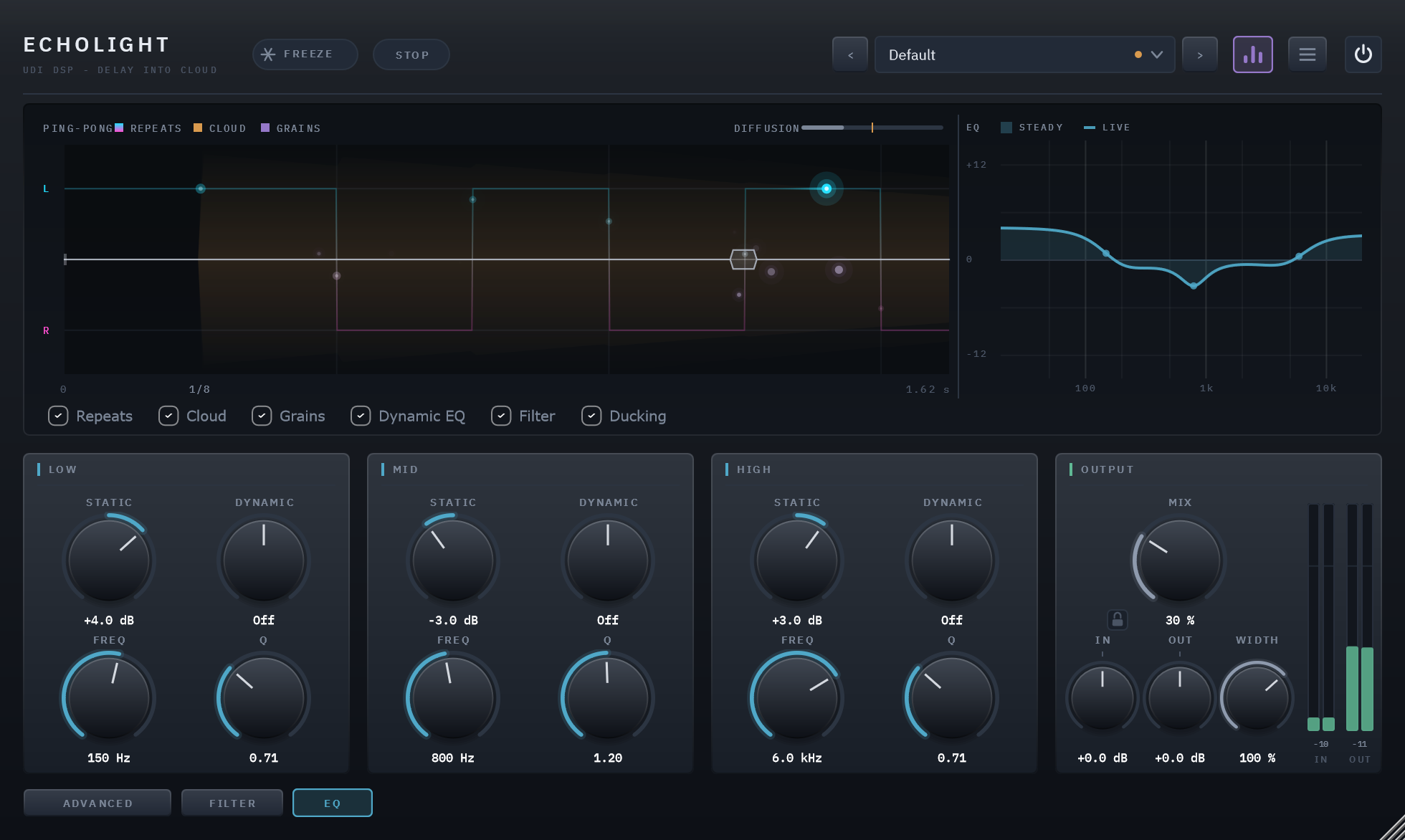
The low end lifted, a gentle dip in the mids, a little air at the top.
It is the same dynamic EQ as Clearlight’s and Ghostlight Pro’s, UDI DSP’s reverbs, and it does the same job here: a long wet tail builds up in ways a dry sound doesn’t — low end that booms as echoes stack, a top that turns harsh as the cloud rings — and a fixed EQ that fixes the loud moments dulls the quiet ones.
Why it is never in the loop. An EQ boost inside a delay’s loop lifts its band again on every pass, and at high Feedback that band grows until it takes over. After the loop, a boost is just a boost (chapter 02).
Static and Dynamic
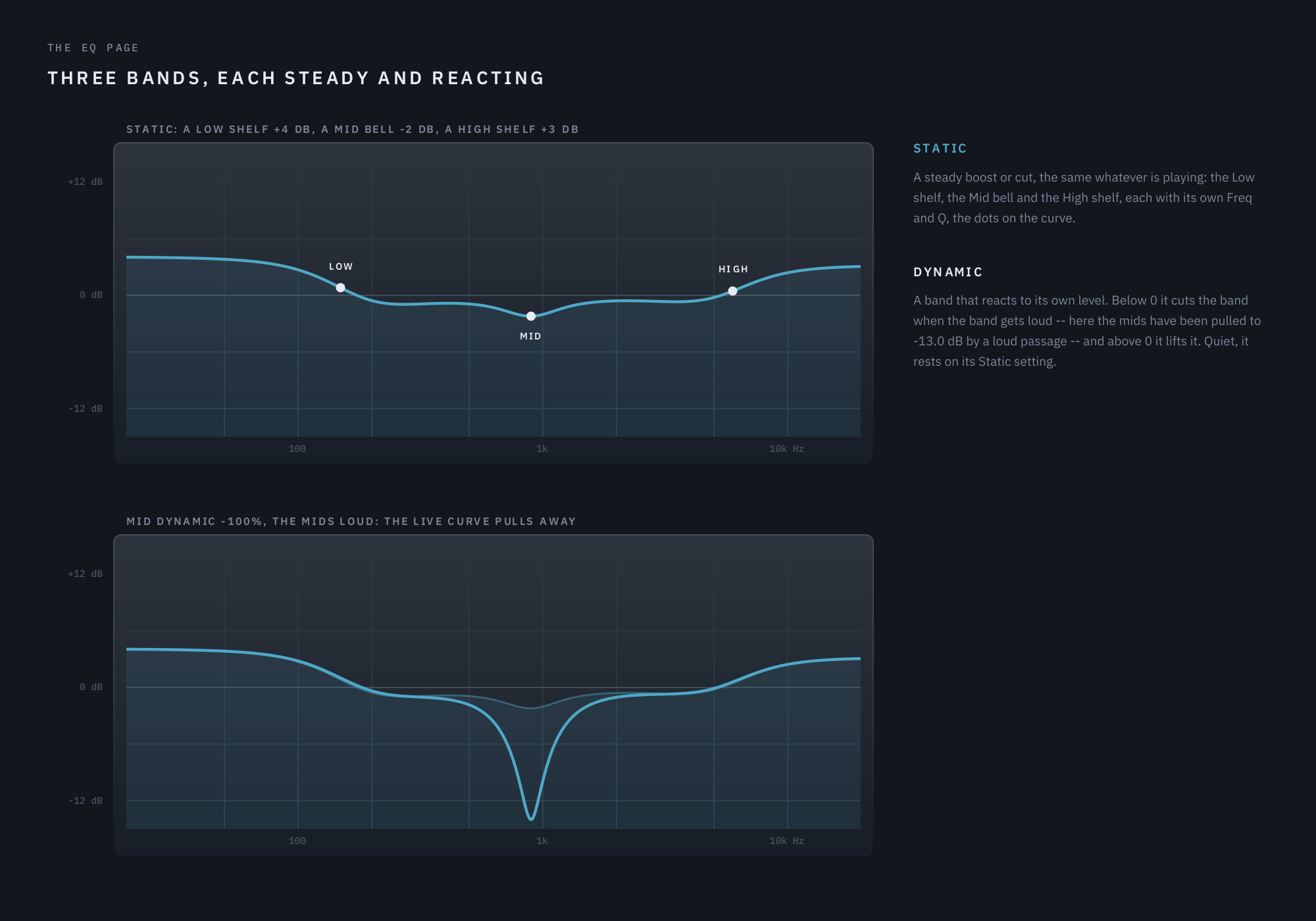
The live curve is read from the plugin’s own EQ after a second of loud noise.
Each band has two gains that stack:
- Static is an ordinary EQ: a steady boost or cut, up to ±12 dB, the same whatever is playing.
- Dynamic reacts to the band’s own level. Each band listens to its own part of the spectrum — the Low band to the lows, and so on — and when that part gets loud, Dynamic moves the band. Below 0 it cuts the band as it gets loud: a boomy low end that builds as echoes stack is pulled down in the loud moments and left alone in the quiet ones. Above 0 it lifts the band as it gets loud, adding weight exactly where the sound is already strongest. At 0 (Off) the band is purely static.
The reaction is smooth — it follows the level rather than each wave — and its thresholds come from Clearlight, where they were measured on real program material.
The three bands
- Low is a shelf: it moves everything below its Freq (20 Hz – 1 kHz, 200 Hz by default).
- Mid is a bell: it moves a band around its Freq (200 Hz – 8 kHz, 1 kHz by default).
- High is a shelf: it moves everything above its Freq (1.5 – 16 kHz, 5 kHz by default).
Q sets how wide the bell is and how steep the shelves are: higher is narrower and steeper.
On the display
The strip at the right of the display draws the EQ on every page: the steady curve filled, the live curve over it, and a dot at each band’s frequency. When a Dynamic band reacts, you see the live curve pull away from the steady one. It is calculated from the same filters the audio runs through. The Dynamic EQ checkbox takes it away.
A few starting points
- A tail that booms: Low Freq around 150 Hz, Low Dynamic -50%. The bass of the echoes comes down only when it piles up.
- A cloud that turns harsh: High Freq around 6 kHz, High Dynamic -40%. Shimmer and bright repeats stay sweet at their loudest.
- Echoes that sit behind a vocal: Mid Static -3 dB around 1.5 kHz, with a gentle Q, to open a space in the wet sound where the voice lives.
The controls, in the order they appear on the page:
Low, Mid and High — Static, Dynamic, Freq and Q
Static ±12 dB · Dynamic −100% – +100% · Freq per band · Q 0.3 – 4.0 · default 0 dB / Off
Three bands: a Low shelf, a Mid bell and a High shelf. Static is a steady boost or cut. Dynamic reacts to the band’s own level once it gets loud: below 0 it cuts the band — taming a boomy low end or a harsh top that builds up in a long tail — and above 0 it lifts it. The two stack. Freq moves the shelf’s corner or the bell’s centre (Low 20 Hz – 1 kHz, Mid 200 Hz – 8 kHz, High 1.5 – 16 kHz), and Q sets how wide the bell is and how steep the shelves are.
08 Presets
Echolight ships with a factory bank of 44 presets in 7 categories, in the preset field’s Factory submenu, and Default, which holds no settings of its own: loading it returns every control to its factory value.
- Classic Delay — plain echoes on the grid: quarters, dotted eighths, ping-pong, triplets and swing, and a free-running long echo: Quarter Note Echo, Dotted Eighth, Eighth Ping-Pong, Triplet Bounce, Swing Pong, Long Free Echo, Clean Digital.
- Tape & Character — Warm, Clipper, Wow and Flutter wearing the repeats, from a slapback to a dub feedback loop: Tape Slap, Worn Cassette, Space Echo Drive, Dub Feedback, Warbly Lo-Fi, Crushed Echo.
- Vocals — echoes that stay out of the words: slaps, ducked throws, a doubler and soft clouds: Vocal Slap, Ducked Eighth, Throw Quarter, Airy Cloud, Octave Halo, Wide Doubler.
- Guitar — the dotted-eighth lead, a country slap, swells and washes, Orbit arpeggios and an octave shimmer: Dotted Edge, Country Slap, Ambient Swell, Shoegaze Wash, Orbit Arpeggio, Octave Shimmer Lead.
- Keys & Pads — soft echoes that dissolve into pads, shimmer and grains: Soft Keys Echo, Dissolving Pad, Fifth Shimmer, Glass Grains, Night Drift, Endless Bloom.
- Filter & Motion — the Filter page moving in and after the loop: sweeps, an envelope wah, a talking formant, comb and ladder: Sweeping Echo, Auto-Wah Repeats, Resonant Ladder Loop, Talking Echo, Comb Resonator, Stereo Notch Sweep, Random Steps.
- Clouds & Design — the echoes dissolving: into a cloud, a shimmering cathedral, reversed grains and a long horizon: Delay Into Cloud, Cathedral Shimmer, Reverse Grain Haze, Sub Octave Rumble, Scatter Pong, Infinite Horizon.
Most follow your song’s tempo, since Time is synced by default; the slaps and a few free-running echoes set their own time in milliseconds. No preset turns on Freeze or Stop.
Your own presets are managed from the preset field’s menu: Save, Save As…, Delete and Open Preset Folder (%APPDATA%\udidsp\Echolight\Presets), with Factory and User submenus to load from. A preset carries every control except bypass, and loading one resets every control first, so it is always an absolute starting point — except Mix, In and Out while the padlock beside Mix is closed (chapter 05), which stay where you set them. The arrows either side of the field step through the list and wrap around; a dot in the field means the loaded preset has been changed since it was loaded.
09 Technical specifications
| Format | VST3 (Windows x64), Standalone app included — AU / macOS not yet available |
| Channels | Mono in and out, or stereo in and out |
| Latency | 0 samples |
| Bypass | The power switch at the panel’s top right — a 20 ms crossfade |
| Delay | Up to 30 seconds free; 1/32 to 8 bars synced, straight, triplet or dotted |
| Cloud | A six-stage diffuser into an 8-line feedback delay network, 0.8 – 12 s decay |
| Grains | Ghostlight Pro’s granular engine |
| Filter | Low-pass, high-pass, band-pass, notch, comb, formant and ladder, after the loop or inside it, moved by a tempo-synced LFO and an envelope |
| Dynamic EQ | A low shelf, a mid bell and a high shelf, each steady (±12 dB) and level-reactive, on the wet signal |
| Live parameters | 78 |
| Factory presets | 44 in seven categories, plus Default |
| Licensing | Moonbase activation, online or offline; a free trial; unlicensed, a short noise burst every 45 s of signal |
| CPU (measured) | 1.2% of one core idle, 6.4% worst case — everything maxed, the Filter page included — @ 48 kHz stereo, 512-sample blocks |
| Tail reporting | 42 s (the longest delay plus the longest cloud), reported to host |
| Shares with Ghostlight Pro | The grain engine and the UI toolkit — built for a different job |