Toolbox
Six effects running side by side instead of in a chain — warmth, compression, ducking, clipping, a bit crusher and a chorus, flanger or phaser — each blended into one sum, with a dynamic EQ and a filter you can put before them or after them.
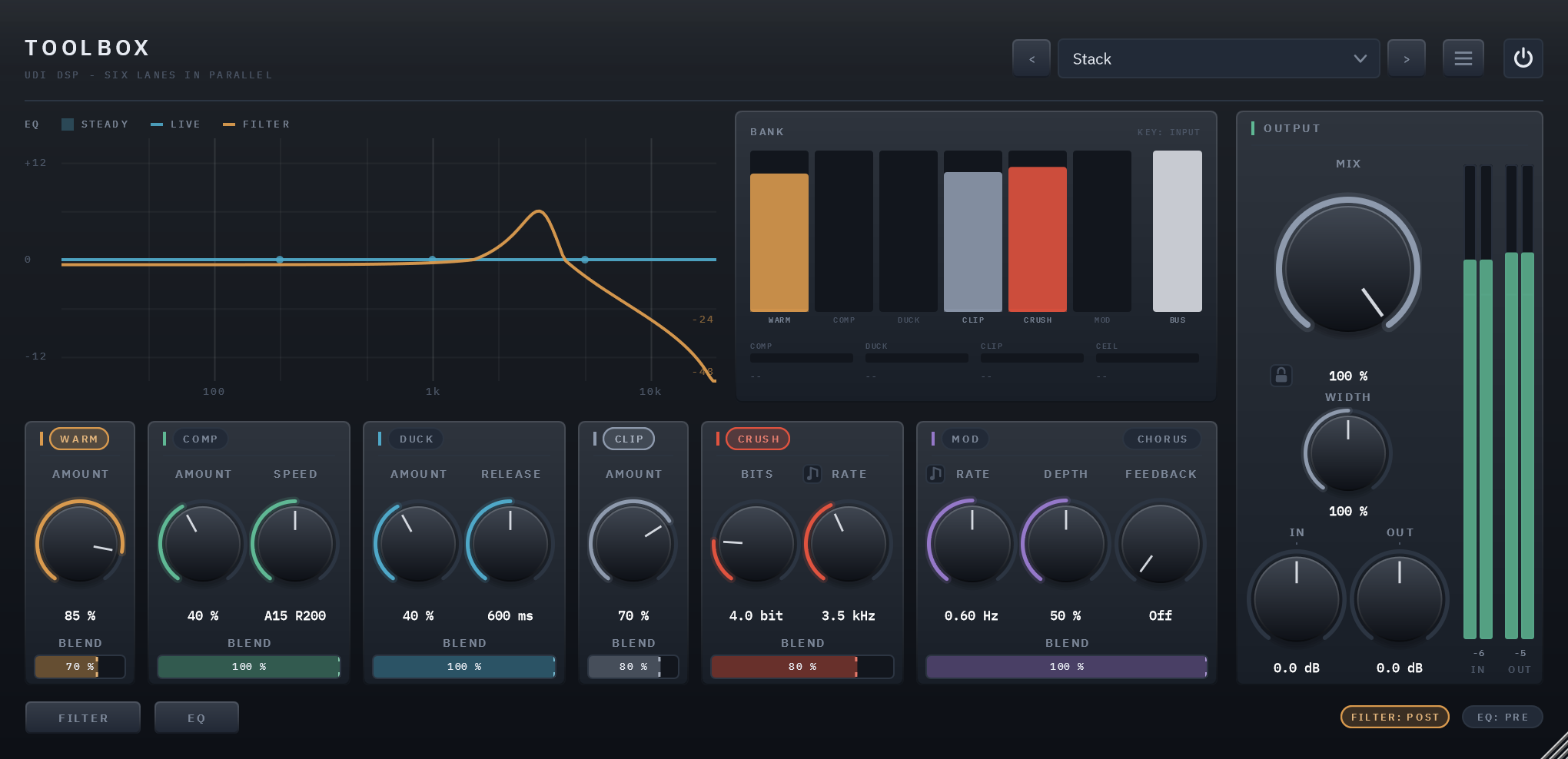
Six lanes that add, not a chain that replaces
Most plugins with several effects chain them: each one processes what the last one handed it. Toolbox doesn't. Every lane hears the same signal, and each adds only what it changes, as much of it as you blend in. That is how parallel compression and parallel saturation have always worked on a mixing desk, and in Toolbox it is how everything works.
So you can drive a lane hard and add only a trace of it, and a lane you switch off can never change what another one is doing. A freshly inserted Toolbox does nothing at all: every lane starts off, and what comes out is exactly what went in, to the bit. Turn on what you came for.
The same clip, dry and wet
8 sources, each run through the factory preset built for it. Toggle Dry/Wet mid-playback — it crossfades from the same instant rather than restarting.
Six lanes in parallel
WARM, COMP, DUCK, CLIP, CRUSH and MOD, side by side. Each hears the same signal and adds only its difference from it, through a BLEND fader of its own.
Parallel compression by design
Squash COMP as hard as you like and blend it under the dry signal, the way it has always been done on a desk. The same shape makes WARM parallel saturation.
A ducker with a real sidechain
Send a kick to Toolbox's sidechain input and put it on the bass: the bass makes room for every kick. RELEASE sets how it swells back, from a pump to a breath.
Lo-fi that stays musical
CRUSH takes away bits and sample rate behind the kind of filter a real converter puts in front of its sampler, so it darkens as the rate falls, the way old samplers do. Sync it and the crush comes and goes in time: in for the second half of every note value, from 1/32 to 8 bars.
Chorus, flanger, phaser
Three different machines in one lane, not one knob's travel. RATE runs free or follows the song's tempo, from 1/32 to 8 bars, and changing type crossfades.
EQ and filter, before or after
A three-band dynamic EQ and a seven-type filter, each on its own page and each placed before or after the lanes with one click. On the same side they run EQ first, so the filter keeps filtering.
Solo any lane
Alt-click a lane's name to hear it alone, even while it's switched off, which is how you audition one. The other lanes fade out, so a solo never clicks.
Width that survives mono
WIDTH runs from mono to twice as wide. Whatever widening adds, a mono speaker takes away again exactly, so the mono sum never changes.
A ceiling you never set
An always-on guard after the lanes, the EQ and the filter, so six lanes stacking can't run the output away. It leaves everything below about +9 dBFS untouched.
Every lane adds its difference
In a chain, an effect replaces the signal with its own version of it. In Toolbox every lane is handed the same signal, and what it adds to the output is only its difference from that signal, scaled by its BLEND: the output is the input plus, for every lane at once, BLEND times what the lane made of it minus the input.
Three things follow. At BLEND 0 a lane adds nothing, however hard it is working, so a compressor slammed and blended low is parallel compression, and heavy WARM at a low blend is parallel saturation. Switching a lane off can't change any other lane. And the order of the lanes doesn't matter, because a sum has no order: they are laid out the way you'd reach for them, colour first, then dynamics, then the two effects.
Before the lanes, or after them
The dynamic EQ and the filter each sit Pre or Post, set independently with a click in the footer. Pre shapes what the lanes receive: take out a resonance before it's compressed, filter something before you crush it. Post cleans up what they made: roll off the top of a distortion, tame a band the saturation brought forward.
When both land on the same side they run one after the other, EQ first, not side by side. Summed side by side, a low-pass stops filtering wherever the EQ boosts: measured, a 900 Hz low-pass let 19.9 kHz straight back through at +3.6 dB. In series it keeps doing what its name says. Moving either one crossfades, so it never clicks.
Hear one lane on its own
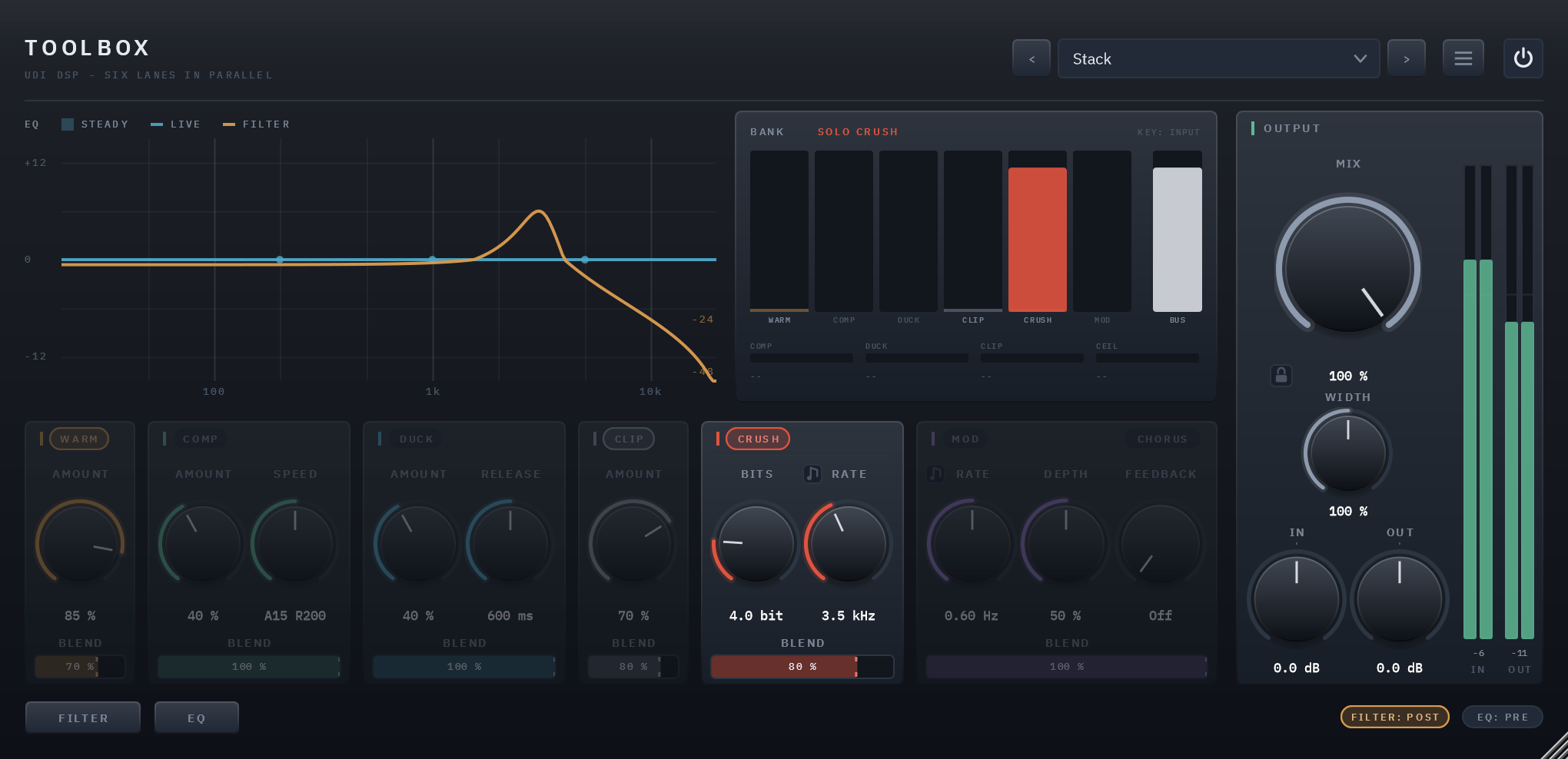
Alt-click a lane's name and the lanes play with only that one in them: the other lanes dim, and the BANK display names the solo in red. A soloed lane plays even when it's switched off, so you can audition a lane before committing to it, and the others fade out rather than cutting.
A solo is a way of listening, not part of a sound: it's never saved with a session or a preset, never automated, and it clears when you load a preset or close the panel.
A ceiling you never set
Six lanes summing, with a boosting EQ among them, can reach a long way past full scale, and CLIP is optional here. So after the lanes, the EQ and the filter sits a safety ceiling: a gentle limiter with no knob and no bypass, which leaves everything below about +9 dBFS untouched and never lets what reaches it past +12 dBFS. It is there to stop a runaway, not to master, and the display's CEIL reading shows when it's working.
Two displays, split by what they show
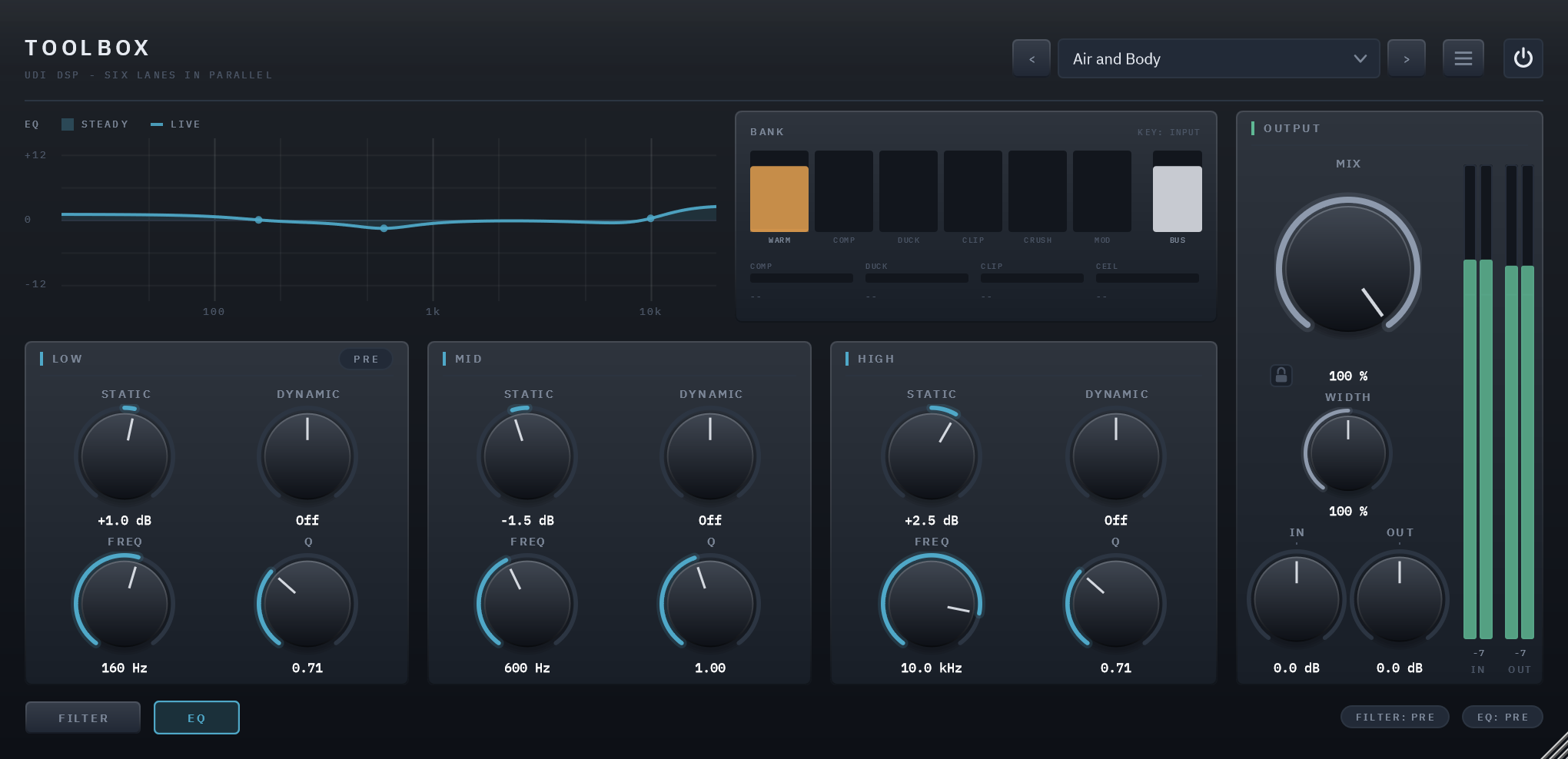
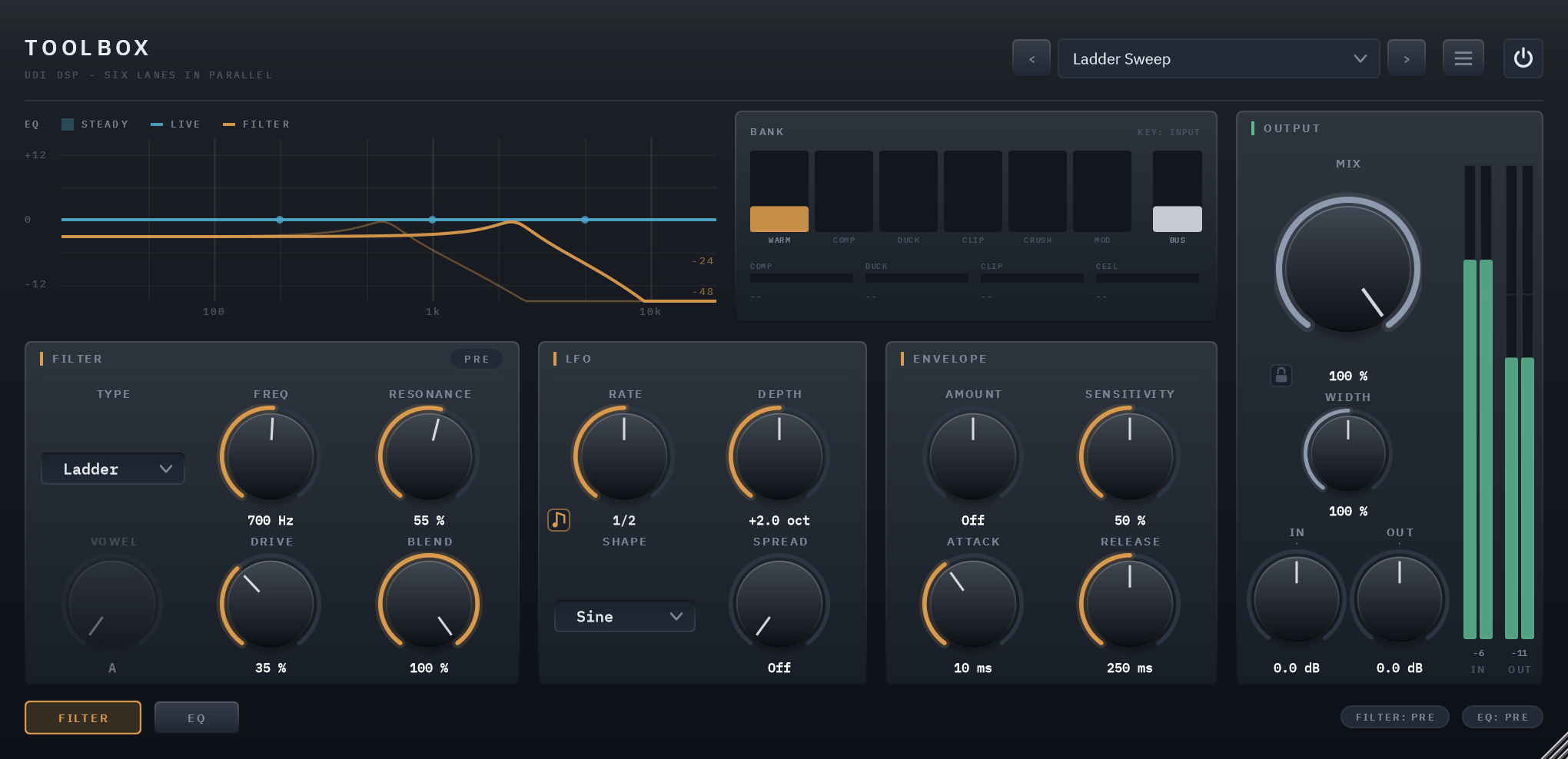
With up to eight things acting at once, one combined display would be unreadable, so there are two. The frequency display draws the EQ's curve and the filter's response from the same maths the audio uses: the EQ's steady shape filled against 0 dB with its live curve moving over it, and the filter's cuts on a deeper scale of their own.
The BANK display shows what each lane is contributing to the sum, not its output level: six bars in the same order as the lanes below them, feeding a BUS bar, so you can see when several are stacking. Underneath are gain-reduction readings for COMP, DUCK, CLIP and the ceiling, and KEY says whether DUCK is listening to the sidechain or to Toolbox's own input.
A dynamic EQ, before or after
Three bands, a low shelf, a mid bell and a high shelf, each with a steady Static boost or cut (±12 dB), a level-reactive Dynamic amount, and movable Frequency and Q. Below zero, Dynamic cuts a band only when it gets loud, so a de-esser does nothing on a quiet phrase. Set it before the lanes or after them; with every band at zero it isn't there at all.
A filter page, before or after
Low-pass, high-pass, band-pass, notch, comb, a formant filter that moves smoothly through the vowels A to U, and a ladder with drive, each with resonance and a blend of its own. An LFO moves it in six shapes, free or locked to the song's tempo, and an envelope makes it follow what you play.
Like the EQ, it sits before the lanes or after them: before, it shapes what they receive; after, it shapes what they made. At Off it isn't there at all.
Specifics, stated plainly
| Lanes | WARM, COMP, DUCK, CLIP, CRUSH and MOD, summed in parallel, each with its own BLEND; a dynamic EQ and a filter, each before or after them |
|---|---|
| Filter | Low-Pass, High-Pass, Band-Pass, Notch, Comb, Formant and Ladder, with an LFO (free, or synced to the host's tempo) and an envelope follower |
| Latency | 0 samples |
| Sidechain | Optional, mono or stereo; keys DUCK, which listens to Toolbox's own input when nothing is patched |
| Output | MIX against the dry signal, with a padlock that holds MIX, IN and OUT through preset changes; WIDTH from mono to 200 % with the mono sum untouched; an always-on safety ceiling |
| CPU | 0.1% of one core as inserted, 1.2% with every lane on, 2.7% worst case (every lane on and both pages working hard) — 48 kHz stereo, 512-sample blocks |
| Parameters and presets | 64 parameters, all automatable; 26 factory presets in seven categories, plus Default |
| Licensing | Free UDI DSP account, one-time online activation — no subscription, works offline for a week between checks |
Compatibility
- VST3, 64-bit — Windows 10/11 (a Standalone app is included in the installer). AU, AAX and macOS are coming soon.
- In active development — full per-host verification across DAWs is ongoing.
- Internet needed once, briefly, to activate (a short browser sign-in) — day-to-day use after that works offline for up to a week between checks.