Spherelight
One reverb for the whole room around you, from stereo to 9.1.6. It reads the layout your track already has and gives every speaker its own reverb, the early reflections arriving from the walls they come from.
 90% off
One reverb for the whole room around you
Spherelight is a reverb for immersive mixing, from stereo to 9.1.6. Put it on a 7.1.4 bus, a Dolby Atmos bed for example, and it gives every speaker its own reverb: no speaker is a copy of another, the early reflections arrive from the walls they come from, the height speakers answer the way a ceiling does, the rear sits further away, and the LFE stays dry.
It reads the layout your track already has, so there is nothing to set up: no speaker matrix, and controls about the space, not about the speakers. Choose the kind of space, a room, a chamber, a hall, a cathedral, open air, a steel plate or the vast Spherelight space, set its size and its decay, and Spherelight places the rest.
Every speaker its own reverb
Each output is a separate view into one reverb, so no two speakers play the same thing, and a stereo or 5.1 fold-down of the mix adds them up without combing.
Reflections from where they come from
Each early reflection, first and second order, is worked out from the room's walls, floor and ceiling and sent to the one speaker nearest the direction it arrives from.
Seven kinds of space
Room, Chamber, Hall, Cathedral, Open, Plate, and Spherelight, a vast hall twice a cathedral's size, each with its own shape and surfaces. SIZE moves within it, and DECAY alone sets how long the tail lasts, 0.35 to 60 seconds.
Hear the fold-down
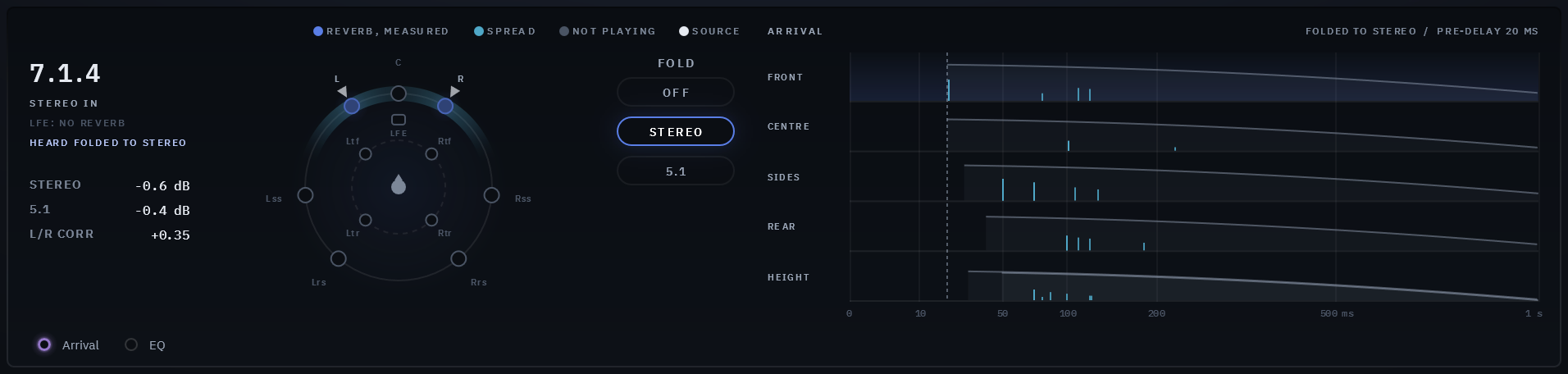
FOLD plays the whole output folded to stereo or 5.1, and a readout under the layout's name shows, live, how much each fold adds or loses. While it folds, the header says so in red, and it is never saved.
Every speaker on the screen
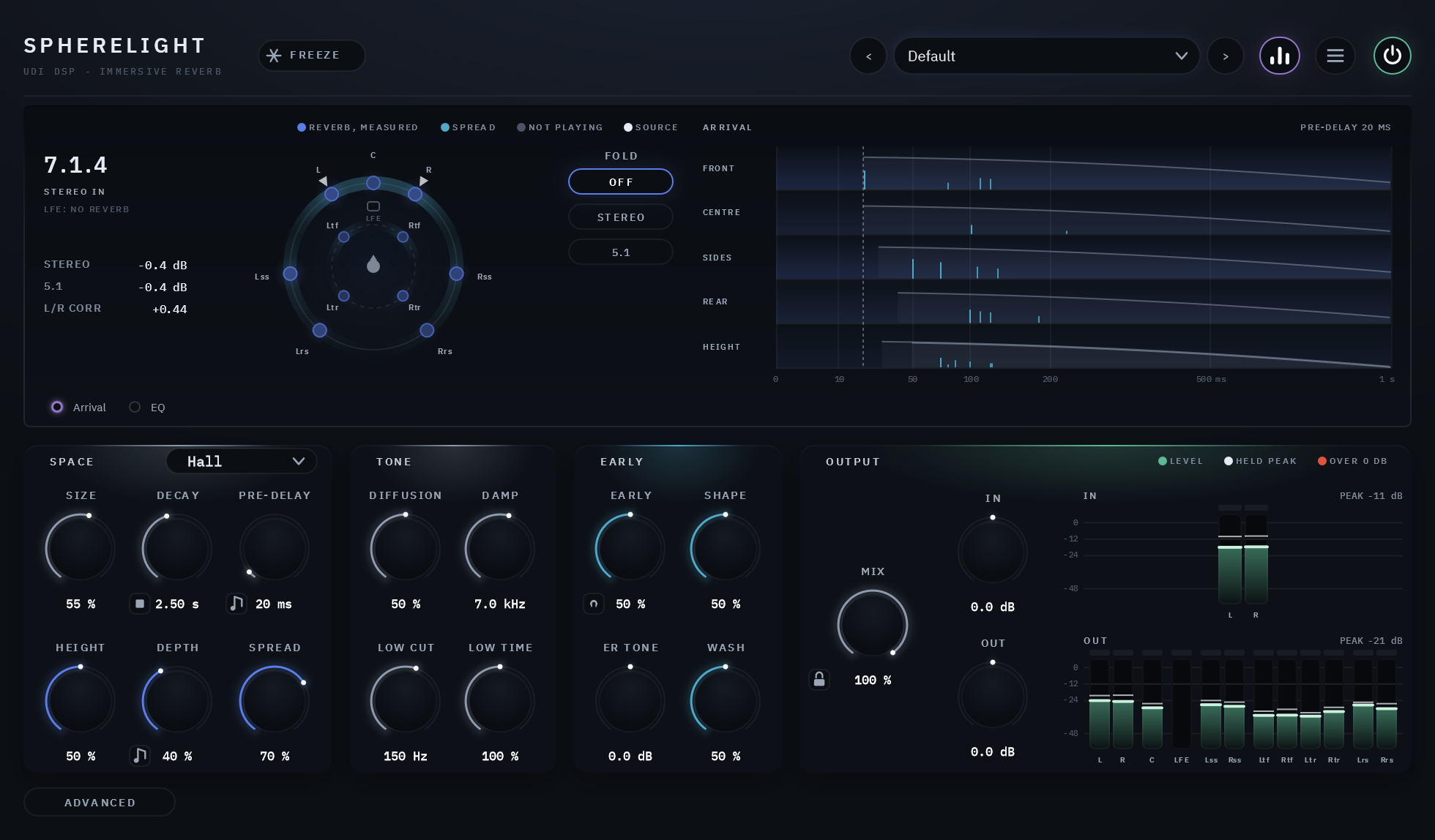
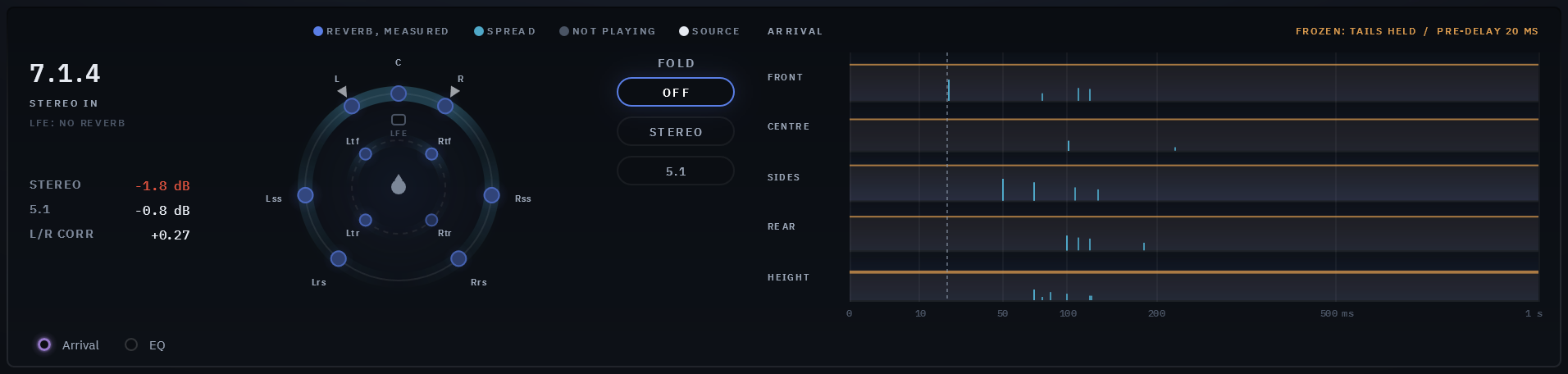
The visualizer draws your layout from above, each speaker glowing with the reverb it is playing now, and beside it when the reverb reaches the front, the sides, the rear and the heights.
Out of the voice's way
DUCKING lets the reverb step aside while the dry plays, or while another track plays through the sidechain, and swell back in the gaps. FOCUS decides where: the whole room together, or only the speakers around where the sound comes in.
Seven kinds of space, from a furnished room to a vast hall
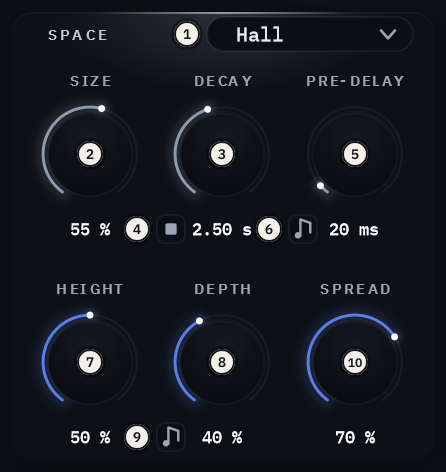
SPACE chooses the kind of space: a furnished room, a small hard echo chamber, a concert hall with its seated audience, a stone nave, open air with nothing but the ground's reflection, a steel plate, or the Spherelight space, a stone hall twice a cathedral's size whose first reflections arrive late and sparse and whose reverb builds the slowest of all. Each room is a box of its own proportions and surfaces, and SIZE takes it from its smallest to its largest. The Plate is not a room: it has no walls, so no reflections, and its sound is dense from its first milliseconds.
DECAY is the one control that sets how long the tail lasts, the time it takes to fall 60 dB, in every space and at every size. PRE-DELAY sets the gap before the reverb starts, up to 500 ms, or locks to your song's tempo as a note from 1/128 up, offering only the notes that fit.
Height, depth and spread, in plain terms
HEIGHT sets how much reverb reaches the height speakers, which answer a little later, lighter in the lows and a little darker, as a ceiling does. DEPTH starts the sides' and the rear's tails later and plays them lower, further back in the larger spaces; its note button locks the rear's start to a note of your song's tempo instead.
SPREAD places the early wash, the dense echoes right after the reflections: low keeps it on the speakers near each source, high spreads it round the whole room, and a band on the dome shows where it plays. The centre speaker's reverb plays 4 dB under the others, so it does not crowd what sits in the centre.
Shape the tail and the first reflections apart
TONE shapes the tail. DIFFUSION runs from separate echoes that keep a hit's attack to a tail smooth and dense from the start, with the chosen space's own in the middle. DAMP sets how fast the highs die away, LOW CUT keeps the lows out of the reverb, and LOW TIME sets how long the lows ring against DECAY.
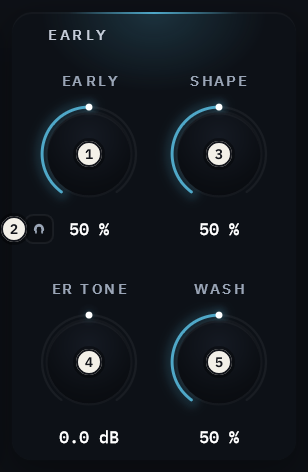
EARLY sets the early reflections and the dense field behind them against the tail. SHAPE moves them from front-loaded to a swell, ER TONE makes them darker or brighter on their own, and WASH trades the crisp reflections for the soft wash behind them. The listen button plays the early part alone, on every speaker, and is never saved.
Check the fold-down without leaving the reverb
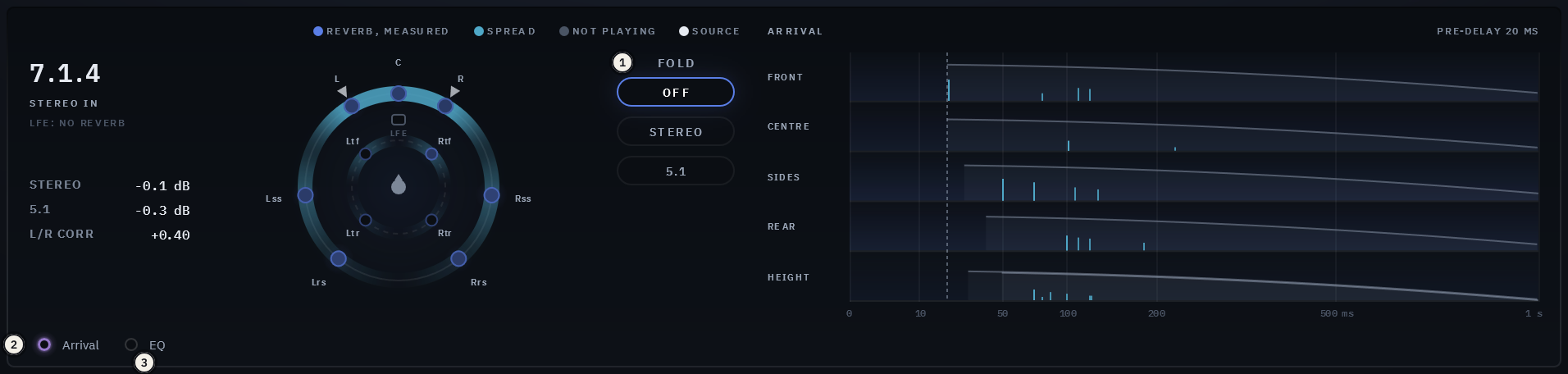
FOLD plays Spherelight's whole output folded to stereo or 5.1, from the front pair (and the centre and the sides for 5.1), every other speaker silent, so you hear how the reverb translates before you deliver it. Under the layout's name, the fold readout shows what each fold adds or loses against unrelated speakers, and the stereo fold's correlation, and turns red past 1.5 dB.
FOLD changes what the plugin outputs, so a bounce made while it folds prints the fold. Whenever it folds, the header shows it in red and a click there switches it off; it is never saved, no preset carries it, and every session opens with it off. The folds use the standard fold-down equations; the heights have no standard fold and are folded by our own approximation, so a renderer's own fold of them may differ.
Hold the tail, or empty it at once
FREEZE holds the tail as it is, on every speaker, for as long as it is on, and nothing you play meanwhile is added to the hold. The kill, the small square beside DECAY, empties the reverb in 10 ms without touching the dry, and Clear Tail on Preset Change does the same each time you load a preset.
A display that shows every speaker
The dome is your track's layout from above, the ear-level speakers on the outer ring and the heights on the inner, each glowing with the reverb it is playing now, measured; grey where nothing plays. The layout is named in plain words at the top left, so a wrong track width shows at a glance, and marks show where your input comes in.
Beside it, the arrival map shows when the reverb reaches the front, the centre, the sides, the rear and the heights over the first second: a tick for each early reflection at its time and level, the tail falling away behind them, and under each lane a glow of what those speakers play now. In OUTPUT, a meter for every channel in and out, each named, with its held peak and its own clip lamp. Hide the visualizer from the header and the panel gets shorter.
The EQ, the compressor and ducking, a page away
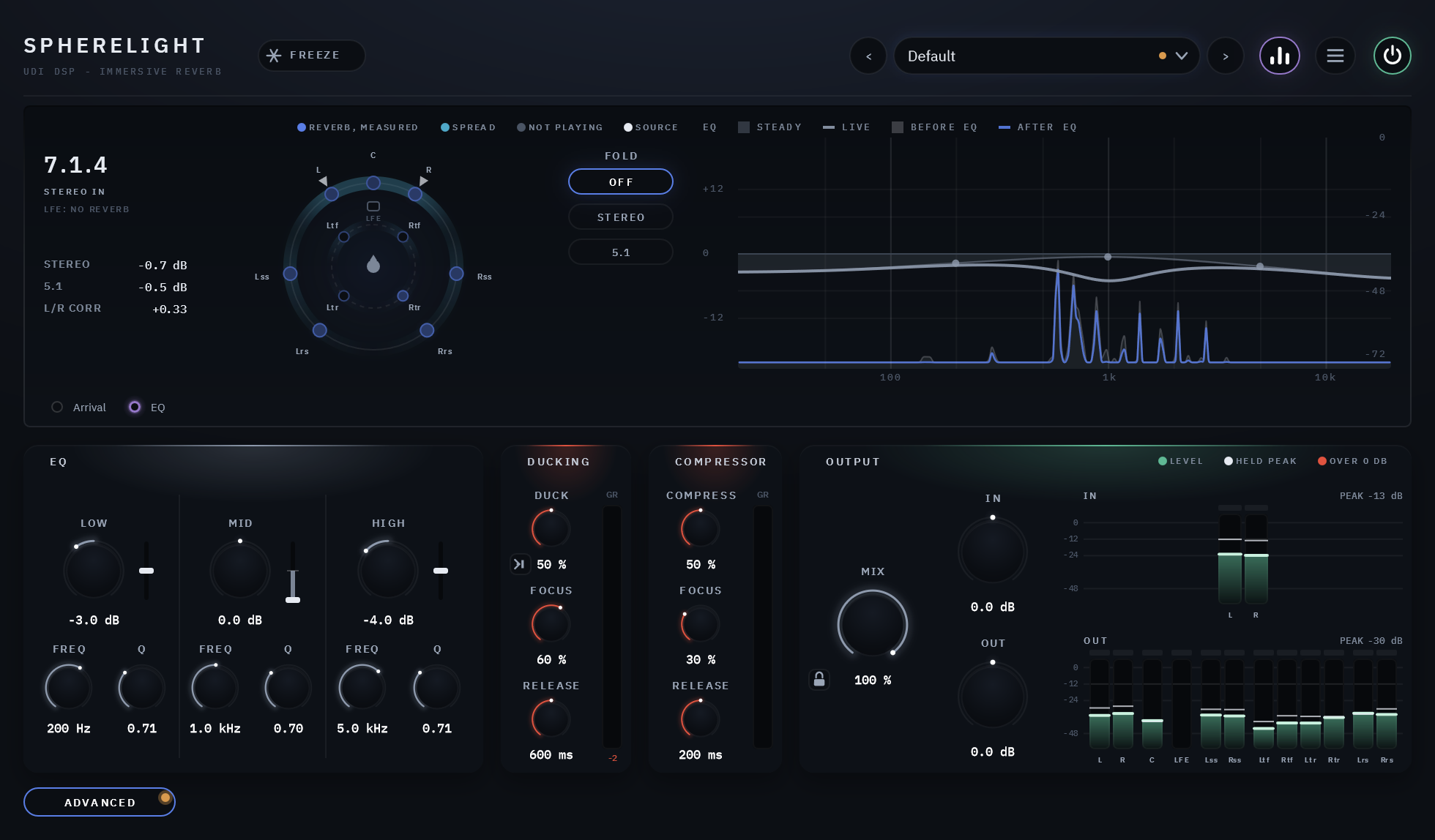
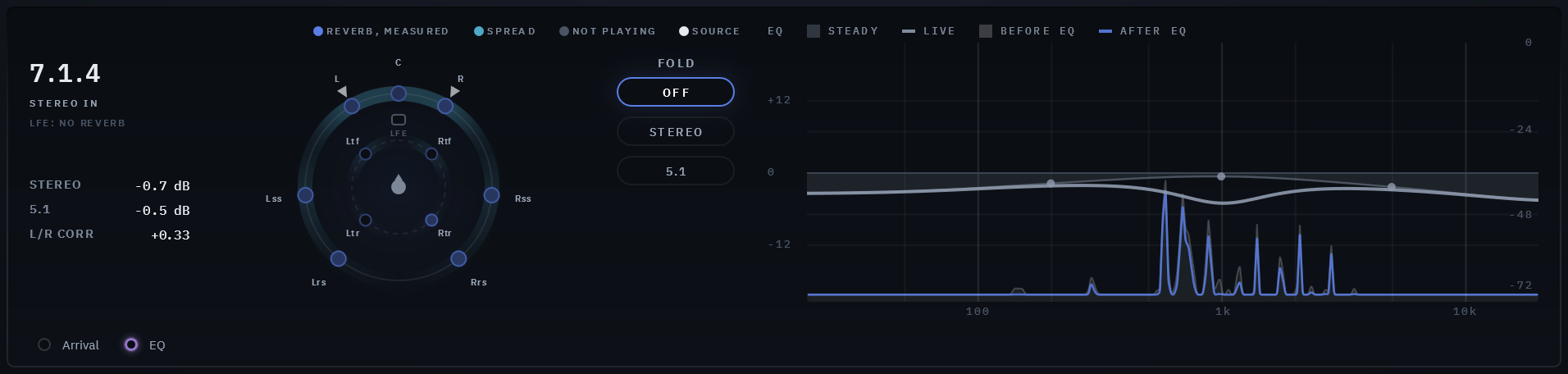
The ADVANCED button at the bottom left swaps SPACE, TONE and EARLY for the EQ, the compressor and DUCKING, and the visualizer shows the EQ's curve in the arrival map's place; the header and OUTPUT stay where they are. All three act on the reverb only, never on the dry, and at their defaults they do nothing. A dot on the button means something on the page is set.
An EQ on the reverb
LOW, MID and HIGH, the same on every speaker, each with a steady boost or cut (±12 dB) and one that follows the band's own level in the reverb (DYNAMIC): below 0 it cuts the band when it gets loud, taming a ringing low end or a harsh top, above 0 it lifts it. Every speaker moves together, so the room never leans, and it acts about the same on every layout.
The curve on the visualizer is the one the knobs set, and the bright line over it moves with what DYNAMIC does now. Behind it the reverb itself plays live, twice: a grey shape as it reaches the EQ and a blue line as the EQ leaves it, on the reverb's own scale, so you see where the EQ cuts and where it boosts.
A compressor on the reverb
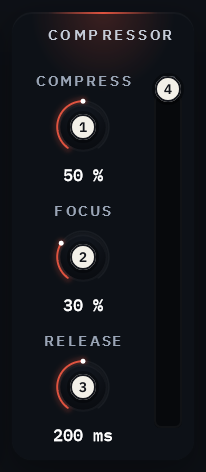
COMPRESS evens the reverb out: its louder moments are held down and its quieter ones kept, and its level is made up so it sits where it was, from off to a strong hold at 100%. It listens to the reverb itself, after the EQ, and acts on the reverb only. FOCUS decides how the speakers compress: at 0 the whole room as one, so the image never pulls; turned up, each speaker more by its own level. RELEASE sets how quickly it lets go, and a meter shows how far it holds the reverb down now.
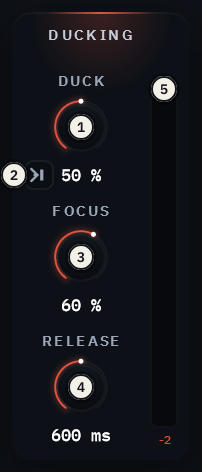
Ducking with FOCUS
DUCK lets the reverb step aside, up to 12 dB, while the dry plays, and RELEASE sets how quickly it swells back once the dry stops. With its key button lit, it listens to the host's sidechain instead: another track, such as the dialogue ducking a music reverb or a kick for a reverb that pumps in time. FOCUS decides where: at 0 the whole room ducks as one; turned up, only the speakers near where the sound comes in duck, so a voice in the centre clears the reverb in front while the sides, the rear and the heights keep going. A meter shows how far the reverb is pulled down now.
Specifics, stated plainly
| Layouts | Out: mono, stereo, 5.1, 7.1, 7.1.2, 5.1.4, 7.1.4, 7.1.6, 9.1.4, 9.1.6. In: mono, stereo, or the same layout as the output, and a mono or stereo sidechain for DUCKING (mono in Pro Tools). Every channel is found by its type, in any host's order |
|---|---|
| Spaces | Room, Chamber, Hall, Cathedral, Open, Plate, Spherelight; SIZE 0-100% within each |
| Reverb | DECAY 0.35-60 s; PRE-DELAY 0-500 ms, or a note of the song's tempo from 1/128; DIFFUSION 0-100%; DAMP 1.5-20 kHz; LOW CUT 20-500 Hz; LOW TIME 50-200% |
| Placement | EARLY with SHAPE, ER TONE (±6 dB), WASH and a listen; HEIGHT, DEPTH (or a note of the tempo) and SPREAD; early reflections of the first and second order, each to the speaker nearest its direction; the LFE carries no reverb |
| Advanced page | EQ: LOW, MID and HIGH, each a steady gain (±12 dB), DYNAMIC (±100%), FREQ and Q, drawn over the reverb before and after it. Compressor: COMPRESS, FOCUS and RELEASE (50 ms-2 s). DUCKING: DUCK, its key (the dry or the sidechain), FOCUS and RELEASE (50 ms-2 s) |
| FOLD | Off, Stereo or 5.1, with the fold readout; never saved, never in a preset, not automatable |
| Output | MIX (100% by default, the reverb alone), with a padlock that holds MIX, IN and OUT through preset changes; IN and OUT trims, ±24 dB, each beside a meter per channel; FREEZE, the kill, a 20 ms bypass crossfade |
| Presets | 48, in Rooms, Chambers, Halls, Churches, Open Air, Plates, Vast, Post, Music, Immersive and Inserts |
| Latency | 0 samples |
| Licensing | Free UDI DSP account, one-time online activation — no subscription, works offline for a week between checks |
| Trademarks | Dolby and Dolby Atmos are trademarks of Dolby Laboratories |
Compatibility
Windows
- Operating system Windows
- OS levels Windows 10 or 11, 64-bit
- Plugin formats VST3 and AAX
macOS
- Operating system macOS
- OS levels Apple Silicon: macOS 11 Big Sur or later
- Intel Mac: macOS 10.15 Catalina or later - limited support (they are old platforms not supported by Apple). Please try the free 14-day trial to verify compatibility.
- Plugin formats AU, VST3 and AAX
Internet needed once, briefly, to activate (a short browser sign-in). Day-to-day use after that works offline for up to a week between checks.
Validated in Cubase Pro, Avid Pro Tools, Apple Logic Pro, Reaper, Waveform and FL Studio. More information.