Spherelight is an immersive reverb plugin by UDI DSP.
01 What Spherelight is
Spherelight is one reverb for a whole immersive layout, from stereo to 9.1.6. Put it on a 7.1.4 bus and it gives every speaker its own reverb: no speaker is a copy of another, the early reflections arrive from the walls they come from, the height speakers answer the way a ceiling does, and the LFE stays dry. It reads the layout your track already has, so there is nothing to set up: the controls are about the space, not about the speakers.
- Every speaker its own reverb. Each output is a separate view into one reverb, so no two speakers play the same thing, and a stereo or 5.1 fold-down of the mix does not comb.
- Directional early reflections. Each early reflection is worked out from the room’s walls, floor and ceiling and sent to the one speaker nearest the direction it arrives from.
- Seven kinds of space. A room, an echo chamber, a concert hall, a cathedral, open air, a steel plate, or the Spherelight space, a vast hall twice a cathedral’s size, each with its own shape and surfaces; SIZE moves within it, and DECAY alone sets how long the tail lasts.
- It checks its own fold-down. FOLD plays the whole output folded to stereo or 5.1, so you hear the translation before you deliver it, and a readout under the layout’s name shows, live, how much each fold adds or loses.
- It shows the reverb on every speaker. The visualizer draws your layout from above, each speaker glowing with the reverb it is playing now, and beside it when the reverb reaches each group of speakers.
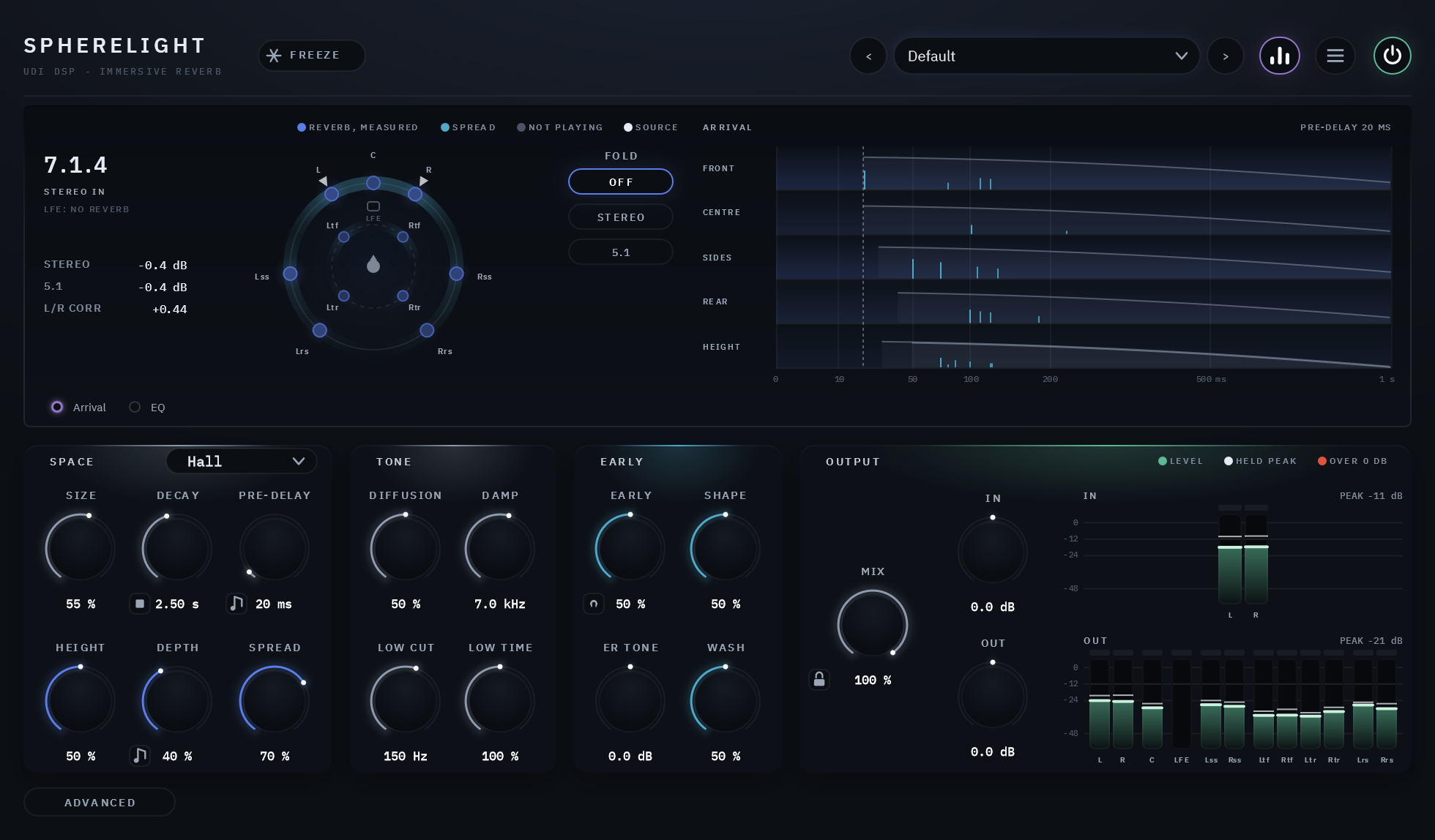
At a glance
- The space: SPACE (Room, Chamber, Hall, Cathedral, Open, Plate, Spherelight), SIZE, DECAY (0.35 to 60 s), PRE-DELAY (to 500 ms, or a note of the host’s tempo).
- The tone: DIFFUSION (separate echoes or a smooth tail), DAMP (how fast the highs die away), LOW CUT (the lows kept out of the reverb) and LOW TIME (how long the lows ring against DECAY).
- The early part: EARLY (the reflections against the tail), SHAPE (front-loaded or swelling), ER TONE (its own tone) and WASH (crisp reflections or a soft wash), and a listen button to hear it alone.
- The layout: HEIGHT, DEPTH and SPREAD.
- FREEZE holds the tail; the kill beside DECAY empties it at once.
- FOLD: Off, or the whole output folded to stereo or 5.1. Whenever it folds, the header says so in red, and it is never saved: every session starts with it off. Under the layout’s name, the fold readout shows, live, how much the stereo and 5.1 fold-downs add or lose.
- The Advanced page: the EQ on the reverb (LOW, MID, HIGH, each a steady and a level-reacting gain), drawn as a live curve in the visualizer; DUCKING, the reverb stepping aside while the dry (or another track, through the sidechain) plays, with FOCUS deciding where in the room it steps aside; and a compressor that evens the reverb out.
- Opens ready: a Hall, SIZE 55%, DECAY 2.5 s, PRE-DELAY 20 ms, MIX 100%.
- No latency, and silence costs almost nothing once the tail has died away.
02 Setting it up
Where it goes
Spherelight is made for its own bus. Send to it from your tracks and leave MIX at 100% (its default): the bus returns only the reverb, and the dry stays where it is. It works the same on a bus feeding an immersive mix’s bed or its objects (a Dolby Atmos bed, for example), on a 5.1 or 7.1 stem, or on a plain stereo aux.
It can also sit on a track as an insert: lower MIX to blend the dry back in (the Inserts presets do). The dry is never processed: it plays on its own speakers, unfiltered.
What comes in can be mono, stereo, or the same layout as the output:
| Input | Where it enters the room | Where the dry plays (MIX under 100%) |
|---|---|---|
| Mono | at the centre | the centre (on a layout without one, left and right) |
| Stereo | at left and right | left and right |
| The same layout as the output | each channel at its own speaker | each channel on its own speaker |
The layouts Spherelight accepts on its output: mono, stereo, 5.1, 7.1, 7.1.2, 5.1.4, 7.1.4, 7.1.6, 9.1.4 and 9.1.6. Every channel is found by what it is (left, centre, top front left …), never by its place in the list, so a host’s own channel order does not matter. The visualizer names the layout it was given at its top left: if it reads anything other than what you expected, the track is the wrong width.
A bed holds only two heights (7.1.2). A 7.1.4 or 9.1.6 reverb sent to the bed loses its rear heights in the renderer; to keep every height, return it through objects, or run it at 7.1.2 on the bed.
Hosts
Spherelight needs a host with multichannel tracks for anything wider than stereo. As we understand each host at release (check your version’s own documentation):
| Host | What it gives Spherelight |
|---|---|
| Pro Tools Studio | layouts up to 7.1.6 |
| Pro Tools Ultimate | layouts up to 9.1.6 |
| Logic Pro | layouts up to 7.1.4 |
| Nuendo, Cubase Pro | multichannel tracks and buses |
| Studio One 6.5 and later | multichannel tracks and buses |
| DaVinci Resolve (Fairlight) | multichannel tracks and buses |
| Reaper | wide tracks, as a VST3 host |
| Ableton Live, Bitwig Studio | no multichannel tracks: stereo only |
Spherelight writes loudspeaker channels. To hear an immersive mix on headphones, use your host’s or renderer’s own headphone monitoring.
03 The panel
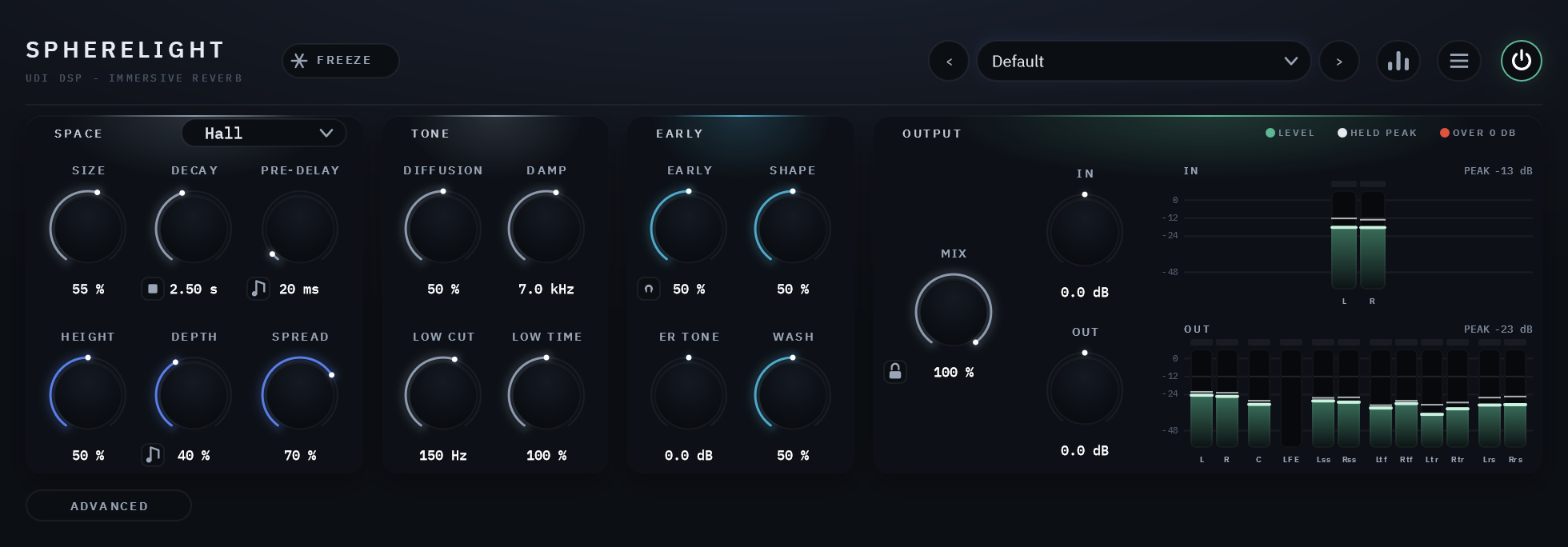
Across the top

| # | Control | What it does |
|---|---|---|
| 1 | FREEZE | Holds the tail as it is, on every speaker, for as long as it is on (below) |
| 2 | FOLD: STEREO | Shown in red only while FOLD is folding the output (FOLD: STEREO or FOLD: 5.1). Click it to switch FOLD off |
| 3 | The preset field | The current preset, with its arrows; a dot means you have changed something since it loaded |
| 4 | The visualizer button | Shows or hides the visualizer; hidden, the panel gets shorter |
| 5 | The menu | Panel size, Clear Tail on Preset Change, tooltips, About (section 04) |
| 6 | POWER | Bypasses Spherelight with a 20 ms crossfade; bypassed, every speaker plays the input untouched |
The visualizer
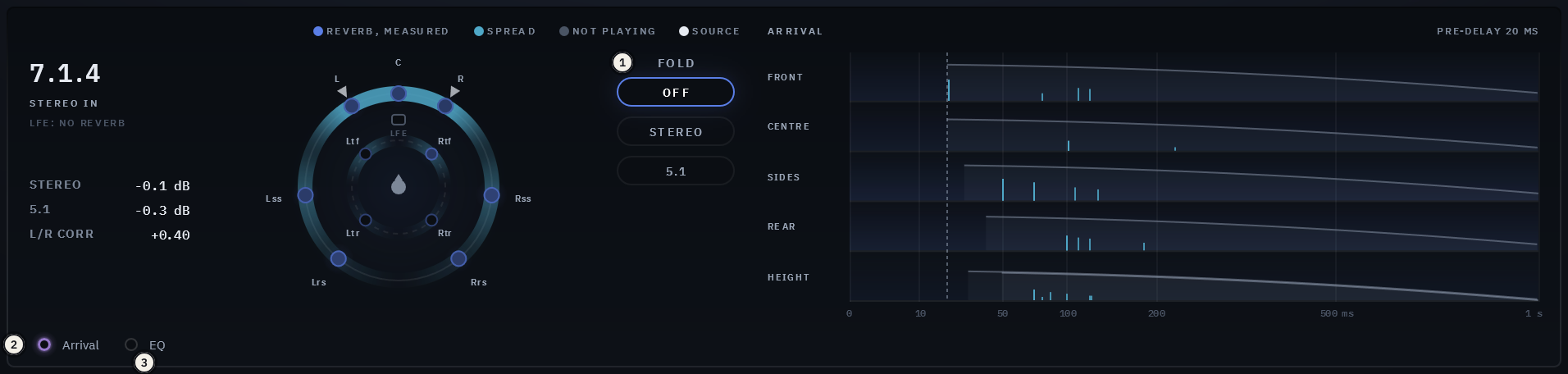
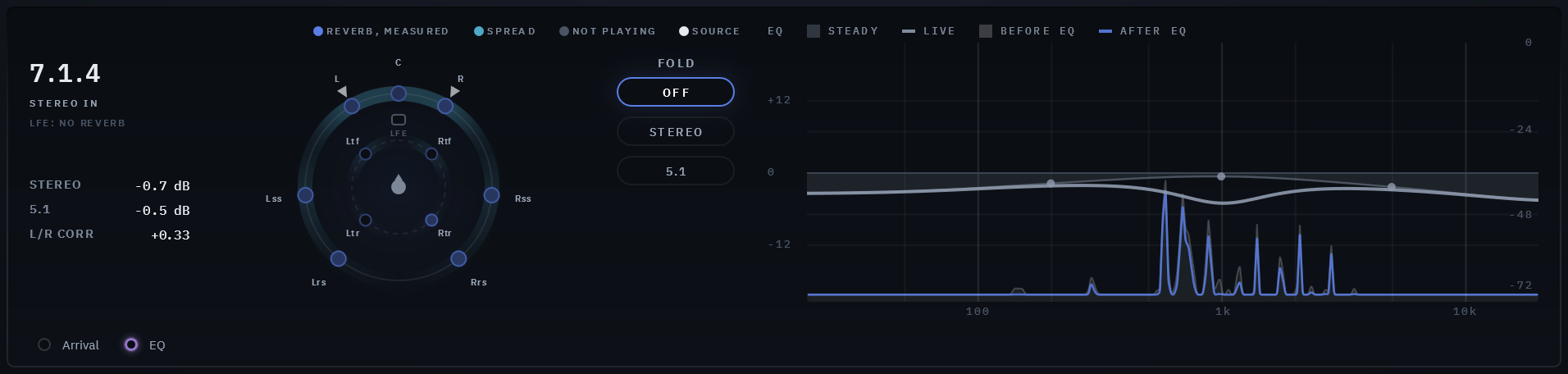
The dome is your layout seen from above, the front at the top:
- The ear-level speakers sit on the outer ring and the height speakers on the inner ring, each at its own angle, with the listener in the middle.
- Each speaker glows with the reverb it is playing now, measured: brighter is louder, on a scale from -48 to -6 dBFS (RMS). Grey means nothing is playing there: a speaker FOLD silences, the heights at HEIGHT 0, or every speaker at MIX 0.
- The small white marks are where your input comes in: one at the centre for a mono input, two at left and right for stereo, one at every speaker for a full layout. They brighten while something plays.
- The cyan band along the rings is SPREAD: where the early wash plays (the dense echoes right after the reflections), around the sources you feed in. At SPREAD 0 it is a short arc around them; at 100% it runs round the whole room. It follows where the sound comes in, and stays put while nothing plays. It is faint at rest and brightens while you move SPREAD or point at its knob. At EARLY 0 there is no wash, so there is no band.
- The LFE is drawn as a small square, never lit: Spherelight sends no reverb to it.
- At the top left, the layout’s name (“7.1.4”), what comes in (“STEREO IN”), and “LFE: NO REVERB”.
The arrival map, at the right, shows when the reverb reaches each group of speakers, over the first second after the sound comes in (the time runs on a square-root scale, so the first milliseconds and a long pre-delay both read):
- One lane per group of speakers your layout has: FRONT, CENTRE, WIDE, SIDES, REAR, HEIGHT.
- The dashed line is the PRE-DELAY: everything starts after it.
- Each cyan tick is an early reflection landing on that lane’s speakers, at its time and at its level as played (EARLY, HEIGHT and DEPTH included).
- The faded shape is the tail on those speakers, from the moment it begins (DEPTH starts the sides and the rear later), falling 60 dB over DECAY. It is drawn from the reverb’s own numbers as a guide to its shape; its height compares the lanes with one another, not with the ticks.
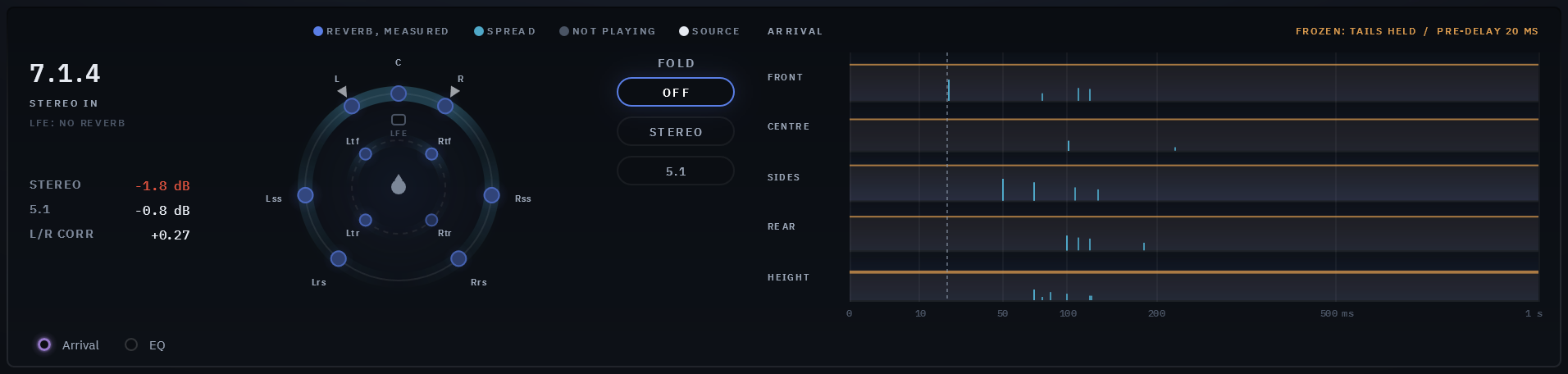
- While FROZEN, the tails are drawn flat and in amber: held.
- Under each lane, a blue glow rising from its baseline is what those speakers play right now, measured as the dome measures it: brighter is louder. It shows where the reverb is while the music plays; the ticks and the tails keep the timing. A group FOLD or HEIGHT 0 silences stays dark.
- With the Plate, there are no ticks: a plate has no walls, so no reflections. The map says so, and the plate’s early wash shows as the cyan band on the dome.
The EQ curve takes the arrival map’s place when you open the Advanced page (below), and the EQ switch under the dome shows it on either page. It is the Advanced page’s EQ, drawn from 20 Hz to 20 kHz:
- The filled curve is what your knobs set: each band’s LOW, MID or HIGH knob, its FREQ and Q, with a dot at each band.
- The bright line over it is what the EQ is doing now: DYNAMIC’s boost or cut, moving as the reverb plays. With DYNAMIC off, the two are one line.
- Past 12 dB the scale eases off, so a band pushed further still moves on the screen. The EQ’s dB is labelled at the left.
- Behind the curve is the reverb itself, live, twice: BEFORE EQ, a faint grey filled shape, is the reverb as it reaches the EQ; AFTER EQ, the blue line over it, is the reverb as the EQ leaves it. Where the blue line drops under the grey shape, the EQ is cutting there; where it rises over it, boosting. With DYNAMIC set, you see the gap open only while that band is loud.
- The reverb has its own scale, labelled at the right: 0 dB at the top down to -72 dB at the bottom, where nothing plays. It is not the EQ’s dB: a line near the bottom is a quiet part of the reverb, not a cut. Both run only while the EQ strip shows.
Arrival and EQ take turns: ticking one shows it and hides the other. ADVANCED shows the EQ curve; going back to the main page brings the arrival map back.
The fold readout, under the layout’s name at the visualizer’s left, shows how much louder or quieter Spherelight’s whole output (the reverb, and the dry when MIX is under 100%) gets when it is folded to stereo, and to 5.1 on a layout wider than 5.1, against what the same fold would give if no two speakers had anything in common:
- 0 dB means the fold neither builds up nor cancels. A positive number means something adds up when folded (the same sound on two speakers that fold to one side); a negative one, that something cancels.
- L/R CORR is how alike the stereo fold’s two sides are: +1 the same, 0 unrelated, below 0 out of phase.
- It turns red beyond 1.5 dB either way. It averages about the last second and reads the output whatever FOLD is set to. It holds its last reading through a pause, and shows a dash once the output has been silent for a while. On a stereo or mono track, where nothing folds, it is not there.
The folds are the same as FOLD’s (below), so a renderer’s own downmix of the heights may differ.
| # | Control | What it does |
|---|---|---|
| 1 | FOLD | Off, Stereo or 5.1: what the plugin plays (below). Greyed on a stereo or mono track, where there is nothing to fold |
| 2 | Arrival | Shows the arrival map at the right (and hides the EQ curve), or hides it. It changes how you look at the sound, not the sound, and is not saved |
| 3 | EQ | Shows the EQ curve, with the reverb’s spectrum behind it, in the arrival map’s place (and hides the arrival map), or hides it. ADVANCED ticks it for you; the main page ticks Arrival again |
The visualizer button in the header hides the visualizer, and the panel gets shorter:
SPACE
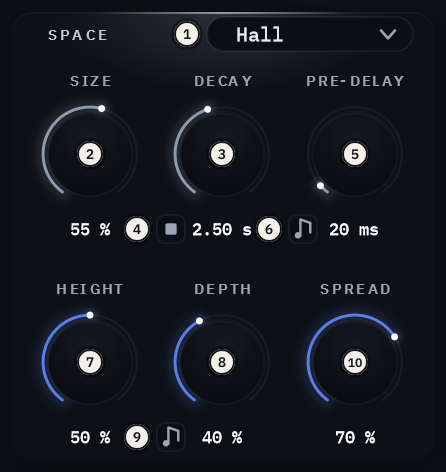
The card’s top row sets the room; the row under it, in blue, how the reverb fills the speakers around you.
| # | Control | What you hear | Range | Default |
|---|---|---|---|---|
| 1 | SPACE | The kind of space: its shape, its surfaces, how its reverb builds (the seven below). It never sets how long the tail lasts | Room, Chamber, Hall, Cathedral, Open, Plate, Spherelight | Hall |
| 2 | SIZE | How big the space is, within the chosen SPACE: the spacing of the reflections and the length of the tail’s paths | 0-100% | 55% |
| 3 | DECAY | How long the tail lasts: the time it takes to fall 60 dB. The one control that sets it, in every space and size | 0.35-60 s | 2.50 s |
| 4 | The kill | Empties the reverb now (below) | press | |
| 5 | PRE-DELAY | The gap before the reverb starts | 0-500 ms | 20 ms |
| 6 | The note | Locks PRE-DELAY to the host’s tempo: the knob then offers the notes that fit in its 500 ms at that tempo, from 1/128 up, spread across its whole turn (1/128 to 1/4 at 120 BPM, 16 to 500 ms; to 1/8 at 90), and always names the note you hear. If the tempo slows so the chosen note no longer fits, the longest one that does plays and is shown; your note comes back when the tempo allows. Click again to set it freely | Free or a note | Free |
| 7 | HEIGHT | How much reverb reaches the height speakers. They answer a little later, lighter in the lows and a little darker, as a ceiling does. At 0 they carry no reverb | 0-100% | 50% |
| 8 | DEPTH | How far the reverb reaches front to back. The sides’ tail starts later and up to 2 dB lower, the rear’s later still and up to 5 dB lower. Up to 40% it moves gently; above, the rear goes further back, and how far grows with the space’s size (in the largest spaces, the rear 120 ms after the front at 100%). The early reflections keep their own times | 0-100% | 40% |
| 9 | The note | Locks DEPTH to the host’s tempo: the rear’s tail starts a note after the front’s (the sides at four tenths of it), whatever the SIZE. The knob offers the notes that fit in 250 ms at that tempo (1/128 to 1/8 at 120 BPM) and names the one you hear; the level drop is the one DEPTH would give that distance. If the tempo slows so the note no longer fits, the longest one that does plays. A note change crossfades, so nothing bends in pitch. Click again to set DEPTH freely | Free or a note | Free |
| 10 | SPREAD | Where the early wash plays, the dense echoes right after the reflections: low keeps it on the speakers near each source, high spreads it round the whole room. The cyan band on the dome shows it. The reflections and the tail are placed by the room itself | 0-100% | 70% |
The centre speaker’s reverb plays 4 dB under the others, so it does not crowd what sits in the centre.
SPREAD works on the early wash only, and the wash’s level is EARLY’s: at EARLY 0 SPREAD has nothing to place, so its knob is dimmed (you can still set it). You hear it best with EARLY high and a short DECAY.
The seven spaces. Each room is a box of its own proportions and surfaces; SIZE takes it from its smallest to its largest. The Plate is not a room.
| SPACE | What it is | From SIZE 0% to 100% (width x length x height) |
|---|---|---|
| Room | A furnished room: plasterboard walls, a rug on a wooden floor. The early sound close, the reflections a little dark | 4.5 x 6.1 x 2.4 m to 6.4 x 8.7 x 3.4 m |
| Chamber | An echo chamber: a small hard room, plaster and tile, almost nothing absorbed. Bright and dense | 5.6 x 8.4 x 3.5 m to 9.6 x 14.4 x 6.0 m |
| Hall | A concert hall: plaster and wood walls, its floor the seated audience | 14 x 22 x 8 m to 26 x 46 x 18 m |
| Cathedral | A stone nave: stone walls and vault. Slower to build, its reflections darker | 12 x 30 x 15 m to 30 x 80 x 32 m |
| Open | Open air: no walls and no ceiling, the ground’s reflection alone, and a quieter tail | |
| Plate | A steel plate, not a room: no surface at all, so no reflection (the arrival map shows no tick), and a sound that is dense and smooth from its first milliseconds. The classic vocal, snare and keys sound; LOW TIME under 100% gives the plate’s shorter low end | a small plate to a large one |
| Spherelight | A vast hall, twice a cathedral’s size: stone walls and vault, a hard floor. Its first reflections arrive late and sparse, darkened by the air over their long paths, and its reverb builds the slowest of all, into an enormous space around you. DECAY still sets how long it lasts | 30 x 80 x 30 m to 60 x 160 x 60 m |
TONE
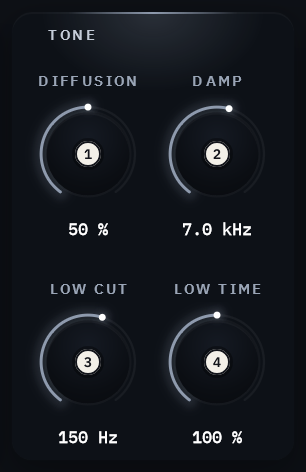
| # | Control | What you hear | Range | Default |
|---|---|---|---|---|
| 1 | DIFFUSION | How smeared the reverb is, against the chosen space’s own: at 50% it is as the space makes it. Down, the reverb breaks into separate echoes and keeps a hit’s attack crisp; up, the tail is smooth and dense from the start. DECAY still sets how long it lasts | 0-100% | 50% |
| 2 | DAMP | How fast the highs die away in the tail: each pass round the reverb darkens it a little more | 1.5-20 kHz | 7.0 kHz |
| 3 | LOW CUT | Keeps the lows under it out of the reverb. The dry is untouched | 20-500 Hz | 150 Hz |
| 4 | LOW TIME | How long the lows ring against DECAY: the deep lows last about DECAY times this, the change easing in from around 300 Hz; the mids and highs keep DECAY. Up for a warm, long low end, down for a tight one | 50-200% | 100% |
EARLY
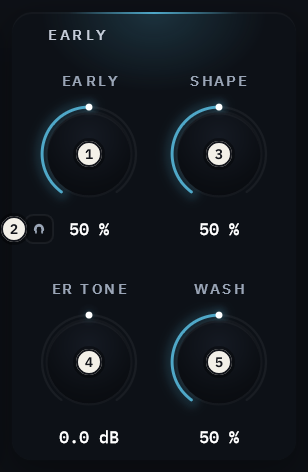
| # | Control | What you hear | Range | Default |
|---|---|---|---|---|
| 1 | EARLY | The early reflections, each from its own wall to the speaker nearest its direction, and the dense field behind them, against the tail. Up, the sound is placed in the room; at 0, the tail alone | 0-100% | 50% |
| 2 | The listen | The headphones button: hear the early part alone, on every speaker. The tail and the dry are muted and DUCKING steps aside, so what you hear is what EARLY, SHAPE, ER TONE and WASH shape. For listening only: never saved, so every session opens with it off, and no host automates it | on / off | off |
| 3 | SHAPE | The early part’s shape over time. 50% is the space’s own. Down, front-loaded: the first reflections strongest, close and punchy. Up, a swell: the later ones grow, and the space blooms. The early part’s level stays the same; only its balance in time moves | 0-100% | 50% |
| 4 | ER TONE | The early part’s tone alone, darker or brighter about 1 kHz, up to 6 dB at each end. The tail keeps DAMP’s tone. Darker puts the source further away; brighter brings it close | -6 to +6 dB | 0 dB |
| 5 | WASH | The crisp reflections against the soft wash behind them. 50% is both as the space makes them; down, the reflections alone, clear and discrete; up, the wash alone, smooth. The ticks on the arrival map and the cyan band on the dome follow it. In the Plate, which has no reflections, down thins the wash | 0-100% | 50% |
OUTPUT
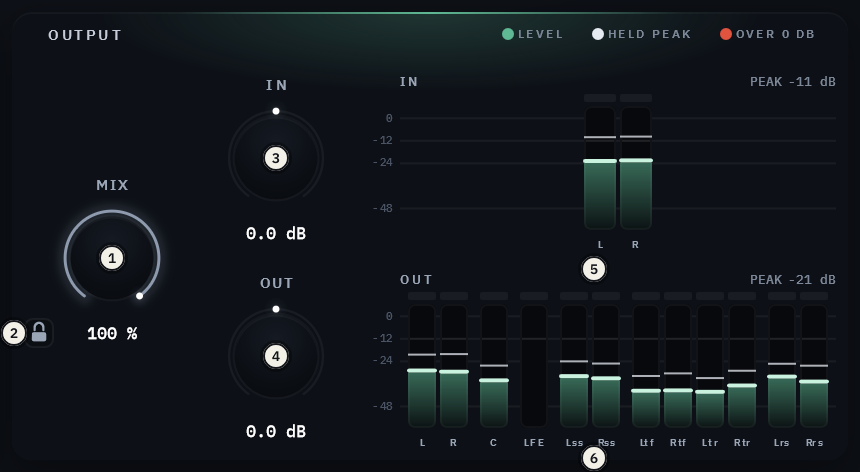
| # | Control | What it does | Range | Default |
|---|---|---|---|---|
| 1 | MIX | The dry and the reverb. 100%: the reverb alone, for its own bus; lower blends the dry back in on its own speakers | 0-100% | 100% |
| 2 | The padlock | Holds MIX, IN and OUT where they are while you change presets | on / off | off |
| 3 | IN | The input’s level, before the reverb | -24 to +24 dB | 0 dB |
| 4 | OUT | The output’s level, after everything, on every speaker | -24 to +24 dB | 0 dB |
| 5 | The IN meter | One bar per channel of your input, as it arrives, in your layout’s order, beside the IN knob | ||
| 6 | The OUT meter | One bar per speaker of the output, beside the OUT knob, so no speaker can clip unseen |
Both meters read the same way:
- Each bar is named under it (L, R, C, LFE, Lss, Rss, Ltf …), with a small gap between groups of speakers. Point at a bar for its full name and level.
- A scale at the left: 0, -12, -24 and -48 dBFS.
- Each bar’s held peak is a thin line that stays a moment, then falls; PEAK at the top is the loudest one’s.
- Each bar has its own clip lamp over it, red for two seconds when that channel goes over 0 dB.
- The legend in OUTPUT’s title row names the colours: LEVEL, HELD PEAK, OVER 0 DB.
Each speaker’s own reverb is on the dome.
The Advanced page
The ADVANCED button at the bottom left opens the page, and pressed again returns to the main one. On it, the EQ and DUCKING and the compressor take the place of SPACE, TONE and EARLY, and the visualizer shows the EQ curve in the arrival map’s place; the header and OUTPUT stay where they are. A dot on the button means something on the page is set (anything away from its default), so an EQ or a duck is never left on unseen. Both act on the reverb only: the dry is never touched. At their defaults they do nothing and cost nothing.
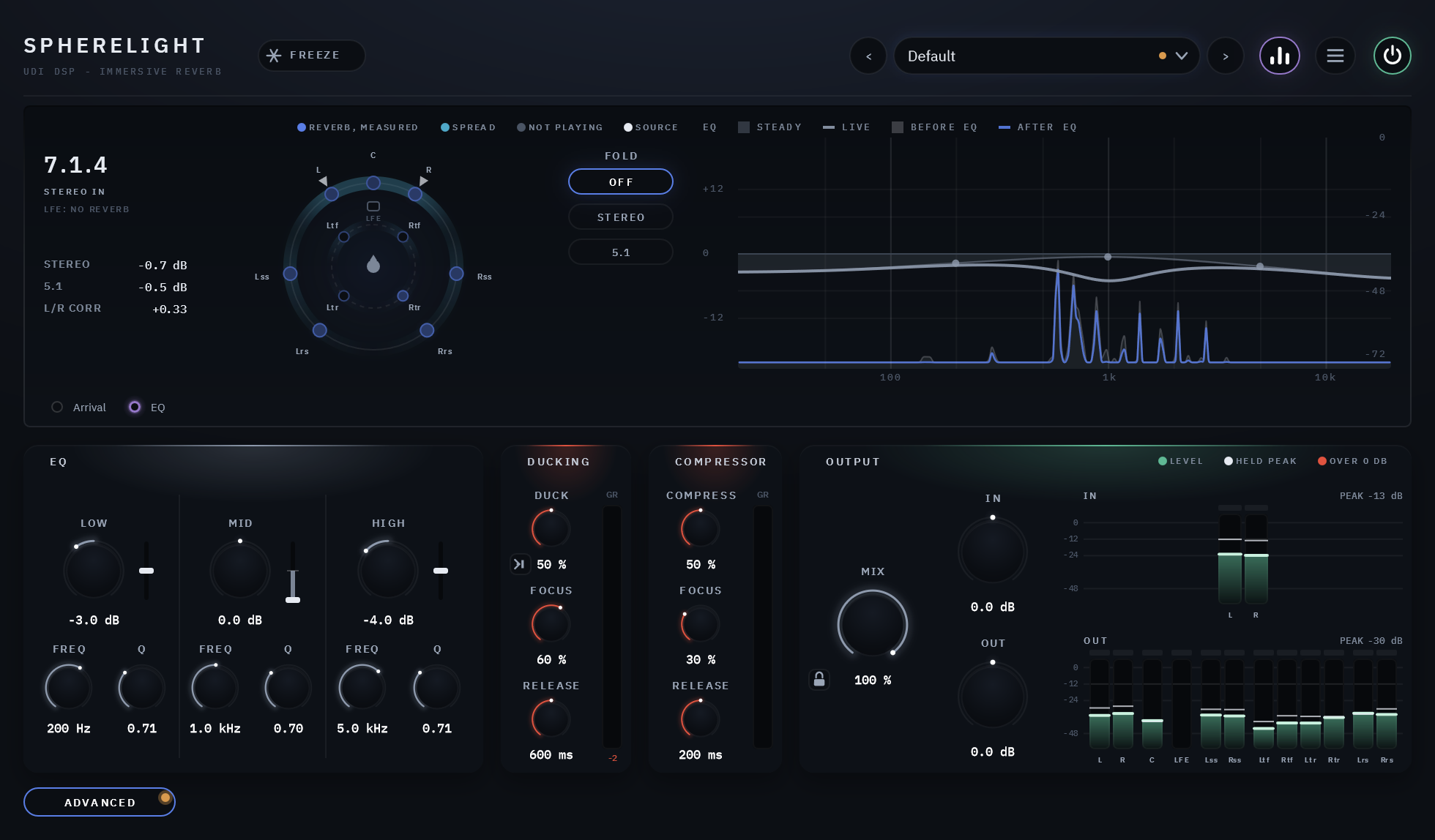
The EQ shapes the reverb’s tone with three bands, the same on every speaker, in one card: a column per band, its knob named for the band with DYNAMIC’s slider beside it, and FREQ and Q under them. LOW’s are numbered; MID and HIGH have the same four:
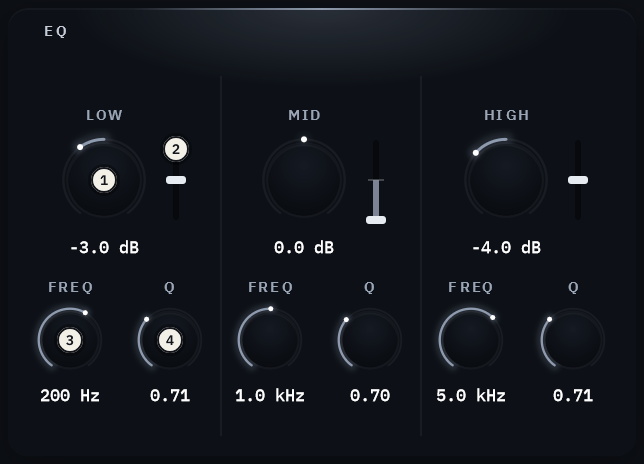
| # | Control | What you hear | Range | Default |
|---|---|---|---|---|
| 1 | LOW, MID, HIGH | The band’s knob: a steady boost or cut of the band | -12 to +12 dB | 0 dB |
| 2 | DYNAMIC (the slider) | Up from the middle boosts, down cuts; the middle is off, and a double-click brings it back. A boost or cut that follows the band’s own level in the reverb: below 0 it cuts the band when it gets loud (taming a ringing low end or a harsh top), above 0 it lifts it. Every speaker moves together, so the room never leans, and it acts about the same on every layout: the more speakers share the reverb, the quieter each one carries it, and DYNAMIC listens that much lower | -100 to +100% | Off |
| 3 | FREQ | Where the band sits: LOW a shelf (20 Hz to 1 kHz), MID a bell (200 Hz to 8 kHz), HIGH a shelf (1.5 to 16 kHz) | 200 Hz, 1 kHz, 5 kHz | |
| 4 | Q | MID’s width (higher is narrower); for the shelves, how steep the slope is | 0.3-4 | 0.71, 0.70, 0.71 |
DUCKING lets the reverb step aside while the dry plays and swell back in the gaps, so a voice or a lead line stays clear without less reverb overall. It listens to the dry input, or, with its key button lit, to the host’s sidechain input: another track, such as the dialogue ducking a music reverb, a lead vocal, or a kick for a reverb that pumps in time. Its three knobs stand in a column, the meter beside them.
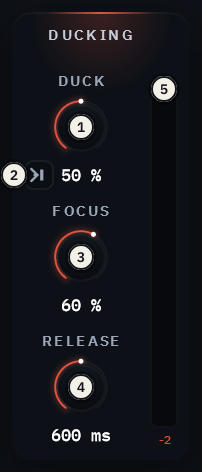
| # | Control | What you hear | Range | Default |
|---|---|---|---|---|
| 1 | DUCK | How much the reverb steps aside, up to 12 dB at 100%, and how easily: higher ducks deeper and at quieter levels | Off-100% | Off |
| 2 | The key | The small button by DUCK’s value: dark, DUCKING listens to the dry input; lit, to the host’s sidechain input. Route a track to Spherelight’s sidechain in your host (in Pro Tools the key is mono). Nothing ducks while the sidechain has nothing connected. A mono key counts as coming from the front centre, a stereo one from left and right, for FOCUS | Dry / Sidechain | Dry |
| 3 | FOCUS | Where it steps aside. At 0 the whole room ducks as one. Turned up, only the speakers near where the sound comes in duck: a voice in the centre clears the reverb in front while the sides, the rear and the heights keep blooming. At 100%, a speaker 30 degrees away ducks a third as much, and one at 90 degrees not at all | 0-100% | 0% |
| 4 | RELEASE | How quickly the reverb swells back once the key stops. A loud phrase’s duck lets go well inside this time | 50 ms-2 s | 600 ms |
| 5 | The meter | How far the reverb is pulled down now, on the speaker it ducks most; the number is the deepest of the last moment |
FOCUS and RELEASE are dimmed while DUCK is off, since they have nothing to do then (you can still set them).
The compressor evens the reverb out: its louder moments are held down and its quieter ones kept, and its level is made up so it sits where it was. It listens to the reverb itself, after the EQ and before DUCKING, and acts on the reverb only. It is the family’s compressor (Clearlight’s), on every speaker.
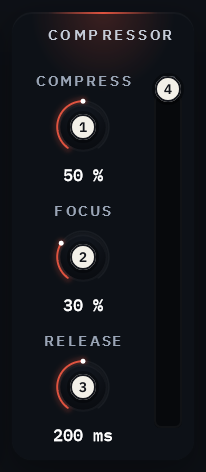
| # | Control | What you hear | Range | Default |
|---|---|---|---|---|
| 1 | COMPRESS | How much: from off to a strong hold at 100% (-40 dB and 8:1, its level made up). Turn it up for a steadier, closer reverb that does not swell over the mix | Off-100% | Off |
| 2 | FOCUS | How the speakers compress. At 0 the whole room as one: the loudest speaker sets it for all, so the image never pulls. Turned up, each speaker more by its own level, so a loud rear does not pull the front down | 0-100% | 0% |
| 3 | RELEASE | How quickly it lets go | 50 ms-2 s | 200 ms |
| 4 | The meter | How far the reverb is held down now, on the speaker it holds most |
FOCUS and RELEASE are dimmed while COMPRESS is off.
FOLD: the output folded down
FOLD folds Spherelight’s whole output down, so you can hear how the reverb translates before you deliver:
| FOLD | What Spherelight plays |
|---|---|
| OFF | Every speaker, as your layout plays |
| STEREO | The whole output folded to stereo (Lo/Ro), from the front pair; every other speaker silent |
| 5.1 | The whole output folded to 5.1, from the front pair, the centre and the side pair; the LFE as it is |
The folds use the standard fold-down equations; the heights and a 9.1 layout’s wide pair have no standard fold, and are folded by our own approximation, each at -3 dB. A renderer’s own fold of them may differ.
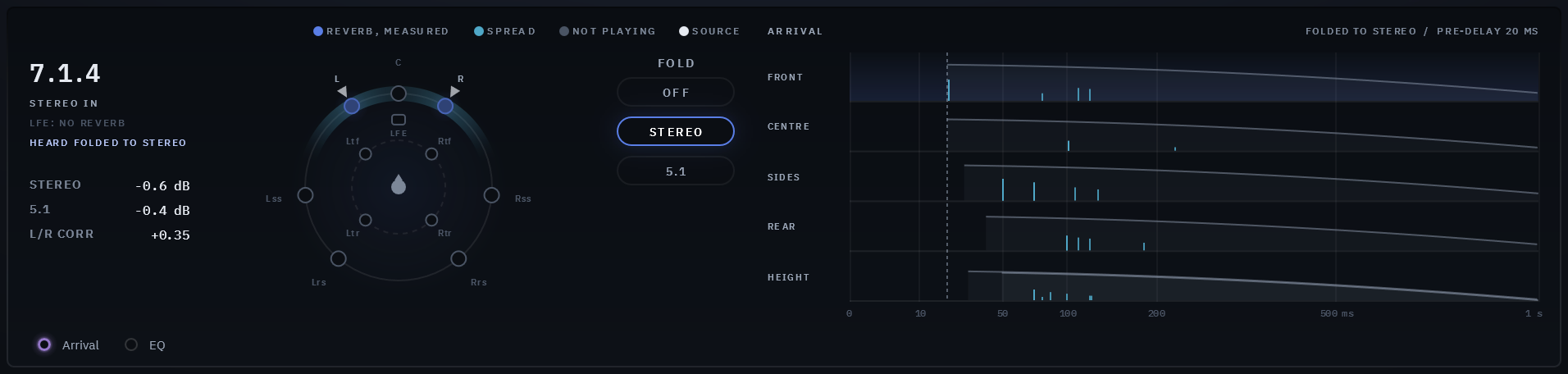
FOLD changes what the plugin outputs, not only what you hear: while it folds, a bounce or an export of the track is the fold. So:
- Whenever it folds, the header shows FOLD: STEREO or FOLD: 5.1 in red, whether the visualizer is shown or not, and a click there switches FOLD off.
- It is never saved: every new instance and every reopened session starts with FOLD off, and no preset carries it.
- No host can automate it.
Switch it off before you print. On a stereo or mono track it folds nothing.
FREEZE and the kill
FREEZE holds the tail as it is, on every speaker, for as long as it is on. Nothing you play meanwhile is added to the hold: it plays through the early reflections only (and dry, if MIX is under 100%). FREEZE is saved with your session but never in a preset; a session saved frozen opens frozen, holding silence until you release FREEZE and freeze again over the music (a session keeps the settings, not the sound that was held).
The kill, the small square beside DECAY’s readout, empties the reverb now, without waiting for the tail to die away: it fades out in 10 ms, and the next sound starts a fresh tail. The dry is never touched. Under FREEZE it also releases FREEZE. A host can automate it as a pulse, to cut a tail at the end of a section. With Clear Tail on Preset Change on (the menu), every preset you load does the same, so the old tail does not ring into the new preset.
04 Menu settings
| Setting | Choices | Default |
|---|---|---|
| Panel Size | 75%, 100%, 125%, 150% | 100%. The menu sets this computer’s default; dragging the corner sets this session’s |
| Clear Tail on Preset Change | on / off | off. This instance’s, saved with the session |
| Show Visualizer, Show Tooltips | on / off | on |
There is no oversampling setting: the reverb runs at the host’s own rate.
05 Presets
Forty-seven presets plus Default, in eleven categories:
| Category | What it holds |
|---|---|
| Rooms | Small, furnished rooms, the early sound up front |
| Chambers | Hard, bright, dense echo chambers |
| Halls | Concert halls, the audience as their floor |
| Churches | Stone churches and cathedrals: long and dark |
| Open Air | The ground alone and a quiet tail, from a courtyard to a valley |
| Plates | The steel plate: for a vocal, a snare, a bright one and a long one |
| Vast | The Spherelight space: a vast hall, a bloom, a distant voice and an endless one |
| Post | Places for picture: a dialogue room, a corridor, a warehouse, an underground space, an ambience bed |
| Music | By instrument: vocals, drums, piano, strings, pads |
| Immersive | What the layout can do: a front stage, an envelope, an overhead wash, a deep rear |
| Inserts | For a track, with the dry kept (MIX under 100%) |
Each name ends with its DECAY: “Halls/Concert Hall - 2.0 s”, “Churches/Cathedral - 6.0 s”. The reverb times follow real rooms: small rooms under half a second, concert halls about two seconds, cathedrals four to seven. Default returns every control to its factory value.
Save your own from the preset field: a forward slash in the name files it in a folder (“Vocals/My Plate Room”). Presets
are .sppreset files in %APPDATA%\udidsp\Spherelight\Presets on Windows and
~/Library/Application Support/udidsp/Spherelight/Presets on the Mac.
06 CPU and latency
Measured at 48 kHz, 512-sample blocks, with a stereo source, on the development machine (one core):
| Layout | Defaults | The heaviest setting |
|---|---|---|
| Stereo | 5.45% | |
| 7.1.4 | 8.55% | 10.0% |
| 9.1.6 | 10.6% | 12.1% |
The heaviest setting is SIZE 100%, DECAY 60 s, EARLY 100% and SPREAD 0. In silence, once the tail has died away, Spherelight rests: about 0.4% at 7.1.4.
Latency: none, at every setting.
07 Technical specifications
| Formats | VST3 and AAX, 64-bit (Windows 10/11); AU, VST3 and AAX (Apple Silicon: macOS 11 Big Sur or later; Intel Mac: macOS 10.15 Catalina or later - limited support (they are old platforms not supported by Apple). Please try the free 14-day trial to verify compatibility) |
| Output layouts | mono, stereo, 5.1, 7.1, 7.1.2, 5.1.4, 7.1.4, 7.1.6, 9.1.4, 9.1.6 |
| Input | mono, stereo, or the same layout as the output |
| Latency | none |
| Reported tail | worked out from the settings, erring long: about 7.7 s at the defaults; endless while frozen |
| Bypass | 20 ms crossfade; bypassed, every speaker plays the input untouched |
08 Trial, activation and support
As across the UDI DSP line: see the support page. About in the menu shows the version and build.
Dolby and Dolby Atmos are trademarks of Dolby Laboratories.