Fluxwave Multiband
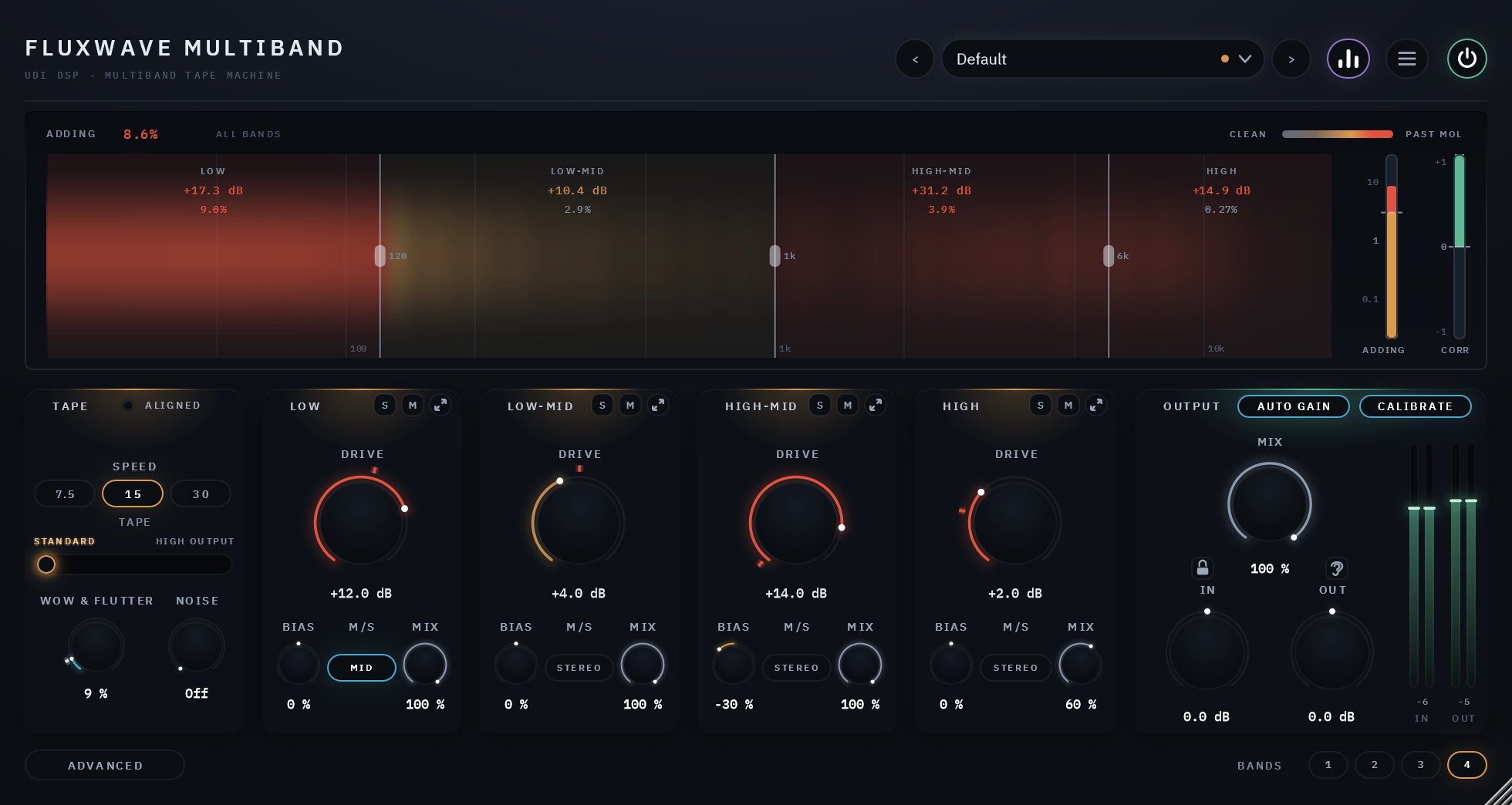
Fluxwave's tape machine in up to four bands. One tape, one speed, one transport, with its own DRIVE, BIAS, M/S and MIX in every band, so the lows can run hot while the top stays clean.
One tape machine, split into bands
Fluxwave Multiband is Fluxwave's tape machine with the signal split into up to four bands before the tape. Each band has its own DRIVE, BIAS, M/S and MIX, and everything that makes it one machine stays shared: one tape, one speed, one transport, one hiss. Push the low end into the tape's saturation while the vocals and cymbals pass nearly clean, or bias the top darker without touching the bottom.
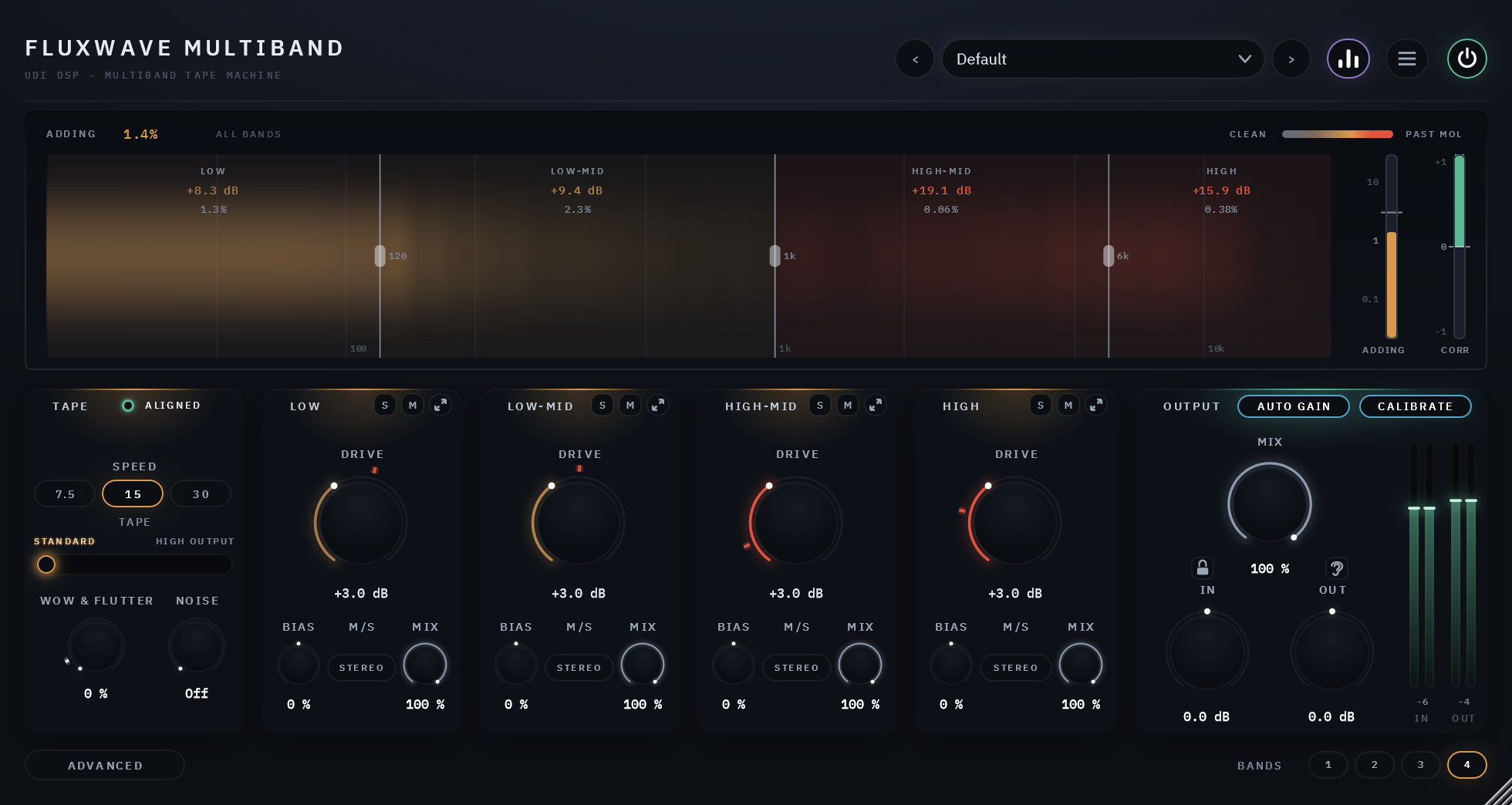
It is worked the way Fluxwave is. DRIVE is in dB over the tape's reference level in every band, so 0 dB is aligned and +6 is running that band hot. CALIBRATE and AUTO GAIN work band by band, so the same DRIVE means the same amount of tape in a quiet band as in a loud one, and turning it never jumps the volume.
Up to four bands
BANDS 1, 2, 3 or 4, split at three crossovers you drag on the display: 120 Hz, 1 kHz and 6 kHz to start. The bands add back up to the whole, so with the tape at rest nothing is lost between them.
DRIVE and BIAS per band
DRIVE runs from -6 to +18 dB over the reference level in each band, with a red tick for where the music playing now would reach the tape's maximum output level (MOL). BIAS darkens and roughens, or cleans and smooths, one band at a time.
M/S and MIX per band
Each band runs its tape on the whole signal (STEREO), its middle or its sides, and blends its tape against its own dry signal with MIX. The dry part goes through the same transport as the tape, so a partial MIX never combs, even with WOW & FLUTTER up.
One machine, shared
SPEED (7.5, 15 and 30 in/s), TAPE (STANDARD or HIGH OUTPUT), WOW & FLUTTER and NOISE sit in one card at the left: one tape for every band. The hiss is one tape's, played back band by band, so it follows each band's DRIVE in its own part of the spectrum.
Solo, mute and a closer look
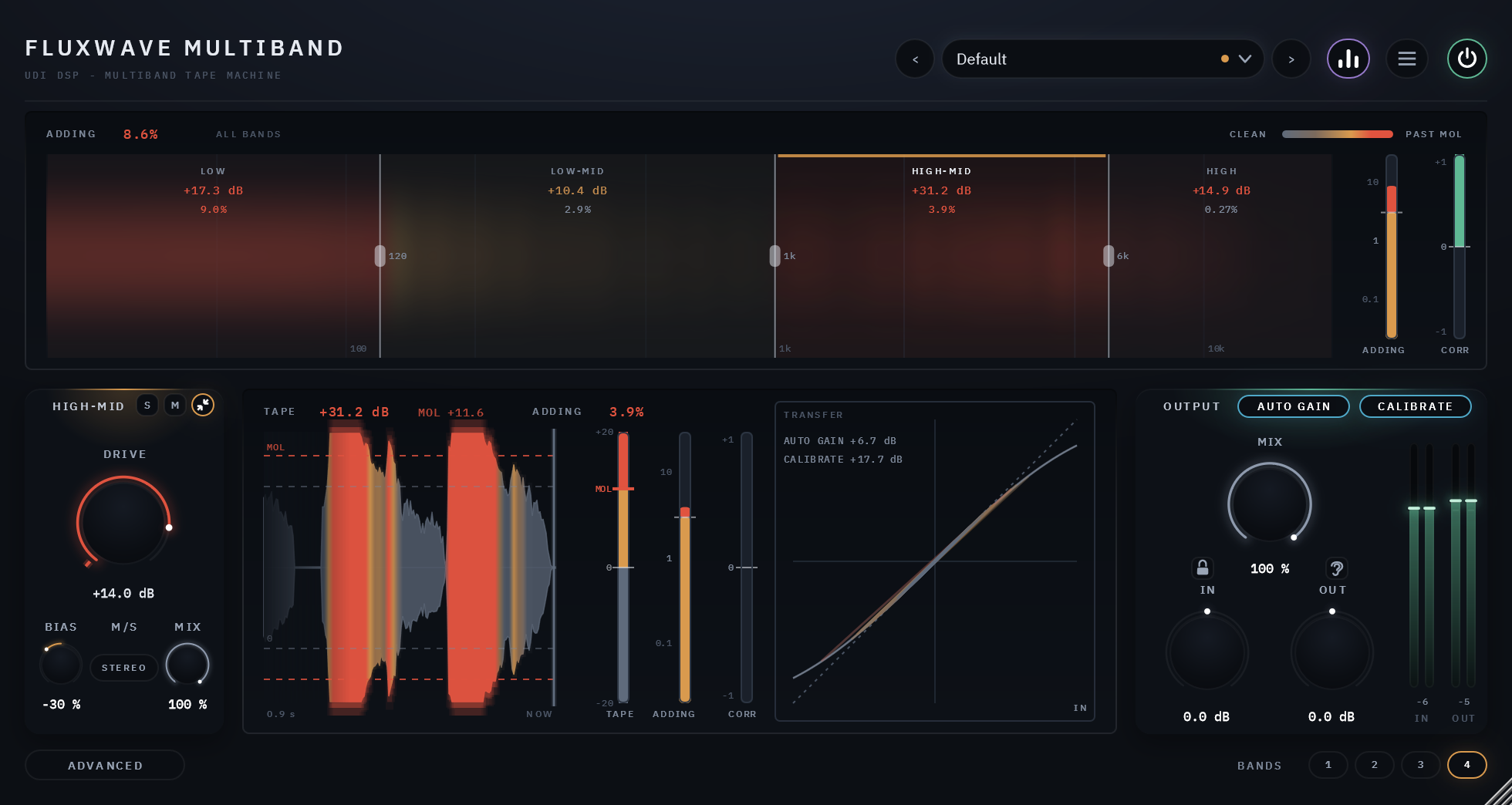
S and M on every band. The expand button swaps the band's strip for its own view: its tape level over the last seconds, its meters, its transfer curve, and the AUTO GAIN and CALIBRATE it applies now.
Hear what it adds
The ear beside MIX steps through the output, only the new sound the tape creates (ADDED), and everything the plugin changes (DIFF). Solo a band to hear what that band adds alone.
Heat where you want it
A single tape saturates whatever is loudest, which on a full mix is usually the kick and the bass. Split into bands, each part of the spectrum gets its own amount of tape: the low end driven into a thick, rounded squash, the mids aligned, the top kept open. The display shows every band's tape level in dB and the harmonics it adds, and lights each band's part of the spectrum from steel to amber to red as it is driven harder.
With one band, Fluxwave Multiband is a single tape across the whole signal, its own view always open. Two bands split at the middle crossover, three at the low and the high; the hidden bands' settings wait where they were.
The same DRIVE in every band
The bands of a mix are rarely at the same level: the low end can be 20 or 30 dB louder than the top. CALIBRATE measures each band on its own, brings it to the tape's working level before the tape and undoes that exactly afterwards, so DRIVE 0 dB means aligned in the quietest band as in the loudest. AUTO GAIN then holds each band's loudness while you turn its DRIVE.
A band's expanded view shows the amounts it is applying now, under its transfer curve: AUTO GAIN's makeup and CALIBRATE's lift or cut, in dB.
Back to spec in one click
The ALIGNED lamp in the TAPE card is lit while the machine is set to spec: every band's BIAS at its centre, WOW & FLUTTER at or under its tick, the transport linked. Click it to return there; DRIVE, M/S, MIX and the crossovers stay as they are.
A display that shows every band at work
The spectrum is split where the bands are, each band's part lit by how hard its tape is driven: steel under the reference level, amber as it saturates, red past MOL. Each band shows its tape level in dB over the reference and the harmonics it adds as a percentage; ADDING across the top and its meter give the whole machine's, and CORR is a mono-safety meter.
Drag a crossover's handle to move it. Expand a band to see its own ribbon of the last seconds, its TAPE LEVEL, ADDING and CORR meters and its transfer curve. Hide the display from the header and the panel gets shorter.
The machine's own adjustments
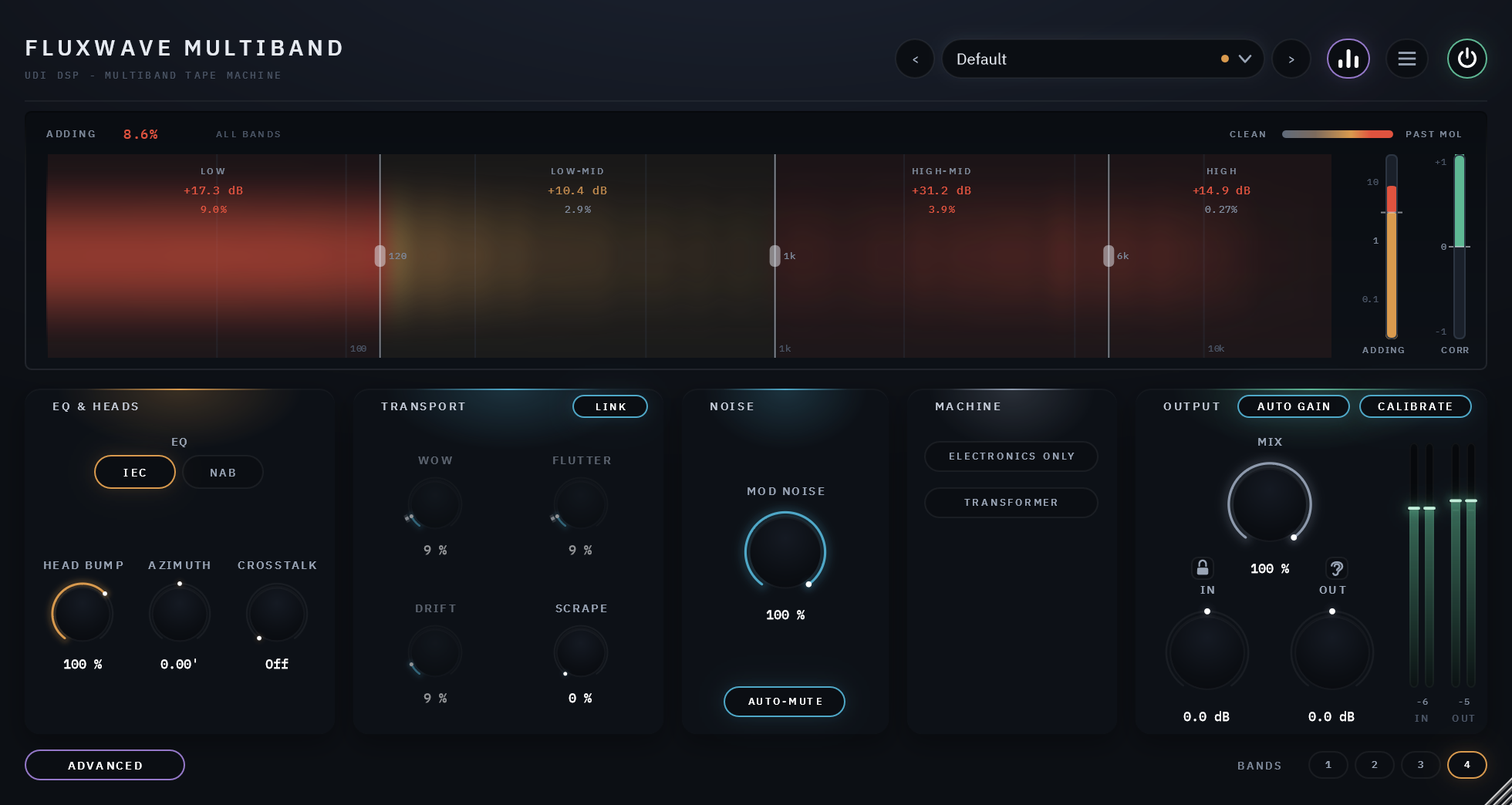
The ADVANCED button swaps the bands for four cards of the machine's own adjustments, shared by every band. The display and OUTPUT stay where they are.
EQ and heads
The record and playback EQ, IEC or NAB at 7.5 and 15 in/s and AES at 30; HEAD BUMP from 0 to 150%; AZIMUTH; and CROSSTALK.
Transport
WOW, FLUTTER and DRIFT each on its own, SCRAPE, and LINK, which ties them back to the WOW & FLUTTER knob in the TAPE card.
Noise
MODULATION NOISE lets the hiss rise with the music; AUTO-MUTE fades it in silence. NOISE itself is in the TAPE card.
Machine
ELECTRONICS ONLY, the machine with the tape taken out of every band, and TRANSFORMER, the output transformer's weight in the lowest notes. M/S is set band by band, on the bands' strips.
Specifics, stated plainly
| Bands | 1, 2, 3 or 4; crossovers 30 Hz to 1 kHz, 150 Hz to 8 kHz and 1 kHz to 18 kHz (120 Hz, 1 kHz and 6 kHz by default), neighbours kept at least a major third apart |
|---|---|
| Per band | DRIVE (-6 to +18 dB over the reference level), BIAS, M/S (STEREO, MID or SIDE), MIX, SOLO and MUTE |
| Shared | SPEED 30, 15 and 7.5 in/s; STANDARD or HIGH OUTPUT tape; WOW & FLUTTER; NOISE; the ADVANCED page's EQ, heads, transport, noise and machine controls |
| Oversampling and latency | Off, 2×, 4× (default), 8× or 16×, in the menu, set separately for playing and for exporting; 177 samples at 48 kHz at the default, 117 with oversampling Off. The split adds none, and no knob or preset changes it |
| Channels | Mono, mono in and stereo out, or stereo |
| Output | MIX against the dry signal, with a padlock that holds MIX, IN and OUT through preset changes; IN and OUT trims, ±24 dB; AUTO GAIN and CALIBRATE, each band on its own |
| Licensing | Free UDI DSP account, one-time online activation — no subscription, works offline for a week between checks |
Compatibility
Windows
- Operating system Windows
- OS levels Windows 10 or 11, 64-bit
- Plugin formats VST3 and AAX
macOS
- Operating system macOS
- OS levels Apple Silicon: macOS 11 Big Sur or later
- Intel Mac: macOS 10.15 Catalina or later - limited support (they are old platforms not supported by Apple). Please try the free 14-day trial to verify compatibility.
- Plugin formats AU, VST3 and AAX
Internet needed once, briefly, to activate (a short browser sign-in). Day-to-day use after that works offline for up to a week between checks.
Validated in Cubase Pro, Avid Pro Tools, Apple Logic Pro, Reaper, Waveform and FL Studio. More information.