Fluxwave Multiband is a tape machine plugin by UDI DSP, Fluxwave in up to four bands.
01 What Fluxwave Multiband is
Fluxwave Multiband is Fluxwave’s tape machine with your sound split into up to four bands before it reaches the tape. A single tape saturates whatever is loudest, which on a full mix or a drum bus is usually the kick and the bass; here each part of the spectrum gets its own amount of tape. Push the low end into a thick, rounded squash while the vocals and the cymbals stay open, or bias the top darker without touching the bottom.
It stays one machine. The bands share one tape, one speed, one transport and one hiss, and they are summed before the playback head, so they never drift apart in time and the wavering of the tape is the same in every band.
- Calibrated in tape terms, band by band. Each band’s DRIVE is how hot that band prints, in dB over the tape’s reference level. 0 dB is aligned; +6 is “running it hot”. CALIBRATE brings each band to the reference on its own, so the same DRIVE means the same amount of tape in the quietest band as in the loudest.
- Level-matched. AUTO GAIN holds each band’s loudness while you turn its DRIVE, so you judge the tone, not the volume.
- M/S and MIX in every band. A band’s tape can run on the whole signal, its middle or its sides, and be blended with that band’s own dry signal.
- It shows what the tape is doing. The display lights each band’s part of the spectrum by how hard its tape is driven, from steel through amber to red past the tape’s own maximum, and any band opens into its own view: its tape level over the last seconds, its meters and its transfer curve.
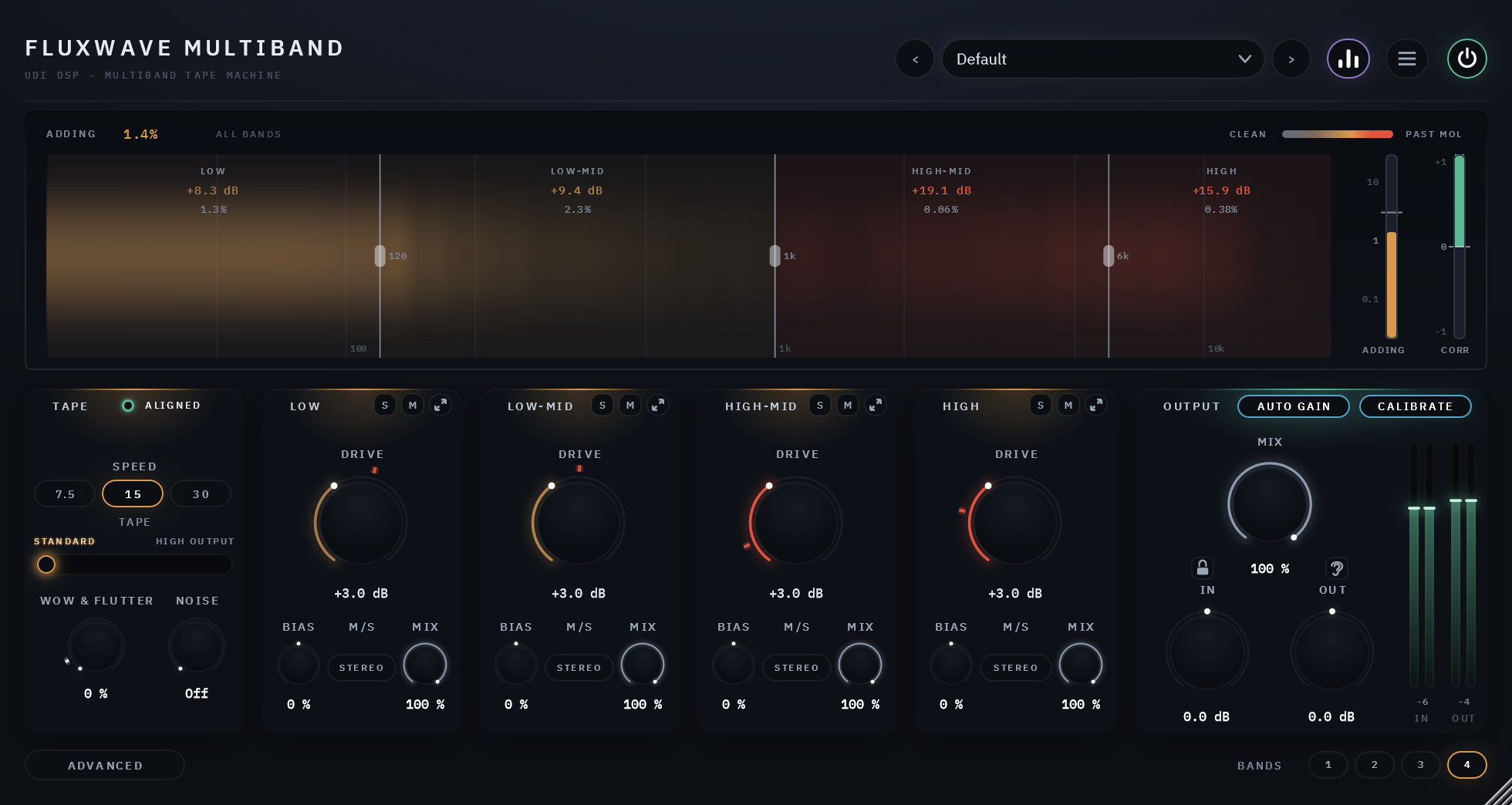
At a glance
- BANDS: 1, 2, 3 or 4, split at three crossovers you drag on the display (120 Hz, 1 kHz and 6 kHz to start).
- In every band: DRIVE, BIAS, M/S and MIX, with SOLO and MUTE.
- One machine for all: SPEED (7.5, 15 or 30 inches per second), TAPE (standard or high output), WOW & FLUTTER and NOISE in the TAPE card; the EQ standard, the head, the transport’s parts, the noise’s behaviour, the electronics without the tape and the output transformer on the ADVANCED page.
- Opens subtle: four bands, each printed just above the reference level; 15 in/s, the European EQ, standard tape, aligned bias.
- Low latency: 177 samples at 48 kHz at the default 4x oversampling. The split adds none, and no control moves it.
02 The ideas behind Fluxwave Multiband
None of this is needed to use the plugin, but each idea explains why a control behaves the way it does.
Tape has a reference level
A real tape machine is lined up so that a tone at the studio’s operating level records at the tape’s reference level. How the tape behaves follows from where your signal sits against that line: a few dB over it is the classic warm print; well over it the tape saturates; at its maximum output level (MOL), the industry’s own definition of too hot, the tape adds 3% distortion to a 1 kHz tone. Fluxwave Multiband works in exactly those terms, in every band: DRIVE is dB over the reference, each band’s TAPE figure reads in it, and the display colours each band by where it sits against MOL.
MOL depends on the tape and the speed (BIAS moves it a little), and it is the same for every band:
| 7.5 in/s | 15 in/s | 30 in/s | |
|---|---|---|---|
| Standard | +10.0 dB | +12.5 dB | +13.0 dB |
| High Output | +11.5 dB | +14.0 dB | +14.0 dB |
Why bands
The bands of a real mix sit at very different levels: the low end is often 20 or 30 dB louder than the top. On one tape, the loudest band decides how hard everything is driven, so the kick saturates long before the cymbals are touched, and turning the drive down to spare the low end leaves the top untouched too. Split into bands, each part of the spectrum is printed at its own level: DRIVE in each band, and CALIBRATE per band, which lines each band up to the reference on its own. With CALIBRATE on, DRIVE 0 dB is aligned in every band whatever its level.
The bands are split with crossovers that add back up to the whole: with the tape at rest, the four bands summed are your sound, with nothing lost between them. MIX’s dry signal goes through the same split, so a partial MIX blends two signals with one phase and cannot comb.
The highs saturate first
On a tape machine the recording EQ boosts the highs before they reach the tape, and the playback EQ takes the boost back out. So in each band the highest frequencies it holds reach the tape’s limit first. At 7.5 in/s, where the boost is largest, the effect is strongest: there the top bands saturate sooner at the same DRIVE.
Bias, by its sound
Bias is a high-frequency signal a tape machine records along with the music to make the tape behave linearly. Too little and the sound turns brighter and grittier, then breaks up around quiet notes; too much and it turns duller, cleaner and smoother. More bias is cleaner, not dirtier. Here each band has its own BIAS, so you can rough up the mids while the low end stays smooth. Under-biased, the band’s transfer curve opens into a loop.
Wow, flutter and drift: the speed of the tape
No transport runs at a perfectly constant speed. Drift wanders the pitch over seconds; wow is a gentle waver around once a second; flutter is faster and heard as a slight roughness. On a real machine they never repeat, and here neither do they: there is no LFO. There is one transport, so every band wavers together, as one tape does. At the ALIGNED point on the WOW & FLUTTER knob the speed holds to the specification of a studio machine at that speed, weighted the way the industry measures it: 0.06% at 7.5 in/s, 0.04% at 15 and 0.03% at 30.
The head bump
A playback head reads long wavelengths partly from the edges of its face, which adds a gentle bump in the low end, a small dip after it, then a roll-off below. There is one head after the bands, so the bump is the machine’s, not a band’s: its frequency changes an octave with each change of speed, deepest at 7.5 in/s, highest at 30.
03 The panel
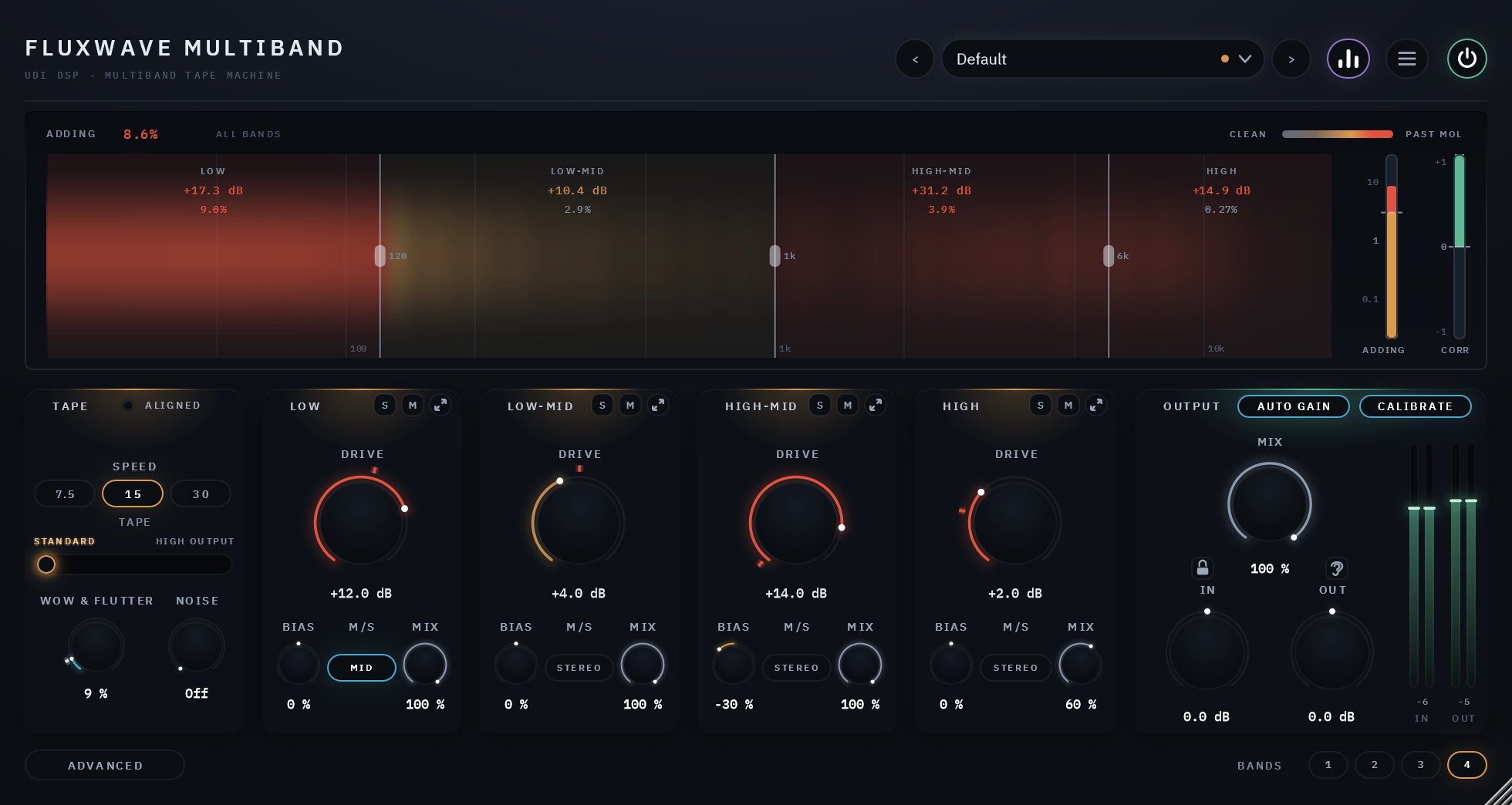
Across the top
The name; then, from the right, POWER (bypass, with a 20 ms crossfade), the menu, the visualizer button, and the preset field with its arrows. A dot in the preset field means you have changed something since the preset loaded.
The display
- The spectrum, the large display: your sound’s spectrum, split where the bands are. Each band’s part is lit in its tape’s heat: steel under the reference level, amber as it saturates, red past MOL, read from that band’s own tape level. CLEAN to PAST MOL, top right, is the scale.
- Each band’s figures: its name, its TAPE level in dB over the reference (not dBFS), and its ADDING, the harmonic content its tape adds as a share of what it puts out.
- The crossovers: a handle on each line between two bands, with its frequency. Drag it to move the split.
- ADDING, top left and the meter at the right: the whole machine’s added harmonic content, measured live with the machine’s own frequency response left out (so the head bump and the high-end loss are not counted as distortion). Red past 3%, MOL’s own figure.
- CORR, the meter at the far right: mono safety. +1 when the two channels are the same, 0 when they are unrelated, below 0 (in red) when they start to cancel as the track is summed to mono.
Click a band’s part of the spectrum to open its own view (below). The visualizer button in the header hides the display, and the panel gets shorter.
TAPE
The one machine, at the left of the bands.
| Control | What you hear | Values | Default |
|---|---|---|---|
| SPEED | 30: cleanest, the widest top, the least bump. 15: the classic mixing speed, a bump in the low end. 7.5: darker, bass-forward, the highs saturate early | 7.5 / 15 / 30 in/s | 15 |
| TAPE | STANDARD saturates sooner and rounder. HIGH OUTPUT has more headroom: cleaner and punchier at the same DRIVE | Standard / High Output | Standard |
| WOW & FLUTTER | The tape’s speed variation, every band together. 0 is a still transport; the tick, ALIGNED, is a serviced studio machine; 100% needs a service | 0-100%; the knob lands on ALIGNED as you pass it (Shift for fine moves) | 0 |
| NOISE | Tape hiss at its real level for this tape and speed, rising with the music and fading when it stops | Off, -30 to +12 dB over the real hiss | Off |
The hiss is one tape’s, played back band by band: it is split as the bands are and each part follows its own band’s DRIVE, so driving one band harder brings up the hiss in that part of the spectrum only.
The ALIGNED lamp in the card’s title row is lit while the machine is set to spec: every band in use with its BIAS centred, the transport linked, and WOW & FLUTTER at or under its ALIGNED point. Click it to return there: every band’s BIAS to its centre, LINK on, and WOW & FLUTTER down to its tick if it was above it. DRIVE, M/S, MIX, the crossovers and the rest stay where they are: a safe place to explore from. With fewer than four bands, only the bands in use count.
The bands
One strip per band, from LOW at the left to HIGH at the right.
| Control | What it does | Values | Default |
|---|---|---|---|
| DRIVE | How hot this band prints. More: denser, rounder peaks, then audible distortion past MOL. Its ring glows amber while the band’s tape saturates and red past MOL; the red tick is the DRIVE at which what is playing now in this band would reach MOL | -6 to +18 dB over the reference | +3 dB |
| BIAS | Below centre: brighter, grittier, then breaking up on quiet notes. Above: duller, cleaner, smoother | -100% to +100%; the centre is aligned | 0 |
| M/S | Which part of the band goes to tape. STEREO: all of it. MID: what the two channels share, the sides passing clean. SIDE: only what they differ by, the middle passing clean. Click to step through | Stereo / Mid / Side | Stereo |
| MIX | How much of the band goes through the tape; the rest is the band’s own dry signal | 0-100% | 100% |
| S (solo) | Hear only the soloed bands. Several can be soloed at once | on / off | off |
| M (mute) | Silence this band, its dry included. Mute wins over solo | on / off | off |
A band’s MIX never combs. The band’s dry signal is taken from the same split and goes through the same transport as its tape, so even with WOW & FLUTTER up, a band at 50% blends two signals that waver together. At 0% the band is exactly its dry signal.
SOLO and MUTE fade in 10 ms, are saved with your session and can be automated, but are never stored in a preset, so loading one never leaves a band silenced.
BANDS, at the bottom right: 1, 2, 3 or 4. Two bands split at the middle crossover, three at the low and the high, four at all three. The bands you hide keep their settings for when you bring them back. Neighbouring crossovers are kept at least a major third apart.
A band’s own view
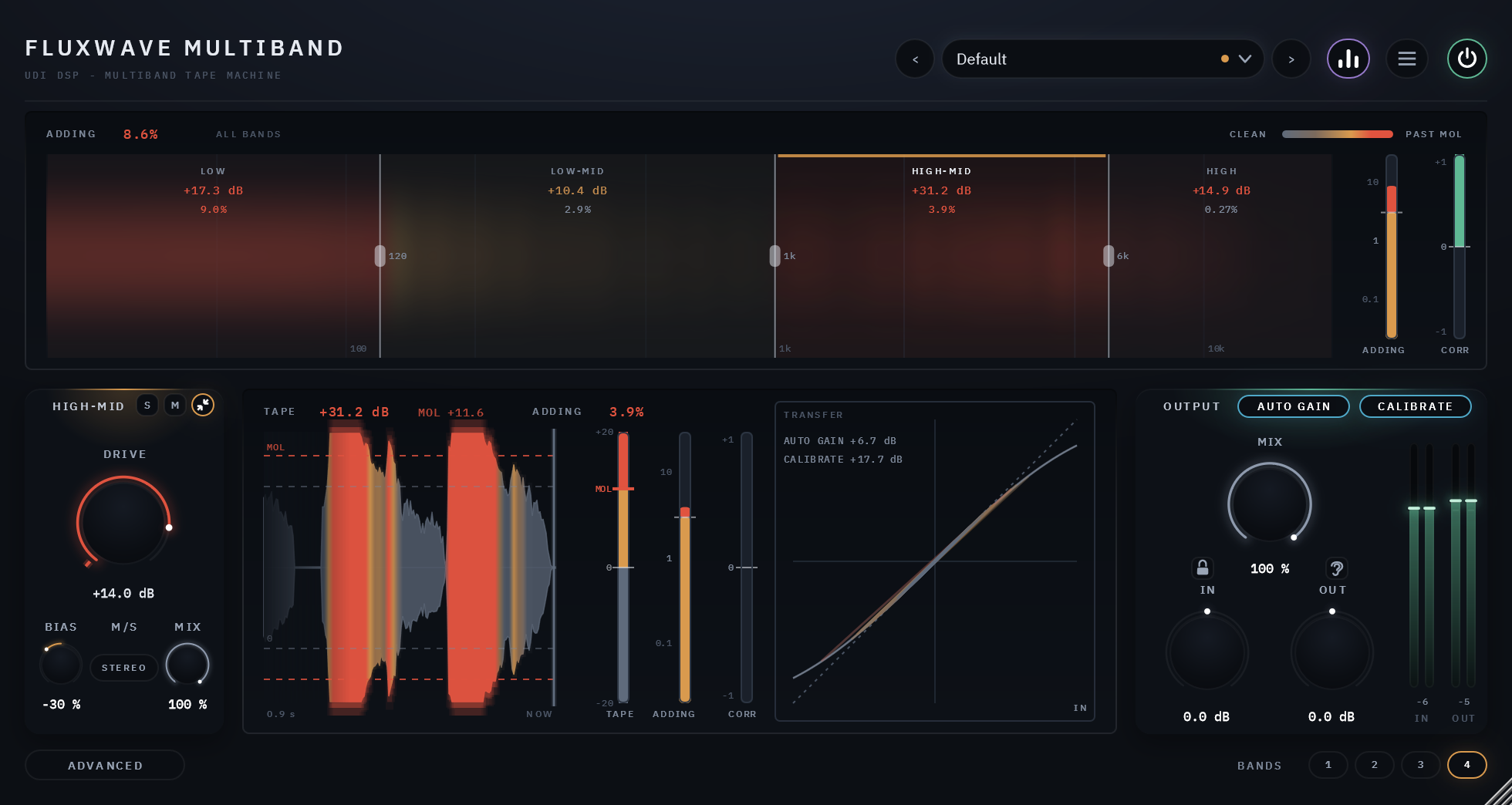
The expand button in a band’s title row (or a click on its part of the spectrum) opens that band’s own view in place of the TAPE card and the other strips; the band’s strip stays at the left. The same button closes it. With BANDS at 1 the one band is FULL, with no S, M or expand button, and its view is always open.
- The ribbon: the band’s tape signal over the last seconds, flowing from NOW at the right, each moment as tall as the tape level it reached and coloured by it. The dashed lines are the reference and MOL.
- TAPE, a figure along the top and a meter: the band’s tape level in dB over the reference, with its MOL marked.
- ADDING, a figure and a meter: the harmonics this band’s tape adds.
- CORR: this band’s mono safety.
- TRANSFER: the curve the band’s tape runs the signal through, with the last fraction of a second traced along it. Under it, the band’s AUTO GAIN makeup and CALIBRATE lift or cut, in dB, as they are now (OFF when switched off).
OUTPUT
| Control | What it does | Default |
|---|---|---|
| AUTO GAIN | Holds each band’s loudness as its DRIVE moves, so you judge the tone and not the volume. One switch, working in every band | on |
| CALIBRATE | Brings each band’s level to the tape’s reference, band by band, so DRIVE is the same heat in every band. One switch, working in every band | on |
| MIX | The whole machine against the dry signal, latency-matched to the sample | 100% |
| IN, OUT | Trims before and after, with their meters | 0 dB (±24 dB) |
The padlock beside MIX holds MIX, IN and OUT where they are while you change presets.
MIX and WOW & FLUTTER together make a chorus. The whole machine’s MIX blends a wavering tape with a dry signal that does not waver, which is how a chorus works. That can be what you want; if not, keep MIX at 100% while WOW & FLUTTER is up, and blend band by band instead: a band’s own MIX does not do this.
LISTEN, the ear beside MIX, changes what you hear, one click at a time; the ear names the mode while it is on:
| LISTEN | You hear |
|---|---|
| (off) | The output, as normal |
| ADDED | Only the new sound the tape creates: its harmonics and the squash on the peaks, exactly what the ADDING figures measure, and TRANSFORMER’s own when it is on. The tone the machine gives (the head bump, the high-end loss), the speed variation and the hiss are left out. Every band is heard; solo a band to hear what it adds alone |
| DIFF | Everything Fluxwave Multiband changes: the output less the input. With WOW & FLUTTER up this is mostly the timing |
It is a way of listening, not a setting: it is never saved, MIX is set aside while it is on, and it returns to the output when you close the panel. With ELECTRONICS ONLY on there is no tape to add anything, so ADDED is silent and DIFF nearly so; the ear dims and its tooltip says why.
04 The ADVANCED page
The ADVANCED button swaps the TAPE card and the bands for four cards of the machine’s own adjustments, shared by every band. The display and OUTPUT stay where they are.
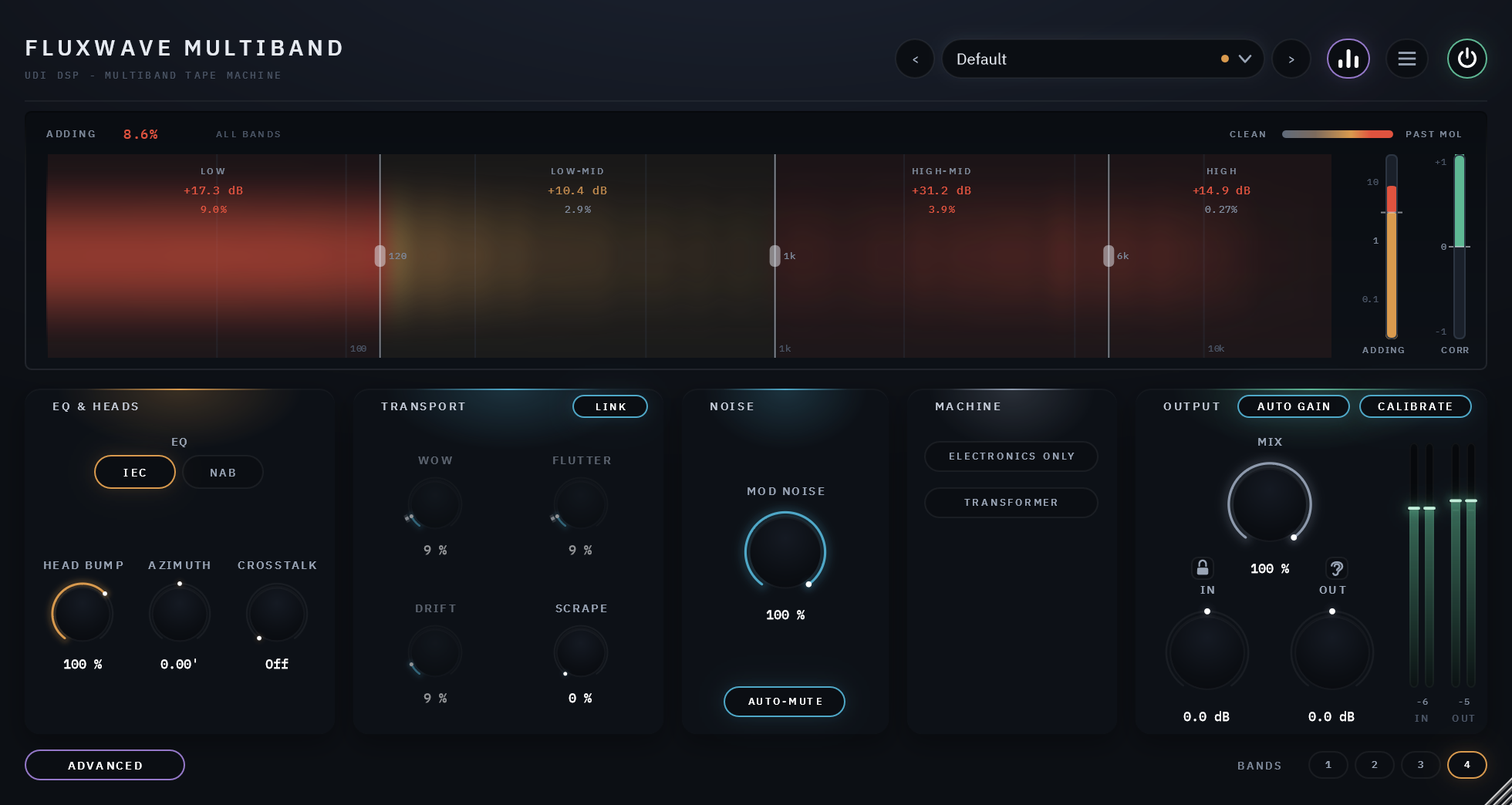
| Card | Control | What it does | Default |
|---|---|---|---|
| EQ & HEADS | EQ | The playback standard: IEC (flat in the lows) or NAB (a low-end lift that thickens the bottom when driven). At 30 in/s there is one standard, AES | IEC |
| HEAD BUMP | The size of the low-end bump, 0-150% of the voiced amount | 100% | |
| AZIMUTH | A tiny tilt of the playback head: the two channels’ highs drift apart in time, so the top softens and widens | 0’ | |
| CROSSTALK | Each track hears a little of its neighbour | Off | |
| TRANSPORT | WOW, FLUTTER, DRIFT | Each part of the speed variation on its own. With LINK on they follow WOW & FLUTTER and show it, dimmed; touch one and it goes its own way, starting where the macro had it, until you click LINK | follow |
| SCRAPE | A fine, fast roughness: the tape rubbing the heads | 0 | |
| NOISE | MOD NOISE | How much the hiss rises with the music: what makes tape hiss sound like tape | 100% |
| AUTO-MUTE | Fades the noise when the input goes silent. A convenience: no studio machine did it | On | |
| MACHINE | ELECTRONICS ONLY | The machine’s path with the tape taken out of every band: switch it on and off to hear which part of the sound is the tape | Off |
| TRANSFORMER | The output transformer: weight and softness in the lowest notes, growing as you drive it | Off |
M/S is set band by band, on the bands’ strips, so the MACHINE card has none. A small mark on the ADVANCED button tells you when anything there is away from its default.
05 Menu settings
| Setting | Choices | Default |
|---|---|---|
| Oversampling: Playing | Off, 2x, 4x, 8x, 16x | 4x. Plain oversampling: each band’s tape curve runs at the higher rate with no other anti-aliasing |
| Oversampling: Exporting | Same as Playing, or Off, 2x, 4x, 8x, 16x | Same as Playing |
| Drift range | 1 ms (about 0.7 cents), 5 ms (about 3.5 cents), 10 ms (about 7 cents): how far the slow drift may wander the tape’s speed | 1 ms |
| Panel Size | 75%, 100%, 125%, 150% | 100%. The menu sets this computer’s default; dragging the corner sets this session’s |
| Show Visualizer, Show Tooltips | on / off | on |
The oversampling and drift settings are this session’s: a new instance always opens at 4x and 1 ms.
06 CPU and latency
Measured at 48 kHz, stereo, 512-sample blocks, on the development machine (one core), four bands at their default DRIVE:
| Setting | CPU |
|---|---|
| Defaults (4x) | 4.1% |
| Defaults, panel open | 6.1% |
| Defaults, two bands | 4.3% |
| Oversampling off / 2x / 8x / 16x | 2.7% / 3.3% / 4.9% / 7.0% |
| Everything up at 16x, panel open | 14.6% |
| Silence | about 0.3% |
Four bands are four tapes, so the plugin uses more than the single-band Fluxwave; the shared stages (the head, the EQ, the transport) run once.
Latency is reported to the host and never moved by a control: Off 117, 2x 166, 4x 177, 8x 175, 16x 176 samples at 48 kHz. The split adds none: the latency is the single-band machine’s. Playing and Exporting at different settings report the larger of the two, so the timing never jumps when an export starts.
07 Presets
Default returns every control to its factory value. Save your own from the preset field: a forward slash in the name
files it in a folder (“Drums/My Kit”). Presets are .fwmpreset files in %APPDATA%\udidsp\Fluxwave Multiband\Presets on
Windows. A preset holds every band’s settings and the crossovers, but never SOLO or MUTE.
08 Technical specifications
| Formats | VST3 and AAX, 64-bit (Windows 10/11); AU, VST3 and AAX (Apple Silicon: macOS 11 Big Sur or later; Intel Mac: macOS 10.15 Catalina or later may work, please try the free 14-day trial to verify compatibility) |
| Channels | mono, mono in / stereo out, stereo |
| Bands | 1 to 4; crossovers 30 Hz-1 kHz, 150 Hz-8 kHz, 1-18 kHz (defaults 120 Hz, 1 kHz, 6 kHz) |
| Speeds | 7.5, 15, 30 in/s |
| EQ standards | IEC and NAB at 7.5 and 15 in/s, AES at 30 |
| Latency | 177 samples at 48 kHz at the default 4x |
| Reported tail | worked out from the settings |
| Bypass | 20 ms crossfade; bypassed, the input delayed by the reported latency |
09 Trial, activation and support
As across the UDI DSP line: start a trial from the badge in the header or Activate… in the menu; About in the menu shows the version and build. See the support page.