Ghostlight is a reactive spectral reverb by UDI DSP.
01 What Ghostlight is
Where a conventional reverb has a single decay time, Ghostlight splits its tail into four frequency bands and continuously re-weights how long each band rings, based on what the input signal is actually doing — in real time, with zero added latency.
It is also simply a good reverb. With the spectral engine centred, you get a smooth, dense, modulated feedback-delay-network tail comparable to a classic algorithmic hall or plate. That’s the baseline everything else is built on.
Ghostlight is the reactive engine at the centre of Ghostlight Pro, UDI DSP’s other reverb, without the granular tail engine or the deeper control set.
At a glance
- Reactive spectral decay — one bipolar control, two different instruments. Bloom rings the loud bands longer; Ghost dies them fast and lets what’s hidden ring on instead. Centred, it’s just a very good reverb.
- A display that shows the reverb — a continuous, always-on field shows the real wet spectrum, and bars show exactly what the spectral engine is doing, live.
- Zero added latency — the entire spectral analysis runs side-chain. Reported latency is 0 samples.
- Freeze, and play into it — holds the tank indefinitely for pads and live layering, while new input ducks quietly underneath rather than piling on top.
- Tail reported to your host — worked out from the current settings, so the reverb can finish in a bounce that includes the tail, a track freeze, or a host that pauses silent plugins. With Freeze on, the tail is reported as unlimited.
- A reverb worth trusting at the core — 8-line Hadamard-mixed FDN, modulated and diffused inside the feedback loop.
- Nothing in a drawer you’ll never open — every control on the panel is live.
- Lock the rhythm to the track, not the clock — Pre-Delay can sync to the host tempo, so a slapback lands on the beat at any tempo without retuning it by hand.
Which one do I need?
| Ghostlight | Ghostlight Pro | |
|---|---|---|
| Space (Size, Decay, Pre-Delay, Diffusion, Low Cut, Damp) | Yes | Yes |
| Reactive spectral decay (Bias, Reactivity — Bloom/Ghost) | Yes | Yes |
| Granular tail (Scatter, Grain, Shimmer, Air, Link) | — | Yes |
| Dynamic EQ (3-band, static + level-reactive, movable Freq/Q) | — | Yes |
| Advanced drawer (Tilt, Low/Mid/High Crossover, Low Width, De-Ess, Pan Rate, grain detail, Link split) | — | Yes |
| Tempo sync | Pre-Delay | Pre-Delay + Shimmer Pan Rate |
| Freeze | Holds the tank | Holds the tank and latches the grain buffer |
| Live parameters | 17 | 52 |
| Factory presets | 45 | 45 |
Ghostlight Pro adds a second, completely different kind of tail and the detail controls to shape both — reach for it when you want the full instrument. Ghostlight is for when you want a reverb that’s just really good at the one thing, with nothing in a drawer you’ll never open.
Design philosophy
A small front panel where every knob does something audible and non-obvious, and nothing hidden behind a button. That is deliberate, not a cut-down Ghostlight Pro missing features by omission: Ghostlight is meant to be the whole instrument you can see at a glance.
Tempo sync follows the same rule. Pre-Delay can lock to the host tempo because that is audible and specific — a slapback that always lands on the eighth note behind the hit, at any tempo. Decay, Diffusion and Damp stay free-running on purpose: nothing about how long a tail rings has a natural relationship to tempo.
02 The engine: spectral decay
The Bias knob is bipolar, and its two directions are two different instruments. In each diagram below, the left bars show the input’s spectrum; the right bars show how long each band of the reverb tail rings.
Bloom
BIAS → +100Bands that are loud in your source ring longer. The reverb amplifies what's already dominant — chords swell around their own harmonics. Resonant, agreeable, "the room agrees with you."
Ghost
BIAS → −100The inverse — and the sound nobody else has. Loud bands decay fast; quiet bands ring long. The tail carries what your source is not emphasising: on a vocal, the mid presence dies instantly while the air and low body linger.
Centred at 0, the spectral engine is exactly neutral and Ghostlight behaves as a plain — but high-quality — reverb.
03 Signal flow
Freeze holds the reverb tank itself, so it sits across the whole FDN rather than at any one point in this chain.
Low Cut and Diffusion are on the way in; Damp is inside the loop. A filter inside a feedback loop applies again on every recirculation, so its effect compounds — which is exactly what you want from high-frequency absorption, and exactly what you do not want from a low cut. So Damp is in the loop and Low Cut guards the door.
The input runs as two independent chains, not a mono sum. Left and right get their own low cut, their own pre-delay and their own diffuser with different stage lengths, so anti-phase stereo content reaches the tail intact instead of cancelling itself out on the way in.
04 The panel
Three sections: SPACE (Size, Decay, Low Cut, Pre-Delay, Diffusion, Damp) is the room itself; SPECTRAL (Bias, Reactivity) is the analyser-driven pair; OUTPUT (Mix, Width, the two trims, and the meters). There is no advanced drawer and no fourth section — every control Ghostlight has is visible all the time.
Freeze sits in the header, next to the power switch, rather than in any section. It holds the reverb tank, and it is the control most likely to be reached for mid-take, so it belongs where nothing covers it.
Colour is used for meaning, not decoration: amber = ringing longer than the Decay setting, cyan = dying faster. The SPACE and OUTPUT knobs are deliberately neutral so the spectral section is what your eye lands on. Knobs that are centre-detented — Bias, Input Gain, Output Gain — fill their ring outward from twelve o’clock and carry a small tick there, so “neutral” is findable without reading the number.
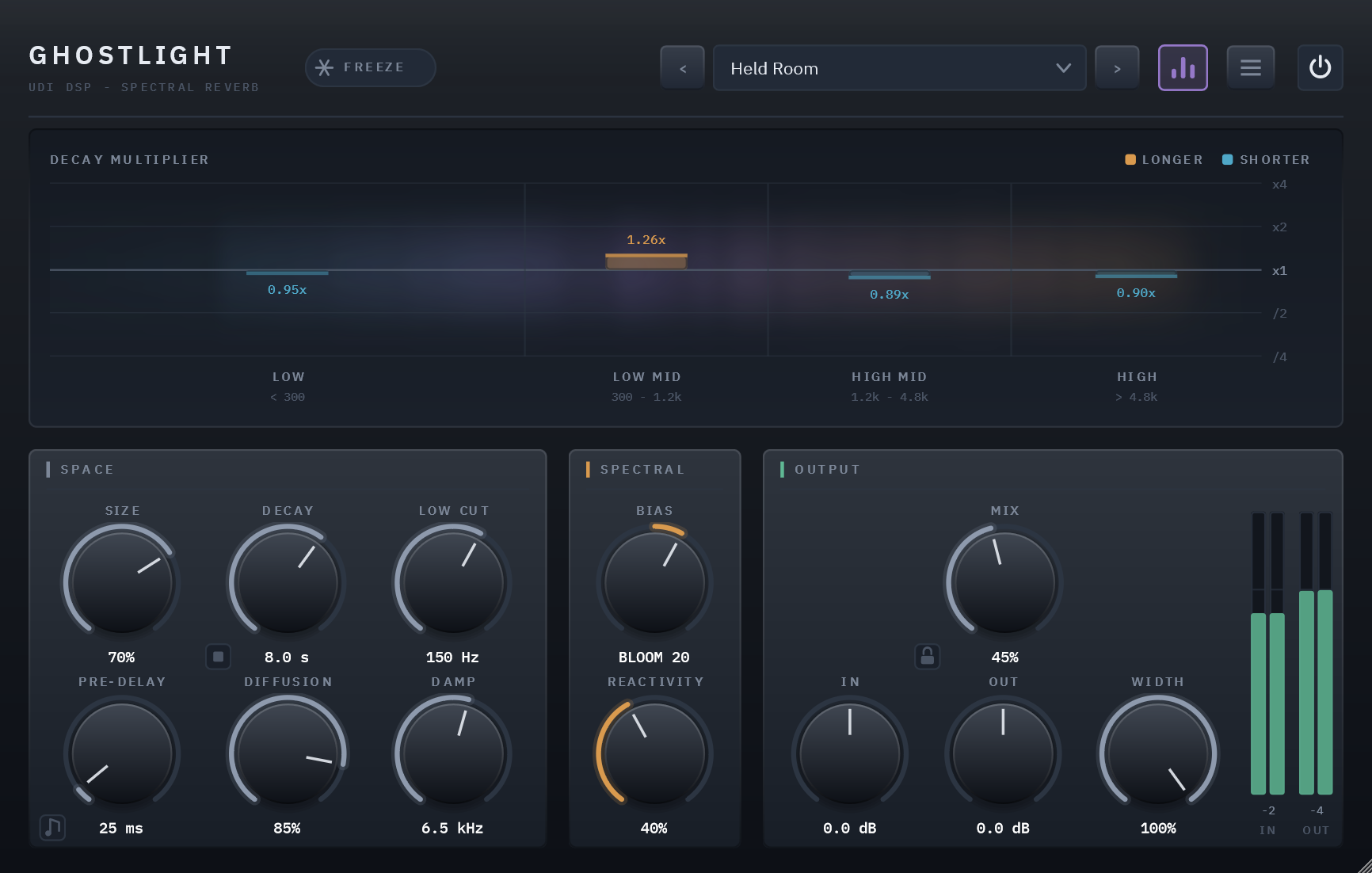
The front panel. The display is live: the cloud shows real energy spread across the whole spectrum, and the bars show what the spectral engine is doing to each band’s decay.
The power switch
The circle at the top left is Ghostlight’s own bypass, and it’s the one to reach for. It crossfades over about 20 ms rather than hard-switching, so there’s no click even with a loud tail ringing, and the engine keeps running while it’s off — switch back a few seconds later and the tail is still there, quieter than you left it.
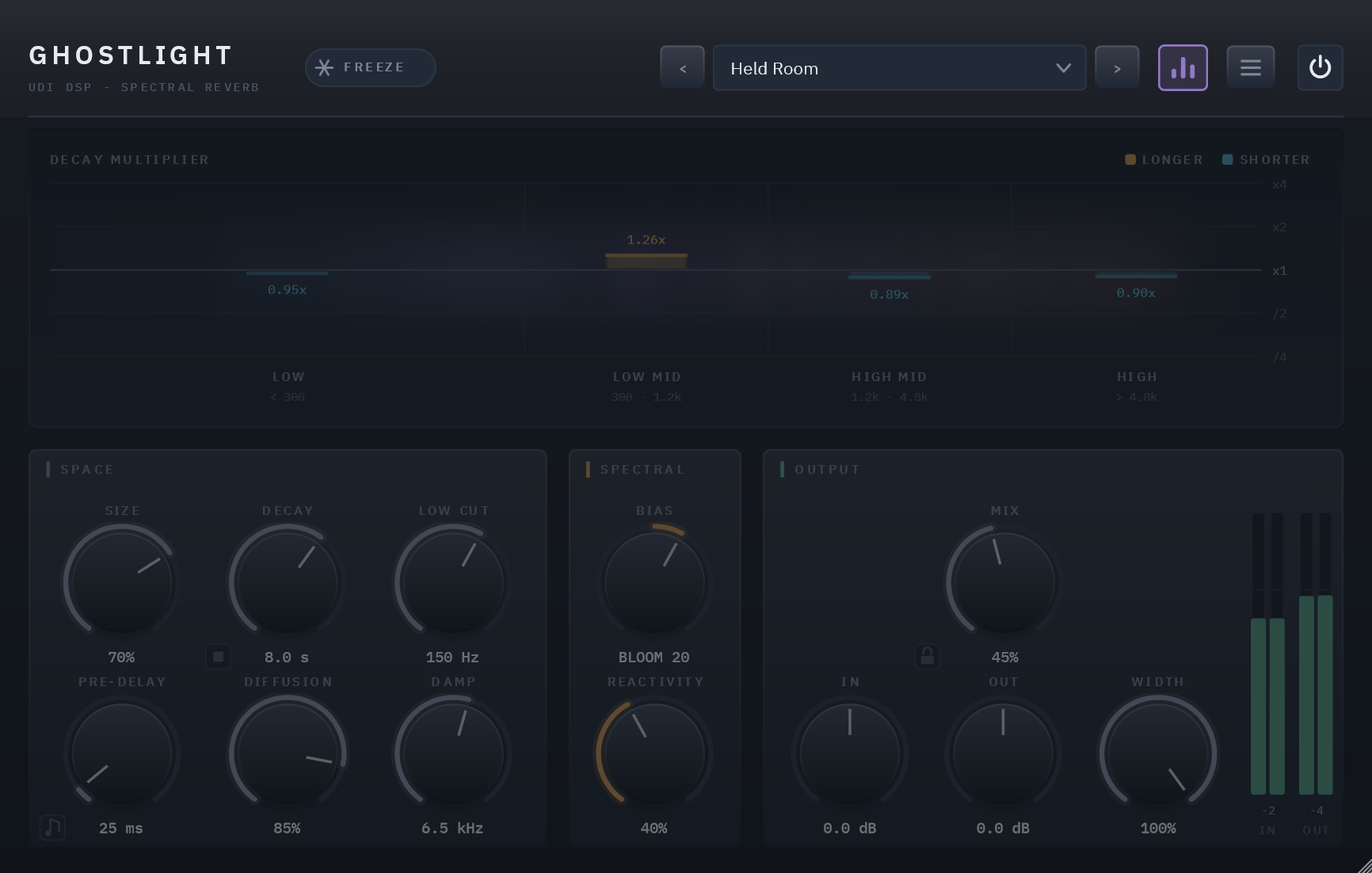
Bypassed. Everything below the header dims; the header stays lit, because the switch you press to undo it lives there.
It’s also the reliable one. Hosts drive plugin bypass inconsistently — FL Studio’s mixer LED, for instance, deactivates the plugin outright rather than bypassing it, which stops Ghostlight running at all and cuts the tail dead. The panel switch always gives you the crossfade.
Reading the display
The cloud shows what’s actually in the wet signal, live, across a real 20 Hz – 20 kHz axis. The bars show what the spectral engine is doing to each band’s decay time — up and amber means ringing longer than your Decay setting, down and cyan means dying faster. The scale is log2, so “twice as long” and “half as long” are equal and opposite deflections. At Bias 0 every bar collapses flat: the display goes quiet exactly when the feature is off.
The band labels beneath the plot are the reverb’s actual crossovers, fixed at below 300 Hz, 300 Hz – 1.2 kHz, 1.2 – 4.8 kHz and above 4.8 kHz. The button in the header collapses the whole visualizer if you don’t want it.
Presets
The field in the header shows the loaded preset. Click it for the full menu:
- Factory — 45 curated presets plus Default, compiled into the plugin and grouped into nine category submenus.
- User — your own, stored as files under
%APPDATA%\udidsp\Ghostlight SE\Presets. Put a forward slash in the name when saving (“Pads/Wide and Slow”) and it files itself into a folder. - Save / Save As… / Delete — Save overwrites the loaded user preset; on a factory preset it falls through to Save As.
- Open Preset Folder — sharing a preset is just sending someone the file.
The arrows either side step through everything in order, factory then user, and wrap around. An amber dot appears next to the name once any control differs from the preset you loaded.
Two things make auditioning presets easier:
- The Mix lock — the small padlock beside the Mix readout. While it’s closed, loading a preset leaves Mix, Input Gain and Output Gain exactly where you have them, so every preset plays at your blend and your levels. It’s saved with the session, per instance. A preset saved while it’s locked still stores the Mix, Input Gain and Output Gain you’re hearing, and moving any of the three while locked doesn’t light the amber dot.
- Clear Tail on Preset Change — in the main menu (the ☰ button). With it ticked, the previous preset’s tail is cut as the next one loads, so a long decay doesn’t bleed into the preset you’re judging. Off by default. Like the Mix lock it’s saved with the session, per instance: every new instance starts with it off, and it works on your DAW’s own program changes whether or not the panel is open.
Resizing
Drag the bottom-right corner. The panel is one fixed design scaled by a transform, so it holds its proportions anywhere between 75% and 150%, and the size you choose is saved with the session.
05 Controls
All parameters are automatable from your DAW and saved with your project.
Size
0 – 100% · default 40%
Scales the lengths of all eight delay lines — from a tight chamber at low settings to a vast, slow-blooming space at maximum. For example, 15–25% reads as a small live room — a drum booth or a tight vocal booth; 70–90% reads as a cathedral or a warehouse.
Decay
0.2 – 30 s · default 2.5 s
The master reverb time (RT60): how long the tail takes to fall 60 dB. This is the base decay before Spectral Bias reshapes it per band. For example, 0.6 s suits a drum room where you want size without washing out the groove; 2.5 s is a generic hall that works on most material; 12 s and up stops reading as a room and starts reading as a pad underneath the source.
The small square button beside the Decay readout kills the tail: a press fades the reverb out over 10 ms, smoothly enough not to be heard as a cut, and empties it, pre-delay included, so a long decay doesn’t have to ring out every time you try a setting. Your dry signal is untouched, and so is Freeze: a frozen tail is emptied, but the hold stays on and refills as you play into it. It’s also a host parameter, Kill Tail, fired each time it switches on, so you can automate a clean cut at the end of a section. It is never saved in a preset.
Low Cut
20 – 500 Hz · default 150 Hz
What gets into the tank at the bottom — a high-pass on the reverb send only, never on your dry signal. The longer the Decay, the higher this wants to sit: around 100–150 Hz for normal reverb times, 200 Hz and up past ten seconds.
Pre-Delay
0 – 500 ms · default 20 ms
Silence inserted before the reverb onset. Short values (10–40 ms) keep a vocal upfront while still sitting it in a space; long values create distinct slapback-into-wash effects. For example, 15 ms keeps a lead vocal feeling close while still giving it room; 120 ms on a snare gives a clear gap before the tail arrives.
The small note-icon button, bottom-left, syncs it to your host’s tempo. Tap it and the same knob stops sweeping milliseconds and instead steps through tempo divisions — 1/32 up to 8 Bars — snapping to the nearest one as you turn it. The value readout switches from “20 ms” to the division name (“1/8”, “2 Bars”) so you always know which mode you’re in. Tap the button again to drop back to Free.
For example, at 120 BPM a Pre-Delay synced to 1/8 sits at 250 ms; the same 1/8 at 90 BPM is 333 ms. Sync it once and the plugin keeps the musical relationship right every time the tempo changes.
Diffusion
0 – 100% · default 70%
How much the tail is scattered — whether you hear a pattern recirculating or a smooth wash. At 0% it’s the least diffuse setting that still sounds like a room — tight and defined, transients intact; at 100% it’s smooth and blooming even on sharp transients. Because it lives inside the loop, it stays live under Freeze.
Damp
1.5 – 20 kHz · default 7 kHz
High-frequency absorption inside the feedback loop — the control for “darker.” Because it sits in the loop and is one-sided, it shortens the top without lengthening the bottom. Stays live under Freeze.
Spectral Bias
−100 (Ghost) – +100 (Bloom) · default 0
The signature control — see section 02. At 0 the spectral engine is bypassed exactly (mathematically identical to a static reverb). The further from centre, the stronger the effect; its actual depth and speed are governed by Reactivity.
Reactivity
0 – 100% · default 50%
A dual macro controlling both the depth and the speed of the spectral response. At 0% the spectral engine doesn’t react at all — Spectral Bias has no effect. Raising it increases how far the band decays deviate and how quickly they track the input.
Mix
0 – 100% · default 30%
Dry/wet balance. The dry signal holds on through most of the knob and only gives way near the top, so even 60–80% keeps the source’s weight under the reverb. At 0% the plugin is a bit-transparent passthrough. On an insert, 15–30% is a natural amount of space; on a dedicated aux/send channel, set this to 100% and control the amount from the send level instead.
The padlock beside the readout locks Mix, Input Gain and Output Gain against preset changes — see Presets in section 04.
Width
0 – 100% · default 100%
How wide the reverb tail sits. This affects the reverb only — your dry signal keeps its own stereo image at every setting — so it is most audible with Mix at 100%, and quite subtle in a busy mix. At 100% the tail is exactly as the engine produced it; turning it down narrows the tail toward the centre, reaching mono at 0. The centre level itself never changes: the control only ever removes side content, never the middle.
Input Gain / Output Gain
±24 dB · default 0 dB
Utility trims at either end of the chain, each paired with a stereo peak meter. Input gain changes level only, never the reverb’s character — the spectral analyser normalises band energies, so driving the input harder does not alter the Ghost/Bloom response.
Freeze
Off / On · default Off · header, beside the power switch
Holds the reverb tank indefinitely, independent of new input. Release it and normal decay resumes — no click either way, ramped over about 20 ms so it is usable mid-take. You can play into a freeze: the input is trimmed to −12 dB rather than cut, so new notes layer over the held tail instead of piling up on it. Size, Damp and Diffusion stay live while held; Decay, Low Cut and Pre-Delay go inert, because they act on how fast the tail dies or on what enters the tank, and a hold suspends both.
A note on De-Ess
Ghostlight’s reverb send is always lightly de-essed — the same sibilance protection Ghostlight Pro’s De-Ess control provides, fixed at a sensible middle setting rather than exposed as its own knob. If you need to adjust exactly how much, or where it sits in frequency, that’s one of the things Ghostlight Pro’s advanced drawer adds.
06 Presets
45 factory presets ship with the plugin, plus Default — which holds no settings of its own, so loading it returns every control to its factory value. A fresh instance opens on Default, and it’s the way back to zero.
They’re organised into nine categories by instrument and use — Vocal, Guitars, Strings, Brass, Cinematic, Ambient, Drums, Keys and Sound Design, five presets each — and each category appears as its own submenu in the header’s preset field. Selecting any preset resets every control, so they’re absolute starting points; the arrows either side of the field step through the whole bank in order and wrap around.
07 Technical specifications
| Format | VST3 (Windows x64) — AU / macOS planned |
| Channels | Mono or stereo in, mono or stereo out |
| Latency | 0 samples — spectral analysis is side-chain only |
| Bypass | The power switch at the panel’s top left — a short crossfade rather than a hard switch, engine kept running so the tail is still decaying when you switch back |
| Reverb engine | 8-line FDN, Hadamard mixing, Lagrange-interpolated modulated delays |
| Decay bands | 4, fixed crossovers (300 Hz, 1.2 kHz, 4.8 kHz) |
| Spectral analysis | 1024-pt FFT, Hann, 50% overlap, level-normalised |
| Live parameters | 17 |
| Factory presets | 45, in nine categories |
| CPU (measured) | 4.74% of one core at defaults, 4.73% with a real preset engaged (5.03% with the display’s cloud active), 4.82% worst case — everything maxed — 5.17% worst case with the display’s cloud active — @ 48 kHz stereo, 512-sample blocks (Release build, reference machine) |
| Tail reporting | Worked out from the current settings and reported to the host, so a bounce, a track freeze or a host’s silence-suspend lets the reverb ring out in full: the time the tail takes to fall 140 dB, erring long — about 10 s at the defaults, several minutes at the longest (Decay 30 s with Bloom or Ghost pushed hard) — and infinite while Freeze holds the tank |
| Parameter handling | All parameters smoothed; state saved and restored with the session |
| Real-time safety | No allocation, locking or I/O on the audio thread; a host block longer than the one prepared for is processed in pieces; denormals flushed |
| Sample rates | 44.1–192 kHz |
| Interface | Fixed 677×520 design, scaled 75–150%; size saved with the session |
| Typography | IBM Plex Sans / Mono, embedded in the binary (SIL Open Font License 1.1) |
| Shares with Ghostlight Pro | Reverb core, spectral analyser, licensing/activation — the same engine, tested the same way, in a smaller instrument |