Fluxwave
A tape machine that shows its work. DRIVE in dB over the tape's reference level, a mark where the tape tops out, loudness held steady while you turn it, and a display that glows with what the tape is doing to your music.
 40% off
Tape, worked like a machine
Fluxwave gives your tracks what analog tape gives music: a little density, a top that softens as you print harder, weight low down. It is tape-inspired rather than a copy of any one machine: it starts from how studio machines and tapes behave, and does better than tape where software can, with no hum, no dropouts and no repeating warble.
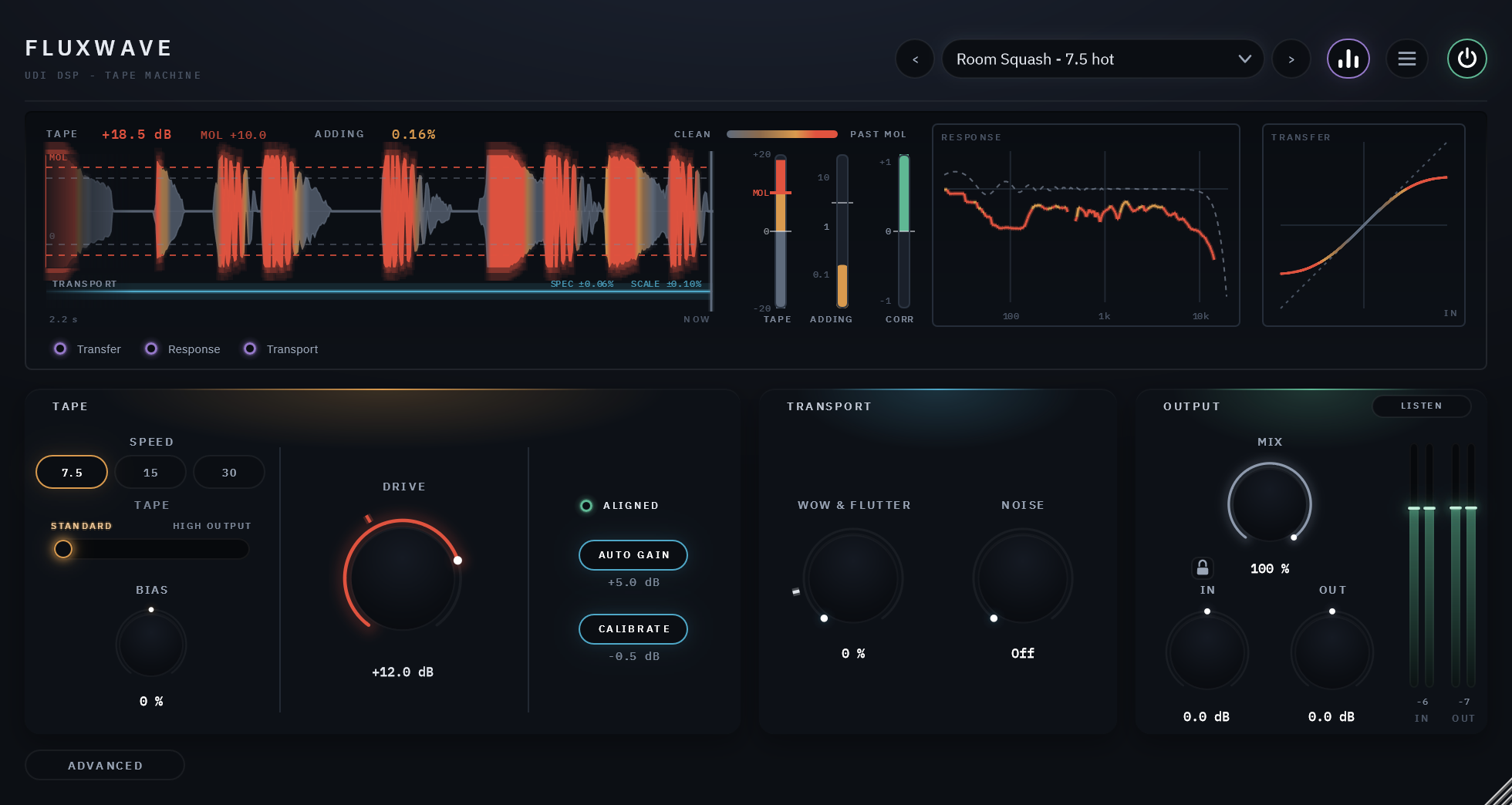
It is worked the way an engineer lines up a real machine. DRIVE is in dB over the tape's reference level, so 0 dB is aligned and +6 is running it hot. The display marks the tape's maximum output level (MOL), the point where it reaches 3% distortion for that tape and speed, and turns red past it. AUTO GAIN holds the loudness steady while you turn DRIVE, so switching POWER compares the tape, not the volume.
The same clip, dry and wet
8 sources, each run through the factory preset built for it. Toggle Dry/Wet mid-playback — it crossfades from the same instant rather than restarting.
Calibrated in tape terms
DRIVE runs from -6 to +18 dB over the reference level. CALIBRATE brings any track to one working level first, so the same DRIVE means the same amount of tape on a quiet vocal and a loud drum bus.
A mark where the tape tops out
MOL, the level at which a tape reaches 3% distortion, is marked on the display and on the TAPE LEVEL meter for the tape and speed you're on, a red tick on DRIVE shows where the music playing now would reach it, and DRIVE's ring glows red when it does.
Three speeds, two tapes
30, 15 and 7.5 in/s, each with its own low-end bump and top end; STANDARD tape, or HIGH OUTPUT, which takes more level before it saturates.
BIAS
Centred is aligned. Under-biased is brighter and grittier; over-biased duller, cleaner and smoother. The ALIGNED lamp lights when the machine is set to spec, and a click puts it back there.
WOW & FLUTTER that never repeats
Tape-speed variation from still to a machine that needs a service. Its tick is ALIGNED, a studio machine's specification for the speed, and the pattern never repeats.
Hear what it adds
LISTEN plays the output, only what the tape adds, or the difference from the input, one click at a time. ADDING shows the added harmonics as a number and a meter.
Loudness held still
AUTO GAIN works out the level change from the input, so there is no dip or swell while you turn DRIVE, and POWER compares at matched level.
Light on every track
1.2% of one CPU core at the defaults, 2.8% with everything up at 16x oversampling, almost nothing in silence. 175 samples of latency at 48 kHz, which no control moves.
30 presets in six groups
Mix Bus, Drums, Bass, Vocals, Guitars & Keys and Character, each named with the speed or level that makes it.
One DRIVE setting, any track
Tape reacts to how hard it is printed, so the same setting on a quiet track and a loud one would normally be two very different amounts. CALIBRATE measures the track's level, brings it to one working level before the tape and undoes that exactly afterwards. It never changes how loud Fluxwave is, only how hard the tape is driven, and the figure under CALIBRATE shows the lift or cut it is applying now.
With it on, DRIVE reads as it would on a machine: 0 dB at the reference level, MOL a known number of dB above it. The MOL mark is measured on Fluxwave itself, for each tape and speed: from +10 dB on STANDARD tape at 7.5 in/s to +14 dB on HIGH OUTPUT at 15 and 30.
Speed that wanders like a machine, never like a loop
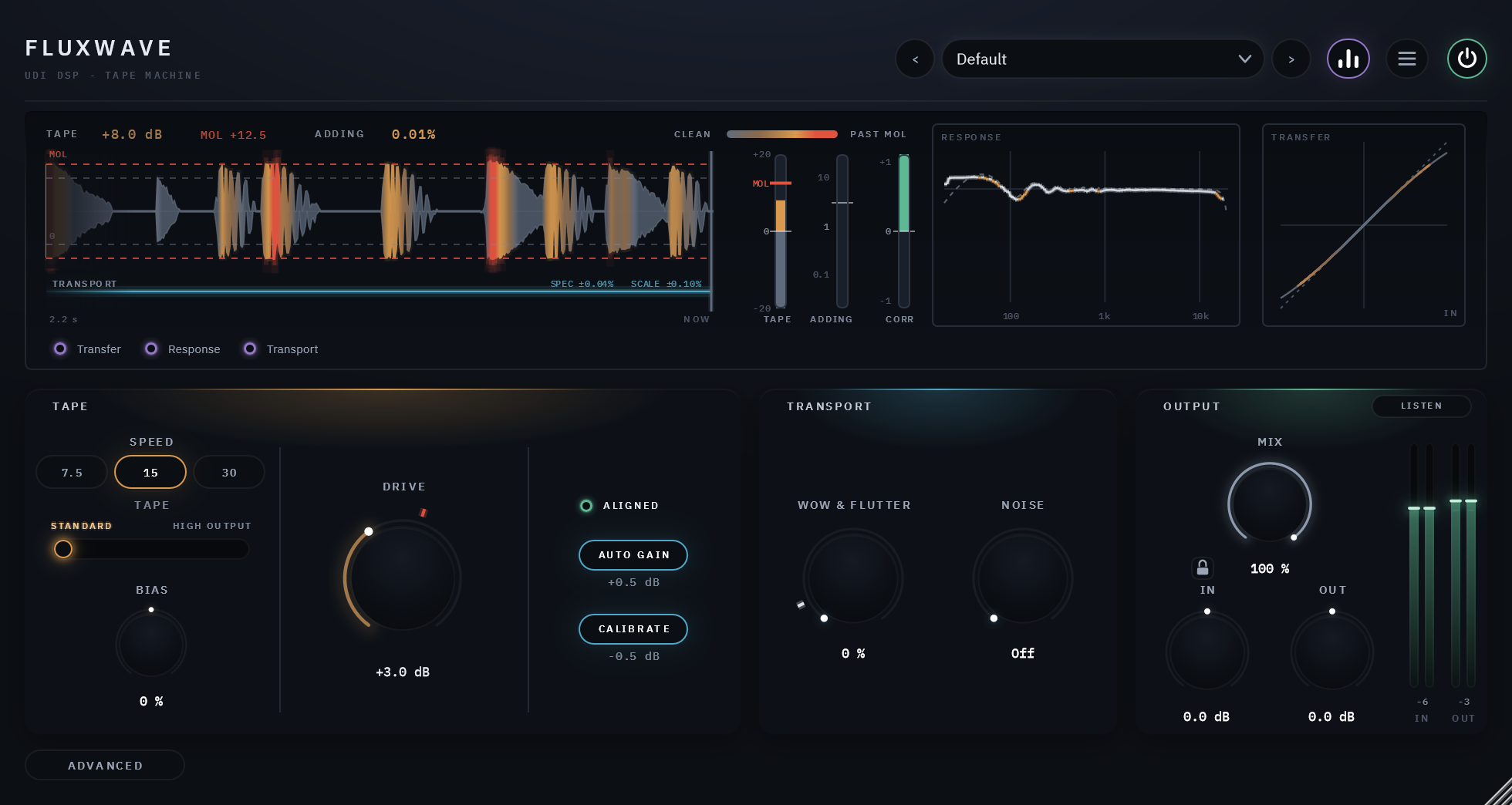
WOW & FLUTTER moves three kinds of tape-speed variation together: slow wow, faster flutter and a slow drift. At 0 the transport is still; its tick, ALIGNED, is a studio machine's weighted specification for the speed you're on; at 100% it needs a service. On the ADVANCED page each can be set on its own, with SCRAPE, a fine, fast roughness.
The speed's variation is drawn live under the ribbon against the specification, and as the ribbon's shimmer, and it never repeats: measured, it shows no recurring pattern beyond a second. MIX blends the tape with the dry signal, aligned to the sample, so a little variation against the dry turns into a chorus when you want one.
Harmonics that stay harmonics
Tape adds harmonics, and anything above half your session's rate folds back as aliasing, heard as a grainy harshness. Fluxwave runs the tape at a multiple of the session's rate, so those harmonics land above the audible band and are filtered away cleanly. 8x is the default; Off, 2x, 4x and 16x are in the menu, set separately for playing and for exporting.
Latency is set by that choice alone, never by a knob or a preset, and reported to your host so it lines everything up: 175 samples at 48 kHz at the default, 117 with oversampling Off.
A display that shows the tape at work
The ribbon shows the tape's own signal over the last seconds as one band whose colour runs with how hard the tape is driven: steel under the reference level, warming to amber as it saturates, red and glowing past MOL. At its right end, three meters: TAPE LEVEL in dB over the reference with this tape's MOL marked in red, ADDING, the harmonics the tape adds, and CORR, a mono-safety meter; TAPE and ADDING also read as numbers along the top. DRIVE's ring glows in the same colours.
RESPONSE measures the machine's frequency response live on your music, drawn over the response it has at low level, so you see the top sag as you drive harder. TRANSFER draws the curve the tape runs the signal through, with the signal traced along it. TRANSPORT, a lane under the ribbon, shows the tape speed's variation against the specification, and the ribbon shimmers with it, magnified. Each has its own checkbox; hide the display from the header and the panel gets shorter.
The machine's own adjustments
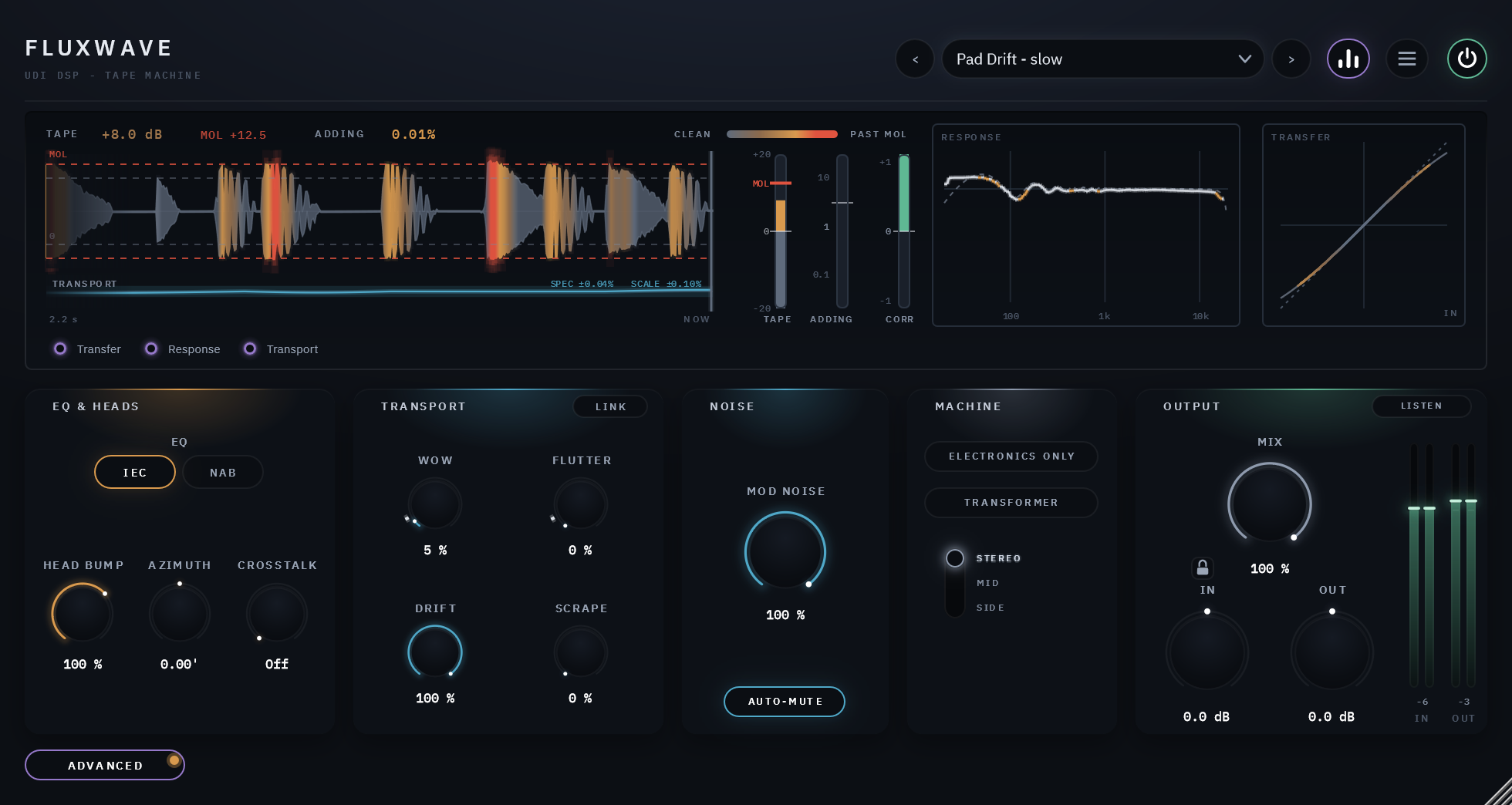
The ADVANCED button swaps the main controls for four cards of the machine's own adjustments. The display and OUTPUT stay where they are.
EQ and heads
The record and playback EQ, IEC or NAB at 7.5 and 15 in/s and AES at 30; HEAD BUMP, the low-end bump a playback head gives, from 0 to 150%; AZIMUTH, a tiny tilt of the playback head that lets the two channels' highs drift apart in time, so the top softens and widens; and CROSSTALK, each track hearing a little of its neighbour.
Transport
WOW, FLUTTER and DRIFT each on its own, SCRAPE, and LINK, which ties them back to the WOW & FLUTTER knob on the main page.
Noise
NOISE sets the tape's hiss, from Off through the tape's own level at 0 dB to +12 dB; MODULATION NOISE lets the hiss rise with the music; AUTO-MUTE fades it in silence.
Machine
ELECTRONICS ONLY, the machine with the tape taken out; TRANSFORMER, the output transformer's weight and softness in the lowest notes, growing as you drive it; and M/S, to run the tape on the whole signal, its middle or its sides.
Specifics, stated plainly
| Speeds and tapes | 30, 15 and 7.5 in/s; STANDARD or HIGH OUTPUT tape (a third position is reserved for a future tape) |
|---|---|
| Oversampling and latency | Off, 2×, 4×, 8× (default) or 16×, in the menu; set separately for playing and for exporting; 175 samples at 48 kHz at the default, 117 with oversampling Off. No knob or preset moves it |
| Channels | Mono, mono in and stereo out, or stereo |
| Output | MIX against the dry signal, aligned to the sample, with a padlock that holds MIX, IN and OUT through preset changes; IN and OUT trims, ±24 dB |
| CPU | 1.2% of one core at the defaults (8× oversampling), 0.6% with oversampling Off, 2.8% with everything up at 16×, about 0.2% with no audio playing — 48 kHz stereo, 512-sample blocks, the panel closed (1.7% at the defaults with it open) |
| Parameters and presets | 26 parameters, all automatable; 30 factory presets in six groups, plus Default |
| Licensing | Free UDI DSP account, one-time online activation — no subscription, works offline for a week between checks |
Compatibility
Windows
- Operating system Windows
- OS levels Windows 10 or 11, 64-bit
- Plugin formats VST3 and AAX
macOS
- Operating system macOS
- OS levels Apple Silicon: macOS 11 Big Sur or later
- Intel Mac: macOS 10.15 Catalina or later - limited support (they are old platforms not supported by Apple). Please try the free 14-day trial to verify compatibility.
- Plugin formats AU, VST3 and AAX
Internet needed once, briefly, to activate (a short browser sign-in). Day-to-day use after that works offline for up to a week between checks.
Validated in Cubase Pro, Avid Pro Tools, Apple Logic Pro, Reaper, Waveform and FL Studio. More information.