Granularscatter
A grain cloud insert. Put it after a reverb, a delay, a pad or a vocal and it scatters what it hears into shimmering, harmonised, rhythmic or frozen clouds of grains, built on the grain engine at the heart of Ghostlight Pro.
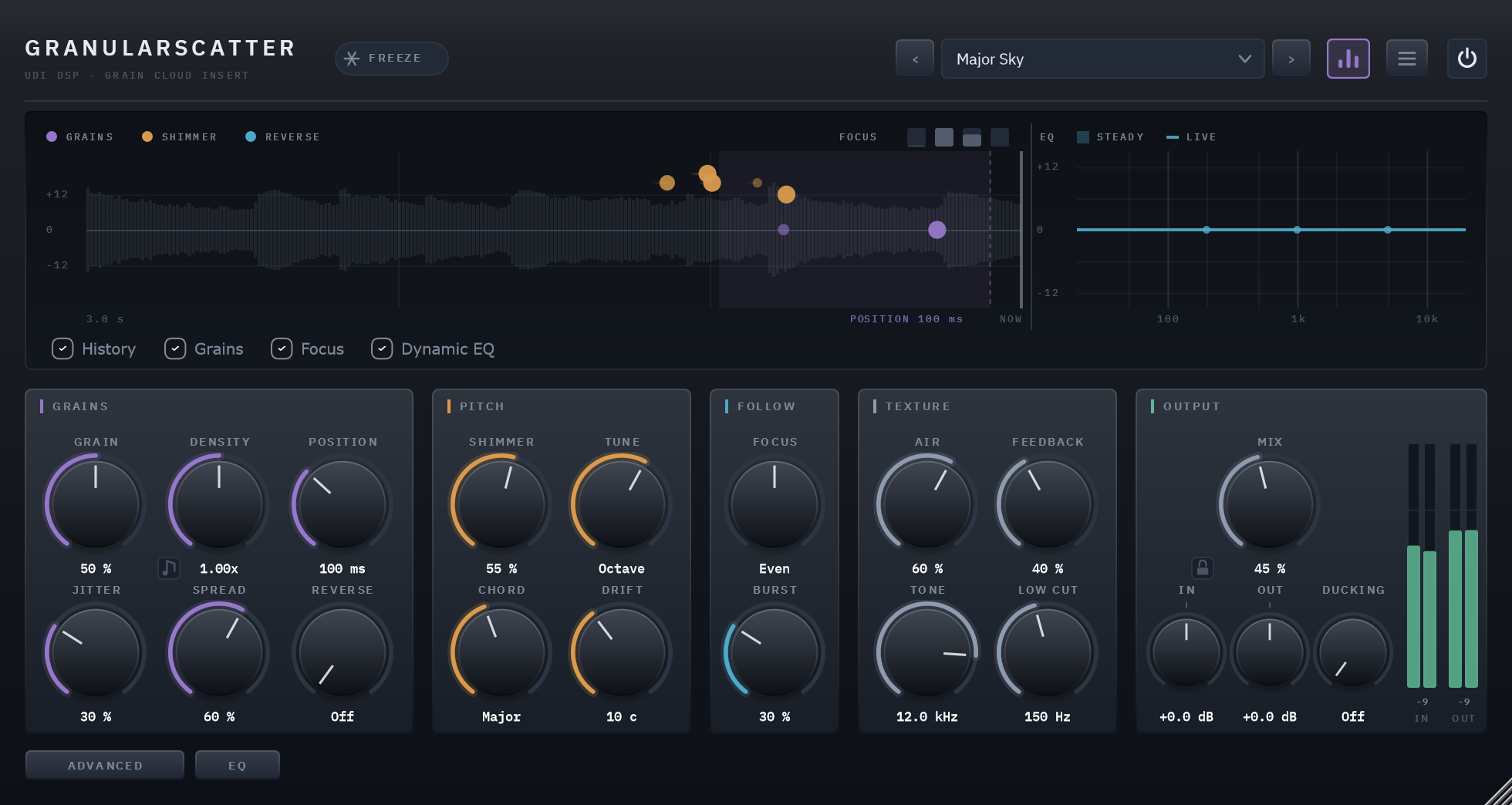
A cloud grown from whatever you play
Granularscatter keeps a recording of the last few seconds and replays it as a cloud of grains: tiny slices, overlapping, each with its own moment in the past, length, pitch, direction and place in the stereo field. After a reverb or a delay it grows a shimmering bloom out of the tail; on a dry voice, guitar or keys it becomes a halo that follows the playing; on a drum loop it locks to the grid and stutters.
It is the grain engine from Ghostlight Pro, taken out of the reverb and given the controls a grain instrument needs. It holds itself to one rule: every control is a statement about grains, what they are cut from, where in time, how long they last, how many there are, what pitch they sound at, and where they land.
The same clip, dry and wet
8 sources, each run through the factory preset built for it. Toggle Dry/Wet mid-playback — it crossfades from the same instant rather than restarting.
Made to sit on top
Its home is after somebody else's reverb or delay, where a tail sliced anywhere still sounds like the space. On a dry source, Position and Jitter keep the cloud on the phrase you are playing.
Harmony clouds
Shimmer pitches a share of the grains; Chord gives each one a note of a chord stacked on Tune: a fifth, octaves, major, minor, sus4 and sevenths. A shimmer becomes a choir.
Grains on the grid
Density's note button spawns one grain per note value, locked to your project's tempo. Repeat makes grains replay the same slice for stutters; Reverse swells them into the beat.
Feedback that always ends
The cloud can be recorded back into itself to ring on after you stop, darker with every pass through Tone. It never grows louder than what you played, and it always dies away.
Grains that follow the playing
Focus draws grains from the loud or the quiet frequencies of your input; Burst makes every new note scatter denser and shorter for a moment, then settle.
Freeze and Scan
Freeze holds the recording while the grains keep playing it; Scan lets the reading point wander slowly through the held moment so it keeps changing.
A display of the grains themselves
Every live grain drawn where in the past it is reading and at what pitch, over the scrolling recording, with Position's reach and Focus's bands marked. Amber grains are shimmered, cyan ones reversed.
The same sound at any buffer size
Grains and their controls are computed on a fixed 32-sample grid, so a render sounds the same whatever buffer size your DAW uses. No latency.
33 presets in six categories
Post-Reverb, Vocals, Keys & Pads, Guitar, Drums & Loops and Sound Design, each voiced on real material and within about 2 dB of its loudness, so stepping through them is not a loudness contest.
A grain is a slice of the past
Granularscatter records the last six seconds. A grain is a short slice of that recording, from a few milliseconds to over a second, faded in and out so it never clicks, and played back. Dozens overlap at once. Position sets how close to now the newest grain may read, Jitter how much further back grains may start: close and tight, the cloud follows what you are playing; far and wide, it becomes a haze of what was played seconds ago.
Grain moves between long, sparse grains that make a smooth wash and short, dense ones that make a fizz, holding the level steady across its travel. Air runs the grains through a six-stage diffuser, from separate grains to a smooth cloud.
Shimmer, tuned to a chord
A grain played faster than it was recorded sounds higher. Shimmer sets how many grains are pitched and Tune by how much, snapping to a fifth, a minor seventh, an octave, an octave and a fifth, two octaves, or an octave down. Chord gives each pitched grain a note to choose from, stacked on Tune, so an octave shimmer can become an octave major chord. Drift adds a little random pitch to every grain, which thickens the cloud like a chorus, or a lot, which unpitches it.
Hold a moment and keep it moving
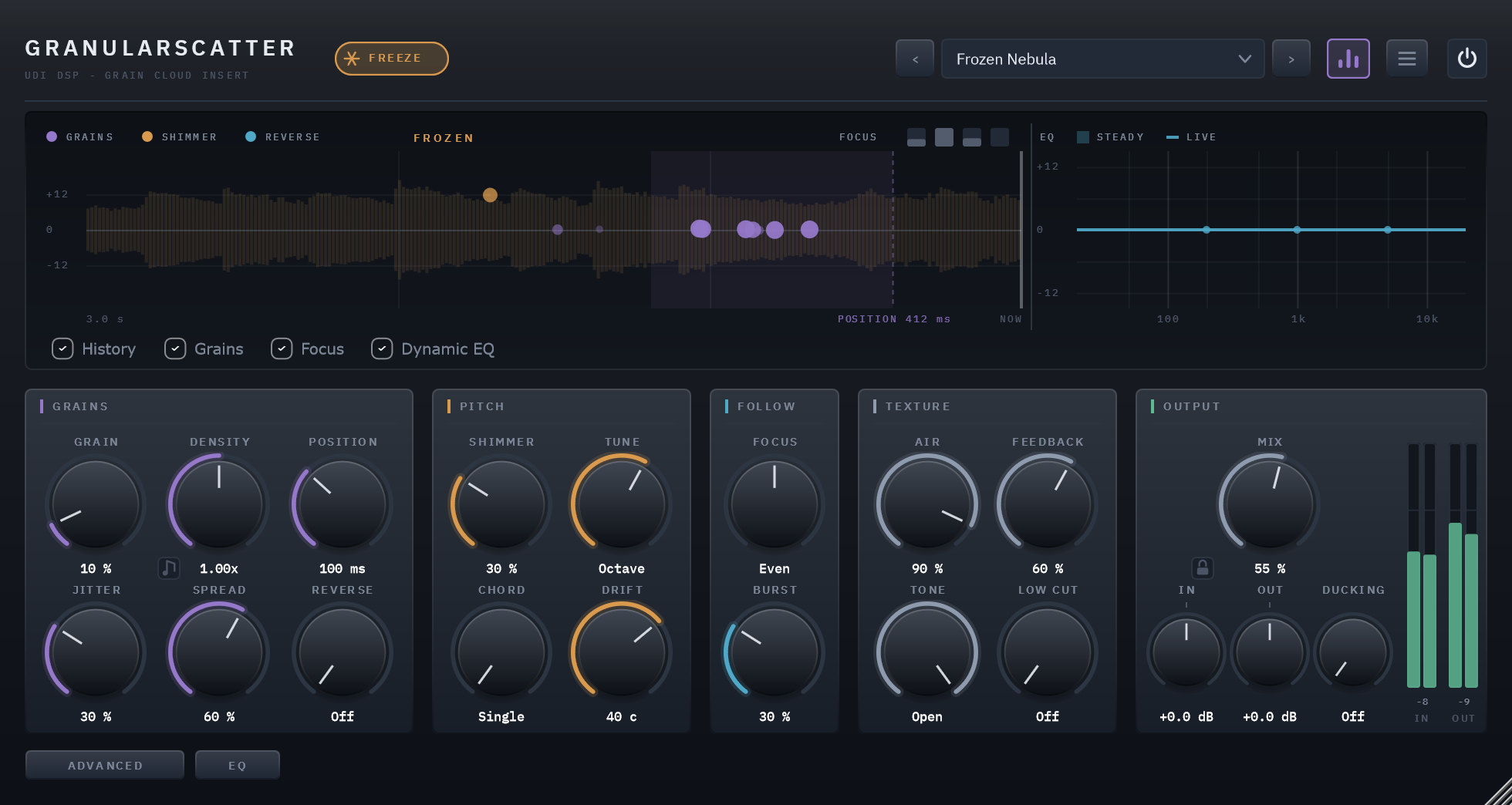
Freeze stops the recording and the grains keep playing the moment you froze. With Scan, the point they read from drifts slowly through that held moment, so a frozen chord evolves instead of looping. The display shows it: the recording stands still, turned amber, and the grains keep moving over it.
A display that shows the grains
The grain field is the engine, drawn as it runs. Time runs right to left from NOW at the right edge back three seconds, as far as a grain can read, over the scrolling envelope of the recording. Every live grain is a dot where it is reading, higher for a higher pitch: purple at the source's pitch, amber when shimmered, cyan when reversed, brightest at the middle of its window.
The dashed line is Position and the shaded span is where Jitter lets grains start, so both read as places rather than numbers. Focus's four bands sit at the top right, the Dynamic EQ's curve in a strip at the right, and checkboxes turn each layer on and off. Hide the display from the header and the window shrinks rather than leaving a gap.
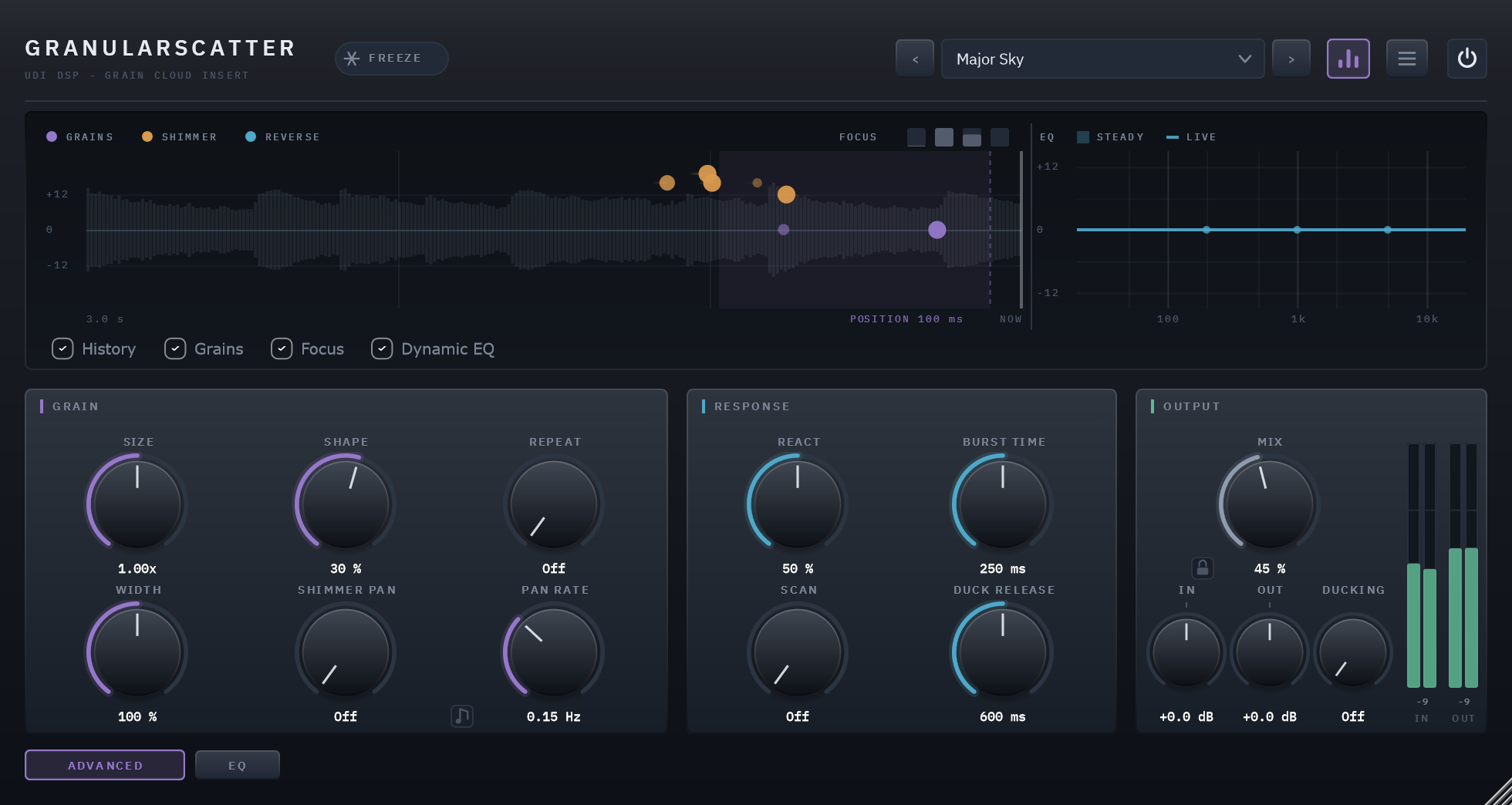
Shape, Repeat, Width and Scan, one button away
The ADVANCED button swaps the main sections for the finer grain controls: Size around what Grain sets, Shape for gritty or smooth grain edges, Repeat for stutters, the cloud's Width, and Shimmer Pan with its rate, free or synced. Beside them, how the cloud responds: React for how fast Focus follows, Burst Time, Scan, and Ducking's release. OUTPUT stays put either way.
A dynamic EQ on the cloud
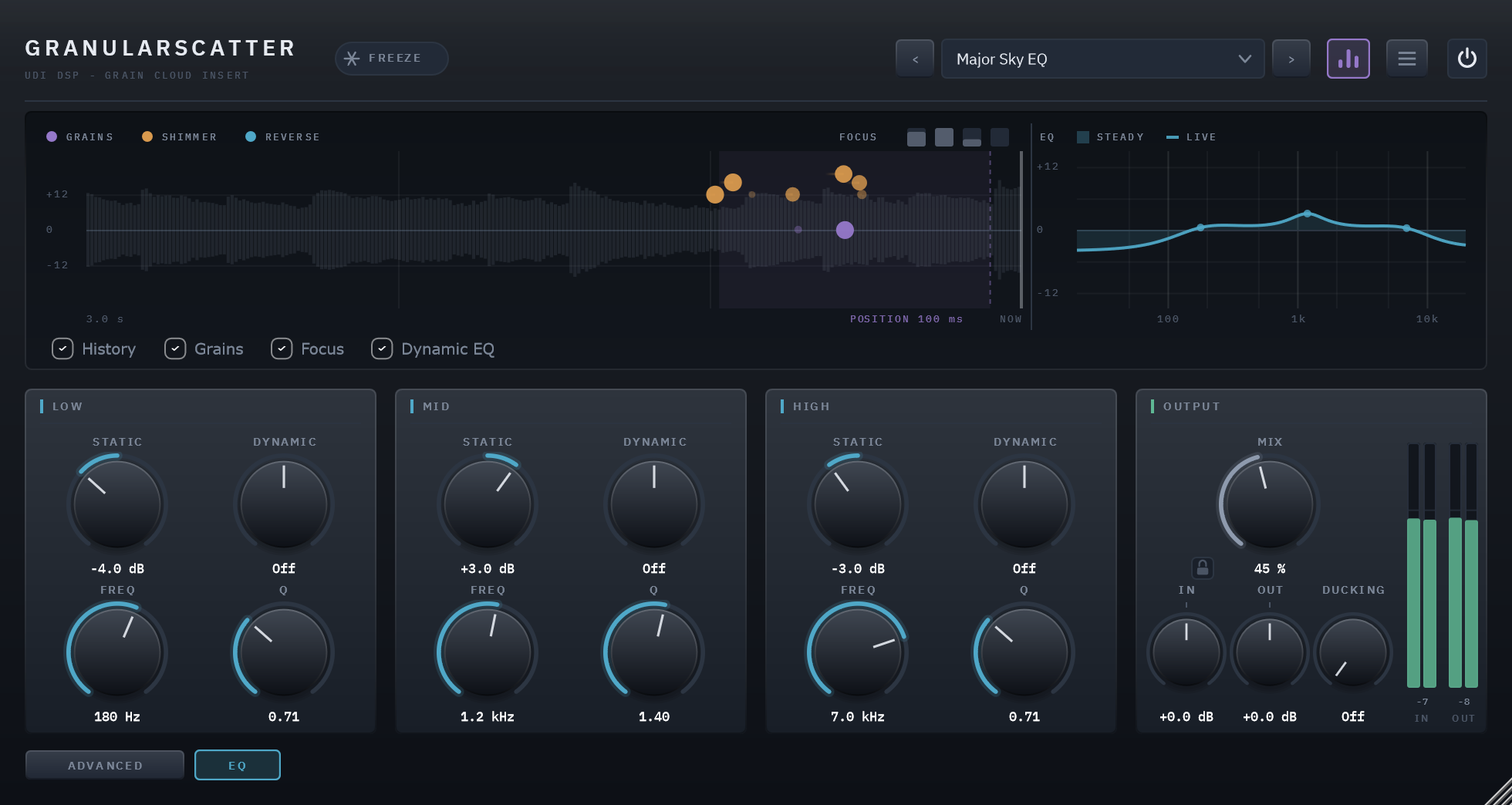
Three bands, a low shelf, a mid bell and a high shelf, each with a steady Static boost or cut (±12 dB), a level-reactive Dynamic amount, and movable Frequency and Q. It works on the cloud alone, never the dry signal, and does nothing at all until you move a band. The display draws its curve live.
Specifics, stated plainly
| Engine | Up to 48 grains from a 6 s recording, reaching 3 s back; playback-rate pitch with cubic interpolation; a six-stage diffuser for Air; the grain engine shared with Ghostlight Pro and Echolight |
|---|---|
| Latency | 0 samples |
| Timing | Grains and controls computed on a fixed 32-sample grid, so the sound is the same at any buffer size; Density and Shimmer Pan sync to the host's tempo |
| Output | Mix against the dry signal, with a padlock that holds Mix, In and Out through preset changes; In and Out trims, ±24 dB; Ducking, which pulls the cloud down while you play |
| CPU | 1.65% of one core at the defaults, 4.47% worst case — 48 kHz stereo, 512-sample blocks |
| Parameters and presets | 49 parameters, all automatable; 33 factory presets in six categories, plus Default |
| Licensing | Free UDI DSP account, one-time online activation — no subscription, works offline for a week between checks |
Compatibility
- VST3, 64-bit — Windows 10/11 (a Standalone app is included in the installer). AU, AAX and macOS are coming soon.
- In active development — full per-host verification across DAWs is ongoing.
- Internet needed once, briefly, to activate (a short browser sign-in) — day-to-day use after that works offline for up to a week between checks.